
Growkin
/Year
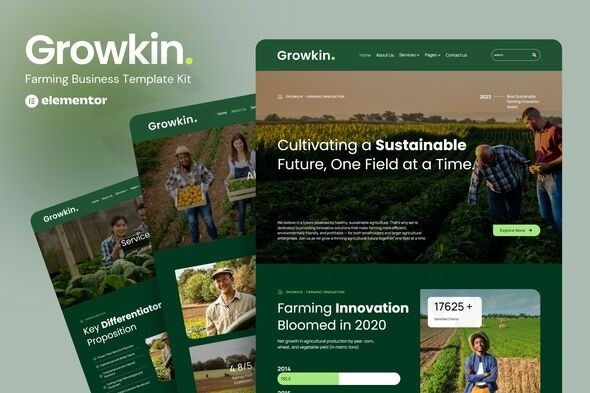
The digital landscape offers immense opportunities for every industry, and agriculture is no exception. For modern farms, organic producers, and agricultural service providers, establishing a robust online presence is no longer a luxury but a necessity. The Growkin Elementor Template Kit emerges as the ultimate solution, empowering agricultural businesses to create stunning, functional, and SEO-optimized websites without a single line of code. This template kit blends earthy aesthetics with cutting-edge functionality, perfectly designed to showcase your farming projects, sustainable practices, and vital agricultural services.
Why Choose Growkin Elementor Template Kit for Your Farming Business?
The Growkin kit is more than just a collection of pages; it’s a comprehensive platform tailored specifically for the agricultural sector. It addresses the unique needs of farms, agribusinesses, and sustainable agriculture advocates by providing a visually appealing and highly practical foundation. Whether you’re a small family farm looking to highlight local produce or a large agricultural corporation seeking to present diverse services, the Growkin Elementor Template Kit streamlines your journey to a powerful online presence. Its design ethos reflects the values of innovation and sustainability, making it an ideal choice for showcasing what makes your agricultural business unique.
Key Features of the Growkin Agriculture Website Elementor Kit
The Growkin kit is packed with features designed to make website creation accessible, efficient, and effective for agricultural businesses.
1. True No-Code Drag & Drop Customization
At its core, Growkin leverages the power of Elementor, the leading WordPress page builder. This means you can customize every aspect of your farming business Elementor template using intuitive visual controls. Modify fonts, colors, layouts, and content with simple drag-and-drop actions, eliminating the need for technical knowledge or coding skills. This true no-code approach makes professional web design accessible to everyone.
2. Modern, Professional & Responsive Design
Growkin boasts a professional design with nature-inspired color schemes and clean layouts that resonate with the agricultural industry. Crucially, it features a farm website template Elementor responsive design, ensuring your site looks and functions flawlessly across all devices—desktops, tablets, and mobile phones. This commitment to responsiveness guarantees an optimal user experience for all visitors.
3. Complete Website Pages Package
This comprehensive template kit includes all the essential pages you need to launch a full-fledged agricultural business website:
- Modern Homepage: A compelling hero section to grab attention and highlight featured services.
- Detailed About Us Page: Share your farming story, mission, and values.
- Professional Services Pages: Showcase your agricultural services with dedicated overviews and individual service pages.
- Projects Portfolio: Display successful farming initiatives and showcase your expertise.
- Team Members Section: Introduce your agricultural experts and build trust.
- Testimonials Page: Feature customer reviews and success stories to build credibility.
- Contact Us Page: Integrated forms and location details for easy communication.
4. SEO-Optimized Structure
Growkin is built with search engine optimization (SEO) best practices in mind. Its inherent SEO-friendly structure helps your agricultural business rank higher for vital keywords like “organic farming services,” “sustainable agriculture,” and “local farm products.” This means more visibility for your farm and easier discoverability for potential customers.
5. Fast Loading Performance
Optimized for speed and performance, the Growkin kit ensures your potential customers enjoy a smooth browsing experience. A fast-loading website not only improves user satisfaction but also positively impacts your search engine rankings, making it a crucial element for any agri business Elementor design.
6. Global Style Customization
Maintain a consistent brand identity across your entire website. Growkin allows you to customize fonts and colors from a single location, ensuring a cohesive look and feel. You also have the flexibility to fine-tune individual elements for precise control over your brand identity.
Installation & Setup: Your Growkin Elementor Template Kit Installation Guide
Installing the Growkin Elementor Template Kit is a straightforward process, even for those new to WordPress.
- Install WordPress and Elementor: Ensure you have a fresh WordPress installation and the free Elementor plugin activated. While many kits can function with the free Elementor, some advanced features (especially for custom headers/footers) may benefit from Elementor Pro.
- Install Required Plugins: Growkin typically requires additional Elementor add-ons for enhanced functionality. You’ll likely need to install plugins like Ultimate Addons for Elementor Lite and The Plus Addons for Elementor. These are usually bundled or recommended during the kit import process.
- Install Envato Template Kit Import: This plugin simplifies the template kit installation. Go to Plugins > Add New in your WordPress dashboard, search for “Envato Template Kit Import,” install, and activate it.
- Upload the Template Kit: Download the Growkin Elementor Template Kit file (do not unzip it). Navigate to Elementor > Installed Kits in your WordPress dashboard. Click the “Upload Template Kit Zip File” button and select your Growkin .zip file.
- Install Requirements & Import: Follow the prompts to install any remaining required plugins. Then, import the Global Style Kit. After that, you can import individual page templates (Home, About, Services, etc.) one by one into your Elementor templates library.
- Create Your Pages: Create new pages in WordPress (Pages > Add New), then edit them with Elementor. From the Elementor editor, click the folder icon to access your templates, and insert the desired Growkin page template.
- Customize Content: Replace the demo content and images with your own farming details, product photos, service descriptions, and team information. Remember that demo images may require separate licensing or should be replaced with your custom images.
Practical Usage and Best Practices for Your Farming Website
The Growkin Elementor Template Kit provides a powerful foundation. Here’s how to maximize its potential for your agri business Elementor design and daily operations:
1. Highlight Your Sustainable Practices
Use the dedicated sections and pages to showcase your commitment to sustainable agriculture, organic farming methods, and environmental stewardship. This builds trust with environmentally conscious consumers and aligns with the growing demand for ethically sourced products. Integrate images and videos of your farm in action.
2. Showcase Your Produce & Services Effectively
Whether you offer crop production, agricultural consulting, or farming equipment, dedicate clear sections to each. Use high-quality images of your produce and clear descriptions of your services. The projects portfolio is ideal for detailing successful farming initiatives and showcasing results.
3. Build Authority with Your Team and Testimonials
Introduce your agricultural experts on the Team page to build a personal connection with your audience. Leverage the Testimonials page to share glowing reviews from satisfied customers. Authentic feedback is crucial for establishing credibility and encouraging new business.
4. Optimize for Local SEO
For “organic farming services” and “local farm products,” local SEO is paramount. Ensure your Contact Us page has accurate address details, phone numbers, and an embedded map. Consider adding specific location-based content to your service pages to attract nearby customers.
5. Prioritize Performance and User Experience
While Growkin is optimized for speed, continue to implement best practices. Use a lightweight, Elementor-compatible theme (like Hello Elementor), optimize all images (e.g., WebP format, lazy loading), and consider caching and a Content Delivery Network (CDN) for even faster loading times. This ensures your farming website template Elementor responsive design truly shines.
FAQ & Troubleshooting
Q1: What is Growkin Elementor Template Kit?
A1: Growkin Elementor Template Kit is a professionally designed website template specifically created for agricultural businesses, organic farms, and sustainable agriculture companies. It leverages the Elementor page builder to allow users to create a comprehensive, modern, and responsive farming business website without any coding knowledge.
Q2: Is Growkin Elementor Template Kit mobile-friendly?
A2: Yes, the Growkin Elementor Template Kit features a fully responsive design. This means your website will automatically adapt and display perfectly across all devices, including desktops, tablets, and mobile phones, ensuring an optimal user experience for all visitors.
Q3: What plugins are required for Growkin Elementor Template Kit to function?
A3: The Growkin Elementor Template Kit primarily requires the free Elementor page builder plugin. Additionally, it may recommend or bundle specific Elementor add-ons for enhanced functionality, such as Ultimate Addons for Elementor Lite and The Plus Addons for Elementor, which are installed during the kit import process.
Q4: Can I use Growkin Elementor Template Kit with any WordPress theme?
A4: Growkin is an Elementor Template Kit and is optimized for use with lightweight, Elementor-compatible themes such as Hello Elementor. While it generally works with most Elementor themes, using a dedicated Elementor-friendly theme ensures the best compatibility and performance.
Q5: How can Growkin Elementor Template Kit help my site’s SEO?
A5: Growkin is built with an SEO-friendly structure that adheres to search engine optimization best practices. This includes clean code, fast loading performance, and a clear content hierarchy, all of which contribute to better search engine rankings for relevant agricultural keywords, making your farm more discoverable online.
Conclusion
The Growkin Elementor Template Kit offers an unparalleled opportunity for agricultural businesses to establish a strong, professional, and high-performing online presence. Its intuitive no-code customization, comprehensive page package, and focus on modern, responsive, and SEO-friendly design make it an ideal choice for any organic farm, crop production company, or agricultural consulting service. By transforming your agricultural business website with Growkin, you’re not just building a site; you’re creating compelling content that converts visitors into customers and firmly establishes your authority in the agricultural industry. It’s where farming tradition seamlessly meets digital innovation.
I. Download Limits & Account Benefits
- Free Downloads: Each email address receives 3 downloads per day for free products
- Upgrade Benefits: Purchase any paid product to increase your daily download limit by 3 for each paid product
- No Account Required: You can download immediately by receiving the download link via email
- Account Recommended: Create an account for easier access to your order history and direct update downloads
II. Understanding GPL vs Official Versions
Important: The products available on WPPick are GPL-licensed versions, which differ from official developer versions. Before purchasing, please read our comprehensive guide: Understanding GPL & Official Differences at WPPick
Key Points:
- GPL versions may not include premium support from original developers
- Updates may be delayed compared to official releases
- Some premium features might have limitations
- Always consider your specific needs and support requirements
III. Support & Assistance
We’re here to help through multiple channels:
- Email Support: Direct email assistance for all inquiries
- Live Chat: Real-time support during business hours
- Comprehensive Documentation: Detailed guides and tutorials
IV. Order Tracking
Access your complete purchase history and download links anytime: Order History
V. Account Access
New to WPPick? Login or Create Account to manage your downloads and orders efficiently.
VI. Refund Protection
We stand behind our products with a clear refund policy. Review our terms: Refund Policy
VII. Privacy & Security
Your data security is our priority. Learn how we protect your information: Privacy Policy
VII. Terms of Service
Understanding our service terms ensures a smooth experience: Terms of Use
Quick Tips for Best Experience
- Verify Compatibility: Check plugin/theme compatibility with your WordPress version
- Backup First: Always backup your site before installing new plugins or themes
- Test Environment: Consider testing on a staging site first
- Stay Updated: Regularly check for updates in your account dashboard
- Read Documentation: Review any included documentation for optimal setup
Need Help?
If you have questions about downloads, licensing, or need technical assistance, don’t hesitate to contact our support team. We’re committed to ensuring you have the best possible experience with WPPick products.
Ready to get started? Your download adventure begins with just one click!