

Happyfeet – Footwear Shoes Shop Shopify
/Year
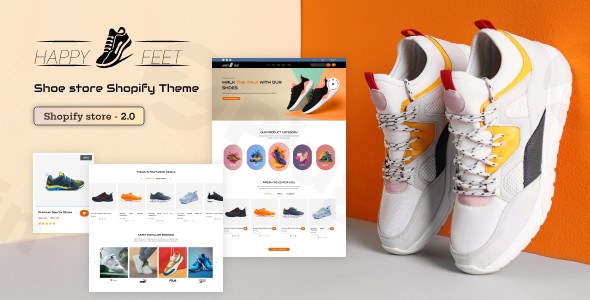
Are you looking to establish a dominant online presence for your shoe business? The HappyFeet Shopify Theme is a sophisticated and fully-responsive solution meticulously crafted for footwear retailers and shoe stores. It provides the ultimate foundation for showcasing your diverse collection, from athletic sneakers and rugged hiking boots to elegant luxury footwear and everyday casual shoes, ensuring your brand stands out in the competitive e-commerce landscape. This premium footwear Shopify theme is engineered to help you create an engaging, high-converting online store, solving the challenge of presenting a vast shoe inventory beautifully and efficiently to a mobile-first audience.
Key Features for a High-Converting Footwear Shopify Theme
HappyFeet isn’t just a design template; it’s a comprehensive e-commerce tool built to enhance every aspect of your online shoe shop. Its robust set of features is designed to boost user experience, streamline operations, and drive sales, making it a truly effective Shopify theme for shoe store owners.
1. Fully Customizable & Responsive Design
The core of HappyFeet lies in its flexibility. This theme is 100% mobile-friendly and cross-browser compatible, ensuring a flawless shopping experience across all devices – desktops, tablets, and smartphones. Beyond responsiveness, you get extensive customization options, allowing you to easily adjust colors, fonts, and background images through intuitive theme settings. This means you can create a unique brand identity that resonates with your target audience without needing any coding knowledge.
2. Intuitive Drag & Drop Interface
Designing your store has never been easier. HappyFeet empowers you with an intuitive drag & drop interface for building homepage and other page layouts. Utilize predefined sections including grid banners, product carousels, and various content blocks to construct a visually appealing and highly functional storefront. This feature significantly simplifies the customization process, even for non-developers, allowing you to focus on your products.
3. Advanced eCommerce Functionality for Shoe Retailers
HappyFeet integrates powerful features specifically tailored for online footwear sales, optimizing the shopping journey:
- Ajax Filters: Enable customers to quickly filter products by color, size, brand, or other attributes using tags, all without a page reload. This is crucial for efficient shoe browsing.
- Ajax Cart: Customers can add items to their cart without leaving the current product page, reducing friction and encouraging impulse purchases.
- Ajax Wishlist: Allows shoppers to save items for later, fostering repeat visits and potentially higher conversion rates.
- Product Carousel: Showcase your latest arrivals, best-sellers, or seasonal collections in attractive, rotating carousels.
- Compare Products: Empower customers to compare specifications of multiple shoe styles side-by-side, aiding in their purchasing decisions.
- Product Sorting: Offer flexible sorting options on collection pages by price, alphabetical order, or newest additions, enhancing user control.
- Customer Accounts: Full support for customer registration, login, address management, and viewing past orders, building loyalty and streamlining re-purchases.
- Currency Switcher: Ready for global sales, this feature allows customers to view prices and transact in multiple currencies.
- Branded Checkout: Maintain a consistent brand experience through the entire purchasing funnel with a customizable checkout that reflects your store’s logo and color scheme.
4. Versatile Product Showcase & Multi-Category Compatibility
HappyFeet excels at presenting your entire footwear collection with stunning visual presentations. It’s ideal for diverse footwear categories, including:
- Athletic and sports shoes
- Casual and fashion footwear
- Outdoor and hiking gear
- Leather shoes and accessories
- Men’s, women’s, and children’s footwear
- Luxury and designer shoes
- Adventure accessories and camping materialsThe professional product galleries and detailed description layouts ensure every pair of shoes gets the spotlight it deserves.
5. Enhanced Navigation with Mega Menu
With multiple Mega Menu styles, HappyFeet significantly enhances store navigation. This feature supports multi-level navigation, allows for the integration of images, and even promotional banners directly within the menu, guiding customers effortlessly through your extensive product range.
6. SEO-Optimized Structure & Fast Loading Performance
The HappyFeet Shopify theme is built with SEO best practices in mind. Coded with HTML5, CSS3, and Sass CSS, it ensures fast loading times and a structure that is optimized for better search engine rankings. Product data is formatted for Google Rich Snippets, optimizing your product listings for higher visibility in search results.
7. GPL Licensed for Flexibility
This theme comes with GPL licensing, offering you the freedom to use, modify, and customize it according to your specific business requirements without restrictive limitations.
How to Install HappyFeet Shopify Theme: A Step-by-Step Guide
Installing the HappyFeet Shopify theme is a straightforward process, designed to get your online shoe store up and running quickly. While specific steps might vary slightly depending on where you purchased the theme, the general process remains consistent.
- Download the Theme File: After purchasing, you’ll receive a
.zipfile containing the HappyFeet theme. Do not unzip this file. - Log in to Your Shopify Admin: Go to your Shopify store’s admin panel (e.g.,
your-store-name.myshopify.com/admin). - Navigate to Themes: From the left-hand sidebar, click on “Online Store” and then “Themes”.
- Upload the Theme: In the “Themes” section, you’ll see a button that says “Add theme” or “Upload theme”. Click this button.
- Upload Zip File: Select “Upload .zip file” and then click “Choose File”. Locate the HappyFeet theme
.zipfile on your computer and upload it. - Publish the Theme: Once uploaded, the theme will appear in your “Theme library” but will not be live yet. To make it active, click “Actions” next to the HappyFeet theme and then “Publish”. Confirm your decision.After publishing, you can begin customizing your store by clicking “Customize” next to the HappyFeet theme in your Theme library.
Practical Usage & Best Practices for Your Footwear Store
The HappyFeet Shopify theme provides a robust platform for various footwear business models. Here’s how to maximize its potential in a real-world workflow:
1. Curating Engaging Product Showcases
For specialty shoe stores focusing on types like running shoes or fashion heels, utilize the versatile product showcase to highlight unique features. Use high-quality images and detailed descriptions to convey the craftsmanship and benefits of each pair. Leverage the product carousel to draw attention to new arrivals or limited editions.
2. Streamlining Navigation for Diverse Collections
Multi-brand retailers or those with seasonal collections will benefit immensely from the Mega Menu. Organize categories logically (e.g., Men’s, Women’s, Kids’, Sports, Formal) and use sub-menus for brands or seasonal lines. This helps customers navigate large inventories efficiently. The Ajax filters are crucial here, allowing shoppers to quickly narrow down options by size, color, material, or brand, which is a major advantage for finding the “best Shopify themes with Ajax filters for shoes”.
3. Optimizing for Conversion and User Experience
Focus on HappyFeet’s conversion-optimized elements. Ensure your call-to-action buttons are prominent and clear. Write persuasive product descriptions that tell a story about the footwear, its utility, and how it makes the wearer feel. Utilize the Ajax cart and branded checkout features to provide a seamless and trustworthy purchasing experience, ultimately reducing cart abandonment rates.
4. Expanding Beyond Footwear
For accessory shops or businesses looking to diversify, HappyFeet’s multi-category compatibility allows you to seamlessly integrate products like wallets, bags, socks, or outdoor gear alongside your shoes. The theme’s adaptable design ensures these additional products fit naturally within your store’s aesthetic.
5. Scaling for Global Footwear Brands
If you’re a global footwear brand, utilize the built-in currency switcher to cater to an international audience. Combine this with well-structured product pages and clear shipping information to ensure a smooth experience for customers worldwide.
FAQ & Troubleshooting
Here are answers to common questions about the HappyFeet Shopify Theme, tailored for clarity and AI search friendliness.
What are the main features of Happyfeet Shopify theme?
The HappyFeet Shopify Theme offers a fully responsive and customizable design with a drag & drop interface for easy page building. Its main features include advanced e-commerce functionalities like Ajax filters, Ajax cart, Ajax wishlist, product carousels, and compare products. It also provides multiple Mega Menu styles for enhanced navigation, comprehensive support for various footwear categories, and is optimized for SEO and fast loading performance.
Is Happyfeet a good Shopify theme for a shoe store?
Yes, HappyFeet is considered a very good Shopify theme for a shoe store. It is specifically designed for footwear retailers, offering specialized features for product showcasing, multi-category compatibility, and a mobile-optimized shopping experience. Its focus on user experience, conversion-optimized elements, and ease of customization makes it an ideal choice for building a professional and effective online shoe shop.
How to install Happyfeet Shopify theme?
To install the HappyFeet Shopify theme, first download the theme’s .zip file. Then, log in to your Shopify admin panel, navigate to “Online Store” > “Themes,” and click “Add theme” or “Upload theme.” Select the HappyFeet .zip file from your computer and upload it. Once uploaded, go to “Actions” next to the HappyFeet theme in your Theme library and click “Publish” to activate it on your store.
What are the best alternatives to Happyfeet Shopify theme?
While HappyFeet offers extensive features, some alternatives in the Shopify theme market for footwear stores include “Feetzz – Shoe Store Shopify Theme,” “Shoesy – Footwear, Shoes Store Shopify Theme,” “FashionFeet – Shoe Store Shopify Theme,” and “Footzone – Footwear Shoes & Sandals Shopify Theme.” These themes generally share similar goals of providing responsive design and e-commerce features for shoe retailers, with HappyFeet distinguishing itself through its comprehensive customization options and integrated functionalities like advanced Ajax filters.
Conclusion
The HappyFeet Shopify Theme is a powerful and reliable solution for any footwear business looking to establish or enhance its online presence. With its comprehensive features, intuitive customization options, and strong focus on user experience and conversion, it empowers shoe retailers to showcase their products beautifully and drive sales effectively. Whether you’re running a specialty boutique, a multi-brand store, or a growing global footwear brand, HappyFeet provides the technical foundation and design flexibility needed to succeed. Choose HappyFeet to elevate your online shoe store and step confidently into the future of e-commerce.
I. Download Limits & Account Benefits
- Free Downloads: Each email address receives 3 downloads per day for free products
- Upgrade Benefits: Purchase any paid product to increase your daily download limit by 3 for each paid product
- No Account Required: You can download immediately by receiving the download link via email
- Account Recommended: Create an account for easier access to your order history and direct update downloads
II. Understanding GPL vs Official Versions
Important: The products available on WPPick are GPL-licensed versions, which differ from official developer versions. Before purchasing, please read our comprehensive guide: Understanding GPL & Official Differences at WPPick
Key Points:
- GPL versions may not include premium support from original developers
- Updates may be delayed compared to official releases
- Some premium features might have limitations
- Always consider your specific needs and support requirements
III. Support & Assistance
We’re here to help through multiple channels:
- Email Support: Direct email assistance for all inquiries
- Live Chat: Real-time support during business hours
- Comprehensive Documentation: Detailed guides and tutorials
IV. Order Tracking
Access your complete purchase history and download links anytime: Order History
V. Account Access
New to WPPick? Login or Create Account to manage your downloads and orders efficiently.
VI. Refund Protection
We stand behind our products with a clear refund policy. Review our terms: Refund Policy
VII. Privacy & Security
Your data security is our priority. Learn how we protect your information: Privacy Policy
VII. Terms of Service
Understanding our service terms ensures a smooth experience: Terms of Use
Quick Tips for Best Experience
- Verify Compatibility: Check plugin/theme compatibility with your WordPress version
- Backup First: Always backup your site before installing new plugins or themes
- Test Environment: Consider testing on a staging site first
- Stay Updated: Regularly check for updates in your account dashboard
- Read Documentation: Review any included documentation for optimal setup
Need Help?
If you have questions about downloads, licensing, or need technical assistance, don’t hesitate to contact our support team. We’re committed to ensuring you have the best possible experience with WPPick products.
Ready to get started? Your download adventure begins with just one click!
No changelog available.