

Homelengo – Real Estate Html Template
/Year
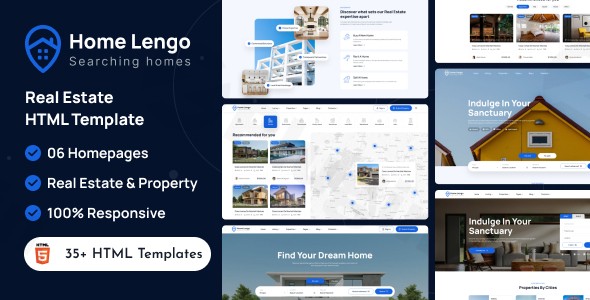
Building a high-converting property portal requires more than just a pretty layout; it demands advanced search functionality, seamless map integration, and a user-friendly management system. Homelengo is a premium real estate WordPress theme specifically designed to meet these needs for agencies, independent realtors, and property developers. By combining a modern, elegant aesthetic with a robust feature set, Homelengo offers a professional platform to showcase listings and generate high-quality leads.
Key Features: Design, Layout, and Performance
Homelengo is engineered for visual impact and technical efficiency. It moves beyond generic multipurpose designs to offer a specialized toolkit for the property market.
Design & Layout Options
The theme offers incredible variety out of the box, ensuring your site doesn’t look like a carbon copy of your competitors:
- 6 Unique Homepages: Choose from different styles optimized for rentals, luxury sales, or agency landing pages.
- 30+ Inner Pages: Pre-designed layouts for “About Us,” “Contact,” “Services,” and “FAQs” ensure a cohesive look across the entire site.
- Property Listing Views: Showcase homes using grid, list, or sidebar layouts to match your users’ browsing preferences.
- Advanced Search & Filtering: A core feature that allows users to filter by price, location, property type, and specific amenities.
Customization Capabilities
With Homelengo, you don’t need to be a developer to build a bespoke site.
- Elementor Real Estate Theme: Deep integration with the Elementor drag-and-drop page builder allows you to edit every section of your site visually.
- Advanced Theme Options: Control your global branding through unlimited color schemes and advanced typography settings (including Google Fonts).
- Header & Footer Builder: Create custom navigation experiences and footer layouts to improve site stickiness and UX.
Performance & SEO Features
Speed is a ranking factor, and Homelengo is built with a “Performance First” mindset. It includes:
- Lazy Load Effect: Images only load as the user scrolls, significantly improving initial page load times.
- SEO-Friendly Markup: Clean HTML5/CSS3 code ensures that search engines can easily crawl and index your property listings.
- Fully Responsive Design: The theme is 100% responsive, providing a flawless experience on smartphones, tablets, and desktops.
Installation and Demo Import Guide
Setting up your Homelengo WordPress theme is straightforward thanks to its user-friendly setup wizard. Follow these steps to get your site live:
- Install & Activate: Upload the
homelengo.zipfile via Appearance > Themes > Add New in your WordPress dashboard. - Required Plugins: Upon activation, you will be prompted to install required plugins, including Elementor, Contact Form 7, and the theme’s core functionality plugin.
- One-Click Demo Import: Navigate to the theme options and select the One-Click Demo Import. This will pull in all sample listings, pages, and menus.
- Pro Tip: Ensure your server has a PHP execution time of at least 300 seconds to prevent the import from timing out.
- Verify Setup: Once complete, check your menus and widgets. The demo content provides a perfect blueprint that you can simply swap with your own property data.
Customization Guide: Branding & Property Management
Once the demo is imported, you can begin personalizing the site to match your agency’s brand identity.
Global Styles
Use the WordPress Customizer to upload your logo and set your primary brand colors. Because Homelengo supports unlimited color schemes, you can match your physical signage and marketing materials perfectly.
Managing Properties and Agents
Homelengo uses Custom Post Types to make data entry intuitive:
- Properties: Add floor plans, high-resolution galleries, and video tours. You can even integrate Google Maps or Mapbox to show exact locations.
- Agent Profiles: Create professional bios for your team, including contact forms that send leads directly to the specific listing agent.
- User Submissions: If you are building a marketplace, Homelengo allows registered users to submit their own properties via a front-end dashboard.
FAQ & Troubleshooting
Is Homelengo compatible with Elementor?
Yes, Homelengo is a dedicated Elementor real estate theme. It uses Elementor as its primary page builder, allowing for full drag-and-drop customization of all layouts without touching a single line of code.
Does the theme support WooCommerce?
Yes, Homelengo is compatible with WooCommerce. This is ideal for agencies that want to charge users for premium property listings or offer subscription-based membership plans.
How to build a real estate website with WordPress using Homelengo?
To build a site, you simply install WordPress on your hosting, activate the Homelengo theme, use the one-click demo import to create the structure, and then use the built-in property management system to add your listings.
Does it support child themes?
Yes, Homelengo is child-theme ready. We recommend using a child theme for any custom code modifications to ensure your changes are not lost when the parent theme is updated.
What should I do if the maps aren’t showing?
Most map issues are related to API keys. Ensure you have generated a valid Google Maps or Mapbox API key and entered it into the theme’s “Advanced Options” panel.
Conclusion: Is Homelengo Right for You?
Homelengo stands out as a top-tier choice for anyone looking for the best WordPress theme for real estate agencies. Its combination of a low entry price (often around $29), specialized property management features, and high-performance optimization makes it a formidable competitor to more expensive themes like Houzez or Real Homes.While it is highly flexible thanks to Elementor, its real strength lies in its niche-specific tools—like interactive maps and agent dashboards—that generic themes simply don’t offer. Whether you are an independent realtor or a large-scale developer, Homelengo provides the professional polish and technical depth required to succeed in the modern real estate market.Ready to launch your property portal? Visit wppick.com for more tips on optimizing your WordPress site.
I. Download Limits & Account Benefits
- Free Downloads: Each email address receives 3 downloads per day for free products
- Upgrade Benefits: Purchase any paid product to increase your daily download limit by 3 for each paid product
- No Account Required: You can download immediately by receiving the download link via email
- Account Recommended: Create an account for easier access to your order history and direct update downloads
II. Understanding GPL vs Official Versions
Important: The products available on WPPick are GPL-licensed versions, which differ from official developer versions. Before purchasing, please read our comprehensive guide: Understanding GPL & Official Differences at WPPick
Key Points:
- GPL versions may not include premium support from original developers
- Updates may be delayed compared to official releases
- Some premium features might have limitations
- Always consider your specific needs and support requirements
III. Support & Assistance
We’re here to help through multiple channels:
- Email Support: Direct email assistance for all inquiries
- Live Chat: Real-time support during business hours
- Comprehensive Documentation: Detailed guides and tutorials
IV. Order Tracking
Access your complete purchase history and download links anytime: Order History
V. Account Access
New to WPPick? Login or Create Account to manage your downloads and orders efficiently.
VI. Refund Protection
We stand behind our products with a clear refund policy. Review our terms: Refund Policy
VII. Privacy & Security
Your data security is our priority. Learn how we protect your information: Privacy Policy
VII. Terms of Service
Understanding our service terms ensures a smooth experience: Terms of Use
Quick Tips for Best Experience
- Verify Compatibility: Check plugin/theme compatibility with your WordPress version
- Backup First: Always backup your site before installing new plugins or themes
- Test Environment: Consider testing on a staging site first
- Stay Updated: Regularly check for updates in your account dashboard
- Read Documentation: Review any included documentation for optimal setup
Need Help?
If you have questions about downloads, licensing, or need technical assistance, don’t hesitate to contact our support team. We’re committed to ensuring you have the best possible experience with WPPick products.
Ready to get started? Your download adventure begins with just one click!
No changelog available.