
Ht Slider Pro For Elementor
/Year
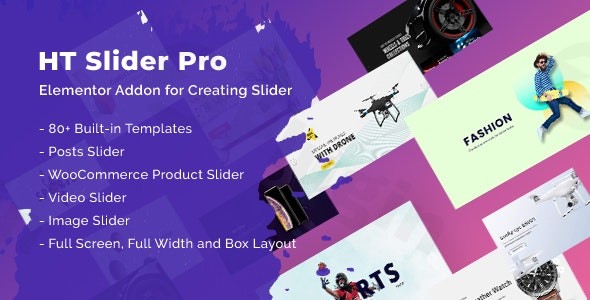
Creating visually captivating and interactive sliders is a cornerstone of modern web design, yet it often requires complex coding or clunky interfaces. The HT Slider Pro For Elementor plugin solves this challenge, empowering WordPress users to design beautiful, responsive sliders directly within the familiar Elementor page builder. This premium Elementor slider plugin offers a seamless drag-and-drop experience, making it the ideal solution for anyone looking to enhance their website’s visual appeal without writing a single line of code.Whether you’re a seasoned developer, a website owner, or a content creator, HT Slider Pro provides the tools to showcase your content, products, or media in an engaging and professional manner. It’s a robust WordPress slider Elementor solution that integrates perfectly into your existing Elementor workflow.
Why HT Slider Pro For Elementor Stands Out
HT Slider Pro distinguishes itself through its powerful features, deep Elementor integration, and focus on user experience. Unlike generic slider plugins, it’s built from the ground up to work in harmony with Elementor, giving you intuitive control over every aspect of your sliders. From basic image carousels to dynamic post and product showcases, this plugin is engineered for flexibility and performance.
Key Features for a Powerful Slider Experience
HT Slider Pro For Elementor comes packed with features designed to give you complete creative control and dynamic content capabilities.
Advanced Slider Customization & Drag-and-Drop Interface
At its core, HT Slider Pro leverages Elementor’s intuitive drag-and-drop interface, making slider creation accessible to everyone. You get full control over:
- Styling and Animations: Fine-tune every visual detail, from text colors to complex slide transitions and advanced animations like fade, slide, and zoom.
- Multiple Layout Options: Choose between fullscreen, full-width, or boxed layouts to perfectly fit your design needs.
- Responsive Design Controls: Ensure your sliders look impeccable on any device. The plugin offers comprehensive responsive Elementor slider design controls for desktops, tablets, and mobile phones, automatically optimizing for seamless display.
Extensive Professional Templates
Kickstart your designs with over 80 professionally designed pre-built slide templates. These industry-specific templates cover a wide array of niches, saving you countless hours of design work:
- Fashion & Apparel
- Electronics & Gadgets
- Furniture & Home Decor
- Food & Beverage
- Jewelry & Accessories
- And many more niche-specific designs.These templates provide a solid foundation, allowing you to quickly adapt and customize them to your brand’s aesthetic. You can truly review these HT Slider Pro pre-built templates review them and find the perfect fit.
Smart & Dynamic Content Display
Go beyond static images with HT Slider Pro’s smart content capabilities.
- Display Content by ID or Category: Easily create elementor post slider carousels or woocommerce product slider elementor showcases by pulling content dynamically.
- Custom Navigation and Pagination: Design unique navigation arrows and pagination dots, controlling their appearance, behavior, and position. You can toggle navigation and pagination options to suit your design.
- Autoplay Controls: Set your sliders to autoplay with customizable timing options and even include an autoplay hover pause.
- Versatile Content Options: Create dynamic content sliders with images, videos (YouTube, Vimeo, self-hosted), text, and buttons. This allows for rich, interactive experiences beyond simple image galleries, making it an excellent elementor video slider or elementor image slider solution.
- Scroll Navigation Slider: A unique feature allowing for effortless vertical or horizontal scrolling with intuitive navigation, perfect for immersive content experiences.
Technical Excellence & Compatibility
HT Slider Pro is built for performance and compatibility:
- SEO Optimization: The plugin is lightweight and optimized for speed and SEO, ensuring your sliders load quickly without negatively impacting overall website performance – a critical factor for search engine rankings.
- Multilingual Ready: Compatible with WPML and other translation plugins, making it ideal for global websites.
- Seamless Elementor Compatibility: Designed exclusively for Elementor and tested with its latest versions, ensuring a stable and integrated experience. While specific minimum WordPress versions aren’t explicitly stated, Elementor typically requires WordPress 6.5 or greater, PHP 8.x (min 7.4), and MySQL 5.6 or greater.
Installation & Setup: How to Install HT Slider Pro in Elementor
Installing HT Slider Pro For Elementor is a straightforward process, just like any other premium WordPress plugin.
- Purchase and Download: First, purchase HT Slider Pro from a trusted source like ZeroPlugin.com. You will receive a downloadable
.zipfile containing the plugin. - Upload the Plugin:
- Log in to your WordPress dashboard.
- Navigate to Plugins > Add New.
- Click the “Upload Plugin” button at the top of the page.
- Click “Choose File”, select the
ht-slider-pro.zipfile you downloaded, and click “Install Now”.
- Activate the Plugin: Once the plugin is uploaded and installed, click “Activate Plugin”.
- Start Building with Elementor:
- Create a new page or edit an existing one with Elementor.
- In the Elementor editor, search for “HT Slider Pro” in the widget panel.
- Drag and drop the HT Slider Pro widget onto your canvas.
- You can now start creating your slider, choosing from pre-built templates or building from scratch.
Practical Usage & Best Practices for HT Slider Pro
HT Slider Pro For Elementor isn’t just about making pretty slides; it’s about making your content more effective and engaging. Here are some practical use cases and best practices:
- Showcasing WooCommerce Products: For eCommerce stores, creating a WooCommerce product slider Elementor style is a game-changer. Use dynamic content to display “New Arrivals,” “Bestsellers,” or “On Sale” products directly on your homepage or category pages. This is the best Elementor slider addon for WooCommerce to highlight promotions and drive sales.
- Best Practice: Keep product sliders focused. Use high-quality images, clear calls-to-action, and link directly to product pages.
- Highlighting Recent Blog Posts: Bloggers and content creators can create dynamic elementor post slider carousels to showcase their latest articles or evergreen content. This keeps visitors engaged and encourages further exploration of your site.
- Best Practice: Combine post titles, featured images, and short excerpts to entice clicks.
- Crafting Engaging Hero Sections: Use the ht slider pro for elementor to create powerful hero sections that immediately capture visitor attention. Combine a full-width or fullscreen layout with captivating imagery, a strong headline, and a clear call-to-action button.
- Best Practice: Limit the number of slides in a hero section (2-4 is ideal) to avoid overwhelming visitors. Ensure messages are concise and impactful.
- Building a Portfolio Showcase: Photographers, designers, and agencies can leverage the plugin to create visually stunning portfolios. Use the elementor image slider and elementor video slider capabilities to present your work beautifully.
- Best Practice: Curate your best work. Use high-resolution images and videos, and consider the “Scroll Navigation Slider” for an immersive browsing experience.
FAQ & Troubleshooting
Here are answers to common questions about HT Slider Pro For Elementor:
What is HT Slider Pro For Elementor?
HT Slider Pro For Elementor is a premium WordPress plugin that allows users to create highly customizable, responsive, and dynamic sliders directly within the Elementor page builder interface. It provides over 80 pre-built templates and extensive customization options for images, videos, posts, and WooCommerce products.
How to create a responsive slider in Elementor with HT Slider Pro?
To create a responsive slider, simply drag and drop the HT Slider Pro widget into your Elementor canvas. The plugin inherently builds responsive sliders. Within the Elementor editor, you’ll find dedicated responsive controls (desktop, tablet, mobile icons) that allow you to fine-tune spacing, font sizes, and visibility for different devices, ensuring your slider looks perfect everywhere.
Does HT Slider Pro support video backgrounds?
Yes, HT Slider Pro For Elementor fully supports video content. You can embed videos from YouTube, Vimeo, or use self-hosted videos within your slides, making it an excellent elementor video slider solution. This allows for dynamic and engaging multimedia presentations within your sliders.
Is HT Slider Pro mobile-friendly?
Absolutely. HT Slider Pro is designed with responsiveness at its core. All sliders created with the plugin are fully optimized for seamless display across desktops, tablets, and smartphones, ensuring excellent performance and usability on all devices. You have granular control over how your sliders appear on different screen sizes.
Can I create a post carousel with HT Slider Pro?
Yes, you can easily create a post carousel (or slider) using HT Slider Pro. The plugin allows you to dynamically display content by ID or category, making it simple to showcase your latest blog posts, news articles, or any custom post types in an engaging elementor post slider format.
Conclusion: Elevate Your WordPress Site with HT Slider Pro For Elementor
The HT Slider Pro For Elementor plugin is an indispensable tool for anyone looking to create professional-grade sliders on their WordPress website using Elementor. Its intuitive drag-and-drop interface, vast library of pre-built templates, and powerful dynamic content capabilities make it a standout solution. By focusing on seamless Elementor integration, responsive design, and performance, HT Slider Pro ensures that your visual content not only looks stunning but also contributes positively to your site’s overall user experience and SEO.For businesses, eCommerce stores, and creative professionals aiming to make a lasting impact with their website’s visual appeal, HT Slider Pro offers unparalleled value. It provides a robust, user-friendly, and high-performing way to implement a wordpress slider Elementor solution that truly converts and engages your audience.
I. Download Limits & Account Benefits
- Free Downloads: Each email address receives 3 downloads per day for free products
- Upgrade Benefits: Purchase any paid product to increase your daily download limit by 3 for each paid product
- No Account Required: You can download immediately by receiving the download link via email
- Account Recommended: Create an account for easier access to your order history and direct update downloads
II. Understanding GPL vs Official Versions
Important: The products available on WPPick are GPL-licensed versions, which differ from official developer versions. Before purchasing, please read our comprehensive guide: Understanding GPL & Official Differences at WPPick
Key Points:
- GPL versions may not include premium support from original developers
- Updates may be delayed compared to official releases
- Some premium features might have limitations
- Always consider your specific needs and support requirements
III. Support & Assistance
We’re here to help through multiple channels:
- Email Support: Direct email assistance for all inquiries
- Live Chat: Real-time support during business hours
- Comprehensive Documentation: Detailed guides and tutorials
IV. Order Tracking
Access your complete purchase history and download links anytime: Order History
V. Account Access
New to WPPick? Login or Create Account to manage your downloads and orders efficiently.
VI. Refund Protection
We stand behind our products with a clear refund policy. Review our terms: Refund Policy
VII. Privacy & Security
Your data security is our priority. Learn how we protect your information: Privacy Policy
VII. Terms of Service
Understanding our service terms ensures a smooth experience: Terms of Use
Quick Tips for Best Experience
- Verify Compatibility: Check plugin/theme compatibility with your WordPress version
- Backup First: Always backup your site before installing new plugins or themes
- Test Environment: Consider testing on a staging site first
- Stay Updated: Regularly check for updates in your account dashboard
- Read Documentation: Review any included documentation for optimal setup
Need Help?
If you have questions about downloads, licensing, or need technical assistance, don’t hesitate to contact our support team. We’re committed to ensuring you have the best possible experience with WPPick products.
Ready to get started? Your download adventure begins with just one click!
- Added Exclude Slides option in HT Scroll Navigation and HT Slider widgets when displaying by slide category.
- Fixed a few minor issues.
- Tested compatibility with latest version of Elementor.
- Option to add an icon and set icon position for the "Read More" button in the Posts Slider widget
- Fixed a few minor issues
- Tested compatibility with latest version of Elementor