

Jetformbuilder
/Year
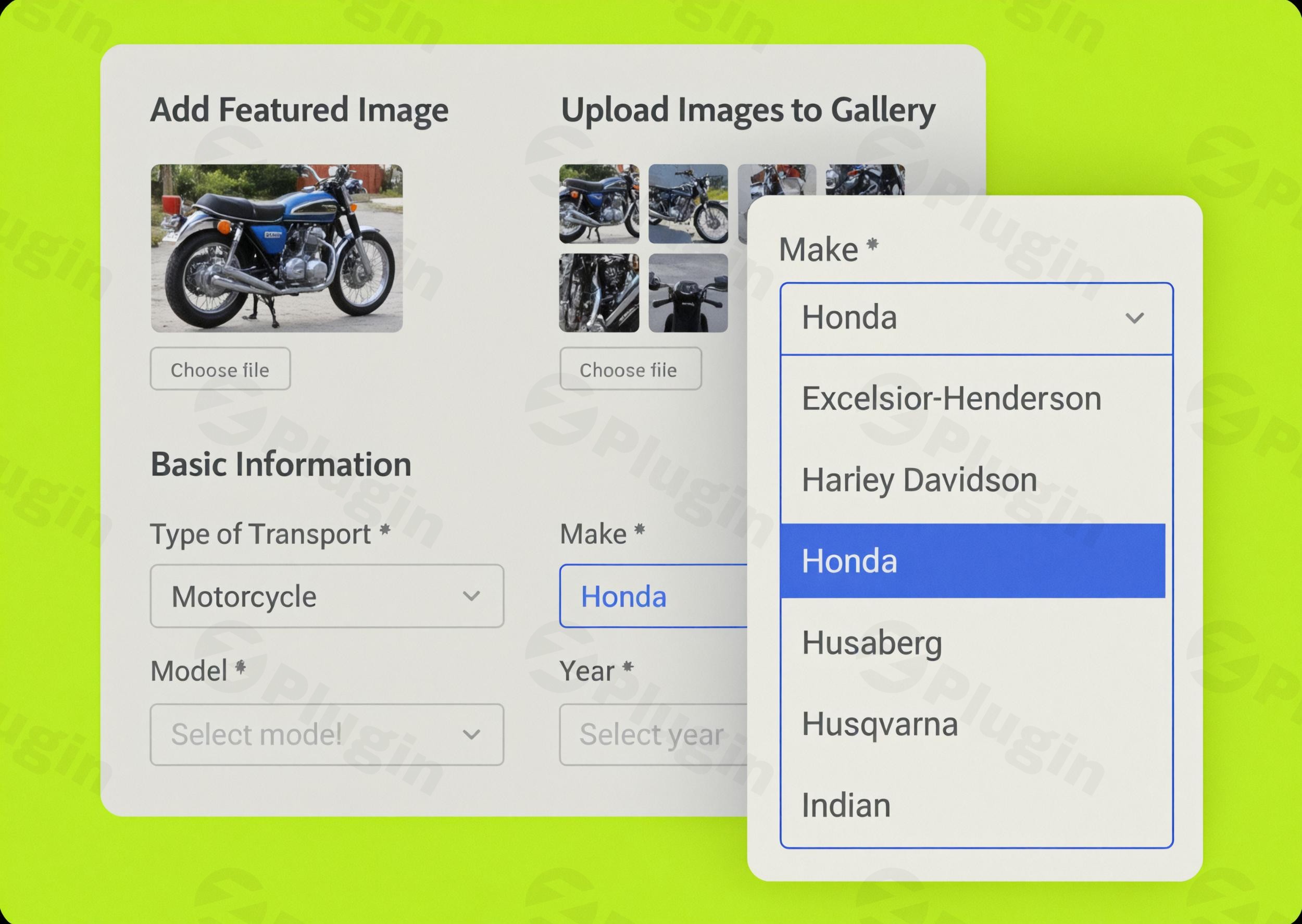
In the dynamic landscape of WordPress, effective data organization is paramount for both user experience and administrative efficiency. While JetFormBuilder offers unparalleled flexibility in form creation, managing complex hierarchical data structures often requires specialized tools. Enter Hierarchical Select for JetFormBuilder, a premium extension meticulously crafted to transform how you handle taxonomies within your WordPress forms.This innovative plugin empowers you to implement sophisticated cascading dropdowns, where user selections in one field dynamically influence the options available in subsequent fields. The result is a streamlined, intuitive, and highly efficient selection process that significantly enhances user experience and simplifies complex data input.
What is JetFormBuilder? A Foundation for Powerful Forms
Before diving into the specifics of Hierarchical Select, it’s essential to understand the robust foundation it builds upon. JetFormBuilder is a versatile and code-free WordPress form builder that leverages the native Gutenberg block editor. It allows users to create a wide array of forms, from basic contact forms to intricate registration, quiz, and even user dashboard forms. Its key strengths include:
- Versatile Form Creation: Craft any form imaginable, from simple contact forms to complex interactive surveys.
- Gutenberg Block Editor Integration: Utilize the familiar WordPress block editor for an intuitive form-building experience, offering extensive field types (24+).
- Dynamic Content Capabilities: Designed to interact seamlessly with Custom Post Types (CPTs) and Custom Content Types (CCTs), enabling powerful front-end content management.
- Advanced Features: Includes conditional logic, multi-step forms, robust post-submission actions (webhooks, post/user creation), form validation, calculated fields, and spam protection with Google reCAPTCHA.
- Extensive Integrations: Works seamlessly with other Crocoblock plugins (especially JetEngine), payment gateways like Stripe and PayPal, and marketing tools such as MailPoet and HubSpot via dedicated add-ons. It’s also compatible with popular page builders like Elementor and Bricks.JetFormBuilder provides a powerful framework, and Hierarchical Select extends this power by adding advanced, intelligent taxonomy management capabilities.
Hierarchical Select: Key Features and Benefits
The Hierarchical Select extension for JetFormBuilder is engineered to bring unparalleled organization and ease of use to your forms, particularly when dealing with multi-level data structures.
Advanced Taxonomy Management
At its core, Hierarchical Select enables the creation of sophisticated multi-level dropdown systems. This means that child terms within your taxonomies will automatically filter and populate based on the parent selections made by the user. This intelligent filtering mechanism eliminates irrelevant options, guiding users through complex data trees with precision. The result is not just a form, but an intelligent interface that understands and responds to user input.
Seamless JetFormBuilder Integration
Designed exclusively for JetFormBuilder, this plugin integrates flawlessly into your existing form workflows. It introduces a new, dedicated field type within JetFormBuilder, allowing you to drag, drop, and configure hierarchical selections without requiring any additional coding knowledge or complex setup. Its compatibility ensures a smooth, intuitive experience for form builders already familiar with the JetFormBuilder ecosystem.
Enhanced User Experience
Complex forms can often deter users. Hierarchical Select addresses this challenge directly by reducing form complexity. By presenting hierarchical data in an organized, step-by-step selection process, users are effortlessly guided through what would otherwise be cumbersome taxonomy structures. This intuitive approach minimizes confusion, reduces errors, and significantly improves the overall user journey, leading to higher form completion rates and greater data accuracy.
Practical Applications in Real-World Scenarios
The versatility of Hierarchical Select for JetFormBuilder extends across numerous industries and use cases, providing a robust solution for diverse data organization needs:
- Automotive Listings Platforms: For car dealerships and automotive marketplaces, implement hierarchical selections for vehicle specifications. Users can logically navigate from
Manufacturer>Model Year>Trim Levels>Specific Features, streamlining the listing or search process. - E-commerce Product Categorization: Merchants can effortlessly select through multi-level product category structures. Imagine
Clothing>Men>Formal>Suits, ensuring precise product placement, improved search functionality, and better inventory management. - Job Portal Applications: Create sophisticated job application forms where candidates can quickly find relevant opportunities. Implement hierarchical selections for
Industry Sectors>Job Categories>Specialization Areas>Position Levels. - Real Estate Property Listings: Organize property types with ease. Users can filter listings through hierarchical selections covering
Location Hierarchies>Property Types>Amenities>Specific Featuresfor comprehensive real estate platforms.These examples highlight how Hierarchical Select empowers both administrators and end-users to interact with complex data in a structured, efficient, and user-friendly manner.
Setting Up and Using Hierarchical Select
Integrating Hierarchical Select into your JetFormBuilder forms is designed to be straightforward, leveraging the familiar WordPress environment:
- Installation: Install Hierarchical Select for JetFormBuilder like any other WordPress plugin. Upload the plugin files via your WordPress dashboard or use the plugin installer.
- Activation: Activate the plugin through the ‘Plugins’ menu in your WordPress admin area.
- Integrating with JetFormBuilder: Once activated, a new “Hierarchical Select” field type will become available within the JetFormBuilder editor.
- Configuration: Drag and drop the Hierarchical Select field into your form. Within the field settings, you will define the taxonomy you wish to use and configure the hierarchical relationships between parent and child terms. The intuitive interface allows you to map your existing taxonomies to the cascading dropdowns.
- Placement and Styling: Place your configured hierarchical select field within your form. You can then style it to match your website’s aesthetic using Elementor, Bricks, or the JetStyleManager add-on for Gutenberg, ensuring a cohesive design.By following these steps, you can quickly implement a dynamic and organized selection experience for your users.
Why Choose ZeroPlugin.com for Your Premium Extensions?
When investing in premium WordPress extensions, trust and reliability are paramount. ZeroPlugin.com stands as a dependable source, offering compelling reasons to choose their software:
- GPL Licensed Software: All plugins from ZeroPlugin.com are distributed under GPL licensing. This ensures you receive fully legal, transparent software with complete usage rights and the flexibility to adapt it for your projects, fostering an open and trustworthy development environment.
- Regular Security Updates: The digital landscape evolves rapidly, and security is a constant concern. ZeroPlugin.com maintains frequent update schedules to guarantee compatibility with the latest WordPress and JetFormBuilder versions, while promptly implementing crucial security patches.
- Safety Guaranteed: Every plugin undergoes comprehensive VirusTotal third-party security scanning before distribution. This rigorous vetting process guarantees malware-free, safe installations, protecting your website’s integrity and user data.
- Dependable Source Code: Transparency and quality are hallmarks of ZeroPlugin.com. Their plugins feature clean, well-documented code that has been thoroughly vetted for security vulnerabilities and optimized for performance reliability, ensuring a stable and efficient addition to your WordPress site.
Technical Specifications and Compatibility
To ensure seamless operation and optimal performance, Hierarchical Select for JetFormBuilder adheres to robust technical standards:
- JetFormBuilder Compatibility: Fully compatible with the latest versions of JetFormBuilder, ensuring seamless integration and access to all its features.
- WordPress Compatibility: Requires WordPress 5.0+ to function correctly.
- Responsive Design: Designed with responsiveness in mind, ensuring a flawless user experience across all devices, from desktops to mobile phones.
- Lightweight Implementation: Engineered for efficiency, the plugin ensures minimal performance impact on your website.
- Easy Configuration: All settings are easily manageable through the intuitive WordPress admin interface, requiring no complex coding.
- PHP Requirement: Requires PHP 7.3 or higher for optimal performance and security.
- MySQL Requirement: Requires MySQL 5.6 or higher.
- Memory Limit: A WP memory limit of 512 MB or higher is recommended for smooth operation, especially with complex forms.
- SSL Certificate: An SSL certificate on your server is highly recommended for secure data transmission.
- TLS Protocol Versions: Supports TLS protocol versions 1.0, 1.1, 1.2, 1.3, ensuring secure communication.
Ideal For
Hierarchical Select for JetFormBuilder is the professional solution for:
- Website Developers: Seeking advanced tools for building complex, data-driven forms.
- E-commerce Store Owners: Needing to streamline product categorization and filtering.
- Directory Website Operators: Managing extensive listings with multi-level categories.
- Membership Platforms: Organizing user profiles and content access based on hierarchical data.
- Educational Institutions: Creating structured registration or course selection forms.
- Any WordPress site that requires organized hierarchical data selection through user-friendly forms.
Conclusion
Hierarchical Select for JetFormBuilder is more than just a plugin; it’s a strategic enhancement for anyone serious about professional form building and robust data management in WordPress. By providing a sophisticated yet intuitive way to handle hierarchical taxonomies through cascading dropdowns, it significantly elevates both the user experience and the administrative efficiency of your website.Transform your form selection experience and bring unparalleled order to your taxonomy management. Choose Hierarchical Select for JetFormBuilder—the professional, reliable solution for organizing complex data with precision and ease.
I. Download Limits & Account Benefits
- Free Downloads: Each email address receives 3 downloads per day for free products
- Upgrade Benefits: Purchase any paid product to increase your daily download limit by 3 for each paid product
- No Account Required: You can download immediately by receiving the download link via email
- Account Recommended: Create an account for easier access to your order history and direct update downloads
II. Understanding GPL vs Official Versions
Important: The products available on WPPick are GPL-licensed versions, which differ from official developer versions. Before purchasing, please read our comprehensive guide: Understanding GPL & Official Differences at WPPick
Key Points:
- GPL versions may not include premium support from original developers
- Updates may be delayed compared to official releases
- Some premium features might have limitations
- Always consider your specific needs and support requirements
III. Support & Assistance
We’re here to help through multiple channels:
- Email Support: Direct email assistance for all inquiries
- Live Chat: Real-time support during business hours
- Comprehensive Documentation: Detailed guides and tutorials
IV. Order Tracking
Access your complete purchase history and download links anytime: Order History
V. Account Access
New to WPPick? Login or Create Account to manage your downloads and orders efficiently.
VI. Refund Protection
We stand behind our products with a clear refund policy. Review our terms: Refund Policy
VII. Privacy & Security
Your data security is our priority. Learn how we protect your information: Privacy Policy
VII. Terms of Service
Understanding our service terms ensures a smooth experience: Terms of Use
Quick Tips for Best Experience
- Verify Compatibility: Check plugin/theme compatibility with your WordPress version
- Backup First: Always backup your site before installing new plugins or themes
- Test Environment: Consider testing on a staging site first
- Stay Updated: Regularly check for updates in your account dashboard
- Read Documentation: Review any included documentation for optimal setup
Need Help?
If you have questions about downloads, licensing, or need technical assistance, don’t hesitate to contact our support team. We’re committed to ensuring you have the best possible experience with WPPick products.
Ready to get started? Your download adventure begins with just one click!
- Support Hierarchical Select in protected price calculations
- Fix JavaScript error in default validation logic
- Fix empty required select with advanced validation