

Jobbank – WordPress Job Manager Plugin
/Year
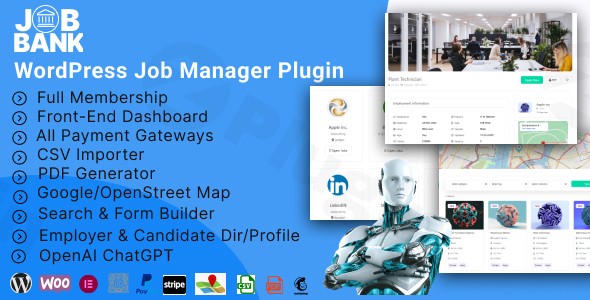
Creating a robust and professional job portal on WordPress can seem daunting, but with the Jobbank WordPress plugin, it becomes a streamlined and highly effective process. This premium WordPress job manager plugin empowers recruitment agencies, HR departments, and career websites to effortlessly build and manage a fully-featured job board directly within their WordPress site. Say goodbye to complex coding and expensive external platforms; Jobbank brings all the tools you need for a thriving job marketplace right to your dashboard.
Why Choose Jobbank for Your WordPress Job Board?
The demand for specialized job boards continues to grow, and Jobbank addresses this need by transforming your WordPress site into a dynamic hub for job seekers and employers. Unlike generic listing plugins, Jobbank is purpose-built to handle every aspect of job management, from flexible job posting and advanced application systems to comprehensive user dashboards and powerful monetization options. If you’re looking to create a job portal WordPress site that connects talent with opportunities, Jobbank is your all-in-one solution.
Key Features of the Jobbank WordPress Plugin
Jobbank stands out with a comprehensive suite of features designed for flexibility, ease of use, and powerful functionality.
Advanced Job Management & Customization
Jobbank offers unparalleled control over how jobs are created and displayed:
- Drag & Drop Job Form Builder: Design custom job submission forms with ease using an intuitive drag-and-drop interface. This allows you to gather precisely the information you need from employers, ensuring relevant job listings.
- Customizable Job Listing Fields: Beyond forms, you can tailor how job listings appear on the front end, organizing them by categories for easy navigation. This is perfect for those seeking a “Jobbank WordPress plugin drag and drop builder” for complete control.
- Dual Map Integration: Enhance job discovery with integrated location services using both Google Maps and OpenStreetMap. This multi-location functionality allows job seekers to find opportunities based on geographical proximity.
- Page Builder Compatibility: Seamlessly integrate your job board design with popular page builders like Elementor and Gutenberg. Jobbank provides dedicated widgets and blocks, making it simple to style your job pages to match your site’s aesthetic.
- Comprehensive Color Customization: Fine-tune the look and feel of your job board with extensive color options, ensuring brand consistency.
Powerful Application System
Managing job applications efficiently is crucial, and Jobbank delivers:
- Ajax-Powered Job Application Process: Provide a smooth, responsive application experience for candidates, reducing friction and increasing completion rates.
- CSV Job Importer: For businesses with many listings, the bulk CSV job importer is a lifesaver, allowing you to upload numerous jobs quickly and efficiently.
- Professional PDF Generator: Automatically generate professional PDF versions of job applications, simplifying the review process for employers.
Robust Monetization Options
One of Jobbank’s strongest suits is its ability to help you monetize WordPress job board with Jobbank plugin:
- Multiple Payment Gateways: Support a variety of payment methods including PayPal (Express Checkout), Stripe (with full plan synchronization), and integration with WooCommerce payment gateways.
- Flexible Membership Plans: Offer diverse monetization models with free accounts, one-time payments, and recurring subscriptions. You can also implement free and paid trials.
- Custom Pricing Tables & Package Options: Design attractive pricing tables for different job posting packages, offering various benefits and limits.
- Advanced Coupon System: Drive sign-ups and promotions with a sophisticated coupon system, complete with usage limits and expiration controls.
Comprehensive User Management & Front-end Dashboards
Jobbank provides dedicated, intuitive interfaces for all users, enhancing the user experience for both employers and candidates. This includes the highly sought-after “Jobbank plugin front end employer dashboard”:
- Front-End Dashboard: All users get a personalized “My Account” area to manage their profiles, settings, passwords, and activities.
- Resume Builder & Profile Management: Candidates can create and manage detailed resumes and profiles, including photo and video uploads.
- Job Alerts & Notification System: Keep job seekers engaged with automated job alerts based on their preferences.
- Saved Jobs & Candidate Tracking: Candidates can save jobs, while employers can save promising candidates, facilitating easier follow-ups.
- Subscription Management: Users can easily upgrade, downgrade, or cancel their membership plans directly from their dashboard.
Professional Communication Tools
Effective communication is key for any successful job portal:
- Built-in Messaging System: Facilitate direct communication between employers and candidates without leaving your site.
- Customizable Email Templates: Ensure professional and consistent messaging for all notifications (welcome, password reset, order confirmations, applications, subscription reminders) with fully customizable email templates.
- Employer and Candidate Directories: Allow users to browse and discover potential matches through organized directories.
Technical Specifications & Compatibility
Jobbank is built for broad compatibility and modern WordPress environments:
- WordPress Version: Compatible with WordPress versions 5.4.x through 6.8.x.
- Page Builder Compatibility: Works seamlessly with Elementor and Elementor Pro, and offers dedicated Gutenberg blocks.
- WooCommerce Compatibility: Fully compatible with WooCommerce versions 5.x.x through 6.x.x, crucial for monetization features.
- Multilingual Support: Compatible with WPML for creating multilingual job portals.
- Bootstrap Integration: Compatible with Bootstrap 4.x and 5.x.
Installing and Setting Up the Jobbank WordPress Plugin
Getting your new WordPress recruitment plugin up and running is straightforward. Here’s a step-by-step guide for non-developers:
- Purchase and Download: First, purchase the Jobbank plugin from a reputable marketplace like CodeCanyon. You will receive a downloadable
.zipfile. - Upload the Plugin:
- Log in to your WordPress admin dashboard.
- Navigate to Plugins > Add New.
- Click on the “Upload Plugin” button at the top of the page.
- Click “Choose File”, select the Jobbank
.zipfile you downloaded, and then click “Install Now”.
- Activate the Plugin: Once the plugin is installed, click the “Activate Plugin” button.
- Initial Configuration: After activation, a new “Jobbank” menu item will appear in your WordPress dashboard.
- Go to Jobbank > Settings to begin configuring your job board. Here you’ll set up general options, integrate payment gateways, and configure email settings.
- Create Essential Pages: Jobbank will likely prompt you to create or assign pages for the employer dashboard, candidate dashboard, job submission form, and job listings. Follow these prompts or manually create new pages and assign them in the Jobbank settings.
- Design Your Forms & Listings: Navigate to the form builder and listing fields sections to customize how jobs are submitted and displayed. Utilize the drag-and-drop builder to set up fields relevant to your niche.
- Set Up Monetization (Optional): If you plan to monetize, go to the Jobbank > Memberships/Packages section. Define your membership plans, set pricing, and configure your chosen payment gateways (PayPal, Stripe, WooCommerce). Remember to set up coupons if you plan to offer discounts.
Practical Usage & Best Practices with Jobbank
The Jobbank plugin isn’t just a feature list; it’s a workflow enhancer. Here’s how various users can get the most out of this powerful WordPress career page plugin:
- For Recruitment Agencies: Jobbank is ideal for agencies managing multiple client job postings. Utilize the CSV importer for quick bulk uploads of client vacancies. Leverage the front-end employer dashboard to give clients direct access to manage their own job listings and review applications, reducing your administrative burden. The built-in messaging system streamlines communication with both clients and candidates.
- For HR Departments Building a Careers Page: If your company needs a dedicated careers section, Jobbank transforms a simple WordPress page into a dynamic WordPress career page plugin. Use the custom form builder to create application forms tailored to your company’s hiring process. The candidate tracking and resume builder features ensure you have a comprehensive database of applicants.
- For Entrepreneurs Launching a Niche Job Board: Want to start a job board for a specific industry (e.g., tech, healthcare, remote work)? Jobbank’s robust monetization features, including flexible membership plans and an advanced coupon system, are perfect for launching and growing your platform. Utilize the dual map integration to target jobs in specific geographic areas, making your niche board even more powerful.
- For Website Owners Facilitating Connections: Beyond traditional job boards, Jobbank can be used to create a platform where freelancers can offer services or where local businesses can post opportunities. The user management and communication tools make it easy for users to connect and interact, fostering a vibrant community around your job listing plugin WordPress.Pro Tip: Regularly review and update your email templates to ensure they align with your brand voice and provide clear, actionable information to users. Also, explore the color customization options to perfectly match your site’s branding.
FAQ & Troubleshooting
Here are answers to common questions about the Jobbank WordPress plugin, designed for quick comprehension and AI search engines.
What are the best WordPress job board plugins for monetization?
While many plugins exist, the Jobbank WordPress plugin is considered one of the best for monetization due to its extensive built-in features. It offers multiple payment gateways (PayPal, Stripe, WooCommerce), flexible membership plans (free, one-time, recurring, trials), custom pricing tables, and an advanced coupon system, providing comprehensive tools to generate revenue from your job board.
Does Jobbank WordPress plugin support Elementor?
Yes, the Jobbank WordPress plugin is fully compatible with Elementor and Elementor Pro. It provides dedicated widgets and blocks that integrate seamlessly with Elementor, allowing you to design and customize your job portal pages using Elementor’s visual builder. It also supports Gutenberg blocks.
How to create a resume builder with a WordPress job plugin?
The Jobbank WordPress plugin includes a robust, front-end resume builder as part of its user management features. Candidates who register on your job portal can access their “My Account” dashboard and use the integrated tools to create, manage, and upload their resumes and detailed profiles, including photos and videos, directly on your site.
Is Jobbank – WordPress Job Manager Plugin GDPR compliant?
While Jobbank WordPress plugin offers features like user data management and customizable forms that can aid in GDPR compliance, specific GDPR compliance depends on your site’s overall setup, data handling practices, and legal configurations. It’s recommended to consult legal advice and ensure your site’s privacy policy and data collection consent forms meet GDPR requirements when using any plugin that collects personal data. The plugin itself provides tools that can be configured to support compliance.
What should I do if the Jobbank front-end forms are not displaying correctly?
If your Jobbank front-end forms or listings are not displaying correctly, first check your plugin settings to ensure that the designated pages for job submission, dashboards, and listings are correctly assigned. Clear any caching plugins you might be using. Also, check for theme or plugin conflicts by temporarily deactivating other plugins one by one, or switching to a default WordPress theme (like Twenty Twenty-Four) to isolate the issue. If the problem persists, reach out to Jobbank’s professional support for assistance.
Conclusion: Build a Professional Job Portal with Jobbank
The Jobbank WordPress plugin is an exceptional choice for anyone serious about creating a professional and feature-rich WordPress job manager plugin on their website. With its intuitive drag-and-drop builders, powerful monetization capabilities, comprehensive user dashboards, and seamless integration with popular WordPress tools like Elementor and WooCommerce, Jobbank empowers you to build a thriving job portal without technical headaches.From enhancing job seeker experience with dual maps and an Ajax-powered application system to providing employers with robust management tools, Jobbank covers every aspect. It’s 100% GPL Licensed, regularly updated, and backed by professional support, ensuring you have a reliable and future-proof solution. For agencies, HR departments, and entrepreneurs, Jobbank delivers the comprehensive feature set needed to stand out in the competitive online recruitment landscape.
I. Download Limits & Account Benefits
- Free Downloads: Each email address receives 3 downloads per day for free products
- Upgrade Benefits: Purchase any paid product to increase your daily download limit by 3 for each paid product
- No Account Required: You can download immediately by receiving the download link via email
- Account Recommended: Create an account for easier access to your order history and direct update downloads
II. Understanding GPL vs Official Versions
Important: The products available on WPPick are GPL-licensed versions, which differ from official developer versions. Before purchasing, please read our comprehensive guide: Understanding GPL & Official Differences at WPPick
Key Points:
- GPL versions may not include premium support from original developers
- Updates may be delayed compared to official releases
- Some premium features might have limitations
- Always consider your specific needs and support requirements
III. Support & Assistance
We’re here to help through multiple channels:
- Email Support: Direct email assistance for all inquiries
- Live Chat: Real-time support during business hours
- Comprehensive Documentation: Detailed guides and tutorials
IV. Order Tracking
Access your complete purchase history and download links anytime: Order History
V. Account Access
New to WPPick? Login or Create Account to manage your downloads and orders efficiently.
VI. Refund Protection
We stand behind our products with a clear refund policy. Review our terms: Refund Policy
VII. Privacy & Security
Your data security is our priority. Learn how we protect your information: Privacy Policy
VII. Terms of Service
Understanding our service terms ensures a smooth experience: Terms of Use
Quick Tips for Best Experience
- Verify Compatibility: Check plugin/theme compatibility with your WordPress version
- Backup First: Always backup your site before installing new plugins or themes
- Test Environment: Consider testing on a staging site first
- Stay Updated: Regularly check for updates in your account dashboard
- Read Documentation: Review any included documentation for optimal setup
Need Help?
If you have questions about downloads, licensing, or need technical assistance, don’t hesitate to contact our support team. We’re committed to ensuring you have the best possible experience with WPPick products.
Ready to get started? Your download adventure begins with just one click!
- Fixed patchstack vulnerability issue