

Kivo – Digital Agency Elementor Template Kit
/Year
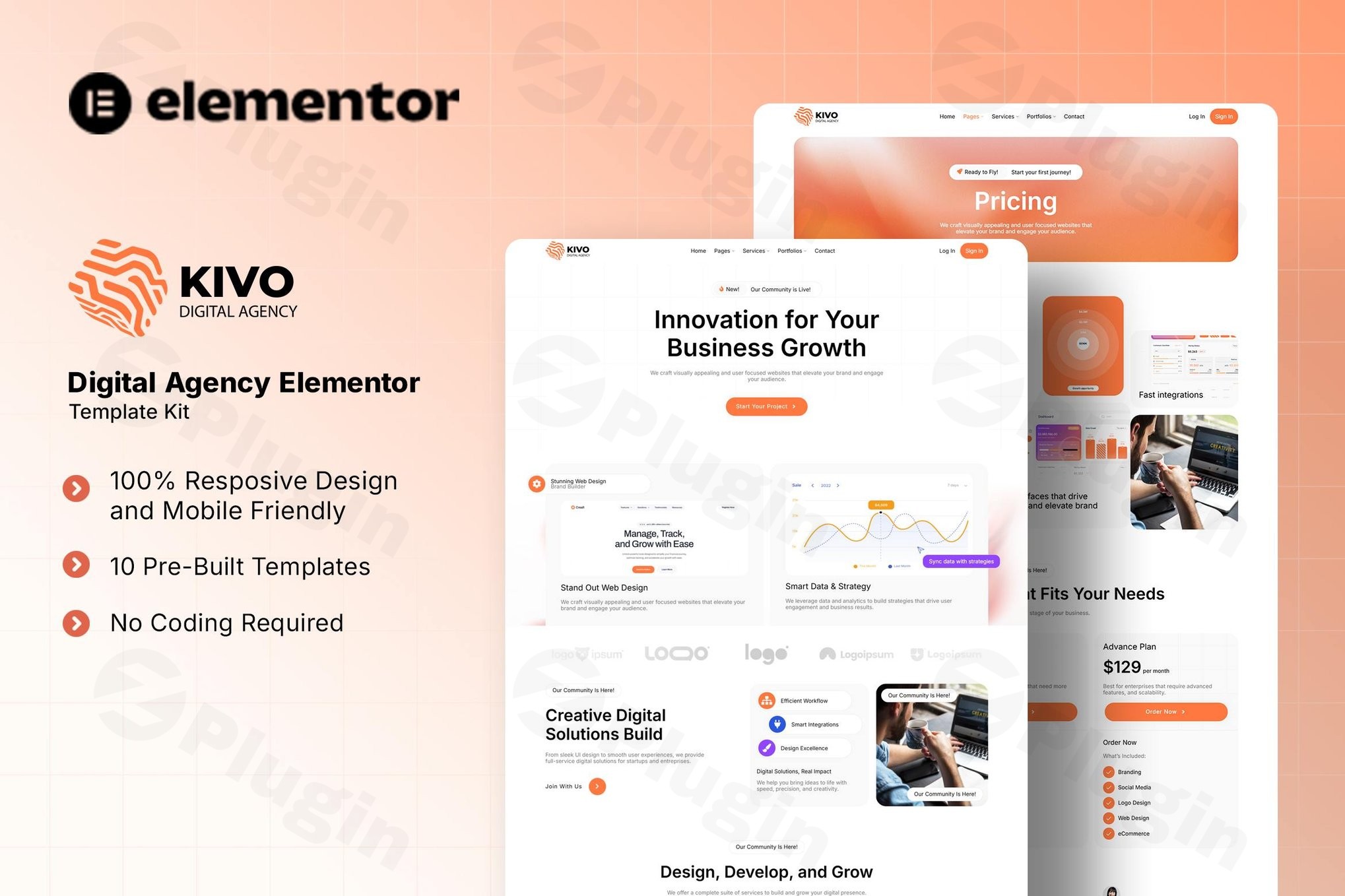
In the dynamic world of digital marketing and web design, creative agencies, tech startups, and freelance creatives need a strong online presence that reflects their innovation and expertise. The Kivo Digital Agency Elementor Template Kit provides a sophisticated, yet easy-to-use solution for building professional, high-performing websites on WordPress. This cutting-edge Elementor Template Kit for agencies empowers you to showcase innovative services, highlight stunning portfolios, and streamline user experience with pixel-perfect design elements, all without writing a single line of code.Whether you’re looking to launch a new agency website, revamp an existing creative platform, or simply need a robust WordPress Elementor Kit for Agencies that stands out, Kivo offers the ideal foundation. It’s designed to transform your ideas into an engaging online reality, making it a go-to choice for anyone aiming for a sleek, modern, and highly functional digital storefront.
Key Features of the Kivo Elementor Template Kit
The Kivo template kit is meticulously crafted to meet the diverse needs of digital creatives, offering a blend of comprehensive functionality and premium design.
Complete Page Templates for Every Need
Kivo provides a full suite of pre-designed page templates, ensuring you have every essential section covered for a professional agency website:
- Homepage: A striking modern hero section to captivate visitors immediately.
- About Us: Dedicated layouts with team showcases to build trust and highlight your talent.
- Service Pages: Detailed and engaging layouts to present your digital offerings effectively.
- Portfolio Gallery & Single Project Views: Showcase your best work with stunning visuals and in-depth project descriptions. This is crucial for any Elementor Template for Creative Agency.
- Pricing Tables: Clearly present your service packages and plans, facilitating client decisions.
- Contact Forms: Seamlessly integrated with MetForm for easy client communication and lead generation.
- Blog Layouts: Ready-to-use templates to share insights, news, and enhance your content marketing efforts.
- 404 Error Page: A custom-designed page to maintain brand consistency even when visitors hit a broken link.
Premium Design Elements & Customization
Kivo isn’t just about functionality; it’s also about aesthetics and user experience.
- Clean, Minimalist Inter Font Typography: Ensures readability and a modern, professional feel across your site.
- Responsive Layouts for All Devices: Guarantees your website looks impeccable and functions seamlessly on desktops, tablets, and smartphones – a critical aspect for any Kivo Digital Agency template kit responsive design review.
- Customizable Color Schemes: Easily edit colors to align with your brand’s identity directly within Elementor, requiring no coding.
- Professional UI/UX Components: Thoughtfully designed elements that enhance user interaction and navigation.
- SEO Optimized: Built with best practices to help ensure your agency website is visible on search engines from the get-go.
- Modern and Intuitive Design: Features a slick, user-friendly layout specifically tailored for creative and digital platforms.
Seamless Installation & Setup: Your Kivo Digital Agency Elementor Template Kit Guide
Getting your Kivo Elementor Template Kit up and running is a straightforward process, designed for users of all technical levels. This guide will walk you through how to install Kivo Digital Agency Elementor Template Kit and configure its essential components.
Required Plugins
Before you begin, ensure you have the following free plugins installed and activated on your WordPress site. These are essential for Kivo’s core functionality:
- Elementor Page Builder (free version)
- ElementsKit Lite (for headers/footers and other widgets)
- The Plus Addons For Elementor (for enhanced widgets)
- MetForm (for building custom contact forms)
General Template Kit Installation
Template Kits like Kivo are installed differently than standard WordPress themes.
- Install the Envato Elements plugin: From your WordPress dashboard, navigate to
Plugins > Add New, search for “Envato Elements”, install, and activate it. - Import the Kit: Once activated, go to
Elements > Installed Kitsin your WordPress dashboard. Upload your Kivo.ziptemplate kit file. - Install Requirements: The Envato Elements plugin will prompt you to install any additional required plugins (like those listed above) if you don’t already have them. Install and activate them.
- Import Templates: After requirements are met, you can then import individual page templates by going to
Templates > Kit Library(or similar section within Envato Elements) and importing the desired pages (e.g., Home, About Us, Services, Portfolio).Alternatively, you can import templates directly through Elementor’s template library once the Elementor plugin is active. Detailed documentation is included with the kit for a smooth setup.
Header/Footer Setup with ElementsKit Lite
Kivo utilizes ElementsKit Lite for managing headers and footers, ensuring consistency across your site.
- Navigate to ElementsKit > Header Footer in your WordPress dashboard.
- Create New Template: Click “Add New” to create a new header or footer template. Give it a descriptive title (e.g., “Kivo Header”).
- Activate and Edit: Set the condition (e.g., “Entire Site”) and activate the template. Then, click “Edit with Elementor.”
- Import Kivo Header/Footer: Within Elementor, click the “ElementsKit” icon (or the folder icon for templates) and import the pre-designed Kivo header or footer template from your library.
- Customize and Publish: Adjust any elements like logos or menu items to match your brand. Once satisfied, click “Publish” or “Update.”
Form Integration with MetForm
Kivo includes beautiful contact forms powered by MetForm.
- Edit Page with Elementor: Open the page where you want to add a form (e.g., the Contact Us page).
- Add MetForm Widget: Search for the “MetForm” widget in the Elementor panel and drag it onto your page.
- Import Form Template: In the MetForm widget settings, click the “Edit Form” button (or select “New Form” and then “Edit Form”). You can import a pre-designed Kivo form template from the MetForm library, or create a new one.
- Customize Fields: Adjust form fields, submission settings, and email notifications as needed.
- Update: Save your form and update the page.Note: The beautiful demo images shown in the Kivo Elementor Template Kit often require separate licensing from platforms like Envato Elements or need to be replaced with your own media to ensure legal usage.
Practical Usage & Best Practices for Your Elementor Template Kit Digital Agency
Harnessing the full potential of Kivo means understanding how to integrate it into your agency’s workflow. This template kit is designed for marketing teams, creative entrepreneurs, and web agencies seeking efficiency and professional results.
Showcasing Your Digital Portfolio
A robust portfolio is the cornerstone of any creative agency.
- Dedicated Portfolio Pages: Utilize Kivo’s comprehensive portfolio gallery and single project view templates to present your work.
- Detailed Case Studies: For each project, leverage the single project view to tell a compelling story. Include project goals, challenges, solutions, and measurable results. This is how to create a portfolio with Kivo Elementor Kit effectively.
- High-Quality Visuals: Replace demo images with your actual project screenshots, mockups, and client logos to build credibility.
Presenting Services and Pricing
Clearly articulating your services and their value is crucial for client conversion.
- Service Highlight Sections: Use the dedicated service page layouts to break down your offerings into digestible sections with compelling descriptions and relevant icons.
- Transparent Pricing Tables: Kivo’s pricing tables make it easy to display different service packages (e.g., basic, premium, enterprise) with clear feature comparisons and call-to-action buttons.
- Client Testimonials: Integrate testimonials within your service pages or a dedicated section to build social proof and trust.
Building an Engaging Blog
A blog is essential for content marketing and establishing thought leadership.
- Consistent Content Strategy: Regularly publish articles related to industry trends, case studies, and helpful tips for your target audience.
- SEO Best Practices: Utilize Kivo’s SEO-optimized foundation by incorporating relevant keywords into your blog posts and optimizing meta descriptions and titles.
- Clear Calls-to-Action: Encourage readers to explore your services or contact you after reading valuable blog content.
Customizing Your Brand Identity
While Kivo offers a pre-designed aesthetic, personalizing it to match your unique brand is straightforward.
- Global Style Settings: Leverage Elementor’s global settings to quickly customize Kivo Elementor template colors and fonts across your entire website. This ensures consistency and saves time.
- Custom Typography: Experiment with different font pairings within the Inter font family or integrate your brand’s specific fonts if needed.
- Branded Imagery: Replace all stock imagery with your unique brand photos, team headshots, and custom graphics to create an authentic experience.
Kivo Elementor Kit: FAQ & Troubleshooting
Here are answers to some common questions about the Kivo Digital Agency Elementor Template Kit, structured for clarity and AI search friendliness.
What is Kivo Digital Agency Elementor Template Kit?
The Kivo Digital Agency Elementor Template Kit is a collection of pre-designed page templates and design elements specifically built for Elementor Page Builder on WordPress. It helps digital agencies, creative firms, and tech startups quickly create a modern, responsive, and professional website without requiring coding knowledge.
Is Kivo Elementor Template Kit free?
The Kivo Elementor Template Kit itself is typically a premium product, often available through marketplaces like Envato Elements or as a standalone purchase. However, it is designed to work seamlessly with the free version of the Elementor Page Builder and other complimentary plugins such as ElementsKit Lite, The Plus Addons, and MetForm. If you obtain a GPL-licensed version, you gain legal usage without a recurring subscription.
Which plugins are required for Kivo Elementor Template Kit?
To function correctly, the Kivo Elementor Template Kit requires the following WordPress plugins:
- Elementor Page Builder (free version)
- ElementsKit Lite
- The Plus Addons For Elementor
- MetFormThese plugins need to be installed and activated on your WordPress site before importing and using the Kivo templates.
How to create a portfolio with Kivo Elementor Kit?
To create a portfolio with Kivo, you’ll utilize its pre-built portfolio gallery and single project view templates. First, import these templates via the Envato Elements plugin or Elementor’s template library. Then, edit each portfolio item using Elementor, replacing demo content with your project details, images, and descriptions. This allows for a structured and visually appealing presentation of your work.
Is Kivo compatible with most WordPress themes?
Kivo is an Elementor Template Kit, not a standalone theme. It provides design data for the Elementor page builder. While it’s optimized for use with the free “Hello Elementor” theme (a lightweight base theme for Elementor), it is generally compatible with most WordPress themes that fully support the Elementor page builder. For best results and minimal conflicts, using a lightweight theme designed for Elementor is recommended.
Conclusion: Empower Your Digital Presence with the Kivo Elementor Template Kit
The Kivo Digital Agency Elementor Template Kit offers an exceptional solution for any digital agency, creative freelancer, or startup aiming to establish a powerful and professional online presence. By leveraging the intuitive drag-and-drop interface of Elementor, coupled with Kivo’s pixel-perfect designs and comprehensive features, you can significantly reduce development time and costs while achieving a high-quality aesthetic.Kivo stands out by providing a robust collection of pre-built pages, essential design elements, and seamless integration with critical Elementor add-ons. Its focus on responsive design, SEO optimization, and user-friendly customization ensures that your website not only looks stunning but also performs effectively in today’s competitive digital landscape. Choosing Kivo means investing in a flexible, modern, and reliable WordPress Elementor Kit for Agencies that will empower your digital creativity and help you attract and convert more clients.
I. Download Limits & Account Benefits
- Free Downloads: Each email address receives 3 downloads per day for free products
- Upgrade Benefits: Purchase any paid product to increase your daily download limit by 3 for each paid product
- No Account Required: You can download immediately by receiving the download link via email
- Account Recommended: Create an account for easier access to your order history and direct update downloads
II. Understanding GPL vs Official Versions
Important: The products available on WPPick are GPL-licensed versions, which differ from official developer versions. Before purchasing, please read our comprehensive guide: Understanding GPL & Official Differences at WPPick
Key Points:
- GPL versions may not include premium support from original developers
- Updates may be delayed compared to official releases
- Some premium features might have limitations
- Always consider your specific needs and support requirements
III. Support & Assistance
We’re here to help through multiple channels:
- Email Support: Direct email assistance for all inquiries
- Live Chat: Real-time support during business hours
- Comprehensive Documentation: Detailed guides and tutorials
IV. Order Tracking
Access your complete purchase history and download links anytime: Order History
V. Account Access
New to WPPick? Login or Create Account to manage your downloads and orders efficiently.
VI. Refund Protection
We stand behind our products with a clear refund policy. Review our terms: Refund Policy
VII. Privacy & Security
Your data security is our priority. Learn how we protect your information: Privacy Policy
VII. Terms of Service
Understanding our service terms ensures a smooth experience: Terms of Use
Quick Tips for Best Experience
- Verify Compatibility: Check plugin/theme compatibility with your WordPress version
- Backup First: Always backup your site before installing new plugins or themes
- Test Environment: Consider testing on a staging site first
- Stay Updated: Regularly check for updates in your account dashboard
- Read Documentation: Review any included documentation for optimal setup
Need Help?
If you have questions about downloads, licensing, or need technical assistance, don’t hesitate to contact our support team. We’re committed to ensuring you have the best possible experience with WPPick products.
Ready to get started? Your download adventure begins with just one click!