
Learndash Certificate Verify & Share
/Year
In today’s competitive professional landscape, verifiable credentials are more crucial than ever. The LearnDash Certificate Verify & Share premium add-on is engineered to transform your learners’ achievements into powerful, verifiable professional assets. This robust WordPress plugin empowers students to not only proudly showcase their accomplishments but also to validate the authenticity of their LearnDash certificates across major social platforms and directly on your website.Designed for educational institutions, corporate training programs, and professional certification providers, this plugin is a sophisticated solution for enhancing the value and credibility of your online courses. It offers a suite of advanced features that build trust, engagement, and a tangible return on investment for both your organization and your learners.
Key Features That Build Trust & Engagement
The LearnDash Certificate Verify & Share plugin integrates seamlessly with your LearnDash LMS, providing a comprehensive solution for managing and validating digital credentials. Here’s a detailed look at its core functionalities:
1. On-Site Certificate Verification System
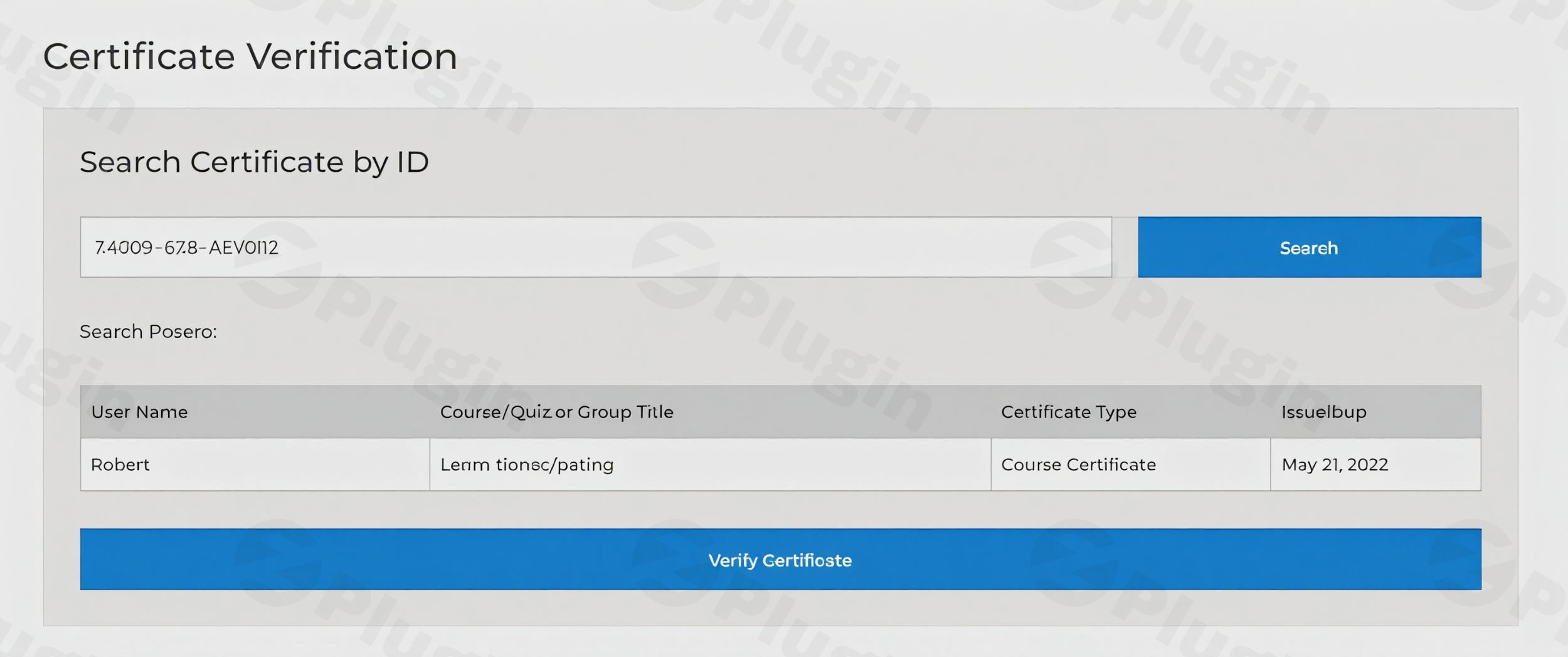
Establish an official, secure verification portal directly on your website. This essential feature allows students, employers, and any interested party to instantly validate the authenticity of a certificate. Each LearnDash certificate can be assigned a unique ID, which is displayed using a simple shortcode. Users can then enter this ID into your dedicated search portal to access the verification information.Benefits: This system provides an immediate and undeniable confirmation of a certificate’s veracity, significantly boosting its credibility. Administrators maintain granular control over the visibility of information on the verification page, including instructor, recipient, issue date, expiry date, and a “Read More” link, ensuring data privacy and relevance.
2. Social Media Integration & Sharing
Empower your students to amplify their achievements with one-click sharing functionality to prominent social media platforms such as LinkedIn, Facebook, and Twitter. This feature allows students to share an image of their certificate along with a verified link that directs to your official verification page.Benefits: Beyond personal satisfaction, social sharing acts as powerful social proof, showcasing your program’s success and encouraging new enrollments. It provides learners with a simple, effective way to broadcast their newly acquired skills and knowledge to their professional networks.
3. LinkedIn Profile Integration
Go beyond simple social sharing. The plugin facilitates direct integration with LinkedIn, allowing students to add their certified achievements to their LinkedIn Profile under the ‘Licenses & Certifications’ section with a single button click. The plugin intelligently auto-populates the necessary fields, streamlining the process for your learners.Benefits: This feature significantly enhances a student’s professional credibility and visibility on the world’s largest professional networking site. Verified credentials on LinkedIn can open doors to new career opportunities and strengthen a learner’s professional brand.
4. QR Code Verification Technology
Incorporate modern, efficient verification methods directly into your certificates. The plugin allows for QR codes to be printed on each certificate. When scanned with a smartphone, these QR codes instantly redirect to the certificate’s official verification page on your site, combining cutting-edge technology with user convenience.Benefits: QR codes offer an immediate and universally accessible method for certificate validation, perfect for print copies or digital displays. This feature adds a layer of professionalism and technological sophistication to your certifications.
5. Customizable Verification Page Templates
Maintain consistent brand identity across all touchpoints with fully customizable verification page designs. Administrators can select from multiple professional templates or create custom designs that perfectly reflect their organization’s identity, ensuring that verification data is presented clearly and professionally.Benefits: Branding consistency reinforces your institution’s professional image and trust. Custom templates allow you to align the verification experience with your existing website aesthetics and brand guidelines.
6. PDF Download Capabilities
Provide additional flexibility for your learners by enabling them to download their verified certificate data in PDF format directly from the verification page.Benefits: Students can save and share their verified accomplishments as professional document files, ideal for portfolios, job applications, or personal records. This offers an additional, secure format for certificate portability.
7. Control & Restrictions
The plugin offers robust administrative controls, allowing you to selectively disable certificate sharing for specific groups, courses, or quizzes. This ensures that only relevant and intended certificates are eligible for sharing and verification.Benefits: This feature provides crucial flexibility for managing different types of educational content and ensures compliance with any internal policies or external regulations regarding certificate dissemination.
8. Reporting & Analytics
Gain valuable insights into learner performance with the ability to generate custom CSV tables reflecting student performance on quizzes. Additionally, shortcodes can be used to display comprehensive certificate reports on any page of your website.Benefits: This reporting functionality aids administrators in tracking learner progress, identifying areas for improvement, and demonstrating the effectiveness of their educational programs.
9. Custom Email Notifications
Enhance communication with customizable email notifications that can be configured for course, quiz, or group completion. This ensures that students receive timely and relevant updates regarding their achievements.Benefits: Automated and personalized email communications improve the overall learner experience, keeping them informed and engaged with their learning journey.
Professional Applications: Empowering Diverse Sectors
The LearnDash Certificate Verify & Share plugin is an invaluable asset for a wide range of organizations:
- Corporate Training Programs: Validate employee upskilling and compliance certifications.
- Academic Institutions: Provide authentic degrees, diplomas, and course completion certificates.
- Professional Certification Bodies: Issue verifiable professional licenses and accreditations.
- Online Coaching Businesses: Offer credible proof of course completion and skill acquisition.By providing tangible, verifiable proof of achievement that students can proudly display to employers and professional networks, this plugin significantly enhances the value of your certifications and can lead to increased course completion rates and greater learner satisfaction.
Setup & Installation Guide
Getting the LearnDash Certificate Verify & Share plugin up and running is a straightforward process, designed for both technical and non-technical users:
- Download the Plugin: Obtain the plugin file from your purchase source.
- Upload to WordPress: Log in to your WordPress dashboard. Navigate to
Plugins > Add New > Upload Plugin. Choose the downloaded file and clickInstall Now. - Activate the Plugin: Once installed, click
Activate Plugin. - Configuration: Access the plugin’s settings within your WordPress dashboard (usually under LearnDash or a dedicated plugin menu). Here, you can configure verification page templates, social sharing options, QR code settings, and any other specific preferences.
- Implement Shortcodes: Use the provided shortcodes (e.g., for unique certificate IDs) within your LearnDash certificate templates to integrate the verification functionality seamlessly.
- Create Verification Page: Designate a page on your website to serve as the certificate verification portal, where users can input certificate IDs.
Technical Compatibility & Assurance
The LearnDash Certificate Verify & Share plugin is built for robust performance and broad compatibility:
- Current Version: 1.6.16
- WordPress Version: 5.8 or higher
- LearnDash Version: 3.6 or higher
- PHP Version: 5.6 or higherIt seamlessly integrates with the LearnDash LMS and is designed to work perfectly with the LearnDash Certificate Builder add-on. Utilizing standard WordPress protocols, it ensures smooth operation with most themes and hosting environments, guaranteeing a stable and reliable experience.
Conclusion
The LearnDash Certificate Verify & Share plugin is more than just an add-on; it’s an investment in the credibility and perceived value of your educational offerings. By providing a secure, efficient, and user-friendly system for certificate verification and sharing, you empower your learners to showcase their accomplishments with confidence and professionalism. This premium solution not only streamlines administrative tasks but also significantly enhances the return on investment for both your organization and your dedicated students, cementing their achievements as truly valuable professional assets.
I. Download Limits & Account Benefits
- Free Downloads: Each email address receives 3 downloads per day for free products
- Upgrade Benefits: Purchase any paid product to increase your daily download limit by 3 for each paid product
- No Account Required: You can download immediately by receiving the download link via email
- Account Recommended: Create an account for easier access to your order history and direct update downloads
II. Understanding GPL vs Official Versions
Important: The products available on WPPick are GPL-licensed versions, which differ from official developer versions. Before purchasing, please read our comprehensive guide: Understanding GPL & Official Differences at WPPick
Key Points:
- GPL versions may not include premium support from original developers
- Updates may be delayed compared to official releases
- Some premium features might have limitations
- Always consider your specific needs and support requirements
III. Support & Assistance
We’re here to help through multiple channels:
- Email Support: Direct email assistance for all inquiries
- Live Chat: Real-time support during business hours
- Comprehensive Documentation: Detailed guides and tutorials
IV. Order Tracking
Access your complete purchase history and download links anytime: Order History
V. Account Access
New to WPPick? Login or Create Account to manage your downloads and orders efficiently.
VI. Refund Protection
We stand behind our products with a clear refund policy. Review our terms: Refund Policy
VII. Privacy & Security
Your data security is our priority. Learn how we protect your information: Privacy Policy
VII. Terms of Service
Understanding our service terms ensures a smooth experience: Terms of Use
Quick Tips for Best Experience
- Verify Compatibility: Check plugin/theme compatibility with your WordPress version
- Backup First: Always backup your site before installing new plugins or themes
- Test Environment: Consider testing on a staging site first
- Stay Updated: Regularly check for updates in your account dashboard
- Read Documentation: Review any included documentation for optimal setup
Need Help?
If you have questions about downloads, licensing, or need technical assistance, don’t hesitate to contact our support team. We’re committed to ensuring you have the best possible experience with WPPick products.
Ready to get started? Your download adventure begins with just one click!
- Fixed a fatal error triggered by learndash_course_status() in the Reports tab
- Added support of pretty permalinks structure
- Added compatibility with LearnDash Multi Certificates and LearnDash Pay For Quiz or Certificate
- Fixed an issue where the certificate link was incorrectly displayed in the LearnDash user profile
- Fixed a compatibility issue with the LearnDash Pay For Quiz or Certificate plugin
- Enhanced Security and fixed minor bugs
- Fixed email compatibility with the LearnDash Certificate Manager
- Enhanced compatibility with the LearnDash Certificate Manager for smoother integration and improved reliability
- Added compatibility with LearnDash Certificate Manager
- QR Code shortcode now works seamlessly outside the certificate view. Use [ld_cvss_certificate_qr_code] anywhere to display the certificate QR code dynamically
- Fixed group email functionality
- Improved compatibility with LearnDash LMS
- Fixed an issue where the certificate was incorrectly displaying the current date instead of the actual issue date
- Fixed an issue where LinkedIn images and titles were not displaying correctly on some courses
- Fixed minor issues
- Added compatibility with LearnDash Multi Certificates
- Fixed certificates issue date conflict with expiry date
- Fixed expiry emails not sent from backend
- Added a filter to customize the color of the [ld_cvss_certificate_id] shortcode output
- Fixed multiple issues related to licenses
- Addressed minor logged issues
- Group Leaders can now receive email notifications when their group members earn course certificates
- Group Leaders can choose whether to receive emails for course completions by their group members
- Admins and Group Leaders can bulk download certificates from backend reports and via a frontend shortcode
- Course completion emails sent to Group Leaders now include a downloadable PDF link for the certificate
- Fixed a minor bug on certificates report shortcode
- Added a multiple certificates on the course page linked with quizzes
- Fixed shortcodes on expiry email notification subject title
- Fixed slash removed from email notification subject title
- Fixed email template editor extra line breaks
- Added shordcode functionality to subject titles too
- Added an option to hide columns
- Now the Reports tab should display all certificates, regardless of certificate expiry
- Fixed a parse error on certificate reports
- Added First Name Column to the shortcode, enabling group leaders to view certificates specifically for their groups
- Added Last Name Column to shortcode, allowing group leaders to identify certificates relevant to their groups
- Added Certificate Column to shortcode, providing group leaders the ability to download or view certificates directly for their groups
- Fixed a parse error on certificate email expiry template
- Added a new shortcode for group leaders to view certificates specificaly for their groups
- Added option to send automated email notifications to Admin, Group Leaders and Users when users'/students' certificates expire
- Added a new sub tab "Expired Certificate" in the Notifications Settings tab
- Added a new setting in the admin panel for certificate expiration
- Added a new tab "Reports" to show certificate reports
- Added option to block search engines from indexing certificate page
- Fixed the restriction of certificate sharing and downloading
- Fixed UI issue copy icon is now visible