

Logik – Logistics & Transportation Elementor Template Kit
/Year
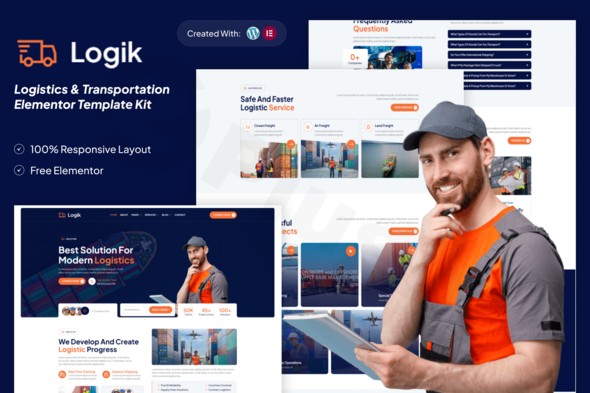
Creating a high-performance website for a freight, cargo, or courier business no longer requires a massive development budget or months of coding. The Logik Elementor Template Kit is a specialized design asset built for WordPress that allows business owners and agencies to launch a professional, industry-specific site using a simple drag-and-drop interface.
In the fast-paced world of global trade, your digital presence acts as your digital storefront. Using a Logistics WordPress Template Kit like Logik ensures that your site is not only visually impressive but also optimized for the specific functional needs of the transportation sector, such as service displays, pricing tables, and lead-generation forms.
Key Features of the Logik Transportation Elementor Kit
The Logik kit isn’t just a single page; it is a comprehensive design system. It provides everything a modern logistics provider needs to establish trust and convert visitors into clients.
1. Comprehensive Industry Templates
Logik comes packed with over 10+ pre-designed templates tailored for the logistics niche. This includes:
- Homepage Variations: Multiple layouts to suit different brand identities.
- Service & Detail Pages: Dedicated sections to explain freight forwarding, air cargo, or maritime shipping.
- About & Team Profiles: Build authority by showcasing your company’s history and expert staff.
- Project Showcases: Display your successful delivery statistics and case studies.
- Pricing Tables: Clear, transparent layouts for different service tiers.
2. No-Code Visual Customization
Built on the Elementor page builder, this kit allows for true no-code customization. You can modify every element—from the hero image to the padding of a button—visually. This makes it an ideal cargo service website builder for those who aren’t tech-savvy but want total control over their brand.
3. Global Style Management
With the Global Kit Style feature, you can change your brand colors and typography site-wide with a single click. This ensures design consistency across your entire freight company website template, saving hours of manual editing.
4. Fully Responsive & SEO Optimized
Logik is built with clean code and a mobile-first approach. Because search engines prioritize mobile-friendly sites and fast loading speeds, this kit provides a solid foundation for your WordPress logistics website design to rank higher in search results.
How to Install the Logik Elementor Template Kit
Setting up the Logik kit is straightforward. Follow these steps to get your logistics site up and running:
- Install a Theme: We recommend using the free Hello Elementor theme for maximum compatibility and performance.
- Install Required Plugins: Ensure you have Elementor (free version) installed. You will also need the Envato Elements plugin or a “Template Kit Import” plugin to upload the kit files.
- Upload the Kit: Go to Elements > Installed Kits and click “Upload Template Kit Zip File.”
- Install Requirements: Before importing templates, click the “Install Requirements” button in the kit dashboard to ensure supporting plugins (like MetForm or ElementsKit Lite) are active.
- Import Templates: Import the “Global Kit Styles” first, then import individual pages (Home, About, Contact, etc.) one by one.
- Assign Header and Footer: Using Elementor Pro or a free header/footer builder plugin, assign the included templates to your site’s header and footer positions.
Practical Usage & Best Practices
To get the most out of the Logik kit, consider these real-world workflows:
- For Freight Forwarders: Use the “Service Detail” pages to create deep-dive content for specific routes or transport types. This helps with long-tail SEO and answers specific client questions about your capabilities.
- For Courier Services: Integrate the MetForm templates included in the kit to create a “Request a Quote” form. Placing this prominently on the homepage is the best way to increase lead conversion.
- For Agencies: If you are building sites for multiple clients, the “Global Styles” feature allows you to quickly re-skin the Logik kit to match different brand identities in a fraction of the time.
Pro Tip: Always optimize your images before uploading them to the kit. Even though Logik is fast-loading, large uncompressed photos of cargo ships or trucks can slow down your site.
FAQ & Troubleshooting
What is the Logik Elementor template kit?
Logik is a collection of pre-designed page layouts for WordPress specifically made for the logistics, transportation, and cargo industry. It is not a standalone theme but a set of templates that work within the Elementor page builder.
Does the Logik template kit require Elementor Pro?
While many parts of the kit work with the free version of Elementor, certain advanced features—specifically the Global Header and Footer templates—usually require Elementor Pro. Alternatively, you can use a free “Header Footer Builder” plugin to achieve similar results.
Is the Logik kit compatible with WooCommerce?
Yes. While the kit focuses on design layouts, it is compatible with WooCommerce. If you want to sell shipping supplies or allow clients to pay invoices online, you can add WooCommerce to your WordPress site and use Elementor to style the shop pages.
How do I customize the contact forms in Logik?
Logik typically uses the MetForm plugin for its forms. Once the kit is imported, you can edit the form templates directly within Elementor to add custom fields, such as “Weight of Shipment” or “Destination City.”
What should I do if the layout looks broken after import?
This usually happens if the “Global Styles” were not imported first or if the “Requirements” (supporting plugins) were not fully installed. Re-run the requirement installer and ensure you have assigned the Global Kit Styles in the Elementor settings.
Final Verdict: Is Logik Right for You?
The Logik Elementor Template Kit offers an excellent ROI for logistics businesses looking for a professional, high-trust website without the high cost of custom development. Its mobile-responsive design, ease of customization, and industry-specific layouts make it one of the best Elementor template kits for transportation and logistics available today.
Whether you are managing a local courier service or a global freight operation, Logik provides the technical foundation and aesthetic appeal needed to compete in today’s digital economy. For more WordPress reviews and tutorials, visit us at wppick.com.
I. Download Limits & Account Benefits
- Free Downloads: Each email address receives 3 downloads per day for free products
- Upgrade Benefits: Purchase any paid product to increase your daily download limit by 3 for each paid product
- No Account Required: You can download immediately by receiving the download link via email
- Account Recommended: Create an account for easier access to your order history and direct update downloads
II. Understanding GPL vs Official Versions
Important: The products available on WPPick are GPL-licensed versions, which differ from official developer versions. Before purchasing, please read our comprehensive guide: Understanding GPL & Official Differences at WPPick
Key Points:
- GPL versions may not include premium support from original developers
- Updates may be delayed compared to official releases
- Some premium features might have limitations
- Always consider your specific needs and support requirements
III. Support & Assistance
We’re here to help through multiple channels:
- Email Support: Direct email assistance for all inquiries
- Live Chat: Real-time support during business hours
- Comprehensive Documentation: Detailed guides and tutorials
IV. Order Tracking
Access your complete purchase history and download links anytime: Order History
V. Account Access
New to WPPick? Login or Create Account to manage your downloads and orders efficiently.
VI. Refund Protection
We stand behind our products with a clear refund policy. Review our terms: Refund Policy
VII. Privacy & Security
Your data security is our priority. Learn how we protect your information: Privacy Policy
VII. Terms of Service
Understanding our service terms ensures a smooth experience: Terms of Use
Quick Tips for Best Experience
- Verify Compatibility: Check plugin/theme compatibility with your WordPress version
- Backup First: Always backup your site before installing new plugins or themes
- Test Environment: Consider testing on a staging site first
- Stay Updated: Regularly check for updates in your account dashboard
- Read Documentation: Review any included documentation for optimal setup
Need Help?
If you have questions about downloads, licensing, or need technical assistance, don’t hesitate to contact our support team. We’re committed to ensuring you have the best possible experience with WPPick products.
Ready to get started? Your download adventure begins with just one click!