
Mainwp Cache Control Integration
/Year
Centralized Cache Management for WordPress Networks
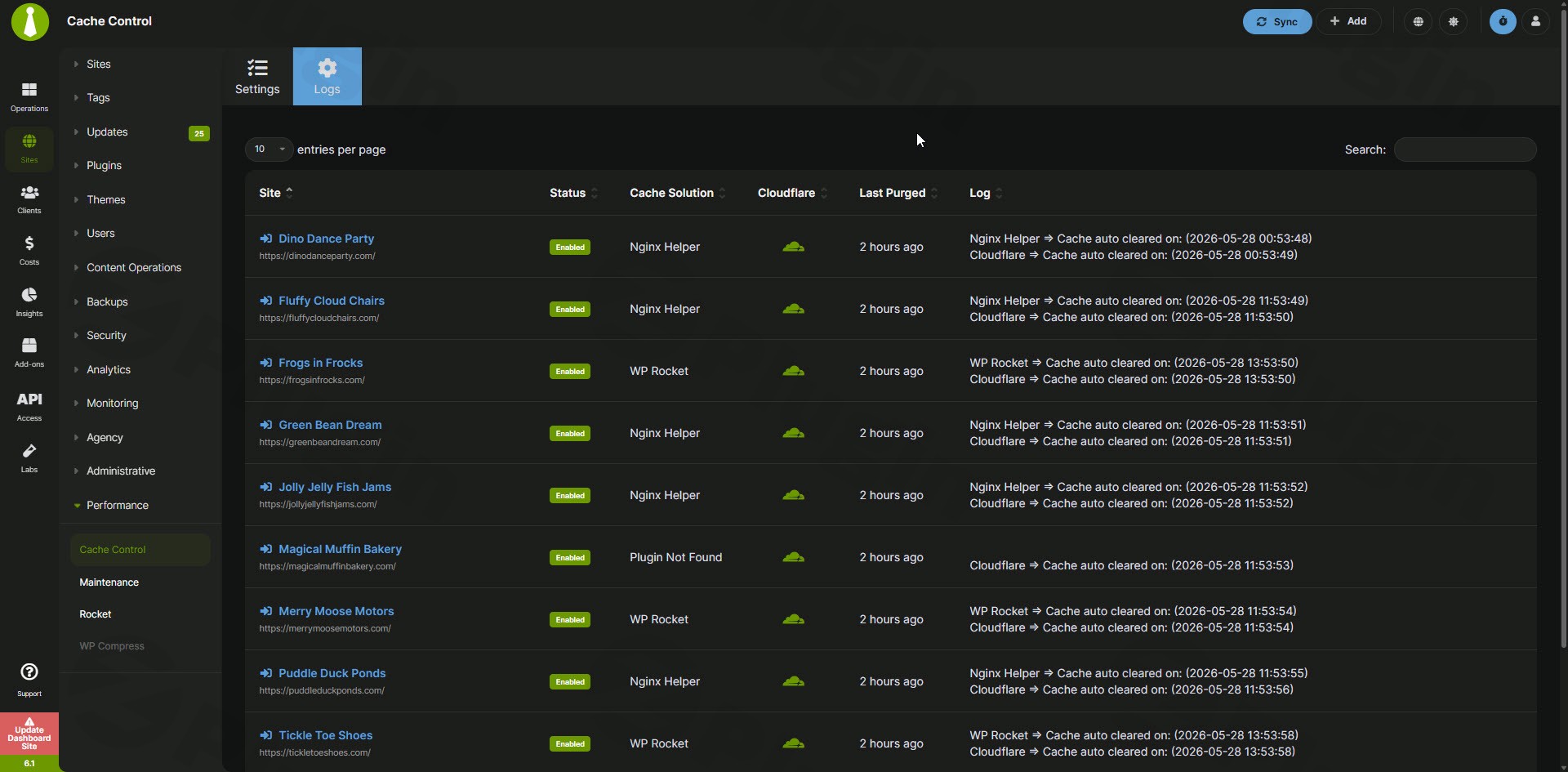
MainWP Cache Control Integration is a dedicated extension for the MainWP Dashboard that centralizes cache management across all connected WordPress websites. Instead of logging into dozens of individual client sites to flush caches after making changes or running routine updates, this extension allows administrators to clear all caches simultaneously directly from one centralized network dashboard. It streamlines maintenance workflows by connecting your central management hub to the local caching environments of every child site.
Core Functionality Overview
The extension acts as a seamless bridge between your MainWP administrative dashboard and the various caching solutions active on your connected child sites. It automatically detects which specific caching plugins are running on each individual installation and provides universal controls to purge them instantly. Furthermore, it brings automation to the cache clearing process during routine maintenance tasks, ensuring that visitors always receive the most recent versions of your pages without manual intervention from the site manager.
Who Benefits from This Extension
This tool is built specifically for WordPress agencies, freelance developers, network administrators, and webmasters who manage multiple websites simultaneously. When your daily workflow involves maintaining dozens or hundreds of WordPress installations, the time wasted navigating to individual site login screens simply to clear a cache is substantial. By eliminating these repetitive steps, the extension recovers billable hours and removes the human error associated with forgetting to flush a cache after an update. It is an essential utility for anyone scaling their WordPress maintenance services.
Key Capabilities
- Universal cache purging across an entire network of child sites with a single click from the central dashboard.
- Automated cache clearing immediately following successful core, theme, or plugin updates on any connected site.
- Seamless compatibility with popular caching plugins including WP Rocket, LiteSpeed Cache, W3 Total Cache, and WP Super Cache.
- Granular control allowing administrators to purge caches on a selection of specific sites rather than the entire network.
- Individual site cache controls accessible directly from the respective child site management overview screen.
- Detailed caching logs to verify that purge commands were successfully transmitted and executed on remote server environments.
Practical WordPress Use Cases
A primary practical application is bulk network maintenance. When an agency updates a critical plugin like WooCommerce or a complex page builder across fifty client sites, old cached CSS or JavaScript files can frequently cause visual layout breaks on the frontend. By utilizing this extension, the administrator configures the system to automatically purge the cache on every updated site immediately after the update process completes, ensuring the frontend renders correctly. Another common use case is initial troubleshooting. When a client reports a visual glitch, clearing the cache is often the first diagnostic step. Executing this directly from the MainWP dashboard without needing client credentials accelerates resolution times significantly.
Setup and Compatibility Notes
To utilize this integration effectively, you must have an active MainWP Dashboard setup and the standard MainWP Child plugin installed on all target websites. The extension itself does not generate its own page cache or object cache; it simply transmits the correct programming hooks and purge commands to the supported caching plugins already configured on the child sites. Supported environments include standard Apache, Nginx, and LiteSpeed servers running compatible WordPress caching plugins. No complex server-level scripting is required to bridge the tools.
Reasons to Choose It on WPPick
Obtaining this extension through the WPPick repository gives you access to the fully functional GPL version of the software. Agencies can evaluate its operational impact on their bulk maintenance workflows and integrate it into their internal standard operating procedures without restrictive per-site licensing limits. This ensures every single client site in your portfolio benefits from automated cache management, optimizing your technical workflows and improving the quality of your maintenance plans.
Latest Version Context
The current release available for download is version 5.2. Based on recent internet search data and repository indexing, detailed release notes are not available from the provided sources for this specific update. The most recent comprehensively documented release notes were for version 5.1.1. Administrators integrating version 5.2 should expect routine compatibility maintenance that aligns the extension with recent changes in the MainWP core dashboard and updates to the third-party caching plugins it commands.
Frequently Asked Questions
- Does this extension replace my existing caching plugin?
- No, it does not replace caching plugins. It acts as a remote control for the existing caching solutions already installed and configured on your individual child sites.
- Which caching plugins are actively supported by this integration?
- The integration supports major caching solutions including WP Rocket, LiteSpeed Cache, W3 Total Cache, WP Super Cache, Comet Cache, and WP Fastest Cache.
- Can I automate cache clearing after plugin or theme updates?
- Yes, you can configure the extension settings to automatically trigger a network-wide or site-specific cache purge immediately following a successful plugin, theme, or core update.
- Do I need to install this specific extension on every child site?
- You only need to install the MainWP Cache Control Extension on your primary MainWP Dashboard installation. The standard MainWP Child plugin handles the incoming purge commands on the client sites.
- What happens if a child site uses an unsupported caching method?
- If a specific child site employs a proprietary or unsupported caching method, the centralized purge command will bypass that site, and you will need to manage its cache manually.
I. Download Limits & Account Benefits
- Free Downloads: Each email address receives 3 downloads per day for free products
- Upgrade Benefits: Purchase any paid product to increase your daily download limit by 3 for each paid product
- No Account Required: You can download immediately by receiving the download link via email
- Account Recommended: Create an account for easier access to your order history and direct update downloads
II. Understanding GPL vs Official Versions
Important: The products available on WPPick are GPL-licensed versions, which differ from official developer versions. Before purchasing, please read our comprehensive guide: Understanding GPL & Official Differences at WPPick
Key Points:
- GPL versions may not include premium support from original developers
- Updates may be delayed compared to official releases
- Some premium features might have limitations
- Always consider your specific needs and support requirements
III. Support & Assistance
We’re here to help through multiple channels:
- Email Support: Direct email assistance for all inquiries
- Live Chat: Real-time support during business hours
- Comprehensive Documentation: Detailed guides and tutorials
IV. Order Tracking
Access your complete purchase history and download links anytime: Order History
V. Account Access
New to WPPick? Login or Create Account to manage your downloads and orders efficiently.
VI. Refund Protection
We stand behind our products with a clear refund policy. Review our terms: Refund Policy
VII. Privacy & Security
Your data security is our priority. Learn how we protect your information: Privacy Policy
VII. Terms of Service
Understanding our service terms ensures a smooth experience: Terms of Use
Quick Tips for Best Experience
- Verify Compatibility: Check plugin/theme compatibility with your WordPress version
- Backup First: Always backup your site before installing new plugins or themes
- Test Environment: Consider testing on a staging site first
- Stay Updated: Regularly check for updates in your account dashboard
- Read Documentation: Review any included documentation for optimal setup
Need Help?
If you have questions about downloads, licensing, or need technical assistance, don’t hesitate to contact our support team. We’re committed to ensuring you have the best possible experience with WPPick products.
Ready to get started? Your download adventure begins with just one click!