
Make Me Halloween
/Year
As Halloween approaches, websites across the globe look for engaging ways to join the festive spirit. The Make Me Halloween WordPress Plugin offers a straightforward yet powerful solution to infuse your site with eerie charm and animated decorations. This WordPress Halloween effects plugin is designed to captivate your visitors, turning your digital space into a delightful Halloween experience without needing complex coding or design skills. Whether you’re a blogger, an online store owner, or an agency looking to add a seasonal touch, Make Me Halloween provides an accessible way to celebrate.
Key Features for a Hauntingly Good Website
The Make Me Halloween plugin focuses on bringing key animated elements to both the header and footer areas of your website, creating an immersive spooky atmosphere. Let’s dive into the Make Me Halloween plugin features that make your site come alive for the season.
Animated Header Decorations
Elevate your website’s top section with dynamic, attention-grabbing elements that instantly signal the Halloween season. These add Halloween animations WordPress sites need to stand out.
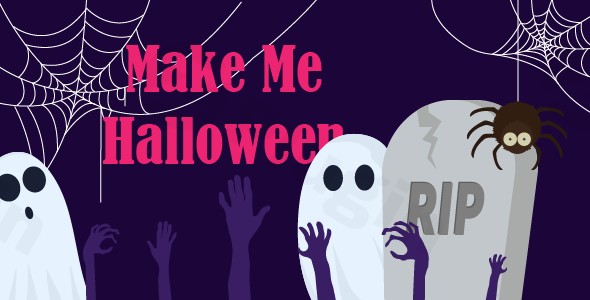
- Animated Spider: A classic Halloween icon, this animated spider gracefully crawls across your header, adding a subtle yet effective touch of fright. It’s a prime example of an animated spider WordPress plugin delivering visual appeal.
- Spiderweb (Black and White): Choose between black or white spiderwebs to adorn your header, adding a touch of gothic elegance or a more traditional haunted house feel. These static elements perfectly complement the animated spider.
Interactive Footer Elements
Don’t let your footer be forgotten! The plugin extends its magical touch to the bottom of your pages, providing animated and interactive elements that surprise and delight visitors as they scroll. For those searching for a WordPress plugin for Halloween ghosts, this section delivers.
- Two Animated Ghosts: These spectral figures gently float across your footer, offering a friendly, spooky presence. Their subtle animation adds depth and character to your site’s bottom section.
- Animated Zombie Hands: Breaking through the digital earth, these animated zombie hands provide a fun, slightly eerie element, perfect for a playful Halloween vibe.
- Animated Grave: A small, animated grave appears in your footer, completing the graveyard scene and enhancing the overall Halloween theme.
Why Choose Make Me Halloween for Your Spooky WordPress Website?
At wppick.com, we understand the importance of reliable, secure, and engaging WordPress solutions. The Make Me Halloween plugin, offered under the GPL license, stands out for its simplicity and effectiveness. We ensure our plugins are regularly updated and thoroughly scanned for security vulnerabilities, providing you with a safe product that performs reliably. Choosing Make Me Halloween means opting for a trusted tool to create a spooky WordPress website plugin experience that your visitors will remember.
Installation & Setup: How to Get Your Site Halloween-Ready
Getting started with the Make Me Halloween plugin is a breeze, even for non-developers. Here’s a step-by-step guide on how to install Make Me Halloween WordPress plugin and set it up on your site:
- Purchase and Download: First, acquire the Make Me Halloween plugin from CodeCanyon. Once purchased, download the plugin’s installable
.zipfile to your computer. - Upload the Plugin:
- Log in to your WordPress admin dashboard.
- Navigate to Plugins > Add New.
- Click on the “Upload Plugin” button at the top of the page.
- Click “Choose File”, then select the
makemehalloween.zipfile you downloaded. - Click “Install Now”.
- Activate the Plugin: After the plugin has finished uploading and installing, click the “Activate Plugin” button.
- Configure Settings (if any): While the plugin is designed for immediate impact, you might find specific settings or options under a new menu item in your WordPress dashboard (e.g., “Halloween Settings” or similar). Check these options to customize elements like enabling/disabling specific animations or choosing between spiderweb colors.That’s it! Your WordPress site should now display the animated Halloween decorations, instantly creating a festive and engaging atmosphere for your visitors.
Practical Usage & Best Practices: Engaging Your Audience with Halloween Decorations
The Make Me Halloween plugin isn’t just about decorations; it’s about enhancing your website’s seasonal appeal and engaging your audience. Here are some practical ways to utilize this plugin and best practices for maximum impact:
- Seasonal Promotion for eCommerce: If you run an online store, using the Halloween decorations WordPress plugin can perfectly complement your Halloween sales and promotions. The animated elements create a festive backdrop, encouraging shoppers to browse your special offers for costumes, candy, or themed products. It helps create a cohesive, immersive shopping experience during the holiday.
- Enhance Blog Content: For bloggers, especially those in lifestyle, parenting, or entertainment niches, the plugin adds a fun, timely aesthetic to Halloween-themed articles. Imagine a recipe blog featuring pumpkin pie recipes, with animated ghosts subtly floating in the footer – it adds an extra layer of engagement and makes your content feel more current and relevant.
- Agency Client Projects: Web agencies can leverage Make Me Halloween to offer quick, impactful seasonal updates for their clients. It’s an easy way to demonstrate responsiveness to seasonal trends and add value without extensive custom development, ideal for clients looking for a temporary festive refresh.
- Community & Event Websites: If you manage a community forum or an event website, especially for local gatherings or school events around Halloween, the plugin provides an immediate visual cue for the season. It helps generate excitement and ensures visitors instantly recognize the topical focus of your site.Best Practice Tip: While the plugin offers delightful animations, ensure they don’t overshadow your primary content or negatively impact your site’s loading speed. The Make Me Halloween plugin is generally lightweight, but always test your site post-installation to confirm a smooth user experience.
FAQ & Troubleshooting
Here are answers to some common questions about the Make Me Halloween WordPress Plugin to help you make an informed decision and troubleshoot potential issues.
What does the Make Me Halloween plugin do?
The Make Me Halloween plugin is a WordPress extension designed to add animated, Halloween-themed decorative elements to your website. It introduces animated spiders and spiderwebs to your header, and animated ghosts, zombie hands, and graves to your footer, transforming your site into a festive, spooky experience for visitors.
Is Make Me Halloween WordPress plugin free?
No, the Make Me Halloween WordPress plugin is not free. It is a premium plugin available for purchase on CodeCanyon.
How to add Halloween effects to my WordPress site?
To add Halloween effects to your WordPress site using Make Me Halloween, you need to purchase and download the plugin from CodeCanyon. Then, upload the .zip file via your WordPress dashboard (Plugins > Add New > Upload Plugin), install it, and activate it. The plugin’s animations will then automatically appear on your website.
Are Halloween WordPress plugins safe?
Generally, reputable Halloween WordPress plugins, like Make Me Halloween from trusted marketplaces, are safe. Make Me Halloween is regularly updated and scanned for security by ZeroPlugin.com. Always ensure you download plugins from official sources or well-known marketplaces like CodeCanyon to mitigate security risks.
Is Make Me Halloween plugin compatibility with WordPress themes guaranteed?
Yes, the Make Me Halloween plugin is noted to be compatible with all themes. It is designed to integrate seamlessly with various WordPress themes to display its animated decorations without conflict.
Conclusion: Embrace the Spooky Season with Make Me Halloween
The Make Me Halloween WordPress Plugin offers a charming and effortless way to embrace the Halloween season on your website. Its focus on classic animated decorations for both the header and footer provides a delightful, engaging experience for your visitors, setting a festive mood without overcomplicating your site. For bloggers, eCommerce stores, and anyone looking to infuse their online presence with seasonal spirit, this plugin delivers excellent value. With its user-friendly installation and reliable performance, Make Me Halloween is an ideal choice to add that perfect touch of spooky fun to your WordPress site.
I. Download Limits & Account Benefits
- Free Downloads: Each email address receives 3 downloads per day for free products
- Upgrade Benefits: Purchase any paid product to increase your daily download limit by 3 for each paid product
- No Account Required: You can download immediately by receiving the download link via email
- Account Recommended: Create an account for easier access to your order history and direct update downloads
II. Understanding GPL vs Official Versions
Important: The products available on WPPick are GPL-licensed versions, which differ from official developer versions. Before purchasing, please read our comprehensive guide: Understanding GPL & Official Differences at WPPick
Key Points:
- GPL versions may not include premium support from original developers
- Updates may be delayed compared to official releases
- Some premium features might have limitations
- Always consider your specific needs and support requirements
III. Support & Assistance
We’re here to help through multiple channels:
- Email Support: Direct email assistance for all inquiries
- Live Chat: Real-time support during business hours
- Comprehensive Documentation: Detailed guides and tutorials
IV. Order Tracking
Access your complete purchase history and download links anytime: Order History
V. Account Access
New to WPPick? Login or Create Account to manage your downloads and orders efficiently.
VI. Refund Protection
We stand behind our products with a clear refund policy. Review our terms: Refund Policy
VII. Privacy & Security
Your data security is our priority. Learn how we protect your information: Privacy Policy
VII. Terms of Service
Understanding our service terms ensures a smooth experience: Terms of Use
Quick Tips for Best Experience
- Verify Compatibility: Check plugin/theme compatibility with your WordPress version
- Backup First: Always backup your site before installing new plugins or themes
- Test Environment: Consider testing on a staging site first
- Stay Updated: Regularly check for updates in your account dashboard
- Read Documentation: Review any included documentation for optimal setup
Need Help?
If you have questions about downloads, licensing, or need technical assistance, don’t hesitate to contact our support team. We’re committed to ensuring you have the best possible experience with WPPick products.
Ready to get started? Your download adventure begins with just one click!