
Mc4wp
/Year
Grow Your Audience with Mc4wp Premium
Mc4wp, widely recognized as Mailchimp for WordPress Premium, is a dedicated integration plugin designed to connect your WordPress website with your Mailchimp email marketing account. The primary goal of this tool is to help website owners, bloggers, and e-commerce stores scale their email lists efficiently. By adding optimized sign-up methods across your site, it transforms casual visitors into permanent email subscribers.
What It Does and Who It Is For
This plugin bridges the gap between your website traffic and your email marketing engine. It allows you to create fully customizable subscription forms, link them with your existing comment or checkout forms, and automatically pass subscriber data directly into specific Mailchimp lists, groups, or tags. It is engineered for digital marketers, content publishers, and online storefronts that rely on targeted newsletters, automated email sequences, and customer retention strategies to drive recurring revenue.
Key Capabilities and Advanced Marketing Features
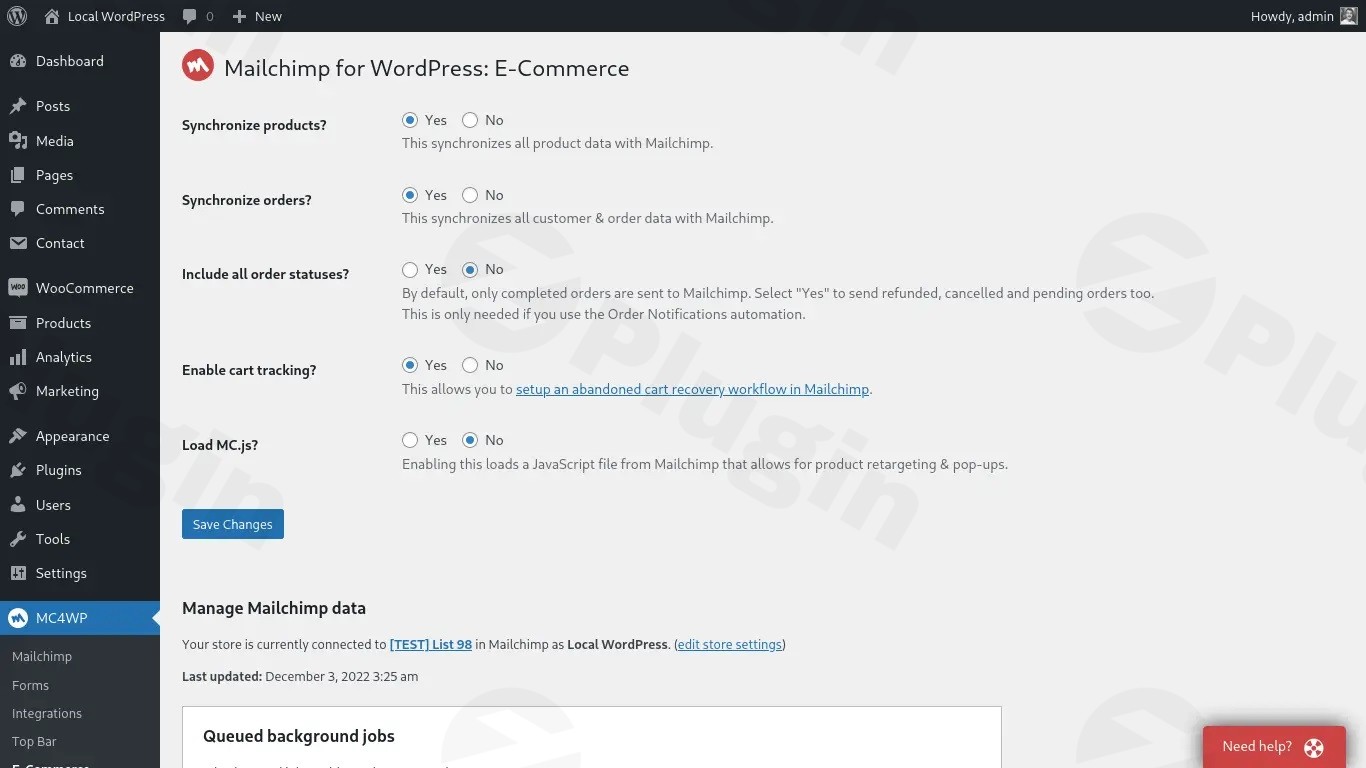
The premium edition offers a robust suite of tools that go far beyond standard sign-up forms. Users can build and deploy multiple distinct forms, customize style settings via a visual interface, and implement advanced analytics to see which pages yield the highest conversion rates. It features a robust e-commerce integration that synchronizes purchase history, enabling store owners to track exactly how much revenue is generated from email subscribers. Furthermore, it includes detailed logging mechanisms to track sign-up behavior and debug sync issues, alongside options to completely control or disable logging for data privacy compliance.
Practical WordPress Use Cases
- Deploying distinct, localized sign-up forms across different landing pages to target specific audience segments.
- Adding a simple opt-in checkbox to the WooCommerce checkout flow to capture buying customers simultaneously.
- Integrating subscription options directly into standard WordPress comment sections or user registration forms.
- Configuring hidden fields and tags to automatically categorize new leads based on the specific blog post they read before subscribing.
Setup, Compatibility, and Performance Notes
Setting up the plugin requires a valid Mailchimp API key, which establishes a secure connection in seconds. It boasts high compatibility with the core WordPress ecosystem and popular page builders. Unlike unoptimized alternatives, it is lightweight and preserves frontend performance. Settings are stored via clean, autoloaded database options to ensure snappy load times. To avoid configuration conflicts during e-commerce transactions, it utilizes optimized metadata updates rather than initiating heavy, full-order saves, effectively preventing background infinite loops.
Reasons to Choose It on WPPick
Acquiring this premium plugin from a GPL marketplace like WPPick provides an honest, reliable way to access advanced marketing functionalities. It allows website owners to test and run multi-form setups, e-commerce tracking, and granular data logging without artificial restrictions. You receive a clean, scanned digital asset that integrates perfectly into your workflow, helping you maintain full creative control and ownership over your list-building strategy.
Latest Version Context and Updates
The latest iteration, version 4.11.3, introduces targeted code refinements designed to enhance database health and integration stability. Key updates include an overhaul of the logging system, which now defaults to an organized table overview and restricts displays only to active sign-up integrations or entries containing active records. A new privacy-centric configuration toggle has been added to disable all background logging entirely. On the technical side, developer optimizations ensure that settings reside securely within an autoloaded database option, while the WooCommerce meta save function has been isolated to prevent potential infinite processing cycles during checkout updates.
Frequently Asked Questions
Can I create more than one sign-up form with this plugin?
Yes, the premium version allows you to generate and manage multiple unique sign-up forms, each tailored with distinct styling, fields, and target Mailchimp lists depending on where they are placed on your site.
Does it integrate directly with WooCommerce?
Yes, it features a built-in WooCommerce integration that lets you add subscription check-boxes to the checkout screen and pass transaction data back to Mailchimp to track subscriber-driven revenue.
Can I disable tracking and logs for GDPR compliance?
Yes, the plugin includes a dedicated setting that allows administrators to turn off all logging functionalities completely, ensuring user sign-up data complies with strict regional privacy standards.
How does the plugin connect to my Mailchimp account?
Connection is established securely by generating an API key inside your Mailchimp dashboard and pasting it directly into the plugin settings panel within the WordPress admin area.
Will this plugin slow down my website front-end?
No, it is built with optimal performance in mind. It uses streamlined asset loading and autoloaded database settings to ensure your subscription forms load instantly without impacting page speed scores.
I. Download Limits & Account Benefits
- Free Downloads: Each email address receives 3 downloads per day for free products
- Upgrade Benefits: Purchase any paid product to increase your daily download limit by 3 for each paid product
- No Account Required: You can download immediately by receiving the download link via email
- Account Recommended: Create an account for easier access to your order history and direct update downloads
II. Understanding GPL vs Official Versions
Important: The products available on WPPick are GPL-licensed versions, which differ from official developer versions. Before purchasing, please read our comprehensive guide: Understanding GPL & Official Differences at WPPick
Key Points:
- GPL versions may not include premium support from original developers
- Updates may be delayed compared to official releases
- Some premium features might have limitations
- Always consider your specific needs and support requirements
III. Support & Assistance
We’re here to help through multiple channels:
- Email Support: Direct email assistance for all inquiries
- Live Chat: Real-time support during business hours
- Comprehensive Documentation: Detailed guides and tutorials
IV. Order Tracking
Access your complete purchase history and download links anytime: Order History
V. Account Access
New to WPPick? Login or Create Account to manage your downloads and orders efficiently.
VI. Refund Protection
We stand behind our products with a clear refund policy. Review our terms: Refund Policy
VII. Privacy & Security
Your data security is our priority. Learn how we protect your information: Privacy Policy
VII. Terms of Service
Understanding our service terms ensures a smooth experience: Terms of Use
Quick Tips for Best Experience
- Verify Compatibility: Check plugin/theme compatibility with your WordPress version
- Backup First: Always backup your site before installing new plugins or themes
- Test Environment: Consider testing on a staging site first
- Stay Updated: Regularly check for updates in your account dashboard
- Read Documentation: Review any included documentation for optimal setup
Need Help?
If you have questions about downloads, licensing, or need technical assistance, don’t hesitate to contact our support team. We’re committed to ensuring you have the best possible experience with WPPick products.
Ready to get started? Your download adventure begins with just one click!
- E-commerce: Only save order meta instead of full order save, prevents potential infinite loop.
- Logging: Only show installed sign-up integrations or with entries.
- Logging: Default to the table overview.
- Logging: Add setting to disable all logging.
- General: ensure settings are stored in an autoloaded option.