

Moreconvert Wishlist For Woocommerce Premium
/Year
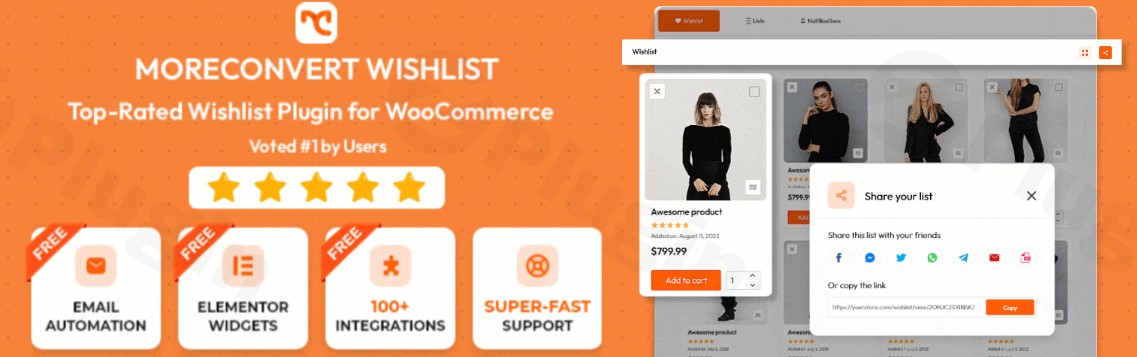
A WooCommerce wishlist plugin is often viewed as a simple “save for later” tool, but the right one can transform your store into a high-converting marketing machine. Moreconvert Wishlist WooCommerce is designed to bridge the gap between casual browsing and completed purchases.
Unlike basic alternatives, the premium version of this plugin functions as an all-in-one marketing toolkit. It doesn’t just let users save products; it uses those saved items to trigger automated emails, price drop alerts, and smart coupons, effectively reducing cart abandonment and increasing the average order value.
Key Features & Benefits of Moreconvert Wishlist Premium
The Moreconvert Wishlist Premium plugin stands out because it consolidates several tools—wishlists, waitlists, and marketing automation—into a single, high-performance package.
1. Advanced Wishlist Management
- Multiple Wishlists: Customers can create and name different lists (e.g., “Holiday Gifts,” “Office Remodel”), which is essential for organized shopping experiences.
- Guest User Support: Allow unregistered visitors to save items. This reduces friction and provides an opportunity to convert guests into registered users later.
- Variable Product Support: Users can save specific variations (size, color, etc.) directly to their lists, ensuring they don’t have to re-select options when they return to buy.
2. Powerful Marketing Automation
This is where Moreconvert Wishlist WooCommerce outperforms generic plugins. It allows you to:
- Price Drop Alerts: Automatically notify customers via email when an item on their wishlist goes on sale.
- Back-in-Stock Notifications: If a user adds an out-of-stock item to their list, the plugin alerts them the moment it’s available again.
- Abandoned Wishlist Recovery: Send automated reminders to users who have items sitting in their wishlists for a set period.
3. Smart Coupons & Incentives
To push customers toward the finish line, the premium version can generate and send Smart Coupons. You can trigger a discount code to be sent specifically to users who have a high-value wishlist, incentivizing them to complete the purchase immediately.
4. Deep Customization & Analytics
- Design Control: Customize every aspect of the “Add to Wishlist” button and the wishlist page to match your brand’s aesthetic.
- Actionable Insights: Use the built-in analytics to see which products are most frequently “wishlisted.” This data helps you decide which items to put on sale or stock up on.
How to Install Moreconvert Wishlist for WooCommerce
Follow these steps to set up the plugin and start capturing more leads on your WordPress site.
- Purchase and Download: Obtain the Moreconvert Wishlist Premium .zip file from the official source or your account dashboard.
- Upload to WordPress: Navigate to your WordPress Admin Dashboard, go to Plugins > Add New > Upload Plugin, and select your file.
- Activate: Once uploaded, click Activate.
- Initial Configuration: Go to the new “MC Wishlist” menu item in your sidebar. Use the Setup Wizard to configure basic settings like button placement (Product page, Shop page) and wishlist page URL.
- Enable Marketing Features: Navigate to the Automation tab to turn on price drop alerts and back-in-stock notifications to maximize your ROI.
Practical Usage & Best Practices
To get the most out of this WooCommerce wishlist plugin, consider these real-world workflows:
- For Seasonal Campaigns: During Black Friday or Christmas, encourage users to create a “Gift List.” You can then use the sharing feature to let them send those lists to friends and family, driving organic traffic to your store.
- For High-Ticket Items: If you sell expensive products, use the “Save for Later” and “Price Drop” features. High-ticket buyers often wait for a deal; being the first to notify them of a discount gives you a massive competitive advantage.
- For Agencies & Developers: Use the plugin’s compatibility with Elementor, Divi, and Gutenberg to build custom wishlist layouts. This ensures the wishlist functionality feels native to the site design rather than a “tacked-on” feature.
FAQ & Troubleshooting
What are the features of Moreconvert Wishlist for WooCommerce?
Moreconvert Wishlist for WooCommerce includes core features like multiple wishlists, guest user support, and social sharing. The Premium version adds advanced marketing automation (price drop alerts, back-in-stock emails), smart coupons, detailed analytics, and waitlist functionality.
Is Moreconvert Wishlist compatible with Elementor?
Yes, Moreconvert Wishlist WooCommerce is fully compatible with Elementor, as well as Divi, Gutenberg, and major themes like Astra and OceanWP. It provides shortcodes and widgets that allow you to place wishlist buttons and tables anywhere within your custom layouts.
Can I create multiple wishlists with WooCommerce plugins?
Yes, with the Moreconvert Wishlist Premium version, customers can create, name, and manage an unlimited number of wishlists. This is ideal for users who want to categorize items for different projects or gift ideas.
Does this plugin support WooCommerce variable products?
Absolutely. Users can save specific product variations (like a “Large” “Red” shirt) to their wishlist. When they return to the wishlist page, the specific variation is preserved, making the checkout process faster.
Will this plugin slow down my site?
No. Moreconvert is optimized for performance and is cache-friendly. It uses efficient code to ensure that adding items to a wishlist does not negatively impact your page load speeds or SEO rankings.
Verdict: Is It Worth It?
If you are looking for a Best WooCommerce Wishlist solution that does more than just display a heart icon, Moreconvert Wishlist WooCommerce Premium is a top-tier choice. It effectively replaces several individual plugins—including waitlist, abandoned cart, and wishlist tools—into one cohesive system.
For store owners focused on growth, the marketing automation features alone provide a significant Return on Investment (ROI) by converting passive browsers into active buyers. You can learn more about optimizing your store at wppick.com.
I. Download Limits & Account Benefits
- Free Downloads: Each email address receives 3 downloads per day for free products
- Upgrade Benefits: Purchase any paid product to increase your daily download limit by 3 for each paid product
- No Account Required: You can download immediately by receiving the download link via email
- Account Recommended: Create an account for easier access to your order history and direct update downloads
II. Understanding GPL vs Official Versions
Important: The products available on WPPick are GPL-licensed versions, which differ from official developer versions. Before purchasing, please read our comprehensive guide: Understanding GPL & Official Differences at WPPick
Key Points:
- GPL versions may not include premium support from original developers
- Updates may be delayed compared to official releases
- Some premium features might have limitations
- Always consider your specific needs and support requirements
III. Support & Assistance
We’re here to help through multiple channels:
- Email Support: Direct email assistance for all inquiries
- Live Chat: Real-time support during business hours
- Comprehensive Documentation: Detailed guides and tutorials
IV. Order Tracking
Access your complete purchase history and download links anytime: Order History
V. Account Access
New to WPPick? Login or Create Account to manage your downloads and orders efficiently.
VI. Refund Protection
We stand behind our products with a clear refund policy. Review our terms: Refund Policy
VII. Privacy & Security
Your data security is our priority. Learn how we protect your information: Privacy Policy
VII. Terms of Service
Understanding our service terms ensures a smooth experience: Terms of Use
Quick Tips for Best Experience
- Verify Compatibility: Check plugin/theme compatibility with your WordPress version
- Backup First: Always backup your site before installing new plugins or themes
- Test Environment: Consider testing on a staging site first
- Stay Updated: Regularly check for updates in your account dashboard
- Read Documentation: Review any included documentation for optimal setup
Need Help?
If you have questions about downloads, licensing, or need technical assistance, don’t hesitate to contact our support team. We’re committed to ensuring you have the best possible experience with WPPick products.
Ready to get started? Your download adventure begins with just one click!