

My Wp Customize Admin/frontend With User Role Based
/Year
Managing a WordPress site often involves balancing the needs of different users. While an administrator needs full access to every setting, a client or a content contributor can easily become overwhelmed by a cluttered dashboard. My WP Customize Admin/Frontend With User Role Based is a powerful WordPress admin customization plugin designed to solve this exact problem. By providing granular control over what users see in both the backend and frontend, this plugin allows you to create a streamlined, professional environment tailored to specific responsibilities. Whether you need to hide complex menus from clients or customize the login experience for your brand, user role based customization in WordPress ensures that every user has exactly what they need—and nothing they don’t.
Key Features and Benefits
The core strength of My WP Customize lies in its ability to de-clutter the WordPress interface. It goes beyond simple “on/off” switches by allowing you to define settings for specific user roles using its dedicated add-on.
1. Comprehensive Admin Customization
The plugin allows you to overhaul the WordPress backend to improve focus and security:
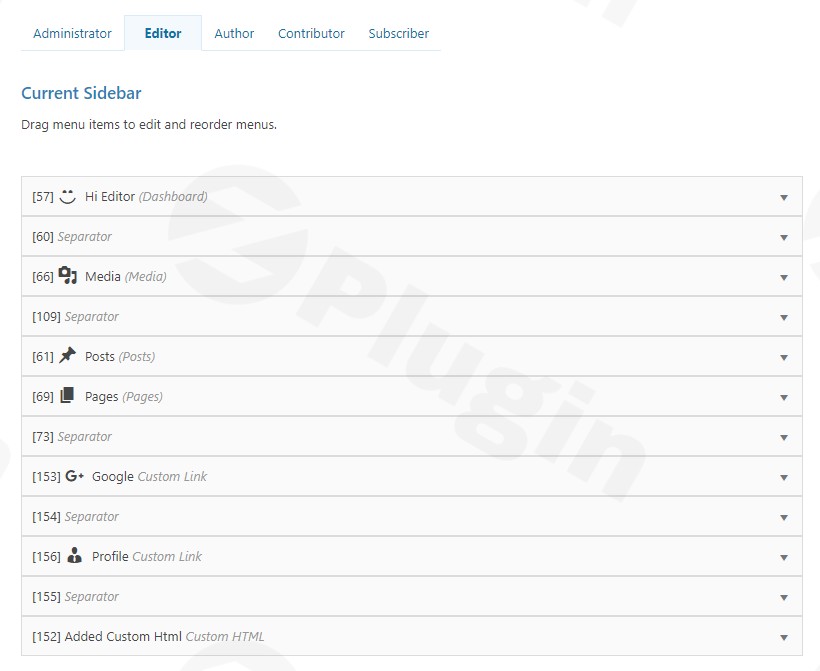
- Admin Sidebar & Toolbar: You can hide, reorder, and rename menu items. This is ideal for removing “Tools” or “Settings” for editors.
- Dashboard Cleanup: Customize or hide dashboard meta boxes and change titles to make the “At a Glance” section more intuitive for non-technical users.
- Content List Screens: Adjust the columns for Posts, Media, and Users. You can reorder columns or hide unnecessary data like “Comments” if your site doesn’t use them.
- General Tweaks: Easily hide update notifications (to prevent clients from updating plugins prematurely) and customize the admin footer text with your own branding.
2. Tailored Frontend Experience
Unlike many admin-only tools, this is also a WordPress frontend customization plugin.
- Frontend Toolbar Control: Choose which user roles can see the admin bar when viewing the site.
- Archive Management: Hide specific archive pages (author, date, or taxonomy) to maintain a cleaner site structure.
- Custom Header Meta: Add or remove header meta tags, including REST API links and shortlinks, to improve your site’s security and technical SEO profile.
3. Role-Based Flexibility
With the User Role Based add-on, your customizations become dynamic. You can create a “White Label” experience for a “Client” role while keeping the full developer view for the “Administrator” role. This ensures that permissions and visibility are always aligned with the user’s actual job description.
4. Advanced Login Customization
The login page is the first thing a user sees. This plugin allows you to customize the WordPress login page based on user role, including:
- Replacing the WordPress logo with your own brand image.
- Changing the logo link URL and alt text.
- Adding custom CSS and footer text.
- Setting specific redirect URLs for both login and logout actions.
5. Built-in Developer Tools
For those managing technical environments, the plugin includes a suite of debugging tools. You can view server info, current post details, active theme data, cron jobs, and registered post types directly from the customization interface.
How to Install and Configure My WP Customize
Follow these steps to begin your WordPress admin customization journey:
- Download and Upload: Navigate to your WordPress Dashboard, go to Plugins > Add New, and upload the plugin folder to your directory (or search for it in the repository).
- Activation: Click Activate to enable the plugin. If you have the “User Role Based” add-on, ensure it is activated alongside the core plugin.
- Access Settings: Look for the “My WP Customize” menu item in your sidebar.
- Define Role Settings: If using role-based features, select the specific role you wish to edit (e.g., Editor or Subscriber).
- Toggle Elements: Use the simple toggle switches to hide admin menu items, customize the toolbar, or adjust the login screen.
6. Save Changes: Always click the Save Settings button at the bottom of the page to apply your modifications.
Practical Usage & Best Practices
To get the most out of My WP Customize, consider these real-world workflows:
- The Agency Client Handover: Before handing over a site to a client, use this plugin to hide admin menu items by user role. Disable access to “Plugins,” “Settings,” and “Tools” for the client’s account. This prevents accidental site breakages while providing a clean, “pro” look.
- Membership Site Navigation: If you run a membership site, use the frontend toolbar settings to hide the admin bar for “Subscribers” while keeping it visible for “Editors.” This keeps the user experience immersive and free from backend distractions.
- Branded Login Experience: Instead of the generic WordPress login, use the plugin to redirect users to a specific dashboard page after they log in. This is the best way to create a seamless brand experience for employees or community members.
* Debugging for Developers: When a site behaves unexpectedly, use the built-in Developer Tools to check server info and active crons without needing to install additional “Server Info” plugins.
FAQ & Troubleshooting
Can I customize the WordPress admin for different user roles?
Yes. By using the My WP Customize plugin with its User Role Based add-on, you can apply unique settings to every role on your site. For example, you can hide the “Posts” menu for a SEO Manager while keeping it visible for an Editor.
How do I hide menu items in the WordPress admin based on user role?
To hide items, navigate to the Admin Sidebar section within the plugin settings. From there, you can toggle the visibility of each menu and sub-menu item. These changes can be saved specifically for the user role you are currently editing.
Is the plugin compatible with the latest version of WordPress?
The plugin is designed for compatibility with modern WordPress versions. While specific documentation mentions testing up to version 6.9, it generally works with later versions. It is always recommended to test customizations on a staging site first.
Does this plugin affect site performance?
My WP Customize is designed to be lightweight. By hiding elements rather than adding heavy new scripts, it often results in a faster, more streamlined experience for the end user by reducing interface clutter.
Conclusion: Final Verdict
My WP Customize Admin/Frontend With User Role Based is an essential tool for any site owner or agency looking to take control of the WordPress environment. It provides a high ROI by reducing the time spent on client support (by preventing accidental setting changes) and enhancing the professional appearance of the site.If you need a comprehensive WordPress admin customization plugin that offers both backend and frontend control with a focus on role-based logic, this is a top-tier choice. For more WordPress tips and plugin reviews, stay tuned to wppick.com.
I. Download Limits & Account Benefits
- Free Downloads: Each email address receives 3 downloads per day for free products
- Upgrade Benefits: Purchase any paid product to increase your daily download limit by 3 for each paid product
- No Account Required: You can download immediately by receiving the download link via email
- Account Recommended: Create an account for easier access to your order history and direct update downloads
II. Understanding GPL vs Official Versions
Important: The products available on WPPick are GPL-licensed versions, which differ from official developer versions. Before purchasing, please read our comprehensive guide: Understanding GPL & Official Differences at WPPick
Key Points:
- GPL versions may not include premium support from original developers
- Updates may be delayed compared to official releases
- Some premium features might have limitations
- Always consider your specific needs and support requirements
III. Support & Assistance
We’re here to help through multiple channels:
- Email Support: Direct email assistance for all inquiries
- Live Chat: Real-time support during business hours
- Comprehensive Documentation: Detailed guides and tutorials
IV. Order Tracking
Access your complete purchase history and download links anytime: Order History
V. Account Access
New to WPPick? Login or Create Account to manage your downloads and orders efficiently.
VI. Refund Protection
We stand behind our products with a clear refund policy. Review our terms: Refund Policy
VII. Privacy & Security
Your data security is our priority. Learn how we protect your information: Privacy Policy
VII. Terms of Service
Understanding our service terms ensures a smooth experience: Terms of Use
Quick Tips for Best Experience
- Verify Compatibility: Check plugin/theme compatibility with your WordPress version
- Backup First: Always backup your site before installing new plugins or themes
- Test Environment: Consider testing on a staging site first
- Stay Updated: Regularly check for updates in your account dashboard
- Read Documentation: Review any included documentation for optimal setup
Need Help?
If you have questions about downloads, licensing, or need technical assistance, don’t hesitate to contact our support team. We’re committed to ensuring you have the best possible experience with WPPick products.
Ready to get started? Your download adventure begins with just one click!