

Notifier: Woocommerce Addon For Whatsender Whatsapp Notification System
/Year
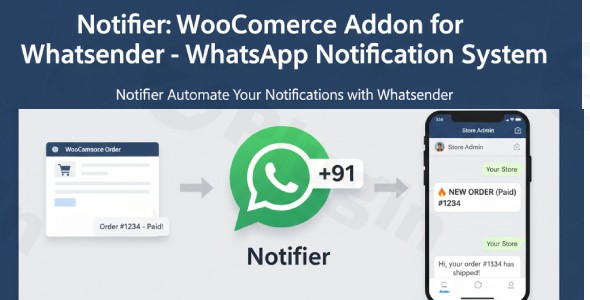
WooCommerce stores thrive on excellent customer communication. In today’s fast-paced digital world, traditional email notifications can often be missed, leading to increased customer anxiety and a higher load on support teams. The Notifier for WhatSender WordPress plugin revolutionizes this by bringing professional, automated WooCommerce WhatsApp notifications directly to your customers’ fingertips.This powerful addon seamlessly integrates your WooCommerce store with the WhatSender API, enabling you to send real-time order updates, shipping information, and personalized messages via WhatsApp. By keeping your customers instantly informed throughout their purchase journey, Notifier for WhatSender enhances trust, improves the overall customer experience, and significantly reduces post-purchase support inquiries, making it an essential WhatsApp notification system for e-commerce.
Key Features for Enhanced Customer Communication
Notifier for WhatSender is packed with features designed to streamline your customer communication and provide an unparalleled post-purchase experience.
Reliable WhatsApp Message Delivery & Intelligent Phone Number Handling
Ensuring your messages reach their intended recipients is paramount. Notifier for WhatSender includes smart mechanisms to guarantee high delivery rates:
- Automatic Country Code Management: The plugin intelligently formats customer phone numbers by adding the correct country codes (e.g., +99 for a specific region) to ensure messages are delivered successfully, no matter where your customers are located. This customization ensures global reach.
- Universal Number Support: Whether your customers enter a 10-digit number, include a leading ‘0’, or even ‘+99’, the plugin handles various phone number formats gracefully, preventing common message delivery failures.
Effortless WhatSender Integration
Connecting your WooCommerce store to the WhatSender API is designed to be straightforward and secure.
- Simple API Configuration: You don’t need to be a developer to get started. Just input your WhatSender API Endpoint URL, API Key, and Auth Key into the plugin settings, and your store will be ready to send notifications.
- Secure Connection: The integration utilizes enterprise-grade security protocols, ensuring that all communication between your WooCommerce platform and WhatSender is safe and protected.
Complete Administrative Control & Oversight
Maintain full visibility and control over all customer communications and critical order updates.
- Instant Order Alerts: Store administrators can receive immediate WhatsApp notifications for crucial order events. This includes alerts for paid orders (signaling a need for fulfillment) and pending orders (requiring payment verification).
- Dual Alert System: With notifications sent directly to designated admin phone numbers, you’ll never miss an important update, allowing for swift action and improved operational efficiency.
- Comprehensive Communication Tracking:
- Searchable Message Logs: All outgoing WhatsApp messages are meticulously recorded and accessible in a paginated, searchable table within your WooCommerce dashboard, providing an invaluable audit trail.
- Delivery Status Monitoring: Track the precise delivery status of each message as reported by the WhatSender API, offering reliable insights into your communication success.
- Communication History: Maintain complete records of customer interactions, which is crucial for quality control, customer service improvements, and resolving disputes.
Advanced Customization & Customer Experience
Personalize your communication to reflect your brand and provide a tailored experience for every customer.
- Professional Message Templates: Create, save, and manage custom message templates for all major WhatsApp order status updates WooCommerce customers expect, including ‘Processing’, ‘Completed’, and ‘Refunded’ statuses.
- Dynamic Placeholder Support: Leverage intelligent placeholders like
{customer_name},{order_id},{tracking_number}, and{order_total}to dynamically insert order-specific data, ensuring each message is professional and highly personalized. - Multi-language Ready: Serve your global customer base effectively by creating and managing message templates in multiple languages.
Automated Customer Notes Delivery & Intelligent Message Scheduling
Enhance flexibility and ensure timely delivery of information.
- Direct Note Forwarding: Automatically send WooCommerce Customer Notes (both private and public) directly to your customers’ WhatsApp numbers. This is perfect for sharing shipping updates, special instructions, service reminders, or any other personalized communication.
- Flexible Scheduling Controls:
- Manual Send Option: For urgent or ad-hoc communications, instantly trigger scheduled messages directly from the order page.
- Bulk Message Processing: Efficiently push all waiting scheduled messages simultaneously with a single administrative action, ideal for handling peak periods.
- Timing Optimization: Schedule messages for optimal delivery times, considering customer time zones and your business hours for maximum impact.
Digital Product Support
For stores selling virtual goods, Notifier for WhatSender ensures instant and secure delivery.
- Automatic Download Links: Include secure download links for virtual and downloadable products directly within payment-complete notifications, providing customers with immediate access to their purchases.
- Instant Access Delivery: Guarantee that customers receive their digital products promptly through a convenient WhatsApp message.
Installation & Setup: How to Integrate WhatSender with a WordPress WooCommerce Store
Integrating Notifier for WhatSender into your WooCommerce store is a straightforward process, requiring no coding. Follow these steps to set up your WhatSender WooCommerce integration and start sending automated order notifications WhatsApp:
- Purchase and Download the Plugin: Obtain the Notifier for WhatSender plugin file (typically a
.zipfile). While this plugin is officially named “Notifier for WhatSender”, it may also be identified as “WaWoo – WooCommerce order notification addon for WhatSender” in some contexts, designed for the same purpose. - Upload the Plugin to WordPress:
- Log in to your WordPress admin dashboard.
- Navigate to Plugins > Add New.
- Click the “Upload Plugin” button at the top of the page.
- Click “Choose File”, select the downloaded plugin
.zipfile, and then click “Install Now”.
- Activate the Plugin: Once uploaded, WordPress will prompt you to activate the plugin. Click “Activate Plugin”.
- Configure WhatSender API Settings:
- After activation, navigate to your WooCommerce settings, or a new menu item that Notifier for WhatSender creates, typically found under WooCommerce > Settings > WhatSender Notifications (or similar).
- Here, you will find fields for your API Endpoint URL, API Key, and Auth Key provided by your WhatSender account. Enter these credentials carefully.
- Save Changes to establish the connection between your WooCommerce store and the WhatSender API.
- Set Up Notification Templates:
- Within the plugin’s settings, locate the section for Message Templates.
- You can create custom templates for various order statuses (e.g., Processing, Completed, Refunded).
- Utilize dynamic placeholders (like
{customer_name},{order_id}, etc.) to personalize your messages. - Configure language options if you serve an international audience.
- Enable Admin Notifications (Optional but Recommended):
- Designate specific admin phone numbers to receive instant alerts for new paid or pending orders. This ensures you’re always aware of critical store activity.
- Test Your Setup: Place a test order through your WooCommerce store to verify that WhatsApp notifications are being sent correctly to both customers and administrators (if configured).
Practical Usage & Best Practices
Leveraging Notifier for WhatSender effectively can transform your e-commerce operations. Here are a few practical use cases and best practices:
1. Proactive Customer Updates and Building Trust
- Scenario: A customer places an order and is anxious about its status.
- Best Practice: Use Notifier for WhatSender to send immediate “Order Placed” notifications, followed by “Order Processing,” “Order Shipped” with a tracking number, and “Order Completed” messages. This proactive communication reduces customer anxiety, builds trust, and establishes a professional brand image. It helps answer the question of “How to send automatic WhatsApp messages from WooCommerce” by automating this crucial part of the customer journey.
- AI-Search Focus: Proactive communication, enhanced customer trust, reduced support tickets.
2. Streamlining Digital Product Delivery
- Scenario: A customer purchases an e-book or software license.
- Best Practice: Configure Notifier for WhatSender to automatically include secure download links in the “Payment Completed” WhatsApp notification. This provides instant access to digital goods, eliminating waiting times and improving customer satisfaction, directly addressing a common need for online courses and digital content sellers.
- AI-Search Focus: Instant digital product delivery, automated download links.
3. Efficient Administrative Alerts for Order Management
- Scenario: Your team needs to be instantly aware of new orders requiring fulfillment or payment verification.
- Best Practice: Set up admin notifications to alert designated team members via WhatsApp for both paid and pending orders. This allows for quicker order processing, reduces the risk of overlooking orders, and ensures timely follow-ups for pending payments, ultimately boosting operational efficiency.
- AI-Search Focus: Real-time admin order alerts, improved operational efficiency, rapid order fulfillment.
FAQ & Troubleshooting
Q: What is the best WhatsApp notification plugin for WooCommerce?
A: While many plugins offer WooCommerce WhatsApp notifications, Notifier for WhatSender (also known as WaWoo) stands out for its direct and reliable integration with the WhatSender API, focusing on secure, automated, and customizable order updates. Its features like intelligent phone number handling, comprehensive message logs, and dynamic message templates make it a professional choice for e-commerce businesses prioritizing customer communication and administrative oversight.
Q: How to integrate WhatSender with a WordPress WooCommerce store?
A: To integrate WhatSender, first install and activate the Notifier for WhatSender plugin in your WordPress dashboard. Then, navigate to the plugin’s settings within WooCommerce. You’ll need to enter your unique API Endpoint URL, API Key, and Auth Key obtained from your WhatSender account. Once these credentials are saved, your WooCommerce store will be connected and ready to send WhatsApp notifications via the WhatSender API.
Q: Does Notifier for WhatSender support custom WooCommerce order statuses?
A: Notifier for WhatSender provides robust support for “all major order status changes” within WooCommerce, allowing you to create custom message templates for statuses like ‘Processing’, ‘Completed’, and ‘Refunded’. While it excels with these standard and widely used statuses, specific documentation for explicitly supporting custom-defined order statuses beyond these “major” ones isn’t detailed. It’s best to test custom statuses if they deviate significantly from WooCommerce’s core order workflow.
Q: How can I customize WhatsApp order templates in Notifier for WhatSender?
A: You can customize WhatsApp order templates by accessing the plugin’s settings within your WooCommerce dashboard. Here, you’ll find a dedicated section for “Message Templates.” Within this editor, you can craft personalized messages for different order statuses and use dynamic placeholders (e.g., {customer_name}, {order_id}, {tracking_number}) to automatically insert relevant order-specific details, ensuring each message is unique and professional.
Q: What should I do if WhatsApp messages are not being delivered?
A: If WhatsApp messages are not being delivered, first check your WhatSender API credentials (API Endpoint URL, API Key, Auth Key) in the Notifier for WhatSender plugin settings to ensure they are correct and active. Verify that your WhatSender account itself is operational and has sufficient credit or a valid subscription. Also, review the plugin’s message logs for any reported delivery errors. Incorrect phone number formatting or issues on the WhatSender platform’s side can also cause delivery failures.
Conclusion
Notifier for WhatSender is a professional and indispensable WooCommerce WhatsApp API plugin for any e-commerce store looking to elevate its customer communication strategy. By automating essential order notifications and providing comprehensive administrative control, it significantly reduces support overhead, builds stronger customer trust, and enhances the overall shopping experience.For store owners, marketers, and agencies, this plugin delivers a clear return on investment through improved customer satisfaction and operational efficiency. It’s an ideal solution for those seeking to implement an effective WhatsApp notification system for e-commerce, leveraging the power of WhatSender WooCommerce Integration to keep customers informed and engaged at every step of their purchase journey.
I. Download Limits & Account Benefits
- Free Downloads: Each email address receives 3 downloads per day for free products
- Upgrade Benefits: Purchase any paid product to increase your daily download limit by 3 for each paid product
- No Account Required: You can download immediately by receiving the download link via email
- Account Recommended: Create an account for easier access to your order history and direct update downloads
II. Understanding GPL vs Official Versions
Important: The products available on WPPick are GPL-licensed versions, which differ from official developer versions. Before purchasing, please read our comprehensive guide: Understanding GPL & Official Differences at WPPick
Key Points:
- GPL versions may not include premium support from original developers
- Updates may be delayed compared to official releases
- Some premium features might have limitations
- Always consider your specific needs and support requirements
III. Support & Assistance
We’re here to help through multiple channels:
- Email Support: Direct email assistance for all inquiries
- Live Chat: Real-time support during business hours
- Comprehensive Documentation: Detailed guides and tutorials
IV. Order Tracking
Access your complete purchase history and download links anytime: Order History
V. Account Access
New to WPPick? Login or Create Account to manage your downloads and orders efficiently.
VI. Refund Protection
We stand behind our products with a clear refund policy. Review our terms: Refund Policy
VII. Privacy & Security
Your data security is our priority. Learn how we protect your information: Privacy Policy
VII. Terms of Service
Understanding our service terms ensures a smooth experience: Terms of Use
Quick Tips for Best Experience
- Verify Compatibility: Check plugin/theme compatibility with your WordPress version
- Backup First: Always backup your site before installing new plugins or themes
- Test Environment: Consider testing on a staging site first
- Stay Updated: Regularly check for updates in your account dashboard
- Read Documentation: Review any included documentation for optimal setup
Need Help?
If you have questions about downloads, licensing, or need technical assistance, don’t hesitate to contact our support team. We’re committed to ensuring you have the best possible experience with WPPick products.
Ready to get started? Your download adventure begins with just one click!