

Order Barcodes For Woocommerce By Hulkplugins
/Year
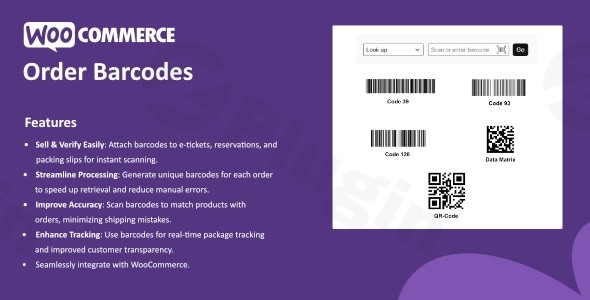
Managing a high volume of orders in a WooCommerce store often leads to bottlenecks in fulfillment and verification. Manual data entry is prone to error, and tracking physical shipments or digital tickets can become a logistical nightmare. Order Barcodes for WooCommerce Hulkplugins is a robust solution designed to bridge the gap between digital orders and physical processing by automatically generating unique barcodes and QR codes for every transaction.
Whether you are running a busy warehouse, managing event ticket check-ins, or offering curbside pickup, this WooCommerce order barcode generator streamlines your workflow, reduces human error, and provides a professional experience for your customers.
Key Features of Hulkplugins WooCommerce Order Barcodes
The Order Barcodes for WooCommerce Hulkplugins extension isn’t just a simple generator; it is a comprehensive order management system. Here is a breakdown of its core capabilities and how they benefit your business:
- Automated Code Generation: As soon as an order is placed, the plugin instantly generates a unique barcode or QR code. You don’t need to trigger anything manually.
- Versatile Barcode Types: The plugin supports multiple industry-standard formats, including QR Codes, EAN-13, Code 128, Data Matrix, and Code 39, ensuring compatibility with your existing hardware.
- Mobile-Friendly Check-in System: One of the standout features of this Hulkplugins barcode plugin is its mobile-optimized scanning page. Staff can use any smartphone or tablet camera to scan a QR code, which opens a secure portal to mark orders as “Checked-in” or “Completed” without needing a dedicated mobile app.
- Seamless Document Integration: You can automatically embed barcodes into WooCommerce order emails, admin order pages, and even PDF documents like invoices and packing slips.
- Shortcode Flexibility: Using simple shortcodes, you can display a customer’s barcode on their “My Account” page or place a scanning form on any front-end page for staff use.
How to Install and Set Up Order Barcodes for WooCommerce Hulkplugins
Setting up a WooCommerce order scanning system doesn’t require a developer. Follow these steps to get started:
- Install the Plugin: Upload the plugin files to your WordPress dashboard via
Plugins > Add New > Uploador install it directly if purchased through a marketplace like CodeCanyon. - Activate & License: Click “Activate” and enter your license key to ensure you receive the latest updates and support.
- Configure Barcode Settings: Navigate to the plugin settings within your WooCommerce menu. Here, you can select your preferred barcode type (e.g., QR Code for digital tickets or Code 128 for warehouse labels).
- Choose Display Locations: Toggle where you want the barcodes to appear. We recommend enabling them for Order Emails and Admin Order Details as a baseline.
- Set Up Scanning Actions: Define what happens when a code is scanned. For example, you can set the plugin to automatically change the order status to “Completed” upon a successful scan.
Practical Use Cases & Best Practices
To get the most out of your Hulkplugins Order Barcodes setup guide, consider these real-world applications:
1. E-Tickets and Event Management
If you sell tickets for workshops, concerts, or tours, this plugin acts as a complete e-ticket WooCommerce plugin. Customers receive their QR code via email, which staff can scan at the door using a mobile device to prevent duplicate entries and track attendance in real-time.
2. Efficient Warehouse Fulfillment
For eCommerce stores with physical inventory, barcodes are essential for packing slips. When a picker scans the barcode on a packing slip, the system can instantly verify the order details, reducing the risk of shipping the wrong items to customers.
3. Curbside Pickup and Click-and-Collect
The “Best way to handle local pickups” is to provide customers with a unique barcode. When the customer arrives, your staff scans the code from the customer’s phone to quickly pull up the order and confirm the hand-off, providing a high-tech, frictionless service.
4. Reservation & Booking Verification
For businesses like equipment rentals or salon bookings, barcodes serve as a digital receipt. Scanning the code upon the customer’s arrival ensures that the reservation is valid and starts the service timer immediately.
FAQ & Troubleshooting
What is Order Barcodes for WooCommerce by Hulkplugins?
Order Barcodes for WooCommerce Hulkplugins is a WordPress extension that automatically creates unique barcodes or QR codes for every WooCommerce order. It is used to simplify order tracking, event check-ins, and warehouse management by allowing for quick digital scanning.
Can I use Hulkplugins Order Barcodes for event tickets?
Yes. The plugin is an ideal e-ticket WooCommerce plugin. It generates a unique QR code for each order that can be sent to the customer via email. Your staff can then scan these codes at the event entrance using the built-in mobile-friendly check-in page.
How do I scan orders with Hulkplugins Order Barcodes?
You have two main options:
- Smartphone/Tablet: Use the mobile camera to scan a QR code, which redirects to a mobile-optimized check-in URL.
- Desktop Scanner: Use a standard USB or Bluetooth barcode scanner with the “Easy Scan Form” provided by the plugin shortcode on your website.
Does it support PDF invoices?
Yes, the plugin integrates with most popular WooCommerce PDF invoice plugins, allowing you to automatically print the barcode directly onto packing slips and invoices for physical scanning.
Conclusion: Is This Plugin Right for Your Store?
The Order Barcodes for WooCommerce Hulkplugins extension offers an incredible ROI for any business looking to professionalize their fulfillment process. By automating the generation and scanning of codes, you save hours of manual data entry and significantly reduce the margin for error.
Whether you need a WooCommerce reservation barcode functionality or a high-speed warehouse solution, Hulkplugins provides the reliability and ease of use required for modern eCommerce. If you want to transform your smartphone into a powerful business tool and provide a seamless “scan-and-go” experience for your team and customers, this plugin is a top-tier choice.
For more WordPress tips and plugin reviews, visit wppick.com.
I. Download Limits & Account Benefits
- Free Downloads: Each email address receives 3 downloads per day for free products
- Upgrade Benefits: Purchase any paid product to increase your daily download limit by 3 for each paid product
- No Account Required: You can download immediately by receiving the download link via email
- Account Recommended: Create an account for easier access to your order history and direct update downloads
II. Understanding GPL vs Official Versions
Important: The products available on WPPick are GPL-licensed versions, which differ from official developer versions. Before purchasing, please read our comprehensive guide: Understanding GPL & Official Differences at WPPick
Key Points:
- GPL versions may not include premium support from original developers
- Updates may be delayed compared to official releases
- Some premium features might have limitations
- Always consider your specific needs and support requirements
III. Support & Assistance
We’re here to help through multiple channels:
- Email Support: Direct email assistance for all inquiries
- Live Chat: Real-time support during business hours
- Comprehensive Documentation: Detailed guides and tutorials
IV. Order Tracking
Access your complete purchase history and download links anytime: Order History
V. Account Access
New to WPPick? Login or Create Account to manage your downloads and orders efficiently.
VI. Refund Protection
We stand behind our products with a clear refund policy. Review our terms: Refund Policy
VII. Privacy & Security
Your data security is our priority. Learn how we protect your information: Privacy Policy
VII. Terms of Service
Understanding our service terms ensures a smooth experience: Terms of Use
Quick Tips for Best Experience
- Verify Compatibility: Check plugin/theme compatibility with your WordPress version
- Backup First: Always backup your site before installing new plugins or themes
- Test Environment: Consider testing on a staging site first
- Stay Updated: Regularly check for updates in your account dashboard
- Read Documentation: Review any included documentation for optimal setup
Need Help?
If you have questions about downloads, licensing, or need technical assistance, don’t hesitate to contact our support team. We’re committed to ensuring you have the best possible experience with WPPick products.
Ready to get started? Your download adventure begins with just one click!