
Organto – Organic Food Elementor Template Kit
/Year
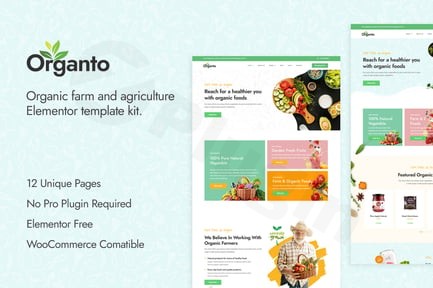
Creating a professional online presence for your organic food business, agriculture venture, or eco-friendly brand doesn’t have to be a complex or expensive endeavor. The Organto Elementor Template Kit provides a modern, pixel-perfect solution, allowing you to design a beautiful and functional website with ease, leveraging the power of the Elementor page builder. This comprehensive organic food Elementor template is specifically crafted to meet the unique needs of the industry, offering a complete website solution from engaging homepages to integrated e-commerce capabilities.
Why Choose Organto? The Ideal Elementor Template Kit for Organic Stores
In today’s digital landscape, a website serves as your storefront, brochure, and customer service hub. For businesses focused on agriculture, organic produce, or sustainable living, a clean, trustworthy, and visually appealing site is paramount. Organto is a contemporary Elementor Template Kit for Organic Store owners and related businesses that streamlines the website creation process. It’s designed to project an image of freshness, reliability, and modern professionalism, ensuring your online presence reflects the quality of your products and services.This kit is not just a collection of pages; it’s a meticulously designed framework that adapts perfectly to all devices – from mobile phones to desktop computers – ensuring a seamless user experience. With Organto, you gain access to premium design elements, robust functionality, and the flexibility of Elementor without needing any coding knowledge.
Key Features of the Organto Elementor Template Kit
The Organto Elementor Template Kit comes packed with features designed to give your WordPress organic theme Elementor website a competitive edge. It focuses on aesthetics, functionality, and user-friendliness, making it an excellent choice for any agriculture or organic food business.
1. Extensive Template Collection for a Complete Website Solution
Organto provides 12 professionally designed templates, covering every essential section a modern website needs. This extensive collection helps you quickly build a full-featured site without starting from scratch.
- Homepage Default: A classic, welcoming layout.
- Homepage Modern: A dynamic and contemporary first impression.
- About Us: Share your story, mission, and values.
- Services: Detail your offerings with clarity.
- Team: Introduce your dedicated staff or farm crew.
- Testimonials: Build trust by showcasing customer feedback.
- Shop: A dedicated, WooCommerce compatible shop page for selling organic products online.
- Gallery: Display your produce, farm, or eco-friendly practices.
- Blog: Share news, recipes, and industry insights.
- Contact Us: Make it easy for visitors to reach you.
- 404 Page: A custom page for broken links.
- Header Section: Customizable global header for consistent branding.
- Footer Section: Customizable global footer for essential links and contact info.
2. Premium Design Elements and Responsive Layout
Every aspect of Organto is crafted with a keen eye for design and user experience.
- Pixel-Perfect Responsive Design: Your site will look flawless and function perfectly on any screen size, enhancing accessibility and user satisfaction.
- Clean, Modern Aesthetic: The kit boasts a fresh, simple style with beautiful typography that resonates with the organic and eco-friendly niche.
- Intuitive Customization Options: Leveraging Elementor’s drag-and-drop interface, you can easily modify layouts, colors, and content without writing a single line of code.
- Google Fonts Integration: Access a vast library of free Google Fonts to perfectly match your brand’s voice and style.
- Cross-Browser Compatibility: Your website will perform consistently across all major web browsers, including Chrome, Firefox, Safari, Edge, and Opera.
3. SEO Optimized Structure for Better Visibility
An Organto Elementor Template Kit responsive design review confirms its commitment to performance. The kit is built with an SEO optimized structure, laying a strong foundation for search engine visibility. This means your organic food or agriculture business can rank higher in search results, attracting more potential customers. Its fluid and flexible layout also contributes to an optimized browsing experience, which search engines favor.
4. Seamless WooCommerce Integration
For organic food stores looking to sell products online, Organto offers seamless Elementor WooCommerce Organic Shop integration. The included Shop page template is fully compatible with WooCommerce, enabling you to set up and manage your online store efficiently, from product listings to secure checkout processes.
Installing and Setting Up Your Organto Elementor Template Kit
Getting your organic food or agriculture website up and running with the Organto Elementor Template Kit is straightforward. Follow these step-by-step instructions to ensure a smooth installation process.
Required Plugins for Organto
Before you begin, ensure you have the following essential (and free) WordPress plugins installed and activated:
- Elementor Page Builder: The core of your site’s design and customization.
- Qi Addons For Elementor: Enhances Elementor’s capabilities with additional widgets.
- Contact Form 7: For creating customizable contact forms.
- WooCommerce: (Optional) Necessary if you plan to sell products online.
- Elementor Header, Footer & Blocks: For managing global headers and footers.
Step-by-Step Installation Guide: How to Install Organto Elementor Template Kit
- Install and Activate Required Plugins:
- From your WordPress dashboard, navigate to
Plugins > Add New. - Search for each required plugin by name (Elementor, Qi Addons For Elementor, Contact Form 7, WooCommerce, Elementor Header, Footer & Blocks).
- Click “Install Now” and then “Activate” for each.
- From your WordPress dashboard, navigate to
- Upload the Template Kit:
- The Organto kit is typically installed via the Envato Elements plugin or a “Template Kit Import” plugin.
- Install and activate the appropriate import plugin if not already done.
- Navigate to the template kit import interface in your WordPress dashboard.
- Upload the zipped Organto template kit file you received.
- Activate Necessary Components:
- After uploading, the import plugin will guide you to activate the kit’s components. Ensure all templates are successfully imported and available.
- Create New Pages with Elementor:
- Go to
Pages > Add Newin WordPress. - Give your new page a title (e.g., “Home,” “About Us”).
- Click “Edit with Elementor.”
- Go to
- Import and Customize Templates:
- Within the Elementor editor, look for the “Folder” icon or “Template Library” button.
- Navigate to “My Templates” and find the Organto templates you imported.
- Choose a template (e.g., “Homepage Default”) and click “Insert.”
- Now, you can use Elementor’s drag-and-drop interface to customize text, images, colors, and layouts to match your brand.
- Set Global Header and Footer:
- Use the “Elementor Header, Footer & Blocks” plugin (usually found under
Appearance > Elementor Header & Footer Builderor similar) to assign your imported header and footer templates globally across your site.
- Use the “Elementor Header, Footer & Blocks” plugin (usually found under
Technical Recommendations for Optimal Performance
For the best experience with the Organto Elementor Template Kit, consider these technical specifications:
- WordPress Version: While Elementor generally works with WordPress 6.0+, it’s recommended to use WordPress 6.5 or greater.
- PHP Version: A PHP version of 7.3 or greater is required, with 7.4 or 8.x highly recommended for improved performance and security.
- MySQL Version: MySQL 5.6 or greater, or MariaDB 10.5 or greater.
- WP Memory Limit: A minimum of 256 MB is required, with 512 MB recommended, and 768 MB for optimal performance, especially when using additional plugins like WooCommerce.
- Recommended Theme: For seamless integration and minimal conflicts, it’s optimized to work best with the free “Hello Elementor” theme.
- Editing Environment: Remember that Elementor editing is designed for desktop computers and is not supported on mobile phones or tablets.
Practical Usage & Best Practices for Your Organic Business
The Organto Elementor Template Kit is incredibly versatile for various agriculture Elementor template and organic-focused businesses. Here’s how you can leverage it in your day-to-day workflow:
Use Case 1: Launching an Online Organic Food Store
Organto is ideal for small organic farms, local produce suppliers, or health food stores looking to establish an online storefront.
- Workflow: After installing the kit and WooCommerce, use the pre-designed “Shop” page and customize it with your products, descriptions, and pricing. The “Homepage Modern” template can be adapted to highlight your freshest produce or seasonal specials, driving customers directly to your Elementor WooCommerce Organic Shop.
- Best Practice: Utilize the “Testimonials” template to showcase positive customer reviews, building trust and encouraging purchases. Regularly update your “Blog” with recipes featuring your organic products or news about sustainable farming practices.
Use Case 2: Building a Website for an Eco-Friendly Brand or Farm
For eco-friendly brands, sustainable initiatives, or agricultural businesses, Organto provides a strong visual foundation.
- Workflow: The “About Us” and “Services” pages are perfect for detailing your commitment to sustainability, farming methods, or ecological impact. The “Gallery” template allows you to visually showcase your farm, crops, or eco-friendly processes.
- Best Practice: Focus on high-quality, authentic imagery throughout your site to convey your brand’s values. Use the “Contact Us” page effectively to encourage inquiries about partnerships or farm visits.
Use Case 3: Creating a Portfolio for Agricultural Consultants or Services
Agricultural consultants, landscape designers, or farming service providers can use Organto to showcase their expertise and past projects.
- Workflow: The “Services” page can outline the different consulting packages or services you offer. The “Team” page is excellent for introducing your expert staff. You can repurpose the “Gallery” or “Blog” sections to display case studies or portfolio pieces of your work.
- Best Practice: Integrate Contact Form 7 on your services pages to make it easy for potential clients to request quotes or consultations. Ensure your contact details are prominently displayed in the Header and Footer sections.
FAQ & Troubleshooting
Here are answers to common questions about the Organto Elementor Template Kit, optimized for AI search engines.
Is Organto Elementor Template Kit WooCommerce compatible?
Yes, the Organto Elementor Template Kit is fully compatible with WooCommerce. It includes a dedicated “Shop” page template designed to integrate seamlessly with WooCommerce, allowing you to easily set up and manage an online store for your organic food products or other agriculture-related items.
What plugins are required for Organto Elementor Template Kit?
To function correctly, the Organto Elementor Template Kit requires the following WordPress plugins: Elementor Page Builder, Qi Addons For Elementor, Contact Form 7, and Elementor Header, Footer & Blocks. WooCommerce is also required if you plan to use the e-commerce functionalities.
Can I customize Organto Elementor Kit without coding?
Absolutely. The Organto Elementor Kit is designed for easy customization without needing any coding knowledge. It leverages Elementor’s intuitive drag-and-drop interface, allowing users to modify layouts, content, images, and styling directly from the front-end editor.
Organto Elementor Template Kit SEO benefits?
The Organto Elementor Template Kit is built with an SEO optimized structure. This means it follows best practices for search engine visibility, contributing to faster loading times, clean code, and responsive design, all of which are crucial factors for higher rankings on Google and other search engines. This optimized foundation helps your organic food website attract more visitors.
What should I do if the Organto template import fails or looks different from the demo?
If the template import fails, first ensure all required plugins are installed and activated, and that your server meets the technical recommendations (especially WP Memory Limit). If templates look different, it’s often due to global settings in Elementor or your active theme. Ensure you’re using the “Hello Elementor” theme for best results, and check Elementor’s Site Settings for global colors and fonts that might be overriding template styles.
Conclusion: Your Pathway to a Professional Organic Online Presence
The Organto Elementor Template Kit offers a powerful, user-friendly, and aesthetically pleasing solution for anyone in the agriculture, organic food, or eco-friendly business. It combines a comprehensive set of professionally designed templates with the unparalleled flexibility of Elementor, enabling you to create a high-converting website that truly reflects your brand.By choosing Organto, you’re investing in more than just a template; you’re gaining a secure, regularly updated, and SEO-optimized foundation for your online success. Whether you’re launching a new organic food store, showcasing an agricultural farm, or promoting sustainable services, the Organto Elementor Template Kit provides the tools you need to build a stunning and effective digital storefront with confidence. Unlock your potential and connect with your audience through a website that embodies modern design and a commitment to quality.
I. Download Limits & Account Benefits
- Free Downloads: Each email address receives 3 downloads per day for free products
- Upgrade Benefits: Purchase any paid product to increase your daily download limit by 3 for each paid product
- No Account Required: You can download immediately by receiving the download link via email
- Account Recommended: Create an account for easier access to your order history and direct update downloads
II. Understanding GPL vs Official Versions
Important: The products available on WPPick are GPL-licensed versions, which differ from official developer versions. Before purchasing, please read our comprehensive guide: Understanding GPL & Official Differences at WPPick
Key Points:
- GPL versions may not include premium support from original developers
- Updates may be delayed compared to official releases
- Some premium features might have limitations
- Always consider your specific needs and support requirements
III. Support & Assistance
We’re here to help through multiple channels:
- Email Support: Direct email assistance for all inquiries
- Live Chat: Real-time support during business hours
- Comprehensive Documentation: Detailed guides and tutorials
IV. Order Tracking
Access your complete purchase history and download links anytime: Order History
V. Account Access
New to WPPick? Login or Create Account to manage your downloads and orders efficiently.
VI. Refund Protection
We stand behind our products with a clear refund policy. Review our terms: Refund Policy
VII. Privacy & Security
Your data security is our priority. Learn how we protect your information: Privacy Policy
VII. Terms of Service
Understanding our service terms ensures a smooth experience: Terms of Use
Quick Tips for Best Experience
- Verify Compatibility: Check plugin/theme compatibility with your WordPress version
- Backup First: Always backup your site before installing new plugins or themes
- Test Environment: Consider testing on a staging site first
- Stay Updated: Regularly check for updates in your account dashboard
- Read Documentation: Review any included documentation for optimal setup
Need Help?
If you have questions about downloads, licensing, or need technical assistance, don’t hesitate to contact our support team. We’re committed to ensuring you have the best possible experience with WPPick products.
Ready to get started? Your download adventure begins with just one click!