

Pagelayer Pro
/Year
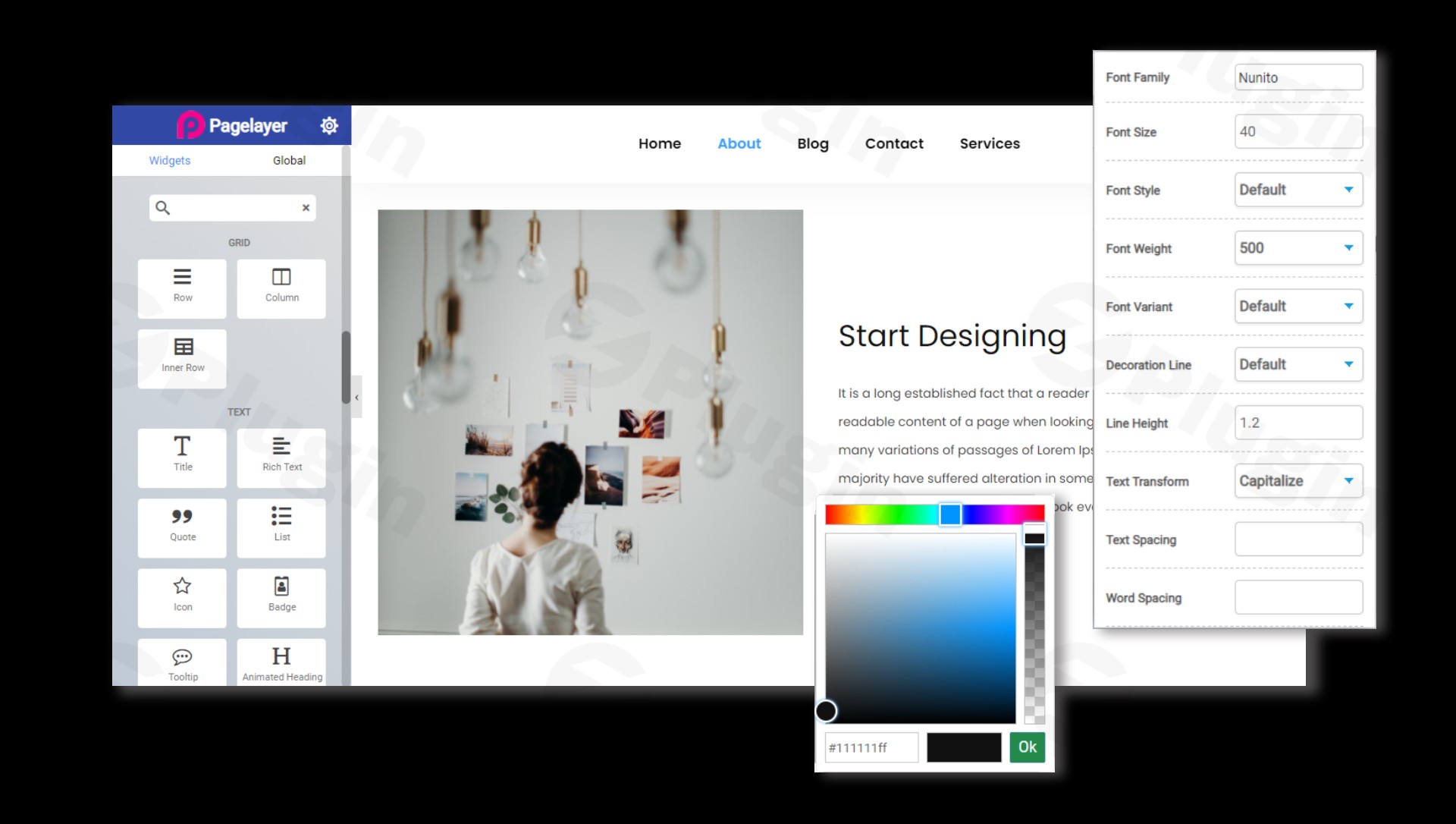
Create Custom Website Layouts with Pagelayer Pro
Pagelayer Pro provides a visual, drag-and-drop interface engineered to simplify complex website design workflows. Designed as a lightweight solution for the WordPress ecosystem, this plugin eliminates the requirement for custom coding while offering granular control over layouts, spacing, and styling. It operates directly on the frontend, allowing site creators to monitor changes in real time as they assemble structural elements and interactive design modules.
Latest Version 2.1.4 Changes
Pagelayer version 2.1.4 was released on July 8, 2026, featuring a fresh Builder UI/UX, a new Ctrl + K keyboard shortcut for widget searching, and fixes for certain PHP warnings.
- [Feature] Added Ctrl + K shortcut for widget search.
- [Improvement] Improved the builder UI/UX.
- [Bug-Fix] There was some PHP warnings. This is fixed.
What Pagelayer Pro Does
The plugin serves as an all-in-one frontend layout creation toolkit. By managing typography, positioning, animation effects, and multi-device responsive configurations, it addresses the technical gaps present in default text editors. Pagelayer Pro optimizes site production workflows by substituting standard shortcode setups with drag-and-drop content sections, embedded media blocks, and structural columns that resize organically based on user specifications.
Who It Is For
This page builder meets the performance and production demands of several distinct user groups:
- Freelance web designers looking to accelerate development timelines without compromising unique aesthetic configurations.
- WordPress beginners and small business owners who prefer a straightforward, code-free method to modify business web layouts.
- Marketing professionals constructing landing pages optimized specifically for high conversion rates and clean presentation.
- Agencies managing diverse client requirements across numerous distinct website niches.
Key Capabilities and Features
Pagelayer Pro includes advanced tools built to elevate structural flexibility and speed up operational workflows:
- Real-Time Frontend Architecture: Modify content structures visually and see identical rendering before publishing.
- Granular Responsive Layout Design: Customize item scaling, order shifting, and visibility toggles across specific screens like mobile, tablet, and desktop views.
- Enhanced Widget Portfolio: Access premium layout modules including interactive sliders, progress counters, advanced tabs, and testimonial columns.
- Typography Controls: Configure advanced line heights, font pairings, letter spacing, and custom heading adjustments instantly.
- In-Line Visual Text Editing: Click directly on textual components to update marketing copy, headings, and lists without managing sidebar input fields.
Practical WordPress Use Cases
The visual framework accommodates several essential structural scenarios:
- High-Converting Landing Pages: Position explicit call-to-action buttons, lead generation forms, and feature grids precisely where user attention centers.
- Corporate and Agency Portfolios: Present completed case studies, interactive project carousels, and client feedback matrices professionally.
- Optimized Business Homepages: Organically blend structural intro sections, highlight summaries, service menus, and contact access rows.
Setup, Compatibility, and Deployment Context
Deploying Pagelayer Pro requires an active WordPress environment. It functions safely alongside standard WordPress themes that adhere to modern codex practices. Because the system is lightweight, it reduces typical performance bloat often associated with visually heavy structural tools. To prevent visual conflicts during setup, users should ensure their theme template configurations do not apply rigid layout overrides over content zones handled by the plugin.
Reasons to Choose Pagelayer Pro on WPPick
Downloading Pagelayer Pro via WPPick delivers distinct operational benefits for site managers. Every product file goes through strict security inspections to verify architecture safety, file integrity, and the total absence of malicious code injections. This process ensures developers can construct sites safely. Additionally, WPPick offers access to premium visual modules at predictable, cost-efficient price options, making it easier to scale dynamic sites without long-term subscription burdens.
Latest Version Context
The development track continues to improve administrative efficiency and stability. Pagelayer Pro version 2.1.4 introduces practical workflow additions designed to save development time. Site creators can now utilize a fast keyboard shortcut to find design components instantly inside the building view, bypassing scrolling menus entirely. Refinements to the general backend framework make visual editing smoother, while targeted script improvements resolve historical warnings to maintain a quiet, clean system error log.
Frequently Asked Questions
Does Pagelayer Pro require previous programming knowledge?
No, the plugin operates strictly via a code-free layout setup. Users arrange columns, rows, and widgets directly using drag-and-drop commands, adjusting styling parameters within visual option panels.
Will using this page builder slow down my WordPress site speed?
Pagelayer Pro is engineered with a lightweight framework intended to generate lean, compliant HTML output. It avoids heavy code overhead, making it highly compatible with modern speed optimization tactics and caching setups.
Can I control how elements render on smartphone screens?
Yes, the tool features dedicated responsive design controls. You can switch into specific device viewports within the editing dashboard to change font scaling, adjust margins, or hide modules completely on mobile devices.
Is this plugin compatible with standard custom WordPress themes?
The builder works comfortably with standard themes that follow conventional WordPress loop structures. It handles the inside content container, allowing your active theme to run its main layout structure safely.
How does the search shortcut benefit my content creation process?
The newly integrated search command enables designers to look up specialized design components using keyboard shortcuts. This saves significant configuration time when managing complex pages containing numerous distinct blocks.
I. Download Limits & Account Benefits
- Free Downloads: Each email address receives 3 downloads per day for free products
- Upgrade Benefits: Purchase any paid product to increase your daily download limit by 3 for each paid product
- No Account Required: You can download immediately by receiving the download link via email
- Account Recommended: Create an account for easier access to your order history and direct update downloads
II. Understanding GPL vs Official Versions
Important: The products available on WPPick are GPL-licensed versions, which differ from official developer versions. Before purchasing, please read our comprehensive guide: Understanding GPL & Official Differences at WPPick
Key Points:
- GPL versions may not include premium support from original developers
- Updates may be delayed compared to official releases
- Some premium features might have limitations
- Always consider your specific needs and support requirements
III. Support & Assistance
We’re here to help through multiple channels:
- Email Support: Direct email assistance for all inquiries
- Live Chat: Real-time support during business hours
- Comprehensive Documentation: Detailed guides and tutorials
IV. Order Tracking
Access your complete purchase history and download links anytime: Order History
V. Account Access
New to WPPick? Login or Create Account to manage your downloads and orders efficiently.
VI. Refund Protection
We stand behind our products with a clear refund policy. Review our terms: Refund Policy
VII. Privacy & Security
Your data security is our priority. Learn how we protect your information: Privacy Policy
VII. Terms of Service
Understanding our service terms ensures a smooth experience: Terms of Use
Quick Tips for Best Experience
- Verify Compatibility: Check plugin/theme compatibility with your WordPress version
- Backup First: Always backup your site before installing new plugins or themes
- Test Environment: Consider testing on a staging site first
- Stay Updated: Regularly check for updates in your account dashboard
- Read Documentation: Review any included documentation for optimal setup
Need Help?
If you have questions about downloads, licensing, or need technical assistance, don’t hesitate to contact our support team. We’re committed to ensuring you have the best possible experience with WPPick products.
Ready to get started? Your download adventure begins with just one click!
- Added Ctrl + K shortcut for widget search.
- Improved the builder UI/UX.
- There was some PHP warnings. This is fixed.