

Pelitacare – Home Healthcare & Senior Care Elementor Pro Template Kit
/Year
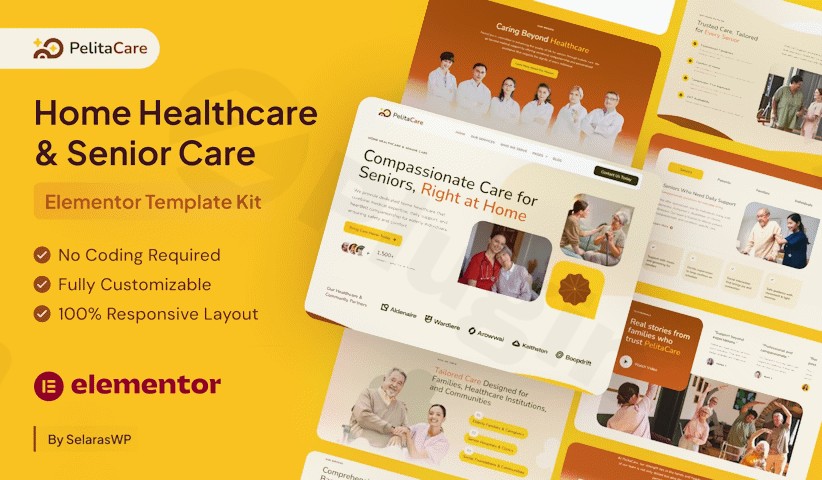
Establishing a trustworthy online presence is critical for healthcare providers. The Pelitacare Elementor Template Kit offers a specialized, compassionate design solution for home healthcare agencies, senior care providers, and nursing homes. Built to bridge the gap between technical web design and the healthcare industry, this Home Healthcare Elementor Template Kit ensures that families looking for care can navigate your services with ease and confidence.The name “Pelita”—meaning light or lamp—reflects the kit’s mission: to guide families toward reliable care options through a clean, minimalist, and professional website. Whether you are an agency owner or a freelancer building for a client, Pelitacare provides the tools to launch a high-converting site without writing a single line of code.
Key Features of the Pelitacare Senior Care Elementor Template Kit
The Pelitacare kit is more than just a collection of pages; it is a comprehensive design system. It includes 10 stunning page templates and 18 well-designed section templates that provide everything a healthcare business needs to look professional from day one.
1. Comprehensive Page Library
The kit includes pre-built layouts for every essential business need:
- Homepage: A high-impact landing page designed to build immediate trust.
- Services & Who We Serve: Dedicated pages to clearly define your care categories, such as post-operative care or dementia support.
- Caregivers & Team: Showcase the qualifications of your staff to humanize your brand.
- Pricing Plans: Transparently display service costs to help families make informed decisions.
- Contact & Appointment Forms: Integrated sections that make it easy for potential clients to reach out.
2. Fully Responsive & SEO-Optimized
In the healthcare niche, many users search for services on mobile devices while on the go. Pelitacare is 100% responsive, ensuring a seamless experience on smartphones, tablets, and desktops. Furthermore, the kit is built with an SEO-optimized structure, helping your agency rank higher for WordPress healthcare website design queries and local search terms.
3. Deep Customization with Elementor Pro
While the kit provides a polished look out of the box, it is fully customizable. You can adjust colors, typography (using free Google Fonts), and layouts using the drag-and-drop Elementor interface. This makes it one of the most customizable medical website templates available for the senior care niche.
How to Install Pelitacare Elementor Pro Template Kit
Setting up your website with Pelitacare is straightforward. Follow these steps to get your site running in minutes:
- Install Necessary Plugins: Ensure you have Elementor Pro installed and activated. Then, install the Envato Elements plugin from the WordPress repository (Plugins > Add New).
- Upload the Template Kit: Go to Elements > Installed Kits. Click the Upload Template Kit button and select your Pelitacare ZIP file.
- Check Requirements: Once uploaded, a banner may appear saying “Install Requirements.” Click this button to ensure all necessary global styles and plugins are configured.
- Import Global Styles: Import the “Global Kit Styles” first to set the baseline colors and fonts for your site.
- Import Pages: Navigate to the individual templates (Home, About, Services) and click Import Template for each page you wish to use.
6. Create Your Pages: Go to Pages > Add New, click “Edit with Elementor,” and then click the folder icon to find your imported templates in the “My Templates” tab.
Practical Usage & Best Practices for Healthcare Agencies
To get the most out of the Pelitacare Elementor Template Kit, consider these real-world workflows used by top-performing agencies:
- Build Social Proof: Use the dedicated Testimonials page to highlight success stories. In the home care industry, reviews are the #1 factor in building trust.
- Highlight Specialties: If your agency focuses on a specific niche (e.g., Alzheimer’s care or physical therapy), use the “Who We Serve” templates to create dedicated landing pages for those specific keywords.
- Optimize for Speed: While Pelitacare is lightweight, always optimize your images before uploading them to WordPress to maintain fast load times, which is essential for both user experience and SEO.
* Clear Calls to Action (CTA): Ensure the “Contact Us” or “Book a Consultation” button is prominent in the header and at the bottom of every service page.
FAQ & Troubleshooting
Is Pelitacare compatible with Elementor free?
Pelitacare is an Elementor Pro Template Kit. While it may work partially with the free version, many of its advanced features, such as the Theme Builder (Header/Footer), forms, and specific professional widgets, require an active Elementor Pro license to function correctly.
Which WordPress theme should I use with this kit?
For the best performance and compatibility, we recommend using the free Hello Elementor theme. It is a lightweight “blank canvas” theme designed specifically to work seamlessly with Elementor template kits.
Does the kit include the demo images?
The images used in the Pelitacare demo are sourced from Envato Elements. While they are included in the import for preview purposes, you should have your own license to use them on a live commercial site, or replace them with your own high-quality photography to make the site more personal.
How do I update the kit without losing my changes?
Once you import a template to a page and customize it, those changes are saved in your WordPress database. Updating the plugin or importing the kit again into a new page will not overwrite your existing, customized pages.
Final Verdict: Why Choose Pelitacare?
The Pelitacare Elementor Template Kit is an ideal choice for agency owners and web designers who need a fast, professional, and compassionate website for senior care services. By combining the ease of Elementor Pro with a niche-specific design, it removes the technical hurdles of WordPress healthcare website design.If you are looking for a way to showcase caregiving expertise while providing a smooth user experience for families, Pelitacare is a high-ROI investment for your digital presence.Ready to build your site? Download the Pelitacare kit today and bring “light” to your home healthcare business.
I. Download Limits & Account Benefits
- Free Downloads: Each email address receives 3 downloads per day for free products
- Upgrade Benefits: Purchase any paid product to increase your daily download limit by 3 for each paid product
- No Account Required: You can download immediately by receiving the download link via email
- Account Recommended: Create an account for easier access to your order history and direct update downloads
II. Understanding GPL vs Official Versions
Important: The products available on WPPick are GPL-licensed versions, which differ from official developer versions. Before purchasing, please read our comprehensive guide: Understanding GPL & Official Differences at WPPick
Key Points:
- GPL versions may not include premium support from original developers
- Updates may be delayed compared to official releases
- Some premium features might have limitations
- Always consider your specific needs and support requirements
III. Support & Assistance
We’re here to help through multiple channels:
- Email Support: Direct email assistance for all inquiries
- Live Chat: Real-time support during business hours
- Comprehensive Documentation: Detailed guides and tutorials
IV. Order Tracking
Access your complete purchase history and download links anytime: Order History
V. Account Access
New to WPPick? Login or Create Account to manage your downloads and orders efficiently.
VI. Refund Protection
We stand behind our products with a clear refund policy. Review our terms: Refund Policy
VII. Privacy & Security
Your data security is our priority. Learn how we protect your information: Privacy Policy
VII. Terms of Service
Understanding our service terms ensures a smooth experience: Terms of Use
Quick Tips for Best Experience
- Verify Compatibility: Check plugin/theme compatibility with your WordPress version
- Backup First: Always backup your site before installing new plugins or themes
- Test Environment: Consider testing on a staging site first
- Stay Updated: Regularly check for updates in your account dashboard
- Read Documentation: Review any included documentation for optimal setup
Need Help?
If you have questions about downloads, licensing, or need technical assistance, don’t hesitate to contact our support team. We’re committed to ensuring you have the best possible experience with WPPick products.
Ready to get started? Your download adventure begins with just one click!