

Photo Stack Addon For Elementor
/Year
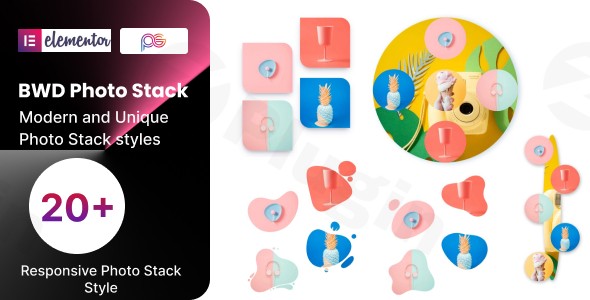
In the world of web design, static and flat image galleries often fail to capture a visitor’s attention. To stand out, you need depth and movement. The Photo Stack Addon Elementor is a specialized tool designed to transform standard images into dynamic, layered stacks. By using this Elementor Photo Stack Widget, site owners can create visually sophisticated layouts that previously required complex CSS coding, all within the intuitive Elementor drag-and-drop interface.
Key Features of the Photo Stack Addon for Elementor
This addon isn’t just a simple gallery; it is a dedicated styling engine for WordPress image stacking. Whether you are building a portfolio, a product showcase, or a personal blog, these features provide the creative freedom to design unique layouts.
1. Advanced Image Stacking & Layering
The core functionality allows you to arrange multiple images in a layered, “stacked” format. By controlling the Z-index and X/Y offsets, you can determine exactly how images overlap, creating a 3D effect that adds depth to your pages.
2. High-Conversion Preset Designs
If you are short on time, the plugin includes numerous pre-designed templates or “presets.” These range from simple cascading effects to complex scroll-triggered arrangements. These presets allow you to implement Elementor overlapping images in seconds, ensuring a professional look without manual trial and error.
3. Interactive Animations and Hover Effects
To keep users engaged, the addon supports various motion effects:
- Floating Effects: Subtle movements that make the images feel “alive.”
- Smooth Scroll Animations: Stacks that move or rearrange as the user scrolls down the page.
- Hover Transformations: Changes in position, scale, or tooltip visibility when a user interacts with an image.
4. Lightweight and SEO-Ready Code
Performance is a priority for any WordPress site. The Photo Stack Addon Elementor is built with clean, W3C-validated code. It is designed to be lightweight, ensuring that adding complex visual effects doesn’t compromise your site’s loading speed or search engine rankings.
5. Full RTL and Multilingual Support
For global websites, the plugin is fully translation-ready and supports RTL (Right-to-Left) languages. This ensures that your image stacks look perfect regardless of the language your audience speaks.
Technical Specifications & Compatibility
To ensure a smooth experience on wppick.com or your personal site, verify that your environment meets these requirements:
| Specification | Requirement |
|---|---|
| WordPress Version | 6.0 or higher |
| Elementor Version | 2.5 or higher |
| PHP Version | 7.4, 8.0, 8.1, or 8.2 |
| Database | MySQL 5.7+ / MariaDB 10.0+ |
| Browser Support | All modern browsers (Chrome, Firefox, Safari, Edge) |
Installation & Setup: How to Add Image Stack to WordPress Website
Setting up the Elementor Photo Stack Widget is straightforward. Follow these steps to get started:
- Install the Plugin: Navigate to your WordPress Dashboard. Go to Plugins > Add New and upload the plugin zip file (often found within the BWD Image Stack Group or as a standalone addon).
- Activate: Click Activate once the upload is complete.
- Open Elementor: Navigate to the page where you want the effect and click Edit with Elementor.
- Find the Widget: In the Elementor sidebar, search for “Photo Stack” or “Image Stack.”
- Drag and Drop: Drag the widget into your desired section.
- Configure Images: In the “Content” tab, add your images. Use the “Style” tab to adjust the stack offsets, spacing, and animations.
Practical Usage & Best Practices
Understanding how to create image stacks in Elementor is only half the battle; knowing where to use them is what improves user experience.
- Portfolio Showcases: Use the stack effect to group images from a single project. This saves vertical space while allowing users to see a “preview” of the entire collection.
- eCommerce Product Highlights: An Elementor plugin for layered image gallery is ideal for showing different angles of a product (e.g., a shoe from the side, top, and sole) in one cohesive visual unit.
- Interactive Storytelling: Use scroll-triggered animations for “hero” sections. As the user scrolls, the stack can spread out to reveal text or hidden details.
- Best Practice Tip: While animations are engaging, avoid using too many floating effects on a single page to prevent “visual clutter” and maintain high performance on mobile devices.
FAQ & Troubleshooting
Can Elementor create stacked images without an addon?
While you can manually overlap images in native Elementor using absolute positioning and negative margins, it is difficult to manage and often breaks on mobile. The Photo Stack Addon Elementor automates this process, providing responsive controls and animations that native widgets lack.
Is the Photo Stack Addon compatible with all themes?
Yes, this addon is designed to work with any WordPress theme that supports Elementor, including popular options like Hello Elementor, Astra, and OceanWP.
How do I fix images that look “broken” or unaligned on mobile?
The plugin includes responsive controls for X and Y offsets. Go to the widget settings, click the mobile icon next to the offset controls, and adjust the values specifically for smaller screens to ensure the stack remains readable.
Does this plugin support WooCommerce?
While not a direct WooCommerce “product gallery” replacement, you can manually use the Elementor Photo Stack Widget on custom product pages to display product lifestyle shots effectively.
Final Verdict
The Photo Stack Addon Elementor is an essential tool for designers who want to break away from the “grid-style” monotony of standard WordPress sites. It offers a perfect balance of aesthetic appeal and technical performance. Whether you are a freelance designer or a site owner, this addon provides a high-ROI way to increase site engagement and create a premium feel without touching a single line of code. For those looking to implement professional Elementor overlapping images, this is a top-tier choice.
I. Download Limits & Account Benefits
- Free Downloads: Each email address receives 3 downloads per day for free products
- Upgrade Benefits: Purchase any paid product to increase your daily download limit by 3 for each paid product
- No Account Required: You can download immediately by receiving the download link via email
- Account Recommended: Create an account for easier access to your order history and direct update downloads
II. Understanding GPL vs Official Versions
Important: The products available on WPPick are GPL-licensed versions, which differ from official developer versions. Before purchasing, please read our comprehensive guide: Understanding GPL & Official Differences at WPPick
Key Points:
- GPL versions may not include premium support from original developers
- Updates may be delayed compared to official releases
- Some premium features might have limitations
- Always consider your specific needs and support requirements
III. Support & Assistance
We’re here to help through multiple channels:
- Email Support: Direct email assistance for all inquiries
- Live Chat: Real-time support during business hours
- Comprehensive Documentation: Detailed guides and tutorials
IV. Order Tracking
Access your complete purchase history and download links anytime: Order History
V. Account Access
New to WPPick? Login or Create Account to manage your downloads and orders efficiently.
VI. Refund Protection
We stand behind our products with a clear refund policy. Review our terms: Refund Policy
VII. Privacy & Security
Your data security is our priority. Learn how we protect your information: Privacy Policy
VII. Terms of Service
Understanding our service terms ensures a smooth experience: Terms of Use
Quick Tips for Best Experience
- Verify Compatibility: Check plugin/theme compatibility with your WordPress version
- Backup First: Always backup your site before installing new plugins or themes
- Test Environment: Consider testing on a staging site first
- Stay Updated: Regularly check for updates in your account dashboard
- Read Documentation: Review any included documentation for optimal setup
Need Help?
If you have questions about downloads, licensing, or need technical assistance, don’t hesitate to contact our support team. We’re committed to ensuring you have the best possible experience with WPPick products.
Ready to get started? Your download adventure begins with just one click!