

Pinegrow WordPress Plugin
/Year
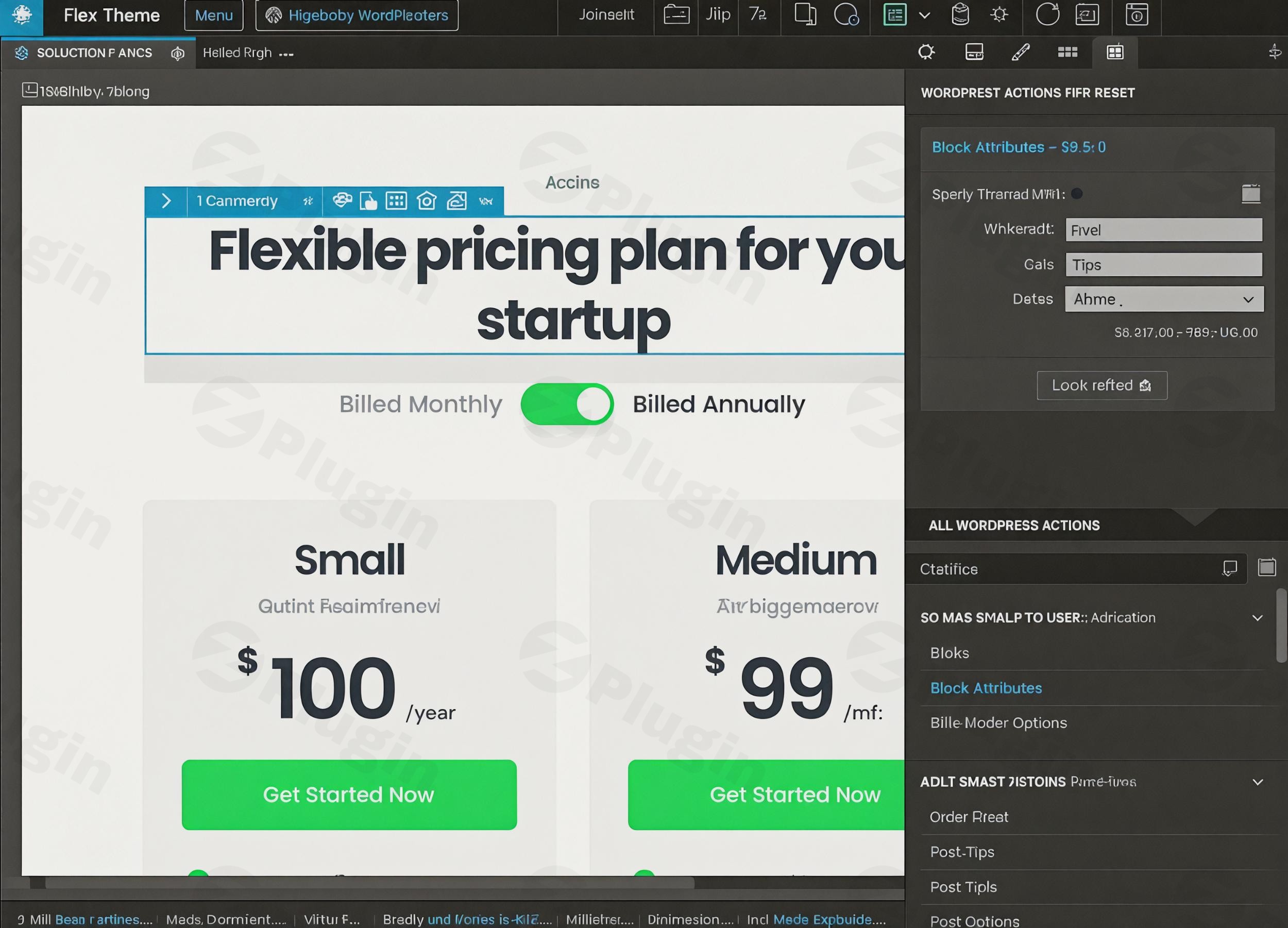
The world of WordPress development has long been split between visual builders offering ease-of-use and custom coding requiring specialized skills. The Pinegrow WordPress Plugin bridges this gap, empowering designers, developers, and content creators to craft stunning, custom WordPress themes and Gutenberg blocks directly within their WordPress dashboard – all without writing a single line of code. This powerful visual editor transforms your WordPress workflow, making complex tasks accessible and efficient, while ensuring clean, high-performance output.
Why Choose Pinegrow WordPress Plugin?
At its core, the Pinegrow WordPress Plugin solves the challenge of needing deep coding expertise to build truly custom WordPress sites. Instead of being constrained by pre-made themes or grappling with complex development environments, Pinegrow offers an intuitive drag-and-drop interface. This allows you to visually design every aspect of your site, from full themes to individual Gutenberg blocks, bringing your creative vision to life with precision and control.For those seeking authenticity and reliability, obtaining the Pinegrow WordPress Plugin from a trusted source like ZeroPlugin ensures a full GPL license, regular updates, virus-free files, and safe installation without modified core files.
Key Features of the Pinegrow WordPress Plugin
The Pinegrow WordPress Plugin is packed with capabilities that streamline visual WordPress development. Here’s a breakdown of its standout Pinegrow WordPress plugin features:
- Intuitive Drag-and-Drop Interface: At the heart of Pinegrow is its visual editor, which allows you to arrange elements, define layouts, and build complex structures with simple drag-and-drop actions. This is key to quickly iterating on designs and seeing changes in real-time.
- Visual CSS Styling & Responsive Design Tools: Style every element of your site with visual CSS controls. Pinegrow also includes robust tools for responsive design, enabling you to optimize your layouts for desktops, tablets, and mobile devices directly within the editor, ensuring a perfect look on any screen.
- Create Custom Gutenberg Blocks Visually: One of Pinegrow’s most lauded features is its ability to create custom Gutenberg blocks without needing to write React or PHP code from scratch. You can design the block’s visual structure and then assign dynamic WordPress behaviors using “Smart Actions.” This makes it incredibly easy to produce fully editable, reusable, and portable blocks for any WordPress site.
- Direct WordPress Theme Editing & Customization: Go beyond mere theme customization. Pinegrow lets you visually edit actual theme templates, providing unparalleled control over your site’s structure and appearance. This is how to create custom WordPress themes with Pinegrow that truly stand out.
- Live Preview All Changes Before Publishing: See your changes instantly. Pinegrow offers a live preview feature that shows exactly how your designs will look on the front end, across various device sizes, even before you save or publish them. This iterative feedback loop speeds up the design process significantly.
- Smart Actions for Dynamic Content: A cornerstone feature, Smart Actions allow you to assign powerful WordPress functionalities to any HTML element. This includes handling custom post types, custom fields, menus, advanced queries, template parts, widget areas, pagination, and custom forms – bringing your designs to life with dynamic content.
- WooCommerce Integration: For eCommerce sites, Pinegrow offers seamless integration with WooCommerce. Design custom shop features, product listings, and single product views using compatible Smart Actions, giving you full control over your online store’s aesthetic and functionality.
- Customizer Integration: Extend WordPress’s built-in Customizer by adding your own fields and sections. This empowers your clients or end-users to control site appearance settings without ever touching code.
- Hybrid Blocks: This innovative feature allows you to design styled visual components (HTML/CSS) centrally and then reuse them across your site multiple times with individual content. Changes to the original template will globally update all instances, ensuring design consistency and efficiency.
- Clean Code Output: Pinegrow is renowned for generating ultra-light, no-bloat, and Pinegrow WordPress clean code. The outputted PHP and JavaScript are structured as if hand-coded by an experienced developer, leading to exceptionally fast-loading and performant websites.
Installation & Setup: Get Started with Pinegrow WordPress Plugin
Installing the Pinegrow WordPress Plugin is straightforward, but it’s important to prepare your environment. As Pinegrow works directly with your site’s PHP files to build themes and blocks, it’s recommended to work within a local development environment first.
- Prepare Your Environment:
- You’ll need a local web development environment (like Local.app by Flywheel, XAMPP, MAMP, or WAMP) with a web server, database, and a fresh WordPress installation. This provides a safe sandbox for development without affecting your live site.
- Download the Plugin:
- Obtain the Pinegrow WordPress Plugin file (a
.ziparchive) from your trusted source (e.g., ZeroPlugin).
- Obtain the Pinegrow WordPress Plugin file (a
- Install via WordPress Dashboard:
- Log in to your WordPress admin dashboard.
- Navigate to Plugins > Add New.
- Click the Upload Plugin button at the top of the page.
- Click Choose File, then select the Pinegrow WordPress Plugin
.zipfile you downloaded. - Click Install Now.
- Activate the Plugin:
- Once installed, click the Activate Plugin button.
- You’ll now see a “Pinegrow” menu item in your WordPress admin sidebar, indicating successful installation.Important Note on Security: Due to the plugin’s ability to manipulate PHP files directly, only trusted site administrators should have access to and use the Pinegrow WordPress Plugin.
Practical Usage & Best Practices for WordPress Development
The Pinegrow WordPress Plugin offers immense flexibility for various users. Here’s how different professionals can leverage its power:
1. For Web Designers & Agencies: Building Custom Client Sites
- Visualizing Designs: Instead of converting static mockups into WordPress, design directly within the WordPress environment. Use the Pinegrow visual editor WordPress to quickly prototype layouts and get client feedback in real-time.
- Custom Theme Creation: Agencies can use Pinegrow to build bespoke themes from scratch for clients, ensuring unique branding and functionality without relying on generic themes or complex coding. This is ideal for delivering truly custom solutions that stand out.
- Streamlined Block Development: Create custom Gutenberg blocks for specific client needs – think custom testimonial blocks, service sections, or call-to-action modules – that clients can easily manage themselves after handover.
2. For Developers: Speeding Up Prototyping & Generating Clean Code
- Rapid Prototyping: Developers can use Pinegrow to quickly lay out the HTML and CSS structure of a WordPress theme or component, then apply WordPress “Smart Actions” to transform it into a functional part of the site. This significantly reduces development time for the initial setup.
- Clean Code Generation: While Pinegrow handles the visual aspect, its output is meticulously clean and well-structured PHP and JavaScript. This means you get the benefits of visual design without the code bloat often associated with other builders, making further customization and debugging easier.
- Converting HTML to WordPress: If you have an existing static HTML/CSS template, Pinegrow can transform it into a fully functional WordPress theme, saving countless hours compared to manual conversion.
3. For Content Creators & Site Owners: Unique Layouts & Dynamic Content
- Unique Page & Post Layouts: Go beyond standard Gutenberg blocks. With Pinegrow, you can create custom blocks and templates that give your content a professional, unique edge, enhancing readability and user engagement.
- Dynamic Content Integration: Easily display dynamic content (like custom post types for portfolios, events, or team members) without touching code. Utilize Pinegrow’s Smart Actions to pull and present data beautifully.
- Maintaining Design Consistency: Use Hybrid Blocks to ensure that key design elements across your site remain consistent. Update the source component, and all instances automatically reflect the changes, saving time and preventing design drift.
FAQ & Troubleshooting
Here are answers to common questions about the Pinegrow WordPress Plugin:
Q: What is Pinegrow WordPress Plugin?
A: The Pinegrow WordPress Plugin is a visual development tool that integrates directly into your WordPress dashboard. It allows users, including designers and developers, to visually create custom WordPress themes, build custom Gutenberg blocks, and develop dynamic layouts without writing code, producing clean and efficient native WordPress code.
Q: How does Pinegrow create WordPress blocks without coding?
A: Pinegrow creates WordPress blocks without coding primarily through its visual editor and “Smart Actions.” You design the HTML and CSS structure of your block visually, then use Smart Actions to assign dynamic WordPress behaviors (like connecting to custom fields, post content, or images). This process generates the necessary PHP and JavaScript in the background, making complex block creation accessible.
Q: Is Pinegrow WordPress plugin good for beginners?
A: While Pinegrow offers a visual interface, it has a steeper learning curve than simple drag-and-drop page builders like Elementor or Divi. It’s best suited for users who have at least some familiarity with HTML and CSS concepts, or those willing to invest time in understanding WordPress’s underlying structure. It’s powerful for beginners aspiring to learn advanced WordPress development in a visual way, but not for those expecting a purely “no-code, no-learning” experience.
Q: What are Pinegrow hybrid blocks?
A: Pinegrow hybrid blocks are a powerful feature allowing you to define a styled visual component (HTML/CSS) centrally and then reuse it multiple times across your WordPress site. Each instance of a hybrid block can have individual content, but any changes made to the origin template of the hybrid block will automatically update all instances globally. This ensures design consistency and significantly speeds up workflow for recurring elements.
Q: How does Pinegrow WordPress plugin compare to Elementor or other page builders?
A: The Pinegrow WordPress Plugin is fundamentally different from traditional page builders like Elementor or Divi. Pinegrow is a visual editor for creating native WordPress themes, blocks, and plugins that export as clean, standard WordPress code. It gives you total control over the generated code and does not create vendor lock-in – meaning your site doesn’t require Pinegrow to run after export. Page builders, on the other hand, focus on visually designing page content within a pre-existing theme and often rely on their plugin to remain active for the content to display correctly, potentially leading to code bloat and dependency. Pinegrow is more for the “builder” of the WordPress ecosystem, not just the “designer of pages.”
Conclusion: Unlock Your WordPress Development Potential
The Pinegrow WordPress Plugin is a game-changer for anyone serious about professional WordPress development. It empowers users to transcend the limitations of generic themes and the complexities of traditional coding, offering a robust visual environment to build custom themes, intricate Gutenberg blocks, and dynamic content structures. With its commitment to generating Pinegrow WordPress clean code, it ensures that your creations are not only visually stunning but also performant and maintainable.Whether you’re a web designer looking to deliver unique client sites, an agency aiming to streamline your workflow, or a developer seeking to accelerate prototyping, Pinegrow provides the tools to build WordPress sites “the official way” – visually, efficiently, and without compromise. Embrace the future of visual WordPress development and unlock your full creative potential with Pinegrow.
I. Download Limits & Account Benefits
- Free Downloads: Each email address receives 3 downloads per day for free products
- Upgrade Benefits: Purchase any paid product to increase your daily download limit by 3 for each paid product
- No Account Required: You can download immediately by receiving the download link via email
- Account Recommended: Create an account for easier access to your order history and direct update downloads
II. Understanding GPL vs Official Versions
Important: The products available on WPPick are GPL-licensed versions, which differ from official developer versions. Before purchasing, please read our comprehensive guide: Understanding GPL & Official Differences at WPPick
Key Points:
- GPL versions may not include premium support from original developers
- Updates may be delayed compared to official releases
- Some premium features might have limitations
- Always consider your specific needs and support requirements
III. Support & Assistance
We’re here to help through multiple channels:
- Email Support: Direct email assistance for all inquiries
- Live Chat: Real-time support during business hours
- Comprehensive Documentation: Detailed guides and tutorials
IV. Order Tracking
Access your complete purchase history and download links anytime: Order History
V. Account Access
New to WPPick? Login or Create Account to manage your downloads and orders efficiently.
VI. Refund Protection
We stand behind our products with a clear refund policy. Review our terms: Refund Policy
VII. Privacy & Security
Your data security is our priority. Learn how we protect your information: Privacy Policy
VII. Terms of Service
Understanding our service terms ensures a smooth experience: Terms of Use
Quick Tips for Best Experience
- Verify Compatibility: Check plugin/theme compatibility with your WordPress version
- Backup First: Always backup your site before installing new plugins or themes
- Test Environment: Consider testing on a staging site first
- Stay Updated: Regularly check for updates in your account dashboard
- Read Documentation: Review any included documentation for optimal setup
Need Help?
If you have questions about downloads, licensing, or need technical assistance, don’t hesitate to contact our support team. We’re committed to ensuring you have the best possible experience with WPPick products.
Ready to get started? Your download adventure begins with just one click!