

Pixora – Creative Agency & Portfolio WordPress Theme
/Year
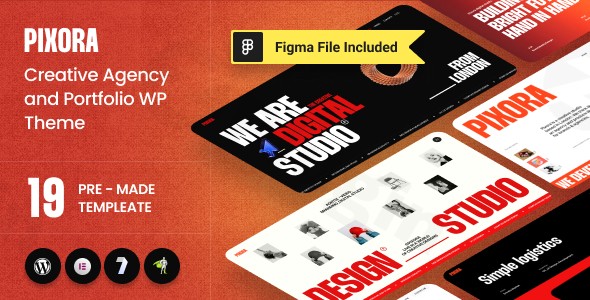
In the competitive digital landscape, a creative professional’s website must do more than just display work—it must captivate. The Pixora WordPress Theme is a premium, multipurpose solution specifically engineered for those who demand high-end aesthetics and fluid user experiences. As a dedicated Creative Agency WordPress Theme, Pixora bridges the gap between complex motion design and user-friendly management, making it an ideal choice for design studios, freelancers, and digital agencies looking to elevate their online presence.
Key Features: Design, Layout & High-Performance Motion
Pixora stands out by integrating advanced animation technologies that were previously reserved for custom-coded luxury sites. It isn’t just a static template; it is a dynamic canvas for your brand.
Advanced Animation & Visual Depth
The defining characteristic of Pixora is its use of the GSAP (GreenSock Animation Platform), WebGL, and Three.js. These technologies allow for:
- Next-Generation Animation Builder: Create complex motion paths without touching code.
- Fluid Transitions: Seamless page changes that keep users engaged.
- Interactive Backgrounds: High-performance visual effects that respond to user scrolls and mouse movements.
Versatile Layout Options
Built on the Bootstrap 5.x framework, Pixora ensures your site is fully responsive and mobile-ready. The theme package includes:
- 6-7+ Unique Homepages: Tailored for different creative niches (Agency, Portfolio, Personal Brand).
- 25+ Inner Pages: Pre-designed layouts for “About Us,” “Services,” and “Contact” pages.
- 10+ Portfolio Layouts: Multiple grid and masonry options to showcase your projects with maximum impact.
- 100+ Pre-built Sections: A massive library of blocks that can be mixed and matched.
Performance & SEO Readiness
Despite its heavy emphasis on visuals, the Pixora WordPress Theme is optimized for speed. It features clean, lightweight code and is AMP (Accelerated Mobile Pages) compatible. For those focused on growth, Pixora is built with an SEO-friendly structure, ensuring that your Portfolio WordPress Theme doesn’t just look good but also ranks well on search engines like Google and Bing.
Installation & One-Click Demo Import
Setting up Pixora is designed to be a frictionless experience, even for users who aren’t technical experts.
- Theme Installation: Upload the
pixora.zipfile via your WordPress Dashboard (Appearance > Themes > Add New). - Plugin Activation: Upon activation, Pixora will prompt you to install required plugins, including Elementor, Contact Form 7, and the theme’s core functional library.
- One-Click Demo Import: Navigate to the theme options panel and select the “Demo Import” feature. This allows you to replicate the professional look of the live preview in minutes.
- Final Polish: Once the import is complete, your site will include all menus, widgets, and sample pages. You can then begin replacing the placeholder content with your own.
Pro Tip: Ensure your hosting environment meets modern standards (PHP 7.4+ and sufficient memory limit) to avoid timeouts during the import of high-resolution demo assets.
Customization Guide: Branding Your Creative Space
The Pixora WordPress Theme offers deep integration with the Elementor Page Builder, providing a “What You See Is What You Get” (WYSIWYG) editing experience.
Global Styling & Typography
You can manage your brand’s visual identity through the global style settings. With unlimited color options and advanced typography (integrated with Google Fonts), you can ensure your site’s font weights and primary colors align perfectly with your brand guidelines.
Header & Footer Builder
Unlike themes that lock you into a few header styles, Pixora features an Elementor Header and Footer Builder. This allows you to drag and drop elements like logos, navigation menus, and social icons into any configuration. It also supports Mega Menus, which is essential for agencies with extensive service lists or large portfolios.
WooCommerce Integration
If you plan to sell digital assets, presets, or physical merchandise, Pixora is WooCommerce Ready. The clean design translates beautifully to shop pages, ensuring your e-commerce experience feels like a natural extension of your creative site.
FAQ & Troubleshooting
Is the Pixora theme compatible with Elementor?
Yes, the Pixora WordPress Theme is fully compatible and optimized for the Elementor page builder. It utilizes Elementor for its drag-and-drop functionality, allowing users to customize every section of the site without coding.
Does Pixora support WooCommerce for online stores?
Absolutely. Pixora is WooCommerce ready, making it easy for creative agencies or photographers to set up an online storefront to sell services or products directly from their website.
Is Pixora theme good for photographers?
Yes, it is an excellent choice. With over 10+ dedicated portfolio layouts and advanced GSAP animations, it provides a high-end, gallery-like feel that highlights high-resolution imagery and visual storytelling.
Does it support child themes?
Yes, Pixora is child theme compatible. It is highly recommended to use a child theme for any custom CSS or functional modifications to ensure your changes are not lost when the parent theme is updated.
Conclusion: Is Pixora Right for You?
The Pixora WordPress Theme is a powerhouse for anyone in the creative industry. By combining the ease of Elementor with the sophisticated motion of GSAP and WebGL, it offers a level of polish that few multipurpose themes can match.Who is this theme for?
- Creative Agencies: Who need to demonstrate their technical and design prowess.
- Freelance Designers & Photographers: Looking for a high-end portfolio that stands out from the crowd.
- Startups: That want a modern, dynamic “tech-forward” aesthetic right out of the box.While the theme has a slight learning curve due to its vast animation options, the one-click demo import and the reliability of being developed by an Elite Author make it a trustworthy investment. If you are looking for a Creative Agency WordPress Theme that prioritizes visual impact and performance, Pixora is a top-tier contender for your next project.For more expert WordPress theme reviews and web design strategies, visit wppick.com.
I. Download Limits & Account Benefits
- Free Downloads: Each email address receives 3 downloads per day for free products
- Upgrade Benefits: Purchase any paid product to increase your daily download limit by 3 for each paid product
- No Account Required: You can download immediately by receiving the download link via email
- Account Recommended: Create an account for easier access to your order history and direct update downloads
II. Understanding GPL vs Official Versions
Important: The products available on WPPick are GPL-licensed versions, which differ from official developer versions. Before purchasing, please read our comprehensive guide: Understanding GPL & Official Differences at WPPick
Key Points:
- GPL versions may not include premium support from original developers
- Updates may be delayed compared to official releases
- Some premium features might have limitations
- Always consider your specific needs and support requirements
III. Support & Assistance
We’re here to help through multiple channels:
- Email Support: Direct email assistance for all inquiries
- Live Chat: Real-time support during business hours
- Comprehensive Documentation: Detailed guides and tutorials
IV. Order Tracking
Access your complete purchase history and download links anytime: Order History
V. Account Access
New to WPPick? Login or Create Account to manage your downloads and orders efficiently.
VI. Refund Protection
We stand behind our products with a clear refund policy. Review our terms: Refund Policy
VII. Privacy & Security
Your data security is our priority. Learn how we protect your information: Privacy Policy
VII. Terms of Service
Understanding our service terms ensures a smooth experience: Terms of Use
Quick Tips for Best Experience
- Verify Compatibility: Check plugin/theme compatibility with your WordPress version
- Backup First: Always backup your site before installing new plugins or themes
- Test Environment: Consider testing on a staging site first
- Stay Updated: Regularly check for updates in your account dashboard
- Read Documentation: Review any included documentation for optimal setup
Need Help?
If you have questions about downloads, licensing, or need technical assistance, don’t hesitate to contact our support team. We’re committed to ensuring you have the best possible experience with WPPick products.
Ready to get started? Your download adventure begins with just one click!
No changelog available.