

Playzio – Kindergarten Child Care Elementor Template Kit
/Year
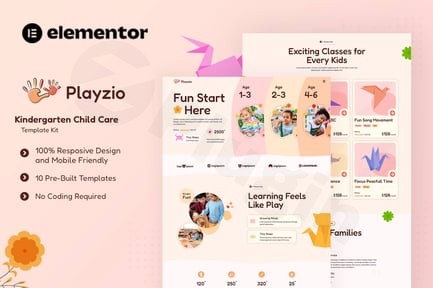
In today’s digital age, creating a warm, inviting, and professional online presence is crucial for any childcare business. The Playzio Kindergarten Elementor Template Kit offers an exceptional solution, empowering kindergartens, preschools, and daycare centers to craft engaging websites without needing a single line of code. This comprehensive template kit is designed to build trust with parents, showcase your nurturing environment, and highlight your unique approach to early childhood education through its cheerful aesthetic and intuitive design.If you’re looking to establish or refresh your online identity, the Kindergarten Child Care Elementor Template provided by Playzio is your ideal partner. It addresses the common challenge of creating a professional, responsive, and SEO-friendly website tailored specifically for the early learning sector, ensuring your message of care and development shines through.
Key Features of the Playzio Elementor Kit for Childcare Websites
The Playzio Template Kit is packed with features engineered to meet the specific needs of childcare and early learning providers. Built with 100% free Elementor widgets, it offers extensive customization without requiring Elementor Pro for its core functionality.
- Niche-Specific, Engaging Design: Playzio delivers a vivid, fun, and cheerful layout that perfectly embodies the spirit of early childhood education. Its intuitive design immediately conveys warmth and care, which is vital for attracting parents seeking a nurturing environment for their children. This Elementor Kindergarten Design is optimized to visually communicate your facility’s playful activities and commitment to learning.
- Fully Responsive and Mobile-Friendly: In an era where most parents access information on the go, Playzio ensures your website looks impeccable on any device – from desktops to tablets and smartphones. This responsive Elementor template for daycare centers guarantees a seamless user experience, regardless of screen size or resolution.
- Comprehensive Page Templates: Save countless hours with a full suite of ready-to-use page templates covering every essential aspect of a childcare website:
- Engaging Homepage: A captivating first impression.
- Detailed About Us: Share your philosophy and mission.
- Service Offerings & Single Service Pages: Clearly outline your programs (e.g., Montessori, after-school care).
- Educator/Teacher Profiles: Introduce your dedicated staff, building trust with parents.
- Activity Showcase: Highlight daily activities and special events.
- Pricing Information: A dedicated Elementor template kit with pricing tables for child care services.
- FAQ Section: Address common parent queries proactively.
- Blog/Article Templates: Share insights, news, and parenting tips.
- Contact Page with Inquiry Form: Make it easy for prospective parents to reach out.
- 404 Page: A branded page for missing content.
- Seamless Customization with No Coding Required: Leveraging Elementor’s drag-and-drop interface, Playzio puts you in complete control. Easily customize fonts (using the cheerful “Fredoka” font by default), colors, images, and layouts to perfectly match your brand’s identity. Elementor’s Global Styles feature also allows for consistent control over typography and colors across your entire site from a central point.
- SEO-Friendly Structure: Designed with best practices in mind, the template kit provides an SEO-friendly structure to help parents find your services more easily through search engines, boosting your online visibility.
Installation & Setup: How to install Playzio Kindergarten Elementor Template Kit
Getting your Playzio website up and running is a straightforward process, even for those new to WordPress. Here’s a step-by-step guide:
- Ensure WordPress is Ready: Playzio requires WordPress 6.5 or greater. For optimal performance and security, it’s highly recommended to use the latest WordPress version and PHP 8.x (PHP 7.4 or greater is the minimum). Your hosting environment should also have MySQL 5.6+ or MariaDB 10.5+. A WP Memory Limit of 512 MB or 768 MB is recommended for Elementor.
- Install Required Plugins: Playzio relies on Elementor and several other free plugins for full functionality. These are crucial:
- Elementor: The core page builder.
- Envato Elements plugin (or Template Kit Import plugin): This plugin is essential for easily importing the Playzio template kit.
- Premium Addons for Elementor
- The Plus Addons For Elementor
- Jeg Elementor Kit
- Ultimate Addons for Elementor Lite
- MetForm: For creating and managing custom inquiry forms.
- Install these plugins from your WordPress dashboard under
Plugins > Add New.
- Install a Compatible Theme: While Playzio works with most themes that support Elementor, it is optimized for use with the free “Hello Elementor” theme. Install and activate this theme for the best experience.
- Import the Playzio Template Kit:
- Once the Envato Elements plugin (or Template Kit Import) is installed and activated, navigate to
Elements > Installed Kitsin your WordPress dashboard. - Upload the Playzio template kit file (usually a
.zipfile). - Follow the on-screen prompts to import the global styles and individual page templates.
- Once the Envato Elements plugin (or Template Kit Import) is installed and activated, navigate to
- Customize Global Styles: After importing, go to
Elementor > Site Settingsto adjust global colors, fonts, and typography to align with your brand. This ensures consistency across all imported templates. - Import and Customize Individual Pages:
- Create new pages in WordPress (
Pages > Add New). - Edit each page with Elementor.
- Click on the “Envato Elements” icon (or “Add Template” icon depending on your import plugin) within Elementor, navigate to “My Templates,” and insert the desired Playzio page template (e.g., Home, About Us, Services).
- Use Elementor’s drag-and-drop interface to replace demo content with your own text, images, and videos.
- Create new pages in WordPress (
Practical Usage & Best Practices for Your Child Care Website Template Elementor
The Playzio Template Kit isn’t just a collection of designs; it’s a foundation for building an effective online presence for your childcare business. Here’s how to maximize its potential:
- Showcase Your Programs Clearly: Utilize the “Service” and “Single Service” page templates to detail each program you offer – from infant care and toddler programs to preschool and after-school activities. Use engaging descriptions, age-appropriate imagery, and clearly outline schedules and learning objectives. This is a vital aspect of any Elementor template kit for education.
- Highlight Your Team: The “Our Teacher” template is an excellent tool for introducing your educators. Include professional photos, brief bios, and their philosophy on early learning. Parents want to know who will be caring for their children, and personalized staff profiles build immense trust.
- Engage with Activities and Events: Regularly update the “Activity Showcase” to display photos and descriptions of daily fun, learning experiences, and special events. This gives prospective parents a vibrant glimpse into your center’s life and helps reinforce your brand as a dynamic and caring environment.
- Simplify Parent Communication: Use the “FAQ” section to answer common questions about enrollment, tuition, daily routines, and health policies. The “Contact Us” page with MetForm integration makes it easy for parents to inquire, schedule visits, or communicate directly, making your Playzio WordPress Template a hub for all interactions.
- Blog for Authority and SEO: Leverage the “Articles (Blog)” templates to share valuable content. Write about child development tips, healthy snacks, educational games, or updates about your center. This not only positions you as an expert but also provides fresh content for SEO, helping you rank for more non-branded search terms.
FAQ & Troubleshooting
Here are answers to common questions about the Playzio Kindergarten Child Care Elementor Template Kit:
What is Playzio Kindergarten Child Care Elementor Template Kit?
Playzio Kindergarten Child Care Elementor Template Kit is a pre-designed collection of website pages and sections specifically created for kindergartens, preschools, daycare centers, and early learning facilities. It’s built for the Elementor page builder in WordPress, allowing users to create a professional, vibrant, and fully responsive website with drag-and-drop ease, without requiring any coding knowledge.
Does Playzio Elementor Kit require Elementor Pro?
No, the core functionality of the Playzio Elementor Kit is designed using 100% free Elementor widgets, meaning you do not need Elementor Pro for its basic operation. However, if you wish to use advanced features like Elementor’s Theme Builder for highly customized global headers and footers, or other Elementor Pro-specific elements, an upgrade to Elementor Pro might be beneficial.
How to customize Playzio Elementor Template Kit?
You can customize the Playzio Elementor Template Kit directly within the Elementor page builder. After importing the kit, you can edit global styles (colors, fonts) via Elementor > Site Settings. For individual pages, open them with Elementor and use the drag-and-drop interface to change text, images, section layouts, and element styles. All elements are editable, giving you full control over the design to match your brand.
What are the best Elementor template kits for preschools?
While Playzio is an excellent choice for preschools due to its cheerful design and comprehensive page set, other notable Elementor template kits for preschools include WonderJoy, SunHappynest, Kidzonia, and Edukids. Playzio stands out for its strong reliance on free Elementor elements, making it a cost-effective option, while offering a complete solution tailored to the early childhood education niche.
What should I do if my website looks different after importing Playzio?
First, ensure all required plugins (Elementor, Envato Elements or Template Kit Import, Premium Addons, The Plus Addons, Jeg Elementor Kit, Ultimate Addons Lite, MetForm) are installed and activated. Also, confirm you are using a lightweight base theme like “Hello Elementor” as recommended. If issues persist, check Elementor’s Site Settings to ensure global styles are correctly applied, and then re-import the specific page templates if necessary. Clearing your website and browser cache can also resolve display inconsistencies.
Conclusion
The Playzio Kindergarten Elementor Template Kit provides a robust, user-friendly, and visually appealing foundation for any childcare or early learning center looking to establish a strong online presence. Its intuitive design, comprehensive set of page templates, and ease of customization make it an invaluable asset for busy educators and administrators. By leveraging the power of Elementor and Playzio, you can build a professional, responsive, and SEO-optimized website that effectively communicates your values, showcases your programs, and builds vital trust with prospective parents. For a high-converting Kindergarten Child Care Elementor Template, Playzio offers significant ROI, delivering a vibrant online home for your nurturing educational environment.
I. Download Limits & Account Benefits
- Free Downloads: Each email address receives 3 downloads per day for free products
- Upgrade Benefits: Purchase any paid product to increase your daily download limit by 3 for each paid product
- No Account Required: You can download immediately by receiving the download link via email
- Account Recommended: Create an account for easier access to your order history and direct update downloads
II. Understanding GPL vs Official Versions
Important: The products available on WPPick are GPL-licensed versions, which differ from official developer versions. Before purchasing, please read our comprehensive guide: Understanding GPL & Official Differences at WPPick
Key Points:
- GPL versions may not include premium support from original developers
- Updates may be delayed compared to official releases
- Some premium features might have limitations
- Always consider your specific needs and support requirements
III. Support & Assistance
We’re here to help through multiple channels:
- Email Support: Direct email assistance for all inquiries
- Live Chat: Real-time support during business hours
- Comprehensive Documentation: Detailed guides and tutorials
IV. Order Tracking
Access your complete purchase history and download links anytime: Order History
V. Account Access
New to WPPick? Login or Create Account to manage your downloads and orders efficiently.
VI. Refund Protection
We stand behind our products with a clear refund policy. Review our terms: Refund Policy
VII. Privacy & Security
Your data security is our priority. Learn how we protect your information: Privacy Policy
VII. Terms of Service
Understanding our service terms ensures a smooth experience: Terms of Use
Quick Tips for Best Experience
- Verify Compatibility: Check plugin/theme compatibility with your WordPress version
- Backup First: Always backup your site before installing new plugins or themes
- Test Environment: Consider testing on a staging site first
- Stay Updated: Regularly check for updates in your account dashboard
- Read Documentation: Review any included documentation for optimal setup
Need Help?
If you have questions about downloads, licensing, or need technical assistance, don’t hesitate to contact our support team. We’re committed to ensuring you have the best possible experience with WPPick products.
Ready to get started? Your download adventure begins with just one click!