

Poptics Pro – Ai Powered Popup Plugin For WordPress
/Year
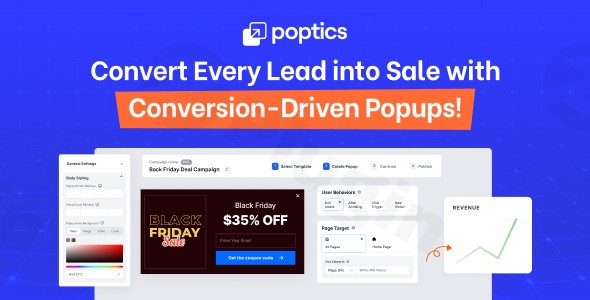
In the competitive landscape of digital marketing, capturing a visitor’s attention before they bounce is a significant challenge. Poptics Pro is a dynamic WordPress popup plugin designed to solve this problem by leveraging artificial intelligence to generate leads and drive sales. Unlike traditional popup tools that require manual copywriting and design expertise, Poptics Pro uses AI to streamline the creation process, making high-level conversion optimization accessible to every website owner.
Whether you are looking to grow your email list, reduce cart abandonment, or promote a seasonal sale, the Poptics Pro plugin provides the intelligence and flexibility needed to turn passive visitors into active customers.
Key Features: Why Poptics Pro is a Game-Changer
Poptics Pro stands out as a leading AI popup builder for WordPress by combining ease of use with advanced targeting technology. Here is a breakdown of the features that deliver real-world ROI:
1. AI-Powered Campaign Generation
By integrating directly with OpenAI, Poptics Pro can automatically generate high-converting headlines, descriptions, and calls-to-action (CTAs). This “smart” marketing approach ensures your messaging is optimized for engagement without requiring you to hire a professional copywriter.
2. Intuitive Drag-and-Drop Editor
You don’t need to know a single line of code. The plugin features a visual builder that allows you to customize every element of your popup. If you’re in a hurry, you can choose from a library of pre-designed, industry-specific templates that are fully responsive and mobile-friendly.
3. Advanced Smart Triggers
Timing is everything in conversion optimization. Poptics Pro includes several triggers to ensure your message appears at the perfect moment:
- Exit-Intent Technology: Detects when a user is about to leave your site and triggers a final offer to keep them engaged.
- Scroll Depth: Shows the popup only after a visitor has consumed a specific percentage of your content.
- Time Delay & Click Triggers: Perfect for showing offers after a set duration or when a specific button is clicked.
4. Specialized WooCommerce Integration
For online store owners, WooCommerce popups are essential. Poptics Pro offers dedicated features for:
- Cart Recovery: Reducing abandonment with timely discounts.
- Upsells & Cross-sells: Suggesting related products directly within the popup interface.
- Product Promotions: Highlighting flash sales on specific product pages.
5. Seamless Marketing Integrations
Centralize your lead collection by connecting Poptics Pro to your favorite tools. It supports FluentCRM, Mailchimp, Zapier, Active Campaign, Pabbly, and more, ensuring your new leads are immediately synced to your email marketing workflows.
How to Install and Set Up Poptics Pro
Setting up a lead generation popup on WordPress shouldn’t be complicated. Follow these steps to get started:
- Download and Install: Purchase Poptics Pro and download the .zip file. Go to your WordPress Dashboard, navigate to Plugins > Add New > Upload Plugin, and select the file. Click Install Now and then Activate.
- License Activation: Enter your license key in the Poptics Pro settings menu to unlock premium features and AI capabilities.
- Connect AI (OpenAI): To use the AI generation features, navigate to the “Integrations” tab and enter your OpenAI API key. This allows the plugin to draft content for you.
- Create Your First Campaign: Click on “Create New Popup.” You can choose to start from scratch with the drag-and-drop builder or select a pre-made template.
- Configure Triggers: Go to the “Display Rules” tab. Here, you can set your exit-intent popup or scroll-based triggers.
6. Publish: Once you are satisfied with the design and targeting, hit Publish. Your popup is now live and collecting leads!
Practical Usage & Best Practices
To get the most out of this conversion optimization WordPress tool, consider these real-world workflows:
Best Way to Reduce Cart Abandonment
Use the Exit-Intent trigger specifically on your WooCommerce checkout and cart pages. Offer a “10% off today only” coupon code. This creates urgency and provides a reason for the customer to complete their purchase instead of leaving.
Ideal for Building Email Lists
If you run a blog or news site, use the Scroll Depth trigger (set to 50%). When a reader is halfway through an article, they have already demonstrated interest. This is the ideal time to trigger a popup offering a free eBook or newsletter subscription in exchange for their email address.
Use A/B Testing for Maximum Performance
Available as a Pro feature, A/B testing allows you to run two versions of a popup simultaneously. Test a “red CTA button” against a “blue CTA button” or different AI-generated headlines. The data-driven insights from the built-in analytics will show you exactly which version converts better.
FAQ & Troubleshooting
What is Poptics Pro?
Poptics Pro is a WordPress plugin that uses artificial intelligence to help website owners create, target, and optimize popup campaigns. It is designed to increase lead generation and sales through smart triggers like exit-intent and scroll depth.
Does Poptics Pro work with WooCommerce?
Yes, Poptics Pro is fully compatible with WooCommerce (versions 5.x through 9.x). It includes specialized features for cart recovery, product-specific promotions, and upsells, making it an excellent choice for eCommerce stores.
Is Poptics Pro compatible with my page builder?
Poptics Pro is designed to work seamlessly with the WordPress Block Editor (Gutenberg) and is compatible with major themes and plugins like Elementor, Contact Form 7, and WPForms. It is a lightweight plugin that follows WordPress coding standards to ensure high performance.
How do I create popups without coding on WordPress?
You can create professional popups using Poptics Pro’s intuitive drag-and-drop editor. You simply select elements (text, images, forms), move them into place, and customize colors/fonts via a visual interface—no CSS or HTML knowledge is required.
What should I do if the AI generation is not working?
Ensure that you have correctly entered your OpenAI API key in the plugin settings and that your OpenAI account has available credits. If issues persist, the Poptics Pro support team is known for being highly responsive and can help troubleshoot API connectivity issues.
Verdict: Is Poptics Pro Worth It?
If you are looking for the best AI-powered popup plugin for WordPress, Poptics Pro offers a compelling balance of innovation and ease of use. While competitors like OptinMonster offer deep features, Poptics Pro’s integration of AI for content creation gives it a unique edge for users who want to save time and improve copy quality.Final Verdict: Poptics Pro is an excellent investment for marketers, agencies, and WooCommerce store owners who want a high-performance, low-friction way to increase their conversion rates. Its lightweight code ensures your site stays fast, while its smart triggers ensure you never miss a lead.Ready to transform your website’s engagement? Visit wppick.com for more insights on the best WordPress tools.
I. Download Limits & Account Benefits
- Free Downloads: Each email address receives 3 downloads per day for free products
- Upgrade Benefits: Purchase any paid product to increase your daily download limit by 3 for each paid product
- No Account Required: You can download immediately by receiving the download link via email
- Account Recommended: Create an account for easier access to your order history and direct update downloads
II. Understanding GPL vs Official Versions
Important: The products available on WPPick are GPL-licensed versions, which differ from official developer versions. Before purchasing, please read our comprehensive guide: Understanding GPL & Official Differences at WPPick
Key Points:
- GPL versions may not include premium support from original developers
- Updates may be delayed compared to official releases
- Some premium features might have limitations
- Always consider your specific needs and support requirements
III. Support & Assistance
We’re here to help through multiple channels:
- Email Support: Direct email assistance for all inquiries
- Live Chat: Real-time support during business hours
- Comprehensive Documentation: Detailed guides and tutorials
IV. Order Tracking
Access your complete purchase history and download links anytime: Order History
V. Account Access
New to WPPick? Login or Create Account to manage your downloads and orders efficiently.
VI. Refund Protection
We stand behind our products with a clear refund policy. Review our terms: Refund Policy
VII. Privacy & Security
Your data security is our priority. Learn how we protect your information: Privacy Policy
VII. Terms of Service
Understanding our service terms ensures a smooth experience: Terms of Use
Quick Tips for Best Experience
- Verify Compatibility: Check plugin/theme compatibility with your WordPress version
- Backup First: Always backup your site before installing new plugins or themes
- Test Environment: Consider testing on a staging site first
- Stay Updated: Regularly check for updates in your account dashboard
- Read Documentation: Review any included documentation for optimal setup
Need Help?
If you have questions about downloads, licensing, or need technical assistance, don’t hesitate to contact our support team. We’re committed to ensuring you have the best possible experience with WPPick products.
Ready to get started? Your download adventure begins with just one click!