
Post Views Counter Pro – Best WordPress Post Views Plugin
/Year
Understanding how your audience interacts with your website content is crucial for any successful online venture. While general analytics tools provide a broad overview, sometimes you need specific, granular insights into your content’s popularity without the overhead of third-party tracking. This is where Post Views Counter Pro, a leading WordPress Post Views Plugin, shines. It offers a powerful, privacy-focused solution to accurately track and display content views, empowering you to make data-driven decisions.Post Views Counter Pro stands out as the best WordPress Post Views Counter for those who prioritize performance, privacy, and actionable insights. It provides real-time analytics directly within your WordPress dashboard, making it easy to see which posts, pages, authors, and even custom post types are captivating your visitors the most.
Key Features That Transform Your Content Analytics
Post Views Counter Pro goes beyond basic view counting, offering a suite of advanced features designed to give you comprehensive insights into your content’s performance.
Comprehensive Content Tracking & Granular Data
Post Views Counter Pro provides detailed tracking capabilities for all your content. You can monitor views for:
- Individual posts and pages.
- Custom post types, ensuring all your unique content, from portfolios to product listings, is covered.
- Specific authors and categories, helping you identify your most successful writers and content topics.
- Taxonomy terms and author archives, offering even deeper segmentation of your performance data.This detailed breakdown helps you pinpoint exactly what content resonates most with your audience, acting as a true WordPress content popularity tracker.
Privacy-Focused & GDPR Compliant Analytics
In an era where data privacy is paramount, Post Views Counter Pro offers a refreshing approach. All view data is stored securely on your server, eliminating reliance on external third-party services. This commitment to data sovereignty ensures that you maintain full control over your visitor information, making it a truly GDPR compliant WordPress analytics solution. You get the insights you need while respecting your visitors’ privacy.
Lightning-Fast Performance & Advanced Caching Optimization
Performance is a core pillar of Post Views Counter Pro. Built with optimization in mind, it utilizes highly efficient database queries and intelligent caching mechanisms to deliver accurate tracking without ever slowing down your WordPress site.
- Fast AJAX Counting: The Pro version introduces an enhanced AJAX counting method specifically designed for superior accuracy and compatibility with advanced caching plugins.
- Caching Plugin Compatibility: It seamlessly integrates with popular caching solutions like WP Rocket, LiteSpeed Cache, W3 Total Cache, and WP Super Cache. This ensures your view counts remain precise even under heavy traffic, addressing the need for a WordPress page view counter with caching that truly works. This means you gain powerful insights without compromising your site’s speed or user experience.
Intuitive Dashboard & In-depth Reporting
Accessing your analytics has never been easier. The plugin features a clean, intuitive dashboard that displays essential metrics at a glance. For deeper dives, it offers:
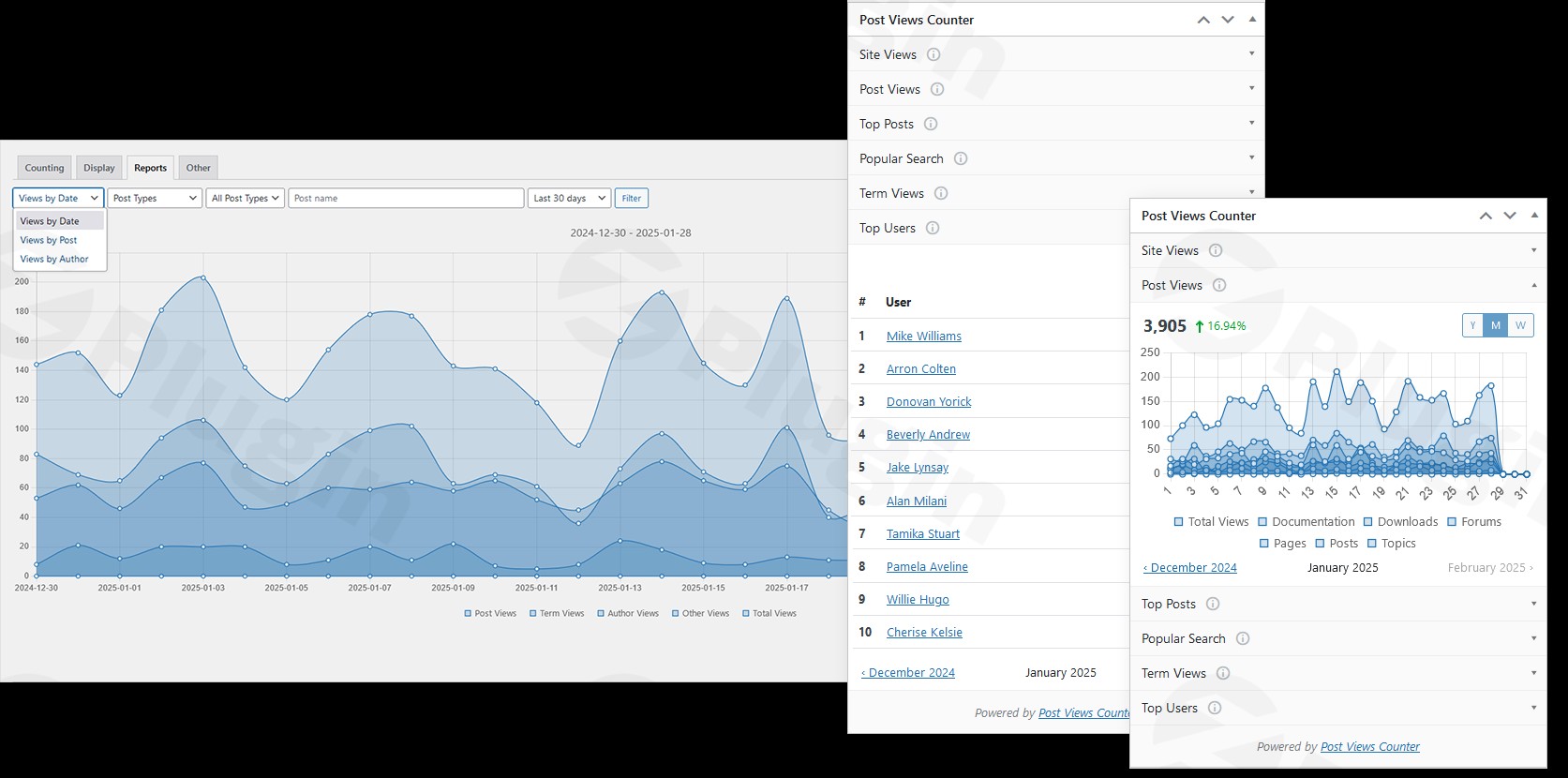
- Detailed Statistics & Visual Charts: Analyze views by date, individual post, and author, presented in easy-to-understand visual charts.
- Customizable Views Period: Set flexible timeframes for your reports, such as the last 7 or 30 days, to track trends and compare performance over time.This user-friendly interface helps you quickly identify top-performing content and make informed, data-driven content decisions.
Advanced Data Management & Accuracy Tools
Post Views Counter Pro provides tools for managing your data with precision:
- Manual View Adjustment: Need to correct a historical count or set a baseline? You have the ability to manually adjust a post’s view count.
- Data Export: Easily export your view data to CSV or XML files for further analysis, archiving, or sharing with your team.
- Exclusion Options: Ensure data accuracy by easily excluding bots, specific user roles, logged-in users, or particular IP addresses from your view counts. This is crucial to
exclude bots from WordPress post view countfor more realistic statistics. - Multisite Compatibility: The plugin works flawlessly in WordPress Multisite environments, making it ideal for networks.
Seamless Integrations for Enhanced Functionality
Post Views Counter Pro extends its utility through smart integrations:
- Page Builder Compatibility: It integrates with popular page builders like Elementor Pro, Divi Theme, and GenerateBlocks Pro. This allows you to order content by view counts directly within your page builder layouts, dynamically showcasing your most popular articles. This addresses
Post Views Counter Pro Elementor integrationand similar needs for other builders. - Google AMP Support: Ensures that view counting functions correctly even on Google AMP (Accelerated Mobile Pages), covering all your content delivery methods.
Installation & Setup: Get Started in Minutes
Installing Post Views Counter Pro is a straightforward process, similar to any other premium WordPress plugin.
- Purchase & Download: After purchasing the plugin, download the
.zipfile from your account. - Upload & Install:
- Log in to your WordPress admin dashboard.
- Navigate to Plugins > Add New.
- Click on the “Upload Plugin” button at the top.
- Choose the downloaded
.zipfile and click “Install Now”.
- Activate: Once installed, click “Activate Plugin”.
- Configuration:
- Go to Settings > Post Views Counter in your WordPress dashboard.
- Review the general settings, including counting methods (PHP, JavaScript, REST API, Fast AJAX), post types to count, and exclusion rules (bots, user roles, IP addresses).
- Configure how you want view counts displayed on your frontend, or opt to use shortcodes/blocks for manual placement.
- Explore the Pro-specific settings for reports, data export, and integrations.With minimal effort, you’ll have your WordPress site analytics plugin up and running, ready to track valuable content insights.
Practical Usage: Making Data-Driven Content Decisions
Post Views Counter Pro isn’t just about numbers; it’s about empowering you to make smarter content choices.
1. Identifying Your Top-Performing Content
Regularly check the “Post Views” column in your WordPress admin area (for posts, pages, and custom post types) and the main dashboard widget. Sort by views to quickly identify your most popular pieces. This immediate feedback allows you to:
- Promote successful content: Reshare popular posts on social media or link to them more prominently.
- Inform content strategy: Understand what topics, formats, or authors are most engaging for your audience, guiding future content creation.
2. Optimizing Editorial and Author Strategies
If you run a multi-author blog or a large content site, tracking views by author and category is invaluable.
- Recognize high-impact authors: See which contributors consistently produce engaging content.
- Refine category focus: Determine which content categories are performing best and allocate resources accordingly. For example, if your “Tutorials” category consistently outperforms “News,” you might create more tutorial-style content.
3. Enhancing Page Builder Layouts with Popular Content
Leverage the plugin’s integrations with Elementor Pro, Divi, and GenerateBlocks Pro. Use dynamic queries within your page builder to:
- Create “Most Popular Posts” sections: Automatically display your highest-viewed content in sidebars, footers, or dedicated sections, encouraging deeper site exploration.
- Order content dynamically: On archive pages or custom layouts, order your posts by view count to highlight what’s trending. This is a powerful application of
Post Views Counter Pro Elementor integrationfor dynamic content display.
4. Ensuring Data Accuracy and Cleanliness
Utilize the comprehensive exclusion options to ensure your data reflects genuine human engagement.
- Exclude bots: Make sure automated crawlers don’t inflate your view counts.
- Exclude specific users/roles: If you’re a content creator constantly editing and previewing, you can
exclude logged-in usersor your own user role to get a more accurate picture of external visitor views. - Manually adjust views: If you migrate content or need to correct an anomaly, the
manual adjustment WordPress post viewsfeature provides flexibility.
FAQ & Troubleshooting
How does Post Views Counter Pro improve performance?
Post Views Counter Pro is built with speed and efficiency as a priority. It uses optimized database queries to minimize load and offers multiple counting methods. Critically, the Pro version includes Fast AJAX Counting mode and caching optimization. This ensures it’s fully compatible with popular caching plugins like WP Rocket, LiteSpeed Cache, and W3 Total Cache, allowing accurate view tracking without slowing down your site, even under heavy traffic.
What are the benefits of Post Views Counter Pro vs. the free version?
While the free Post Views Counter plugin provides robust basic tracking, the Pro version extends its capabilities significantly. Key benefits of upgrading include: Fast AJAX Counting for better performance with caching, in-depth reports with visual charts and customizable view periods, data export (CSV/XML), advanced tracking for taxonomy terms and author archives, integrations with popular page builders (Elementor Pro, Divi, GenerateBlocks Pro) for ordering content by views, and Google AMP support. These features offer more powerful analytics and greater flexibility for professional users.
Is Post Views Counter Pro GDPR compliant?
Yes, Post Views Counter Pro is designed with privacy in mind and is GDPR compliant. It stores all view data directly on your server, giving you full control over the information and eliminating the need to send data to third-party services. This approach helps websites meet GDPR requirements by keeping visitor data local and manageable.
Can I export data from Post Views Counter Pro?
Yes, with Post Views Counter Pro, you have the ability to export view data. You can easily export your detailed content view statistics into either CSV or XML files. This feature is invaluable for further analysis in spreadsheet software, for creating custom reports, or for transferring data for other purposes.
Does Post Views Counter Pro integrate with popular page builders like Elementor?
Absolutely. Post Views Counter Pro provides seamless integrations with leading WordPress page builders, including Elementor Pro, Divi Theme, and GenerateBlocks Pro. This allows you to dynamically order and display your content based on view counts directly within your page builder designs, making it easy to create “Most Popular” sections or feature trending articles across your site.
Conclusion
Post Views Counter Pro is an indispensable WordPress Post Views Plugin for anyone serious about understanding and optimizing their content performance. By providing accurate, real-time, and privacy-focused analytics directly within your dashboard, it cuts through the noise and delivers actionable insights into what truly resonates with your audience.From comprehensive tracking of posts, pages, and custom post types, to lightning-fast performance even with caching, and seamless integrations with popular page builders, Post Views Counter Pro offers a robust and reliable solution. It’s ideal for bloggers, content marketers, website owners, and agencies who need precise data to inform their editorial strategy, improve user engagement, and ultimately drive better results. Invest in Post Views Counter Pro to gain powerful, on-site analytics and transform how you measure content success.
I. Download Limits & Account Benefits
- Free Downloads: Each email address receives 3 downloads per day for free products
- Upgrade Benefits: Purchase any paid product to increase your daily download limit by 3 for each paid product
- No Account Required: You can download immediately by receiving the download link via email
- Account Recommended: Create an account for easier access to your order history and direct update downloads
II. Understanding GPL vs Official Versions
Important: The products available on WPPick are GPL-licensed versions, which differ from official developer versions. Before purchasing, please read our comprehensive guide: Understanding GPL & Official Differences at WPPick
Key Points:
- GPL versions may not include premium support from original developers
- Updates may be delayed compared to official releases
- Some premium features might have limitations
- Always consider your specific needs and support requirements
III. Support & Assistance
We’re here to help through multiple channels:
- Email Support: Direct email assistance for all inquiries
- Live Chat: Real-time support during business hours
- Comprehensive Documentation: Detailed guides and tutorials
IV. Order Tracking
Access your complete purchase history and download links anytime: Order History
V. Account Access
New to WPPick? Login or Create Account to manage your downloads and orders efficiently.
VI. Refund Protection
We stand behind our products with a clear refund policy. Review our terms: Refund Policy
VII. Privacy & Security
Your data security is our priority. Learn how we protect your information: Privacy Policy
VII. Terms of Service
Understanding our service terms ensures a smooth experience: Terms of Use
Quick Tips for Best Experience
- Verify Compatibility: Check plugin/theme compatibility with your WordPress version
- Backup First: Always backup your site before installing new plugins or themes
- Test Environment: Consider testing on a staging site first
- Stay Updated: Regularly check for updates in your account dashboard
- Read Documentation: Review any included documentation for optimal setup
Need Help?
If you have questions about downloads, licensing, or need technical assistance, don’t hesitate to contact our support team. We’re committed to ensuring you have the best possible experience with WPPick products.
Ready to get started? Your download adventure begins with just one click!
- Count Time option to store the views in GMT or Local time
- Reports extended with Author Posts and Author Archive
- Counting Jet Engine Profile Builder user profiles as archive view
- Improved logic for Admin Display and Admin Edit
- Settings UI improvements
- Caching compatibility option
- Displaying dynamic views
- Database table not created in some edge cases
- Load plugin textdomain warning
- Move admin column options to Display settings
I love how your posts are both informative and entertaining You have a talent for making even the most mundane topics interesting