

Printec – Printing Company Woocommerce WordPress Theme
/Year
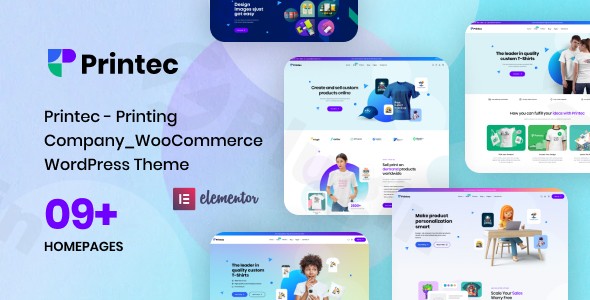
Establishing a robust online presence for a printing business demands more than just a brochure website; it requires a specialized platform capable of showcasing diverse services, handling custom orders, and processing transactions seamlessly. The Printec WordPress theme emerges as a powerful, industry-specific WooCommerce theme for print shops, meticulously engineered to transform printing companies into online powerhouses. Designed with professional aesthetics and advanced e-commerce functionality, Printec offers a comprehensive solution for print shops, graphic designers, and custom merchandise businesses looking to thrive in the digital landscape.Printec is a clean, elegant, and modern responsive premium theme that focuses on delivering a polished, conversion-ready storefront. Its design philosophy prioritizes clarity, intuitive navigation, and a strong visual hierarchy, ensuring that your printing services are presented professionally and engagingly across all devices.
Key Features: Design, Layout & Performance That Elevate Your Print Shop
Printec isn’t just another multipurpose theme; it’s a tailor-made platform built to meet the unique demands of the printing industry. Its feature set combines stunning design with deep functionality, ensuring both visual appeal and operational efficiency.
Design & Layout Options
Printec provides a rich toolkit for crafting a visually compelling website without requiring any coding expertise.
- Diverse Homepage Demos: Get a head start with seven or more unique demo homepages. These pre-designed layouts offer varied structures and styles, allowing you to quickly launch your site with professional content and imagery. Each demo is thoughtfully crafted for printing businesses, offering different approaches to showcase services and products.
- Extensive Inner Pages: Beyond the homepage, the theme includes multiple dedicated “About” pages, at least four distinct blog page layouts, a robust WooCommerce shop page, and a multitude of other inner page designs. These provide a solid foundation for all your content needs, from detailing your company’s story to presenting your product catalog.
- Flexible Headers & Footers: Customize your site’s top and bottom sections with flexible header and footer layouts. This allows for critical branding elements and navigation to be consistently presented, enhancing user experience.
- Specialized Visual Elements: Showcase your work with dedicated gallery, portfolio, and case study layouts, complete with lightbox functionality. This is crucial for demonstrating the quality and range of your printing projects. Smart product tables, quote/estimate prompts, and project galleries are integrated to convert browsers into buyers by clearly presenting options and encouraging inquiries.
Customization Capabilities
Branding your website to reflect your company’s identity is effortless with Printec.
- Drag & Drop Page Builder: The theme deeply integrates with the Elementor Page Builder, a leading visual page builder. This allows you to customize virtually every aspect of your site—from headers and footers to individual page sections—using a powerful yet intuitive drag-and-drop interface. No coding knowledge is necessary to achieve complex and responsive layouts.
- Global Styles & Theme Options: Control your site’s overall look and feel through comprehensive theme options and global styles. Easily brand your website by customizing colors, typography, spacing, and sections across the entire site, ensuring consistency and coherence.
- Pre-built Templates: Leverage the one-click demo import tool to bring in any of the professionally designed homepage and inner page templates. This allows for rapid site deployment, with all content, images, and settings pre-configured.
Performance & SEO Features
In today’s competitive online landscape, speed and search engine visibility are paramount.
- Mobile-Optimized Responsive Design: Printec is built with a mobile-first approach, ensuring your printing services look exceptional and perform flawlessly on desktops, tablets, and smartphones. This critical feature captures customers regardless of their browsing device and is essential for modern SEO.
- SEO-Optimized Structure: Engineered with search engine optimization best practices, Printec helps your printing business rank higher for crucial keywords like “printing services,” “local printing companies,” and “specialized printing solutions.” Its clean code and structured headings provide a strong foundation for organic search success.
- Optimized Assets: The theme is designed for speed, featuring optimized assets to keep page load times lightweight. This contributes to a better user experience and improved search engine rankings, as site speed is a key ranking factor.
Installation & Demo Import: Get Your Print Shop Online Fast
Setting up your professional printing company website with Printec is designed to be straightforward, even for users without extensive technical expertise. Here’s a step-by-step guide:
- Install & Activate the Theme: After purchasing Printec, download the theme package. Navigate to your WordPress dashboard, go to
Appearance > Themes > Add New > Upload Theme, choose the Printec.zipfile, and clickInstall Now. Once installed, clickActivate. - Install Required Companion Plugins: Upon activation, Printec will typically recommend installing a set of plugins essential for its full functionality. These usually include:
- Elementor: For drag-and-drop page building.
- WooCommerce: The core e-commerce functionality.
- Contact Form 7: For contact and inquiry forms.
- Revolution Slider: Often included for dynamic content displays in demo imports.Follow the prompts to install and activate all recommended plugins.
- Use the One-Click Demo Import: Printec features a convenient one-click demo import tool. This is usually found under an
AppearanceorPrintec Optionsmenu in your WordPress dashboard. Select your preferred demo from the available options (e.g., one of the seven unique homepages) and initiate the import. - What to Expect: The demo import process will populate your site with pre-designed pages, posts, sample products, menus, widgets, and theme settings, making your website look identical to the live demo. This can take several minutes, depending on your hosting provider and internet speed. It’s advisable to ensure your server meets standard WordPress memory and timeout limits to prevent issues during large demo imports. After the import, you’ll find pre-configured menus, widgets in their designated areas, and a structured set of pages ready for your content.
Customization Guide: Branding Your Printing Business Website
Personalizing Printec to perfectly match your brand’s identity is intuitive thanks to its deep integration with Elementor and comprehensive theme options.
- Using Elementor for Layouts: For page-specific layouts and content, the Elementor page builder is your primary tool. Simply navigate to any page or post you wish to edit and click “Edit with Elementor.” You can then drag and drop elements, customize text, images, colors, and responsive settings directly on the front end. This visual approach means you see your changes in real-time, making design adjustments incredibly efficient.
- Global Styling with Theme Options: Printec provides a dedicated “Theme Options” panel (often found under
Appearanceor a custom theme menu in your dashboard). Here, you can define global styles that apply across your entire site.- Colors: Easily change your brand’s primary, secondary, and accent colors.
- Typography: Select your preferred fonts, font sizes, line heights, and letter spacing for headings, body text, and other elements.
- Logo & Favicon: Upload your company logo and favicon to establish your brand identity immediately.
- Header & Footer Layouts: Choose from flexible pre-designed header and footer styles and customize their content (e.g., contact information, social media links, navigation).
- Setting Up Pages and Menus:
- Homepage: Go to
Settings > Readingand set your desired imported demo homepage as your static front page. - Blog Page: Similarly, designate a page for your blog posts under
Settings > Reading. - Menus: Manage your site’s navigation under
Appearance > Menus. You can create multiple menus (e.g., primary navigation, footer menu) and assign them to the theme’s various menu locations.
- Homepage: Go to
- Intuitive Customization Experience: Printec’s customization experience is highly intuitive. The combination of Elementor’s visual builder and the structured theme options panel ensures that even beginners can achieve a professional, branded website. The theme often includes helpful design patterns and presets within Elementor to accelerate your design process.
FAQ & Troubleshooting for Printec
Here are answers to common questions about the Printec WordPress theme:
Is Printec compatible with Elementor, WPBakery, or Gutenberg?
Printec is built with and primarily relies on the Elementor Page Builder for its drag-and-drop customization. While it functions with the default WordPress Block Editor (Gutenberg) for basic content, its advanced layouts and features are optimized for Elementor. Other page builders like WPBakery or Beaver Builder are not specifically mentioned as being integrated or fully compatible.
Does Printec support WooCommerce for online stores and custom print orders?
Yes, Printec is a WooCommerce WordPress theme designed for seamless integration with WooCommerce. It includes specialized features for printing companies, such as advanced printing service management, customizable product options (e.g., material selection, finishing services, file upload functionality), and quick quote calculators, making it ideal for managing custom print orders, products, and payments online.
Does the Printec theme support child themes?
Yes, a child theme is included with Printec. Using a child theme is a recommended best practice for making customizations (e.g., custom CSS, template modifications) without affecting the core theme files. This ensures your changes are preserved when the main Printec theme receives updates.
How can I update the Printec theme without losing my customizations?
To update the Printec theme safely, always use the built-in WordPress update mechanism (if you purchased from ThemeForest and have registered your license). If you have made customizations, ensure they are within a child theme. Updates to the parent theme will not overwrite changes made in your child theme. Always back up your website before performing any theme or plugin updates.
What should I do if the demo import fails or looks different from the demo site?
If the demo import fails, check your server’s PHP configuration for sufficient memory limits (e.g., memory_limit, max_execution_time). High-quality hosting is crucial for successful large imports. If the demo looks different, ensure all recommended plugins (especially Elementor, WooCommerce, and Revolution Slider, if used in the demo) are installed and activated. Sometimes, images are placeholders and need to be replaced, or specific global settings need minor adjustments to perfectly match the demo’s appearance.
Conclusion: Why Printec is the Right Choice for Your Printing Business
The Printec WordPress theme stands out as an exceptional choice for any printing company, print shop, or graphic design studio aiming to establish a professional, high-converting online presence. Its specialized feature set, robust WooCommerce integration, and user-friendly customization powered by Elementor make it an unparalleled solution in its niche.With its diverse demo homepages, flexible layout options, and dedicated sections for portfolios and service showcases, Printec offers immense design flexibility. Branding your site is intuitive, thanks to comprehensive global styles and the drag-and-drop power of Elementor. Furthermore, its focus on performance and SEO readiness ensures your site is fast, mobile-friendly, and optimized to rank higher in search results, driving more traffic and sales.Printec is ideal for business owners in the printing sector, freelancers, and agencies who need a reliable, professional, and e-commerce-ready platform without the need for extensive coding. If you’re looking to create a website that not only beautifully showcases your printing expertise but also streamlines online orders and enhances customer engagement, Printec is a confident recommendation. It’s more than just a theme; it’s a comprehensive digital storefront engineered for the success of your printing business.
I. Download Limits & Account Benefits
- Free Downloads: Each email address receives 3 downloads per day for free products
- Upgrade Benefits: Purchase any paid product to increase your daily download limit by 3 for each paid product
- No Account Required: You can download immediately by receiving the download link via email
- Account Recommended: Create an account for easier access to your order history and direct update downloads
II. Understanding GPL vs Official Versions
Important: The products available on WPPick are GPL-licensed versions, which differ from official developer versions. Before purchasing, please read our comprehensive guide: Understanding GPL & Official Differences at WPPick
Key Points:
- GPL versions may not include premium support from original developers
- Updates may be delayed compared to official releases
- Some premium features might have limitations
- Always consider your specific needs and support requirements
III. Support & Assistance
We’re here to help through multiple channels:
- Email Support: Direct email assistance for all inquiries
- Live Chat: Real-time support during business hours
- Comprehensive Documentation: Detailed guides and tutorials
IV. Order Tracking
Access your complete purchase history and download links anytime: Order History
V. Account Access
New to WPPick? Login or Create Account to manage your downloads and orders efficiently.
VI. Refund Protection
We stand behind our products with a clear refund policy. Review our terms: Refund Policy
VII. Privacy & Security
Your data security is our priority. Learn how we protect your information: Privacy Policy
VII. Terms of Service
Understanding our service terms ensures a smooth experience: Terms of Use
Quick Tips for Best Experience
- Verify Compatibility: Check plugin/theme compatibility with your WordPress version
- Backup First: Always backup your site before installing new plugins or themes
- Test Environment: Consider testing on a staging site first
- Stay Updated: Regularly check for updates in your account dashboard
- Read Documentation: Review any included documentation for optimal setup
Need Help?
If you have questions about downloads, licensing, or need technical assistance, don’t hesitate to contact our support team. We’re committed to ensuring you have the best possible experience with WPPick products.
Ready to get started? Your download adventure begins with just one click!
No changelog available.