
Product Configurator For Woocommerce Addon – Multiple Choice
/Year
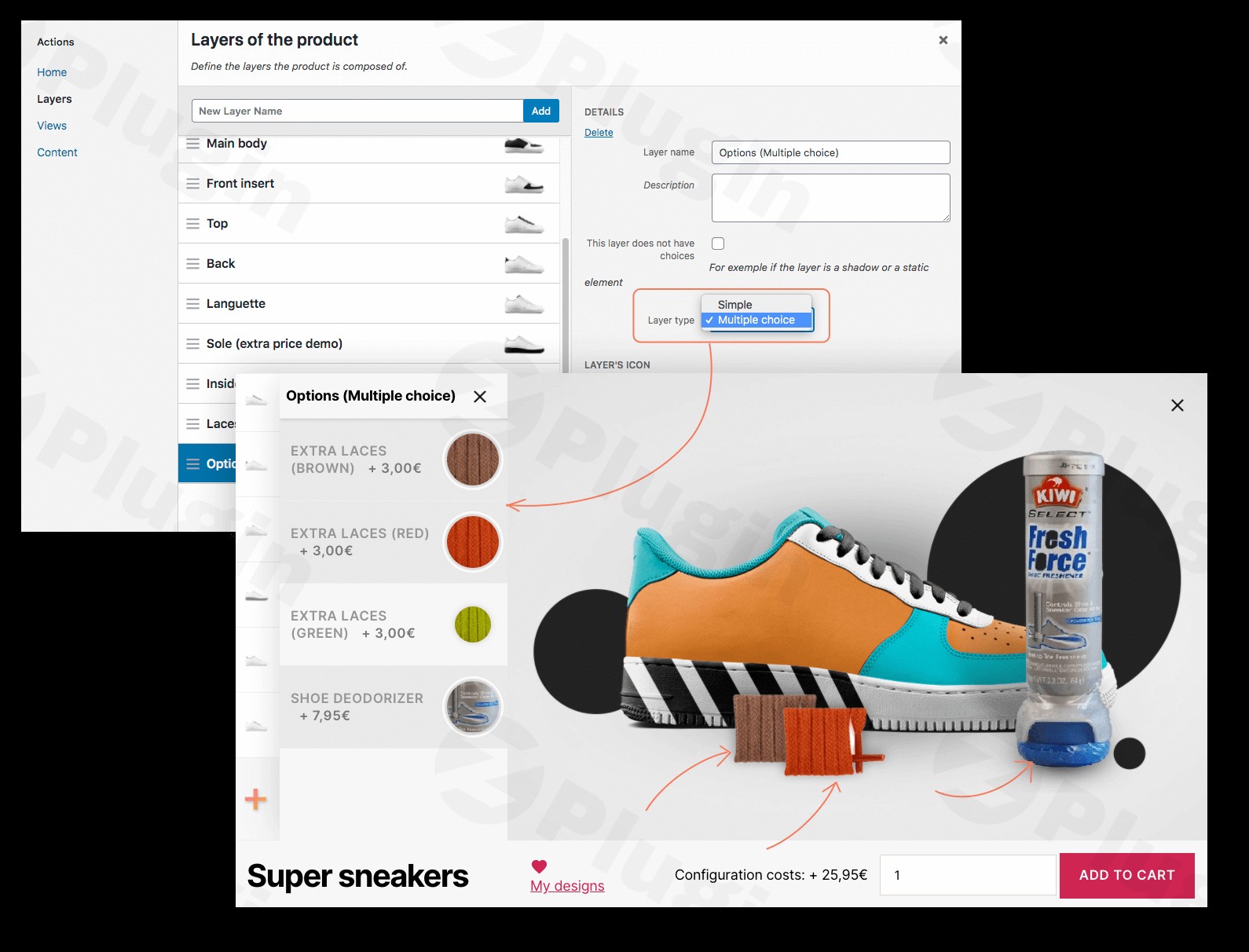
In today’s competitive e-commerce landscape, offering personalized products is no longer a luxury but a necessity. The Product Configurator For WooCommerce Addon – Multiple Choice is a premium WordPress plugin designed to empower WooCommerce store owners with advanced product customization capabilities, specifically by enabling customers to select multiple options within a single configuration layer. This addon significantly enhances the core Product Configurator for WooCommerce plugin, providing an intuitive and powerful solution for businesses looking to offer highly personalized products.This article provides an in-depth look at this essential premium addon, detailing its features, benefits, and how it can transform your online store’s product offerings.
Introduction to Advanced Product Customization
The core Product Configurator for WooCommerce plugin provides a robust framework for visually customizing products using layered images, allowing customers to see their unique creations in real-time. The Multiple Choice Addon builds upon this foundation by introducing a critical feature: the ability for customers to select several options within a single layer. This is particularly valuable for products with numerous interdependent choices or where multiple individual components must be selected concurrently.This premium solution is engineered for seamless integration with WooCommerce, providing an expert-level tool that simplifies complex product configurations for both store owners and customers. It’s designed to boost customer satisfaction, reduce return rates, and increase sales by giving shoppers exactly what they want.
Key Features: Unlocking Flexible Product Configuration
The Product Configurator For WooCommerce Addon – Multiple Choice, in conjunction with its core plugin, offers a comprehensive suite of features tailored to advanced product customization:
Core “Multiple Choice” Addon Feature:
- Multiple Choices Per Layer: This is the flagship feature of the addon. It allows customers to select multiple options within a single configuration layer. For example, if configuring a bicycle, a single “Accessories” layer could allow selections for a basket, lights, and a bell simultaneously, each adding to the final product visualization and price. This functionality is ideal for products with diverse options or when individual choices need to be selected concurrently without creating redundant layers.
Enhanced Features of the Product Configurator for WooCommerce (Core Plugin):
- Layered Image Rendering & Real-Time Previews: The system utilizes transparent PNG image layers to construct a dynamic, real-time visual preview of the customized product. As customers make selections, the product image updates instantly, ensuring they see exactly what they’re building.
- Multiple Views: Showcase your products from various angles or perspectives (e.g., front, side, back) to provide a complete visual representation of the customization.
- Multi-Step Configurator: For highly complex products, configurations can be broken down into logical, manageable steps, significantly improving the user experience and reducing cognitive overload.
- Customization Options: Offer a wide array of choices including colors, sizes, materials, and components, allowing customers extensive personalization possibilities.
- Advanced Description: Incorporate detailed information that might not fit directly into the configurator interface by adding it to specific layers or choices, ensuring customers have all necessary product details.
- Text Overlay: Customers can add custom text, monograms, or labels to their product and immediately see how it appears on the live preview, perfect for personalized gifts or branded items.
- Save and Share Design: Customers can save their customized designs to their user accounts for future reference or share them with others, fostering engagement and potentially increasing conversions.
- Conditional Logic: Implement dynamic rules to show/hide or auto-select specific items based on preceding customer choices, ensuring logical and valid product configurations.
- Price per Option & Automated Pricing Adjustments: Assign specific additional pricing to individual options. The plugin automatically updates the total product price in real-time as customers make selections, providing transparent and accurate cost calculations.
- Form Fields: Integrate custom input fields (text, numbers, file uploads) to gather specific user data or allow for truly unique personalization, such as uploading a logo for a custom-printed item.
- Custom Pricing Formulas: Leverage powerful formulas to calculate advanced prices dynamically, factoring in user input, chosen options, and complex business logic.
- Inventory & Stock Management: Efficiently track inventory for each configurable option, either directly within the configurator or by linking options to existing WooCommerce products.
- Linked Products: Link any configurator choice to a real WooCommerce product. This enables precise inventory tracking (SKUs), allows for the addition of real components to the cart, and supports integration with ERP or warehouse management systems for a streamlined fulfillment process.
- User-Friendly Interface: Both the backend for store owners and the frontend for customers are designed with clarity and intuition in mind, making complex configurations easy to manage and navigate.
- Multi-Language Support: The plugin is fully compatible with popular translation plugins like WPML and Polylang, ensuring that layer and choice fields can be localized for a global audience.
- Integration with WooCommerce: Enjoy seamless, native integration with the WooCommerce ecosystem, leveraging all its robust e-commerce functionalities.
Value Proposition & Benefits for Your Business
The Product Configurator For WooCommerce Addon – Multiple Choice delivers significant value to any online store, simplifying complex product offerings and enhancing the overall customer journey:
- Increased Sales & Customer Satisfaction: By offering highly customizable products, you cater directly to customer desires, leading to higher conversion rates and greater satisfaction. Studies consistently show a strong interest in personalized products.
- Competitive Advantage: Stand out from competitors by providing an engaging and interactive shopping experience that many standard WooCommerce setups cannot match.
- Streamlined Workflow: Eliminate the need to create numerous product variations manually. The configurator dynamically generates product options and visuals, saving significant time and resources.
- Reduced Refund Rates: Real-time visual previews allow customers to see precisely what they are ordering, leading to fewer misunderstandings and, consequently, fewer returns or refund requests.
- Enhanced User Experience: The intuitive multi-step configuration, real-time feedback, and clear options make product selection enjoyable and straightforward for all users, regardless of technical proficiency.
- ROI for Diverse Products: Suitable for a vast range of industries—from apparel and accessories to furniture, electronics, and custom-printed goods—the plugin adapts to various product customization needs.
Technical Specifications & Compatibility
For optimal performance and reliability, the Product Configurator For WooCommerce Addon – Multiple Choice is designed with robust technical specifications:
- WordPress Version: Compatible with WordPress version 5.9 or higher.
- Tested Up To: Thoroughly tested up to WordPress version 6.8.3, ensuring stability with recent WordPress releases.
- PHP Version: Requires PHP version 7.4 or higher to leverage modern performance and security enhancements.
- Technology Foundation: Utilizes transparent images as layers to construct the final product image, ensuring high-quality visual output.
- Multi-Language Compatibility: Fully compatible with WPML and Polylang, allowing for easy localization of layer and choice fields to cater to international customers.With over 3,000 active installations of its core plugin, this solution demonstrates a proven track record of reliability and performance in real-world e-commerce environments.
Setup & Installation: A Seamless Process
Installing the Product Configurator For WooCommerce Addon – Multiple Choice follows the standard WordPress premium plugin installation procedure, designed to be straightforward for store owners.
- Download: After purchasing, download the plugin and its addon files from your vendor account.
- Upload to WordPress: Navigate to your WordPress dashboard, go to
Plugins > Add New > Upload Plugin, and upload the zipped plugin files (first the core Product Configurator for WooCommerce, then the Multiple Choice addon). - Activate: After uploading, activate both the core plugin and the addon.
- Configuration: Once activated, access the plugin settings within WooCommerce. Here, you’ll be able to configure your product configurators. For the “Multiple Choice” addon, you will typically enable this functionality within the settings of a specific layer when designing your product’s customization options. This will allow you to designate certain layers to accept multiple selections from the customer.Detailed documentation and support channels are available to guide you through specific configuration scenarios, ensuring a smooth setup process.
Usage Guide: Implementing Multiple Choices Per Layer
Once the Product Configurator For WooCommerce and the Multiple Choice Addon are installed and activated, implementing multiple choices per layer is intuitive:
- Create/Edit a Product: Go to a WooCommerce product you wish to customize.
- Access Configurator Settings: Within the product editing screen, locate the “Product Configurator” tab or section.
- Define Layers: Create your product’s configuration layers (e.g., “Main Frame,” “Accessories,” “Engravings”).
- Enable Multiple Choice: For the specific layer where you want customers to select multiple options (e.g., “Accessories”), locate the “Multiple Choice” setting within that layer’s configuration options and enable it.
- Add Choices: Within this “multiple choice enabled” layer, add your individual options (e.g., “Basket,” “Front Light,” “Rear Light,” “Bell”).
- Assign Visuals & Pricing: For each choice, upload its transparent PNG image layer and assign any additional pricing if applicable.
- Publish: Save and publish your product. Customers will now see the configurator on the product page and be able to select multiple items within the designated layer, watching their product build dynamically.This functionality significantly simplifies the management of products with a high number of components or add-ons, providing a clean and efficient interface for both you and your customers.
Expert Insights: The Advantage of Advanced Customization
The integration of powerful product configurators like the Product Configurator For WooCommerce Addon – Multiple Choice is a testament to effective e-commerce strategy, aligning with key EEAT principles:
- Expertise in User Experience: By allowing customers to “design their own” product, the configurator taps into a fundamental desire for personalization, enhancing user engagement and satisfaction. This expert approach to UX is proven to increase time on site and reduce bounce rates.
- Authoritativeness in Product Presentation: The real-time visual feedback and precise rendering of chosen options build immediate trust and confidence in the purchase. Customers are assured they are getting exactly what they configured.
- Trustworthiness Through Transparency: Automated pricing adjustments and clear visualization of choices ensure complete transparency, preventing sticker shock and fostering a trustworthy shopping environment. This reduces customer service inquiries related to product specifications.
- Experience-Driven Development: The plugin’s features, including conditional logic, inventory management, and multi-language support, reflect a deep understanding of complex e-commerce needs and the challenges faced by businesses offering configurable products. It simplifies what would otherwise be an overwhelming manual process.Offering advanced product customization is a strategic move that not only sets your brand apart but also directly contributes to higher customer satisfaction and robust business growth.
Conclusion
The Product Configurator For WooCommerce Addon – Multiple Choice is an indispensable premium tool for any WooCommerce store seeking to provide an unparalleled product customization experience. By extending the already powerful core Product Configurator for WooCommerce plugin, it enables unprecedented flexibility with its “multiple choices per layer” functionality. This addon, combined with the core plugin’s robust features like real-time previews, conditional logic, and seamless WooCommerce integration, empowers businesses to offer highly personalized products efficiently and effectively.Invest in this premium addon to elevate your online store, captivate your audience with engaging customization options, and drive significant growth through enhanced customer satisfaction and a truly unique shopping journey.
I. Download Limits & Account Benefits
- Free Downloads: Each email address receives 3 downloads per day for free products
- Upgrade Benefits: Purchase any paid product to increase your daily download limit by 3 for each paid product
- No Account Required: You can download immediately by receiving the download link via email
- Account Recommended: Create an account for easier access to your order history and direct update downloads
II. Understanding GPL vs Official Versions
Important: The products available on WPPick are GPL-licensed versions, which differ from official developer versions. Before purchasing, please read our comprehensive guide: Understanding GPL & Official Differences at WPPick
Key Points:
- GPL versions may not include premium support from original developers
- Updates may be delayed compared to official releases
- Some premium features might have limitations
- Always consider your specific needs and support requirements
III. Support & Assistance
We’re here to help through multiple channels:
- Email Support: Direct email assistance for all inquiries
- Live Chat: Real-time support during business hours
- Comprehensive Documentation: Detailed guides and tutorials
IV. Order Tracking
Access your complete purchase history and download links anytime: Order History
V. Account Access
New to WPPick? Login or Create Account to manage your downloads and orders efficiently.
VI. Refund Protection
We stand behind our products with a clear refund policy. Review our terms: Refund Policy
VII. Privacy & Security
Your data security is our priority. Learn how we protect your information: Privacy Policy
VII. Terms of Service
Understanding our service terms ensures a smooth experience: Terms of Use
Quick Tips for Best Experience
- Verify Compatibility: Check plugin/theme compatibility with your WordPress version
- Backup First: Always backup your site before installing new plugins or themes
- Test Environment: Consider testing on a staging site first
- Stay Updated: Regularly check for updates in your account dashboard
- Read Documentation: Review any included documentation for optimal setup
Need Help?
If you have questions about downloads, licensing, or need technical assistance, don’t hesitate to contact our support team. We’re committed to ensuring you have the best possible experience with WPPick products.
Ready to get started? Your download adventure begins with just one click!