
Product Configurator For Woocommerce Addon – Save Your Design
/Year
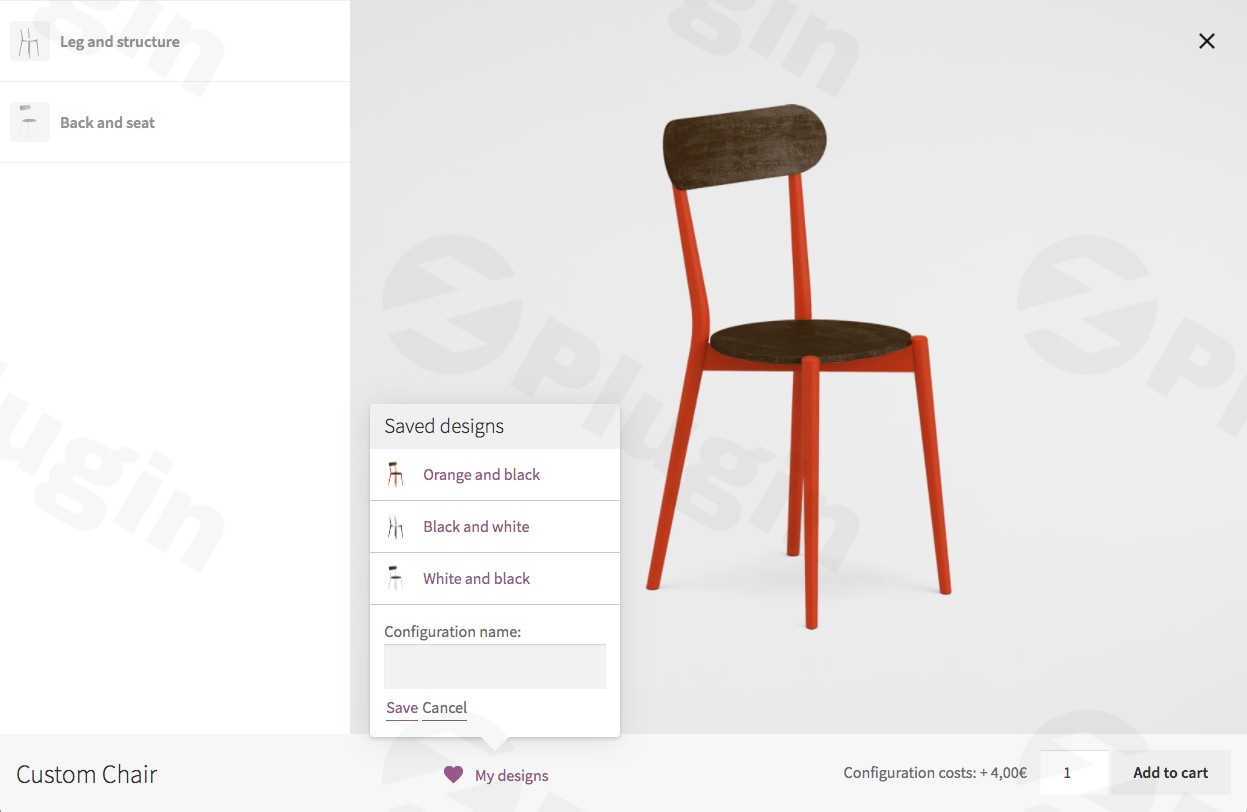
In the competitive world of online retail, offering personalized products can significantly boost customer engagement and sales. However, standard WooCommerce variations often fall short when it comes to complex, visual customization. This is where a dedicated WooCommerce Product Configurator plugin becomes indispensable. Specifically, the “Product Configurator For WooCommerce Addon – Save Your Design” revolutionizes how your customers interact with customizable products, allowing them to effortlessly save, export, and share their unique creations.This powerful WordPress Product Designer Plugin enables online store owners to provide an interactive customization experience, moving beyond static product images to a dynamic, real-time visual builder. For any business looking to offer a truly intuitive Custom Product Builder WooCommerce experience, this add-on, paired with its core plugin, is a game-changer. It not only streamlines the design process for your customers but also provides robust tools for managing and sharing those custom designs, fostering loyalty and word-of-mouth marketing.
Key Features for Design Preservation and Sharing
The “Product Configurator For WooCommerce Addon – Save Your Design” works in conjunction with the core Product Configurator for WooCommerce plugin, which utilizes a clever layered image product customizer system. Instead of uploading countless product variation images, you use transparent PNG layers that stack dynamically as customers make choices, creating real-time visual previews. This add-on then takes that customization a step further by focusing on management and sharing.
Design Preservation & Management
- Save Designs for Future Access: Imagine a customer meticulously designing a custom piece of furniture or an apparel item. With this feature, they can securely store their in-progress configurations within their account dashboard. This means they can step away and return to continue editing at their convenience, significantly improving the user experience and reducing cart abandonment. This directly addresses the long-tail query: how to let customers save custom designs woocommerce.
- Admin-Predefined Templates: As a store owner, you can create and manage ready-made design presets. These templates serve as starting points or inspirational examples for your customers. You can share these expertly crafted configurations via direct URLs or embed them anywhere on your site using configurator shortcodes, making it easy for customers to explore popular or recommended designs.
Professional Output & Sharing
- PDF Export Functionality: Give your customers the power to generate professional PDF documents of their configurations. This is invaluable for record-keeping, printing a physical copy, or easily sharing their design with others offline. It adds a professional touch to their custom creations.
- Multi-Platform Sharing: Encourage viral marketing by allowing customers to share their custom product designs across various social media platforms, via email, or through unique, shareable links. This feature also includes an optional notification system for store administrators, keeping you in the loop about popular designs and potential sales leads.
Core Plugin Foundation (Briefly)
While this article focuses on the “Save Your Design” add-on, it’s built upon the robust foundation of the core “Product Configurator for WooCommerce” plugin. This core plugin provides:
- Layered Image Rendering: Efficiently displays custom products by stacking transparent PNG images, eliminating the need for an image for every possible product combination.
- Multiple Views: Allows you to showcase products from different angles (front, side, back) for a comprehensive preview.
- Multi-Step Configurator: Breaks down complex customization processes into manageable steps, enhancing user flow.For advanced functionalities like Dynamic Product Pricing WooCommerce based on choices, or intricate logic where options appear or disappear based on previous selections (woocommerce conditional logic product builder), other premium add-ons for the core plugin are available, such as “Extra Price” and “Conditional Logic.”
Installation & Setup: Adding Product Customization to WooCommerce
Integrating the “Product Configurator For WooCommerce Addon – Save Your Design” into your store is a straightforward process, designed for non-developers. Before you begin, ensure you have the core “Product Configurator for WooCommerce” plugin installed and activated, as this is an add-on.Here’s a step-by-step guide on how to add product customization to WooCommerce with this powerful tool:
- Purchase and Download: First, purchase the “Product Configurator For WooCommerce Addon – Save Your Design” from ZeroPlugin.com. You will receive a downloadable
.zipfile. - Upload the Add-on:
- Log in to your WordPress admin dashboard.
- Navigate to Plugins > Add New.
- Click on the “Upload Plugin” button at the top of the page.
- Click “Choose File”, select the
.zipfile you downloaded earlier, and then click “Install Now”.
- Activate the Add-on: Once the plugin is successfully installed, click the “Activate Plugin” button.
- Configure Settings: After activation, you’ll find new options within the core Product Configurator settings or a dedicated submenu for the “Save Your Design” add-on. Here, you can enable/disable features like admin notifications for sharing, customize PDF templates, and manage admin-predefined templates.
Practical Usage & Best Practices for Your WooCommerce Store
The “Save & Share Designs” add-on transforms your WooCommerce visual product configurator with save option into a highly interactive and customer-friendly experience. Here are a few concrete use cases and best practices for leveraging its full potential:
- Custom Furniture Stores: Ideal for customers designing sofas, tables, or cabinets. They can select fabrics, finishes, and dimensions, save their design, share it with family for feedback, and return later to finalize the purchase. This reduces decision fatigue and encourages collaborative buying.
- Apparel Designers & Printers: For custom t-shirts, hoodies, or uniforms, customers can choose colors, upload logos (with the “Form Fields” add-on), and position text (with the “Text Overlay” add-on). Saving their design means they don’t have to restart if they need to check a detail or get approval. Sharing is excellent for groups or teams ordering personalized items.
- Jewelry Makers & Personalized Gifts: Customers can design rings, necklaces, or engraved items, seeing real-time visual previews. The ability to save a design for later allows them to ponder their choices or get input, making the purchase decision less pressured. Exporting a PDF serves as a beautiful keepsake or proof.
- Agencies & Client Work: If you’re an agency building sites for clients, utilizing the admin-predefined templates feature allows you to quickly set up and share example configurations, streamlining the client approval process and demonstrating product possibilities efficiently.Best Practices:
- Promote the “Save Design” Feature: Clearly highlight the “Save Design” button on your configurator. A small icon or tooltip can explain its benefits.
- Optimize Layer Images: Use high-quality, transparent PNGs for your layers to ensure smooth and professional-looking product previews.
- Structure Multi-Step Configurators Logically: If using a multi-step configurator, ensure the steps flow naturally to prevent user frustration.
- Leverage Admin Presets: Create a variety of compelling preset designs to inspire customers and showcase popular combinations.
FAQ & Troubleshooting
Q1: Can customers save their designs in WooCommerce using this plugin?
A: Yes, absolutely. The “Product Configurator For WooCommerce Addon – Save Your Design” is specifically designed to enable customers to save their custom product configurations. Once logged in, they can access their saved designs from their user account dashboard or directly within the product configurator interface to resume editing or complete their purchase. This answers the key question: Can customers save their designs in WooCommerce?
Q2: What is the best product configurator for WooCommerce, and how does this one compare?
A: The “best” WooCommerce Product Configurator depends on your specific needs. The “Product Configurator for WooCommerce” (with its add-ons) stands out for its visual, layer-based approach, which is ideal for products where visual appearance is critical. It excels at real-time visual previews without needing hundreds of pre-rendered images. While other form-based or 3D configurators exist, this plugin offers a cost-effective and highly visual solution, especially with the added convenience of saving and sharing designs.
Q3: How to add product customization to WooCommerce effectively with this add-on?
A: To add product customization effectively, first install the core “Product Configurator for WooCommerce” plugin, then this “Save Your Design” add-on. Set up your product layers in the core plugin, allowing customers to build their unique items. Then, enable and configure the “Save Your Design” features to allow customers to save their progress, export PDFs, and share their creations. This layered approach combined with save/share functionality provides a comprehensive customization solution.
Q4: Does the “Save Your Design” add-on support dynamic pricing based on customer choices?
A: The “Save Your Design” add-on itself focuses on design management and sharing. However, the core “Product Configurator for WooCommerce” plugin has a separate premium add-on called “Extra Price” that allows you to assign additional pricing to individual options or layers. This enables dynamic product pricing WooCommerce functionality, making your configurator highly flexible for complex pricing models.
Q5: Is the Product Configurator for WooCommerce plugin mobile-friendly?
A: Yes, the “Product Configurator for WooCommerce” plugin, including its add-ons, is designed to be mobile-friendly. It works smoothly across various devices, including desktops, tablets, and smartphones, ensuring a consistent and engaging customization experience for all your customers.
Conclusion: Transform Your WooCommerce Store with Saved & Shared Designs
The “Product Configurator For WooCommerce Addon – Save Your Design” is an essential extension for any online store offering customizable products. By empowering customers to save, export, and share their unique designs, you’re not just selling products; you’re providing an immersive, interactive, and highly engaging shopping experience.This WooCommerce Product Configurator enhances user experience, reduces cart abandonment by allowing customers to pause and resume their design process, and naturally drives word-of-mouth marketing through effortless sharing options. For custom furniture stores, apparel designers, jewelry makers, and any business leveraging Product Configurator For WooCommerce for personalized items, this add-on is a strategic investment that will undoubtedly boost customer satisfaction and sales. Embrace the power of customer-driven design and watch your conversions grow.
I. Download Limits & Account Benefits
- Free Downloads: Each email address receives 3 downloads per day for free products
- Upgrade Benefits: Purchase any paid product to increase your daily download limit by 3 for each paid product
- No Account Required: You can download immediately by receiving the download link via email
- Account Recommended: Create an account for easier access to your order history and direct update downloads
II. Understanding GPL vs Official Versions
Important: The products available on WPPick are GPL-licensed versions, which differ from official developer versions. Before purchasing, please read our comprehensive guide: Understanding GPL & Official Differences at WPPick
Key Points:
- GPL versions may not include premium support from original developers
- Updates may be delayed compared to official releases
- Some premium features might have limitations
- Always consider your specific needs and support requirements
III. Support & Assistance
We’re here to help through multiple channels:
- Email Support: Direct email assistance for all inquiries
- Live Chat: Real-time support during business hours
- Comprehensive Documentation: Detailed guides and tutorials
IV. Order Tracking
Access your complete purchase history and download links anytime: Order History
V. Account Access
New to WPPick? Login or Create Account to manage your downloads and orders efficiently.
VI. Refund Protection
We stand behind our products with a clear refund policy. Review our terms: Refund Policy
VII. Privacy & Security
Your data security is our priority. Learn how we protect your information: Privacy Policy
VII. Terms of Service
Understanding our service terms ensures a smooth experience: Terms of Use
Quick Tips for Best Experience
- Verify Compatibility: Check plugin/theme compatibility with your WordPress version
- Backup First: Always backup your site before installing new plugins or themes
- Test Environment: Consider testing on a staging site first
- Stay Updated: Regularly check for updates in your account dashboard
- Read Documentation: Review any included documentation for optimal setup
Need Help?
If you have questions about downloads, licensing, or need technical assistance, don’t hesitate to contact our support team. We’re committed to ensuring you have the best possible experience with WPPick products.
Ready to get started? Your download adventure begins with just one click!
- Version 2.0.4 update