

Projecthuddle – A Design Collaboration And Feedback Tool Powered By WordPress
/Year
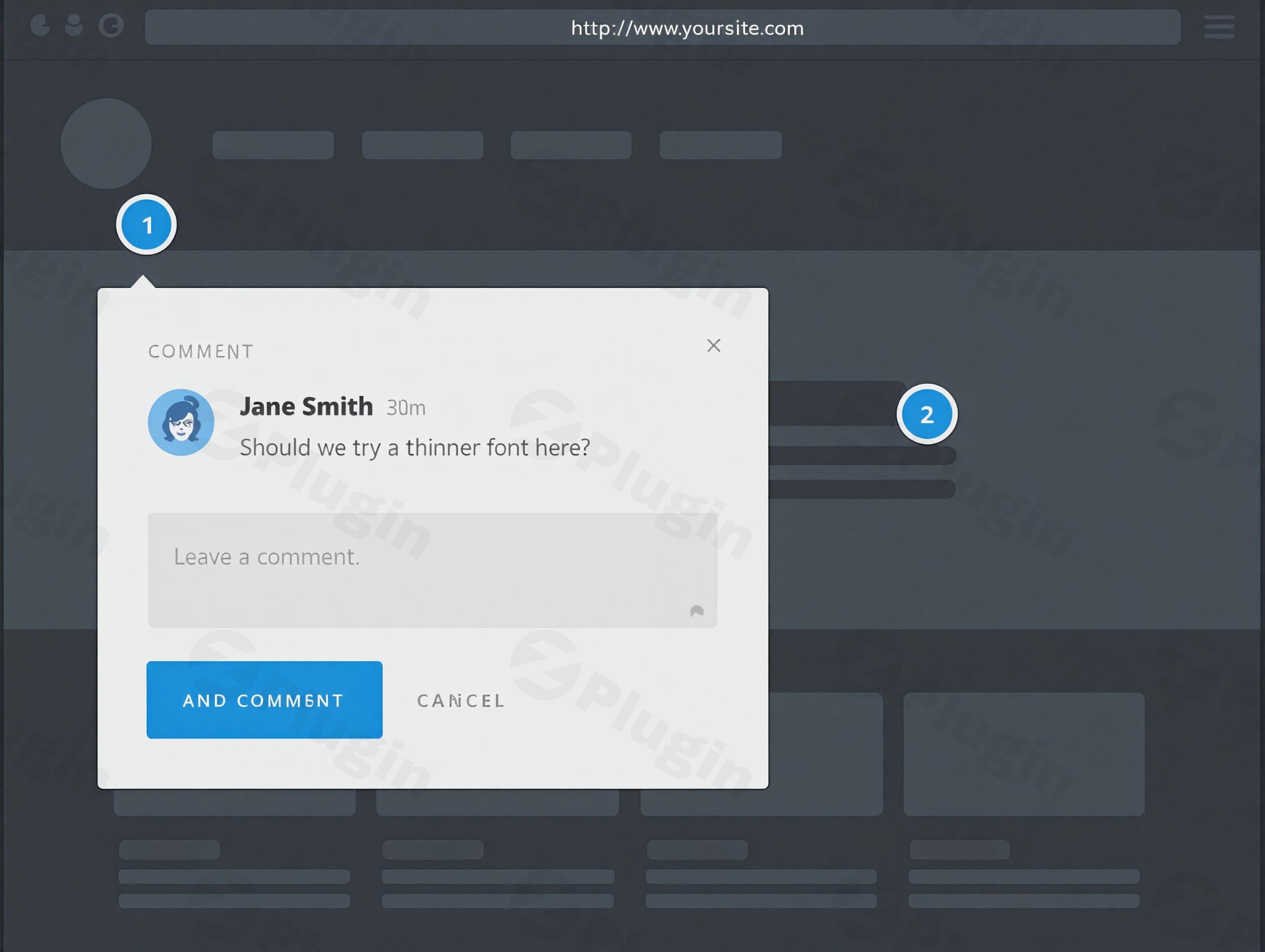
Managing client feedback can often feel like a game of “broken telephone.” Between vague emails saying “make it pop” and endless Slack threads, designers and developers often lose hours trying to decipher exactly what a client wants. The ProjectHuddle WordPress plugin solves this by turning any website or mockup into a living, breathing collaboration space.
ProjectHuddle is a professional WordPress design feedback tool specifically engineered for agencies and freelancers. It allows clients to point and click on any element of a design to leave precise, visual annotations. By centralizing communication directly on the project itself, it eliminates ambiguity and accelerates the design approval workflow.
Key Features of ProjectHuddle
ProjectHuddle isn’t just a simple commenting tool; it is a comprehensive website collaboration tool that functions as a self-hosted alternative to SaaS platforms like InVision or Marker.io.
- Visual Annotations & Point-and-Click Feedback: Clients don’t need to explain which “blue button” they are talking about. They simply click the element and type. This visual annotation tool captures the exact context of the comment.
- Centralized Feedback Dashboard: Even if you are managing fifty different client sites, all comments are aggregated into one central dashboard on your master WordPress site. This prevents “login fatigue” and keeps your team organized.
- Cross-Platform Compatibility: One of ProjectHuddle’s most powerful features is its ability to collect feedback on sites not powered by WordPress. Whether your client is on Shopify, Wix, Drupal, or a static HTML site, ProjectHuddle can manage the feedback loop.
- Mockup & PDF Support: Beyond live websites, you can upload static images (mockups) or PDF documents. This makes it the best WordPress plugin for client feedback on mockups during the early stages of a project.
- White-Labeling & Customization: Maintain your brand’s authority. You can fully white-label the interface, replacing ProjectHuddle’s branding with your agency’s logo and colors.
- Performance-First Architecture: Unlike other plugins that bloat client sites, ProjectHuddle offloads feedback data to your central dashboard site. This keeps the client’s site fast and the database clean.
How to Install and Set Up ProjectHuddle
Setting up this client feedback plugin for WordPress is straightforward and does not require coding knowledge. Follow these steps to get started:
- Install the Parent Plugin: Upload the ProjectHuddle zip file to your “Master” WordPress site (the site where you want to manage all feedback). Activate it via the Plugins > Add New menu.
- Configure Your Dashboard: Go to the ProjectHuddle settings in your WordPress sidebar. Here, you can set up your branding, email notifications, and global preferences.
- Create a New Project:
- For a Website Project, enter the URL of the site you want to track.
- For a Mockup Project, upload your design images (JPG/PNG).
- Connect to Client Sites: If the client site is a WordPress site, you can install the “ProjectHuddle Client” helper plugin. For non-WordPress sites, ProjectHuddle provides a small snippet of JavaScript code to paste into the site’s footer.
- Invite Clients: Send a private access link to your clients. They can begin leaving feedback immediately—no account creation is required for them unless you enable it.
Practical Usage & Best Practices
To get the most out of this self-hosted feedback tool, consider these real-world workflows:
1. The “Design-to-Dev” Handover
Before a line of code is written, upload your high-fidelity mockups to ProjectHuddle. Use the design approval workflow to let clients sign off on the visual direction. Once a mockup is “Approved” in the system, your developers can move forward with confidence.
2. Post-Launch QA
When a site goes live or into a staging environment, use the visual annotation tool for internal Quality Assurance. Your internal team can leave “Private Comments” (visible only to your team roles) to point out bugs or alignment issues before the client ever sees them.
3. Managing Non-WordPress Clients
If you are an agency that builds on various platforms, ProjectHuddle is your “source of truth.” You can use it to get visual feedback on a live site hosted on Shopify, ensuring your workflow remains identical regardless of the tech stack.
FAQ & Troubleshooting
What is the ProjectHuddle WordPress plugin?
ProjectHuddle is a self-hosted WordPress plugin used by agencies to collect visual feedback and annotations on websites and design mockups. It simplifies client communication by allowing users to click and comment directly on web elements.
How does ProjectHuddle work for client feedback?
It works by overlaying a collaborative layer on top of your website or mockup. When a client clicks an element, a comment thread is created. These comments are then synced to a central WordPress dashboard where the agency can manage, assign, and resolve them.
Can ProjectHuddle collect feedback on non-WordPress sites?
Yes. ProjectHuddle can collect feedback on any platform, including Shopify, Wix, and static HTML sites. You simply embed a small JavaScript snippet on the external site to connect it to your ProjectHuddle dashboard.
Is ProjectHuddle now SureFeedback?
Yes, ProjectHuddle was acquired and is now part of the SureFeedback ecosystem. The core functionality remains the same but has been enhanced with better performance and integrated features like PDF feedback and file uploads.
What should I do if the feedback dots aren’t appearing?
Most issues are caused by aggressive caching or ad blockers. Ensure that your caching plugin excludes ProjectHuddle scripts and check that your browser isn’t blocking the feedback overlay.
Conclusion: The ROI of Visual Feedback
The ProjectHuddle WordPress plugin (now SureFeedback) is an essential investment for any agency looking to professionalize their client management. By reducing the time spent on “feedback loops” by up to 50%, it allows your team to focus on creating rather than clarifying.
If you need a WordPress design feedback tool that offers total privacy, a one-time cost (compared to monthly SaaS fees), and a seamless user experience, ProjectHuddle is the gold standard.
For more WordPress plugin reviews and technical guides, visit wppick.com.
I. Download Limits & Account Benefits
- Free Downloads: Each email address receives 3 downloads per day for free products
- Upgrade Benefits: Purchase any paid product to increase your daily download limit by 3 for each paid product
- No Account Required: You can download immediately by receiving the download link via email
- Account Recommended: Create an account for easier access to your order history and direct update downloads
II. Understanding GPL vs Official Versions
Important: The products available on WPPick are GPL-licensed versions, which differ from official developer versions. Before purchasing, please read our comprehensive guide: Understanding GPL & Official Differences at WPPick
Key Points:
- GPL versions may not include premium support from original developers
- Updates may be delayed compared to official releases
- Some premium features might have limitations
- Always consider your specific needs and support requirements
III. Support & Assistance
We’re here to help through multiple channels:
- Email Support: Direct email assistance for all inquiries
- Live Chat: Real-time support during business hours
- Comprehensive Documentation: Detailed guides and tutorials
IV. Order Tracking
Access your complete purchase history and download links anytime: Order History
V. Account Access
New to WPPick? Login or Create Account to manage your downloads and orders efficiently.
VI. Refund Protection
We stand behind our products with a clear refund policy. Review our terms: Refund Policy
VII. Privacy & Security
Your data security is our priority. Learn how we protect your information: Privacy Policy
VII. Terms of Service
Understanding our service terms ensures a smooth experience: Terms of Use
Quick Tips for Best Experience
- Verify Compatibility: Check plugin/theme compatibility with your WordPress version
- Backup First: Always backup your site before installing new plugins or themes
- Test Environment: Consider testing on a staging site first
- Stay Updated: Regularly check for updates in your account dashboard
- Read Documentation: Review any included documentation for optimal setup
Need Help?
If you have questions about downloads, licensing, or need technical assistance, don’t hesitate to contact our support team. We’re committed to ensuring you have the best possible experience with WPPick products.
Ready to get started? Your download adventure begins with just one click!
- Added Vietnamese language translation support.
- Resolved comments not showing up when status is selected.
- PDF upload failing sometimes when uploaded file is larger.