

Pukabop – Kids Store And Baby Shop Shopify Theme
/Year
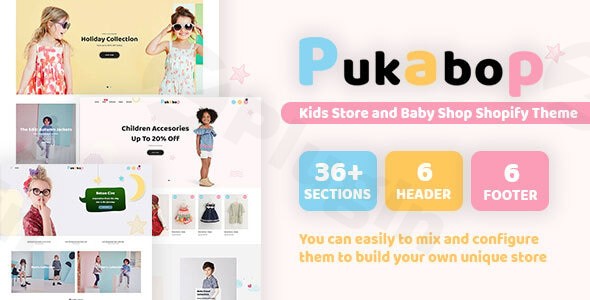
Building a successful online presence for a children’s boutique requires more than just cute images; it requires a high-performance, conversion-oriented platform. The Pukabop theme is a specialized solution designed to help entrepreneurs launch a professional baby shop WordPress theme or Shopify store with ease. Whether you are selling organic baby clothes, educational toys, or nursery furniture, Pukabop provides the aesthetic charm and technical depth needed to compete in the modern e-commerce landscape.
In this guide, we will explore why Pukabop is a top choice for a children’s e-commerce theme, how to set it up, and best practices for maximizing your sales.
Key Features of the Pukabop Theme
Pukabop is packed with premium features that often require expensive third-party plugins in other themes. By choosing this kids store Shopify theme for your WordPress-integrated shop, you gain access to a suite of tools designed to boost user experience (UX) and conversion rates.
1. High-Conversion Shop Elements
- Ajax Add to Cart & Wishlist: Allows parents to shop seamlessly without frustrating page reloads. This keeps the browsing flow natural and encourages higher order values.
- Automatic Price Changes: Perfect for running flash sales or multi-currency operations where exchange rates fluctuate.
- Product Labels (New/Hot/Sale): Use visual cues to direct customers to your best-selling items or clearance stock.
2. Advanced Navigation & Discovery
- Flexible Mega Menu: Organize complex catalogs (e.g., Newborn, Toddler, Toys, Gear) into a clean, visual menu that is easy to navigate on both desktop and mobile.
- Layered Navigation: Provides advanced filtering options, allowing users to sort by size, color, or price range—a must-have for any responsive kids store theme.
- Smart Product Sticky: Keeps essential product information and the “Add to Cart” button visible as the user scrolls, reducing friction during the purchase process.
3. Visual & Interactive Media Support
- 360-Degree Product View & Video: For high-ticket items like strollers or cribs, these features allow parents to inspect every detail before buying.
- Instagram Images Slider: Showcase your community and lifestyle shots directly on your homepage to build social proof.
* Variant Image Groups: Display specific images based on the selected product variant (e.g., showing a blue stroller only when the “Blue” option is clicked).
How to Install the Pukabop Theme on WordPress
Setting up your children’s e-commerce theme shouldn’t be a technical headache. Follow these steps to get your store live.
Step 1: Upload the Theme
- Log in to your WordPress Dashboard.
- Navigate to Appearance > Themes.
- Click Add New, then Upload Theme.
- Choose the
pukabop.zipfile you downloaded and click Install Now. - Click Activate once the upload is complete.
Step 2: One-Click Demo Import
Pukabop features a One-Click Import tool that allows you to mirror the professional look of the demo site instantly.
- Go to the Pukabop Dashboard (usually found in the sidebar after activation).
- Select the demo version that best fits your niche (e.g., Baby Clothing or Toy Store).
- Click Import. Wait a few minutes for the images, settings, and layouts to populate.
Step 3: Configure E-commerce Settings
Ensure your store is ready for transactions by configuring your shop engine (WooCommerce for WordPress or the Shopify integration).
- Set your base currency and tax rules.
- Enable Multi-Currency Support if you plan to sell internationally.
3. Activate the Newsletter Pop-up to start capturing leads from day one.
Practical Usage & Best Practices
To get the most out of your Pukabop features, consider these real-world workflows for different types of business owners:
For Boutique Owners (High Branding)
If you run a high-end baby boutique, focus on the Unlimited Google Fonts and Colors. Match the typography to your brand’s personality—using soft, rounded fonts for a “gentle” feel or bold, playful colors for a “toy store” vibe. Use the Image Banner & Popup Video on the homepage to tell your brand’s story.
For Dropshippers (Efficiency)
Pukabop is ideal for those using Oberlo or similar dropshipping tools. Because the theme is Fast Loading and Speed Optimized, you can host a large variety of products without sacrificing performance. Utilize the Order Product Notification to create a “busy store” feel, which builds trust with new visitors.
For Content Marketers (SEO Focus)
Utilize the Blog Post Slider to highlight educational content (e.g., “Top 10 Safe Toys for 6-Month-Olds”). Because Pukabop is an SEO optimized baby shop theme, your blog posts will help drive organic traffic to your product pages, creating a self-sustaining marketing loop.
FAQ & Troubleshooting
Is Pukabop a good theme for a baby store?
Yes. Pukabop is specifically engineered for the kids’ niche. It includes specialized features like “Buy Together” (for upsells) and “Product Complementary” sections that are often missing from generic e-commerce themes.
Is Pukabop compatible with WooCommerce?
While Pukabop is often marketed as a Shopify theme, many versions are adapted for WordPress. If you are using it on WordPress, it is designed to work seamlessly with WooCommerce, the industry-standard e-commerce plugin.
Can I customize the theme without knowing how to code?
Absolutely. Pukabop features a Drag & Drop building experience. You can move sections, change layouts, and adjust styling through a user-friendly interface without touching a single line of HTML or CSS.
How do I improve my site speed with this theme?
Pukabop is already Speed Optimized. However, you can further enhance performance by using a caching plugin, optimizing your product images before upload, and ensuring you are using a high-quality WordPress hosting provider.
Does it support mobile shoppers?
Yes, Pukabop is Responsive and Retina Ready. It automatically adjusts its layout for smartphones and tablets, ensuring that busy parents can shop easily while on the go.
Final Verdict: Is Pukabop Right for You?
The Pukabop theme provides an exceptional ROI for anyone looking to enter the children’s retail space. Its combination of aesthetic charm and high-end sales features—like the Ajax wishlist and advanced layered navigation—makes it a “business-in-a-box” solution. If you need a baby shop WordPress theme that balances visual appeal with technical performance, Pukabop is a top-tier contender. It eliminates the need for dozens of expensive plugins, allowing you to focus on what matters most: growing your brand and serving your customers.Ready to build your dream store? Visit wppick.com for more insights on the best WordPress tools and e-commerce strategies.
I. Download Limits & Account Benefits
- Free Downloads: Each email address receives 3 downloads per day for free products
- Upgrade Benefits: Purchase any paid product to increase your daily download limit by 3 for each paid product
- No Account Required: You can download immediately by receiving the download link via email
- Account Recommended: Create an account for easier access to your order history and direct update downloads
II. Understanding GPL vs Official Versions
Important: The products available on WPPick are GPL-licensed versions, which differ from official developer versions. Before purchasing, please read our comprehensive guide: Understanding GPL & Official Differences at WPPick
Key Points:
- GPL versions may not include premium support from original developers
- Updates may be delayed compared to official releases
- Some premium features might have limitations
- Always consider your specific needs and support requirements
III. Support & Assistance
We’re here to help through multiple channels:
- Email Support: Direct email assistance for all inquiries
- Live Chat: Real-time support during business hours
- Comprehensive Documentation: Detailed guides and tutorials
IV. Order Tracking
Access your complete purchase history and download links anytime: Order History
V. Account Access
New to WPPick? Login or Create Account to manage your downloads and orders efficiently.
VI. Refund Protection
We stand behind our products with a clear refund policy. Review our terms: Refund Policy
VII. Privacy & Security
Your data security is our priority. Learn how we protect your information: Privacy Policy
VII. Terms of Service
Understanding our service terms ensures a smooth experience: Terms of Use
Quick Tips for Best Experience
- Verify Compatibility: Check plugin/theme compatibility with your WordPress version
- Backup First: Always backup your site before installing new plugins or themes
- Test Environment: Consider testing on a staging site first
- Stay Updated: Regularly check for updates in your account dashboard
- Read Documentation: Review any included documentation for optimal setup
Need Help?
If you have questions about downloads, licensing, or need technical assistance, don’t hesitate to contact our support team. We’re committed to ensuring you have the best possible experience with WPPick products.
Ready to get started? Your download adventure begins with just one click!
No changelog available.