
Pwork
/Year
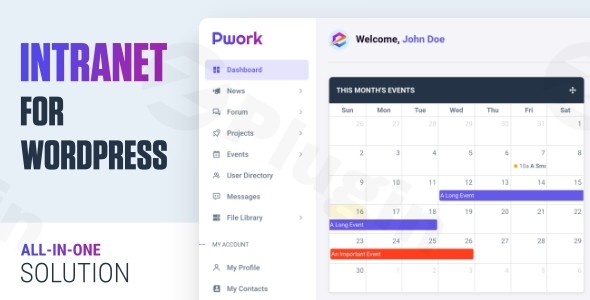
In today’s fast-paced digital landscape, effective internal communication and collaboration are paramount for any organization. Many businesses struggle with fragmented tools, slow and complex intranet setups, or a lack of a centralized hub for their teams. This is where Pwork Intranet WordPress Plugin steps in, transforming your existing WordPress site into a powerful, secure, and user-friendly WordPress Company Intranet. It’s designed to streamline communication, boost productivity, and foster a cohesive work environment without the need for bloated themes or a multitude of conflicting plugins.Pwork offers an all-in-one intranet solution that provides a dedicated, private digital workspace tailored to your team’s needs. From personalized dashboards to robust project management, Pwork empowers businesses, schools, and communities to create an efficient internal platform that works seamlessly with any WordPress theme.
Key Features That Empower Your Team
Pwork is packed with functionalities designed to cover every aspect of internal communication, project collaboration, and resource management. Here’s a detailed look at the Pwork Plugin Features that make it an indispensable tool for your organization:
Personalized User Dashboards
Every team member gains access to a fully customizable dashboard. With intuitive drag-and-drop widgets, users can arrange their workspace to suit their specific role and responsibilities. Administrators can easily enable or disable widgets, ensuring each user sees the most relevant information and tools, thereby enhancing individual productivity.
Corporate News & Announcements Center
Keep your entire team informed with a dedicated platform for internal communications. This feature functions like a private internal blog, allowing authorized members to share company updates, policy changes, important announcements, and celebrate milestones. It ensures everyone is on the same page and engaged with the latest organizational news.
Advanced Discussion Forum & Internal Messaging
Pwork facilitates seamless team communication and knowledge sharing through its fully-featured discussion forum. Enhanced with a robust tagging system and powerful search functionality, team members can quickly find relevant conversations and contribute to ongoing discussions. Additionally, a built-in private messaging system allows members to chat securely, fostering direct and efficient peer-to-peer communication.
Comprehensive Project & Task Management
Streamline project collaboration from inception to completion with Pwork’s integrated task tracking and progress monitoring tools. Teams can assign tasks, set deadlines, and track milestones. Crucially, team members receive automatic notifications for completed tasks, new assignments, and project updates, ensuring everyone stays on the same page and projects move forward smoothly. This makes it an excellent Intranet Project Management WordPress tool.
Employee Directory
Easily manage and display employee profiles within your intranet. The WordPress Employee Directory Plugin functionality allows team members to quickly find contact information, connect with colleagues, and understand organizational structures, promoting better internal networking.
Document Management & File Library
Pwork provides a secure, centralized storage solution for all your company documents, policies, and files. This feature supports private projects and offers granular accessibility options, allowing administrators to control who can upload, access, and share specific documents. It’s a robust WordPress Document Management Intranet for ensuring data security and easy access to critical resources.
Event Management & Calendar
Organize and manage company events, meetings, and schedules with ease. The integrated event calendar ensures all team members are informed about upcoming activities, helping to prevent scheduling conflicts and improve attendance.
Access Control & Role-Based Permissions
Security is paramount for any intranet. Pwork offers comprehensive access control and role-based permissions, allowing administrators to precisely manage user roles and what information they can access. You can define which roles can add posts, projects, topics, send private messages, or upload files, creating a secure environment without requiring coding skills.
Knowledge Base
Empower your team with a centralized database of company resources, policies, and FAQs. The internal knowledge base serves as a first point of contact for employee inquiries, reducing the load on support staff and providing instant answers.
Installation & Setup: How to Create a Private WordPress Intranet with Pwork
Installing the Pwork WordPress Intranet Solution is straightforward and designed for non-developers. Here’s a step-by-step guide to get your private intranet up and running:
- Purchase and Download: After purchasing Pwork, you’ll receive a
.zipfile containing the plugin. Since Pwork is GPL licensed, you get genuine legal compliance and the freedom to use it on unlimited sites. - Upload the Plugin:
- Log in to your WordPress dashboard.
- Navigate to Plugins > Add New.
- Click on the “Upload Plugin” button at the top of the page.
- Click “Choose File” and select the Pwork
.zipfile you downloaded. - Click “Install Now”.
- Activate the Plugin: Once the plugin is installed, click “Activate Plugin”.
- Initial Configuration: After activation, Pwork will add a new menu item to your WordPress dashboard. Navigate to its settings to begin configuring your intranet.
- Dashboard Customization: Start by enabling or disabling the widgets you want to appear on user dashboards.
- Access Control: Define user roles and permissions for various sections of the intranet, such as who can access documents, participate in forums, or manage projects.
- Branding: Upload your company logo and adjust basic styling to match your brand identity.
- Technical Requirements: Pwork is designed to be lightweight and fast, built with modern technologies like Bootstrap 5 and AJAX. It works seamlessly with any WordPress theme. While specific minimum WordPress and PHP versions for Pwork aren’t explicitly detailed, it’s generally recommended to run WordPress 6.0+ and PHP 7.4+ for optimal performance and security. Ensure your hosting environment meets these modern WordPress standards.Every file in Pwork undergoes rigorous VirusTotal third-party scanning, guaranteeing a clean, malware-free installation. Plus, with lifetime free updates, your intranet platform will always be running smoothly with the latest improvements and security patches.
Practical Usage & Best Practices for Your WordPress Intranet
Pwork provides versatile tools that cater to a wide range of organizational needs. Here are a few practical use cases and best practices for leveraging your WordPress Intranet Solution:
- Centralizing Remote Team Operations: For remote or hybrid teams, Pwork acts as the virtual office hub. Use the Corporate News & Announcements Center to share important company-wide updates, ensuring all team members are informed regardless of their location. The Advanced Discussion Forum and Internal Messaging facilitate spontaneous conversations and project-specific discussions, while Comprehensive Project Management keeps distributed teams synchronized on tasks and deadlines.
- Onboarding New Employees: Streamline the onboarding process by providing new hires with immediate access to essential resources. The Document Management & File Library can host HR policies, employee handbooks, and training materials. The Knowledge Base offers a self-service resource for common questions, allowing new team members to quickly find answers and integrate into the company culture.
- Enhancing Project Collaboration for Agencies: Marketing or web development agencies can utilize Pwork for efficient client project management and internal collaboration. Create private projects within the intranet for each client, assigning tasks to team members and tracking progress. The Personalized User Dashboards allow project managers to quickly view their active projects and assigned tasks, while the Document Management feature ensures all project files, briefs, and client feedback are stored securely and accessible only to authorized personnel.
- Building a Secure Community for Schools or Non-profits: Educational institutions or non-profit organizations can use Pwork to build a secure, private portal for faculty, staff, or members. The Employee Directory can serve as a staff directory, while the Event Management & Calendar keeps everyone informed about important academic dates or community events. Access Control & Role-Based Permissions ensure that sensitive information is only accessible to relevant groups, such as department heads or specific committees.
FAQ & Troubleshooting
Here are answers to common questions about the Pwork WordPress Intranet Solution:
Q: What is the best WordPress intranet plugin?
A: While “best” can be subjective, Pwork is consistently highlighted as a leading WordPress Intranet Solution because it offers an “all-in-one” suite of features (employee directory, document management, project management, forums, news, and more) within a single, lightweight plugin. This integrated approach often eliminates the need for multiple, potentially conflicting plugins, simplifying setup and maintenance compared to alternatives like solely relying on BuddyPress and bbPress or dedicated project management plugins.
Q: Can I build an intranet with WordPress using Pwork?
A: Absolutely! Pwork is specifically designed to transform any WordPress site into a fully functional, private, and secure intranet or extranet. It leverages WordPress’s robust content management capabilities and extends them with powerful internal communication and collaboration tools, making it an ideal choice for building a WordPress Company Intranet.
Q: How to secure a WordPress intranet with Pwork?
A: Pwork prioritizes security through several mechanisms. It includes robust Access Control & Role-Based Permissions, allowing administrators to dictate precisely who can access specific content and features. All user interactions occur within a dedicated, private area of your WordPress site. Furthermore, all files distributed by the vendor undergo rigorous VirusTotal scanning, ensuring a malware-free plugin. Combined with standard WordPress security best practices (strong passwords, regular backups, and up-to-date installations), Pwork provides a highly secure environment for your internal data.
Q: Does Pwork Intranet support private groups or projects?
A: Yes, Pwork is designed to support private collaboration. The Document Management & File Library feature allows for private projects, ensuring that sensitive documents and files are only accessible to authorized team members. While specific “group” functionality similar to BuddyPress groups isn’t explicitly detailed as a standalone feature, the role-based permissions and project management tools effectively enable private team and project spaces. Pwork also seamlessly integrates with BuddyPress for enhanced community features, including private groups, if that specific functionality is desired.
Q: What should I do if the Pwork plugin isn’t working correctly after installation?
A: If you encounter issues after installing Pwork, first ensure you’re running compatible versions of WordPress and PHP (latest stable versions are always recommended). Check for plugin conflicts by temporarily deactivating other plugins one by one to identify the culprit. Clear any caching plugins you might be using. If the problem persists, leverage the Professional Support offered by the Pwork team for expert assistance with installation, configuration, and troubleshooting.
Conclusion
Pwork stands out as an exceptional Pwork Intranet WordPress Plugin, offering a comprehensive and efficient way to build a robust internal communication and collaboration platform. By consolidating essential intranet functionalities into a single, lightweight solution, Pwork eliminates the complexity and potential conflicts associated with using multiple plugins or overly complex themes.For businesses, organizations, and communities seeking to enhance productivity, streamline communication, and foster a more connected team, Pwork delivers tangible ROI. It’s ideal for anyone who needs a private, secure, and customizable digital workspace within their existing WordPress environment. With its user-friendly interface, powerful features, and commitment to security and regular updates, Pwork is a reliable and authoritative choice for transforming your WordPress site into the ultimate intranet solution.
I. Download Limits & Account Benefits
- Free Downloads: Each email address receives 3 downloads per day for free products
- Upgrade Benefits: Purchase any paid product to increase your daily download limit by 3 for each paid product
- No Account Required: You can download immediately by receiving the download link via email
- Account Recommended: Create an account for easier access to your order history and direct update downloads
II. Understanding GPL vs Official Versions
Important: The products available on WPPick are GPL-licensed versions, which differ from official developer versions. Before purchasing, please read our comprehensive guide: Understanding GPL & Official Differences at WPPick
Key Points:
- GPL versions may not include premium support from original developers
- Updates may be delayed compared to official releases
- Some premium features might have limitations
- Always consider your specific needs and support requirements
III. Support & Assistance
We’re here to help through multiple channels:
- Email Support: Direct email assistance for all inquiries
- Live Chat: Real-time support during business hours
- Comprehensive Documentation: Detailed guides and tutorials
IV. Order Tracking
Access your complete purchase history and download links anytime: Order History
V. Account Access
New to WPPick? Login or Create Account to manage your downloads and orders efficiently.
VI. Refund Protection
We stand behind our products with a clear refund policy. Review our terms: Refund Policy
VII. Privacy & Security
Your data security is our priority. Learn how we protect your information: Privacy Policy
VII. Terms of Service
Understanding our service terms ensures a smooth experience: Terms of Use
Quick Tips for Best Experience
- Verify Compatibility: Check plugin/theme compatibility with your WordPress version
- Backup First: Always backup your site before installing new plugins or themes
- Test Environment: Consider testing on a staging site first
- Stay Updated: Regularly check for updates in your account dashboard
- Read Documentation: Review any included documentation for optimal setup
Need Help?
If you have questions about downloads, licensing, or need technical assistance, don’t hesitate to contact our support team. We’re committed to ensuring you have the best possible experience with WPPick products.
Ready to get started? Your download adventure begins with just one click!
- Fixed delete project button issue
- General bug fixes
- Updated language file (.pot)