

Qamico – Indie Games Studio WordPress Theme
/Year
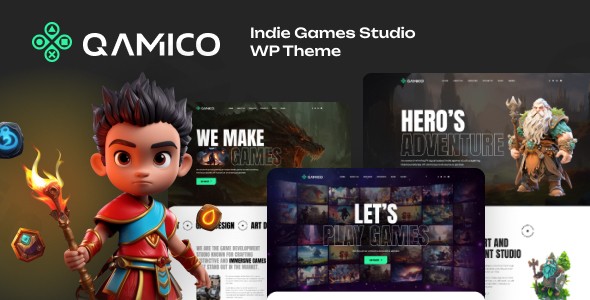
Qamico is a premium WordPress theme meticulously designed to give indie game developers, gaming studios, and esports organizations a powerful, visually stunning, and highly functional online presence. This theme excels at showcasing game portfolios, fostering community engagement, and ensuring a smooth, responsive user experience, making it the ideal solution for anyone in the gaming industry looking to elevate their digital brand.
Key Features: Design, Layout & Performance
Qamico combines cutting-edge design with robust functionality, creating an immersive platform that resonates with gaming audiences and performs exceptionally well.
Immersive Visual Design
Qamico immediately captivates visitors with its contemporary dark-themed interface and vibrant accent colors, perfectly capturing the dynamic aesthetic of the gaming world. The theme incorporates fluid animations, captivating parallax scrolling effects, and support for high-resolution imagery to bring your game visuals to life. With customizable color schemes, you can easily align the theme’s look and feel with your studio’s unique branding while maintaining a distinctive gaming atmosphere.
Game Portfolio Showcase
Effectively present your entire game library using Qamico’s professional portfolio layouts. These are specifically tailored for gaming projects, allowing you to highlight each game’s unique features with dedicated templates. Showcase engaging trailers, stunning screenshots, compelling gameplay videos, and detailed development progress. The theme includes specialized galleries, seamless video integration, and interactive elements that encourage visitors to delve deep into your creations.
Community Engagement Tools
Build and nurture a vibrant gaming community directly on your site. Qamico offers integrated social features, prominent newsletter subscription options, and comprehensive event management systems. It supports forums, comment sections, and user profiles to foster interaction among your audience. For esports tournament organizers, the theme provides dedicated event pages complete with registration systems and clear bracket displays, making it a powerful gaming WordPress theme for competitive play.
Developer-Friendly Architecture & Performance
Qamico is built on clean, optimized code, adhering to WordPress best practices to ensure fast loading times and smooth performance. The theme is fully responsive across all devices, from large desktop monitors to tablets and smartphones, ensuring your content looks impeccable everywhere. It includes essential SEO optimization features to enhance your search engine visibility and comes with regular compatibility updates to ensure seamless operation with the latest WordPress versions.
Layout Options & Prebuilt Demos
Beyond its core design, Qamico offers versatile layout options, including multiple pre-built homepage demos. These can be easily imported using a convenient one-click demo import feature, getting your site up and running quickly. The theme also provides flexible header and footer configurations and allows control over site width, accommodating both full-width and boxed layouts for complete design flexibility.
Customization Capabilities
Personalize nearly every aspect of your site without touching a line of code. Qamico supports extensive customization through the WordPress Customizer, allowing you to select main and secondary site colors, adjust typography, manage spacing, and set various background options, including engaging parallax background images for rows and headers. While some demos may use Adobe Fonts, the theme ensures fallbacks to default or Google Fonts for consistent display.
Installation & Demo Import Guide
Getting started with Qamico is straightforward, even if you’re new to WordPress. Here’s a step-by-step guide to installing the theme and importing its demo content:
- Download the Theme: First, download the Qamico theme package from your purchase source.
- Install the Theme: Log in to your WordPress dashboard. Navigate to Appearance > Themes > Add New > Upload Theme. Choose the
qamico.zipfile (or similar, typically found in the downloaded package) and click “Install Now.” - Activate the Theme: Once installed, click “Activate” to make Qamico your live theme.
- Install Required Plugins: Qamico will likely prompt you to install several recommended or required plugins. These usually include the Elementor Page Builder, Contact Form 7, and Revolution Slider. Install and activate all suggested plugins to ensure full theme functionality.
- One-Click Demo Import: To replicate the stunning demo sites, navigate to the theme’s options panel (often found under Appearance or a dedicated menu item like “Qamico Options” or “Import Demo”). Look for the “One-Click Demo Import” option. Select your desired demo and initiate the import.
- What to Expect: The demo import will bring in pages, posts, images, menus, widgets, and theme settings. This process can take several minutes, depending on your server’s performance. It’s advisable to have sufficient server memory and execution time limits to prevent timeouts for large demo imports.
- Review Your Site: After the import is complete, visit your homepage to see the demo content. You may need to manually set your homepage (under Settings > Reading) and assign your menus (under Appearance > Menus) to match the demo exactly.
Customization Guide: Branding & Layout
Qamico makes it easy to tailor your site to perfectly reflect your gaming brand.
- Access the WordPress Customizer: Most global settings are handled through the native WordPress Customizer. Navigate to Appearance > Customize from your dashboard. Here, you’ll find options for main site options, styling, layout, header, footer, and more.
- Change Colors and Typography: Within the Customizer, you can easily select your brand’s primary and secondary colors, ensuring visual consistency. While specific font systems are not extensively detailed, the theme provides customization options for typography, allowing you to choose font styles that align with your studio’s aesthetic.
- Upload Your Logo: Replace the default logo with your studio’s branding under the Customizer’s header or site identity section. You can also adjust header layouts here.
- Configure Headers and Footers: Qamico boasts a “Stunning Header & Footer builder function” with numerous options. These can be configured via the Customizer or dedicated theme options, allowing you to design unique navigation and footer areas that enhance user experience.
- Set Up Homepage and Blog: After demo import, ensure your static homepage and blog posts page are correctly assigned under Settings > Reading.
- Menu Management: Organize your site’s navigation under Appearance > Menus. Create custom menus and assign them to the theme’s available menu locations (e.g., primary menu, footer menu).
- Page Building with Elementor: For detailed page content and complex layouts, Qamico’s deep integration with Elementor provides a drag-and-drop interface. You can modify existing demo pages or create new ones from scratch using Elementor’s intuitive visual builder and Qamico’s included premade widgets.
FAQ & Troubleshooting
Here are answers to common questions about the Qamico WordPress theme:
Is Qamico compatible with Elementor and WooCommerce?
Yes, Qamico is fully compatible with the Elementor Drag & Drop Page Builder, providing a seamless content creation experience. It also offers WooCommerce compatibility, allowing you to effortlessly set up an online store to sell games, merchandise, or digital assets directly from your website.
What WordPress and PHP versions does Qamico support?
Qamico is tested and approved for WordPress 6.4.2 and supports WordPress versions 5.x–6.x. While specific minimum or recommended PHP versions are not explicitly documented, it’s generally recommended to use PHP 7.4 or higher for optimal performance and security with modern WordPress themes.
How can I customize the Qamico theme headers and footers?
Qamico features a powerful “Stunning Header & Footer builder function.” You can customize these elements through the WordPress Customizer (Appearance > Customize) or dedicated theme options panels, which provide numerous header and footer options to tailor them to your specific brand and design preferences.
Is the Qamico theme good for esports websites and tournament organizers?
Absolutely. Qamico includes dedicated community engagement tools and event management systems, making it excellent for esports teams and tournament organizers. It features dedicated event pages with registration systems and bracket displays to manage and promote your esports events effectively.
What should I do if the Qamico demo import fails or looks different from the demo site?
If the demo import fails, check your server’s PHP memory_limit, post_max_size, and max_execution_time settings, as insufficient resources can cause timeouts. If the import completes but the site looks different, ensure all recommended plugins are installed and activated. Also, manually set your homepage under Settings > Reading and assign your navigation menus under Appearance > Menus.
Conclusion
Qamico stands out as a top-tier Indie Games Studio WordPress Theme, offering an unparalleled blend of visual appeal, specialized features, and robust performance. Its immersive dark design, comprehensive game portfolio showcase, and powerful community engagement tools make it an ideal choice for indie developers, gaming studios, and esports organizations aiming for a professional and engaging online presence. With deep Elementor integration, WooCommerce compatibility, and a mobile-first, SEO-optimized architecture, Qamico provides a flexible and future-proof foundation for your gaming brand. While requiring standard WordPress technical upkeep, its extensive customization options and dedicated gaming features make it a worthwhile investment for anyone serious about showcasing their work and connecting with their audience in the dynamic world of gaming.
I. Download Limits & Account Benefits
- Free Downloads: Each email address receives 3 downloads per day for free products
- Upgrade Benefits: Purchase any paid product to increase your daily download limit by 3 for each paid product
- No Account Required: You can download immediately by receiving the download link via email
- Account Recommended: Create an account for easier access to your order history and direct update downloads
II. Understanding GPL vs Official Versions
Important: The products available on WPPick are GPL-licensed versions, which differ from official developer versions. Before purchasing, please read our comprehensive guide: Understanding GPL & Official Differences at WPPick
Key Points:
- GPL versions may not include premium support from original developers
- Updates may be delayed compared to official releases
- Some premium features might have limitations
- Always consider your specific needs and support requirements
III. Support & Assistance
We’re here to help through multiple channels:
- Email Support: Direct email assistance for all inquiries
- Live Chat: Real-time support during business hours
- Comprehensive Documentation: Detailed guides and tutorials
IV. Order Tracking
Access your complete purchase history and download links anytime: Order History
V. Account Access
New to WPPick? Login or Create Account to manage your downloads and orders efficiently.
VI. Refund Protection
We stand behind our products with a clear refund policy. Review our terms: Refund Policy
VII. Privacy & Security
Your data security is our priority. Learn how we protect your information: Privacy Policy
VII. Terms of Service
Understanding our service terms ensures a smooth experience: Terms of Use
Quick Tips for Best Experience
- Verify Compatibility: Check plugin/theme compatibility with your WordPress version
- Backup First: Always backup your site before installing new plugins or themes
- Test Environment: Consider testing on a staging site first
- Stay Updated: Regularly check for updates in your account dashboard
- Read Documentation: Review any included documentation for optimal setup
Need Help?
If you have questions about downloads, licensing, or need technical assistance, don’t hesitate to contact our support team. We’re committed to ensuring you have the best possible experience with WPPick products.
Ready to get started? Your download adventure begins with just one click!
- Release published on 28 November 2025.