

Quick Buy Now Button For Woocommerce
/Year
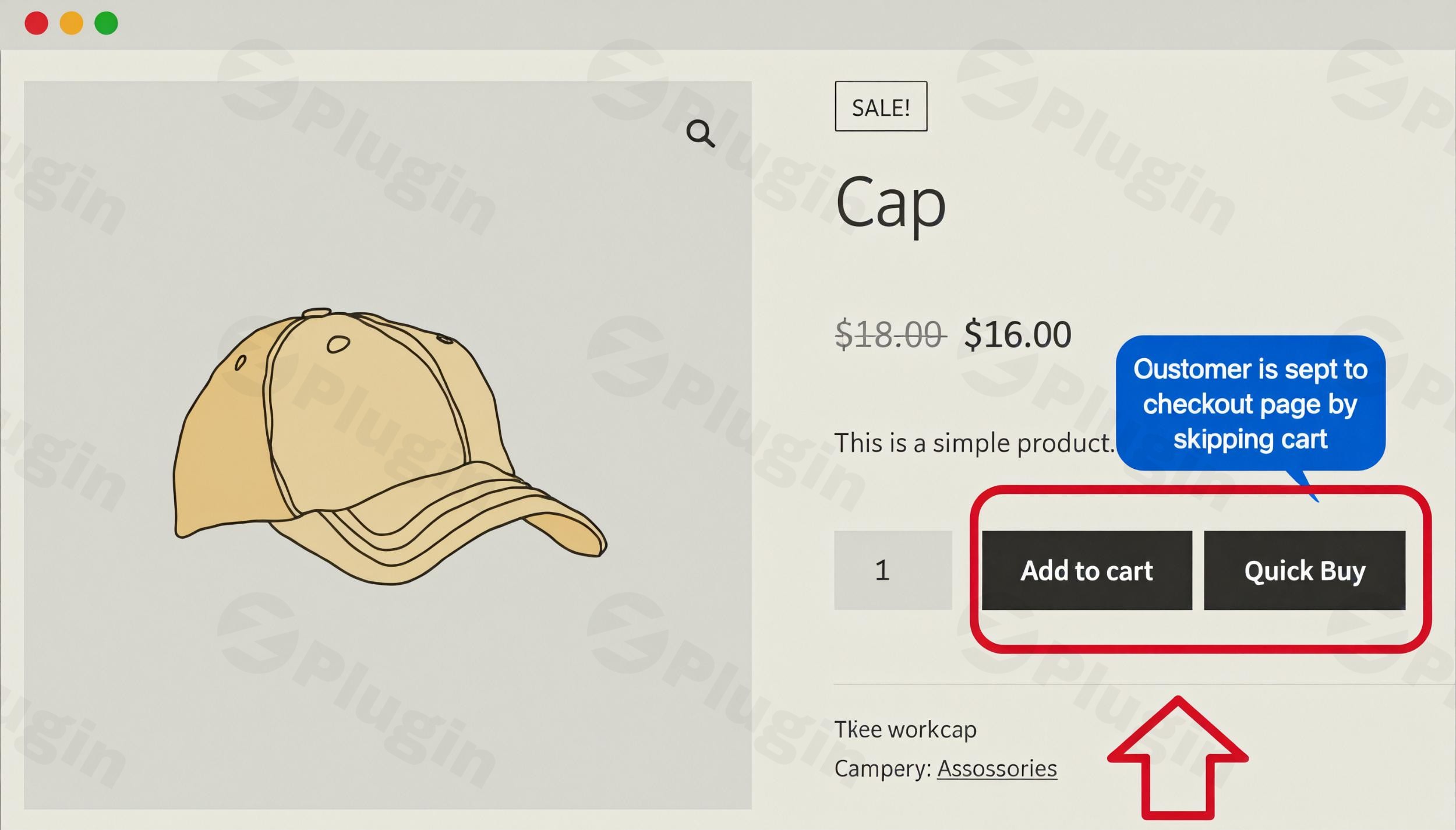
The modern online shopper demands speed and simplicity. In the fast-paced world of e-commerce, every extra click can mean a lost sale. This is where a powerful tool like the WooCommerce Quick Buy Button plugin becomes indispensable. It’s a game-changer for any WooCommerce store looking to significantly streamline WooCommerce checkout processes, enhance user experience, and ultimately boost conversion rates by enabling customers to complete purchases with a single click.By offering a seamless, one-click checkout WooCommerce experience, this plugin effectively eliminates common friction points like the traditional cart page, guiding customers directly from product discovery to a completed transaction. It’s an ideal solution for businesses aiming to reduce cart abandonment and increase impulse purchases.
Key Features That Drive Sales Growth
The WooCommerce Quick Buy Button plugin is packed with robust features designed to optimize your sales funnel and provide ultimate flexibility.
Flexible Redirect Options for Diverse Strategies
One of the standout features is the ability to control exactly where your customers are directed after clicking the “Buy Now” button.
- Direct to Checkout: For maximum conversion, send customers straight to the checkout page, completely bypassing the cart. This is the fastest path to purchase.
- Traditional Cart Experience: Maintain the default cart page if you prefer, giving customers a chance to review their order before proceeding.
- External Marketplace Redirection: Uniquely, this plugin allows redirection to custom or external URLs, such as Amazon or eBay. This is invaluable for merchants operating on multiple sales channels, creating a truly versatile WooCommerce buy now button redirect to external URL capability.
Granular Control Over Button Placement and Visibility
Achieve precise control over where your WooCommerce quick buy button appears, ensuring it complements your store’s design and user flow.
- Global or Selective Display: Choose to display the “Buy Now” button globally across all products, or target specific items, product categories, tags, brands, or even user roles. This allows for highly strategic implementation.
- “Add to Cart” Button Management: You have the option to hide the default “Add to Cart” button entirely or replace it with the Quick Buy button, simplifying the product page interface.
- Flexible Positioning: Place the button strategically on single product pages, shop pages, or both. Adjust its position relative to the “Add to Cart” button (before or after) to optimize visibility and user interaction.
Extensive Customization Capabilities
Match the plugin’s functionality and appearance perfectly with your brand identity.
- Tailor Button Text and Styling: Customize the button’s label text (e.g., “Buy Now,” “Instant Purchase,” “Add to Cart & Checkout”), background color, and text color. This allows you to create compelling calls-to-action that blend seamlessly with your theme.
- Default Quantity Setting: For faster impulse buys, especially on shop or category pages, you can predefine a default product quantity for the Quick Buy button.
- Product-Level Overrides: Global settings can be overridden on individual product pages, offering maximum flexibility for specific promotions or product types.
Shortcode Support for Ultimate Flexibility
For advanced users and developers, the plugin offers powerful shortcode support. This means you can place WordPress instant buy button functionality anywhere on your website – pages, posts, custom templates – and even specify product IDs, quantities, and custom styles directly within the shortcode.
Comprehensive Product & Cart Management
- Product Type Compatibility: The plugin works flawlessly with both simple and variable WooCommerce products. For variable products, it intelligently prompts customers to select variations before enabling the quick purchase.
- Cart Reset Functionality: To prevent confusion and ensure a smooth transaction, the plugin can be configured to automatically reset the cart when a customer uses the Quick Buy button, clearing any previously added items.
- AJAX-Powered Performance: Many implementations feature AJAX functionality, ensuring a speedy checkout experience without the need for full page reloads.
How to Install & Set Up Your WooCommerce Quick Buy Button
Installing the Quick Buy Now Button For Woocommerce plugin is a straightforward process, designed for users of all technical levels.
Step-by-Step Installation Guide:
- Download the Plugin: Obtain the plugin’s
.zipfile from your purchase source (e.g., your WooCommerce account, FmeAddons, or Addify). - Upload to WordPress:
- Log in to your WordPress admin dashboard.
- Navigate to Plugins > Add New.
- Click on the “Upload Plugin” button at the top of the page.
- Click “Choose File” and select the
.zipfile you downloaded. - Click “Install Now”.
- Activate the Plugin: Once installed, WordPress will prompt you to activate the plugin. Click “Activate Plugin”.
- Configure Settings:
- After activation, you’ll typically find the plugin’s settings under WooCommerce > Quick Buy or WooCommerce > Settings > Buy Now Button in your WordPress admin menu.
- Here, you can adjust global settings such as redirection options, default button text, and general appearance.
- Explore product-specific settings by editing individual WooCommerce products. You’ll find options to override global settings and customize the button for that particular product.
Practical Usage & Best Practices to Maximize Conversions
Implementing a WooCommerce instant purchase button is more than just adding a new feature; it’s a strategic move to optimize your entire sales funnel. Here’s how to get the most out of it:
- Reduce Cart Abandonment Rates Significantly: This is the plugin’s core strength. By removing the cart page as a potential point of friction, you create a direct path to purchase. Use it on product pages where impulse buys are common or for products with a clear, single-purchase intent. This is one of the most effective ways to reduce WooCommerce cart abandonment.
- Simplify the Purchasing Process for Mobile Users: Mobile commerce thrives on speed. A WooCommerce quick buy button dramatically simplifies the checkout for users on smartphones and tablets, where navigating multiple pages can be cumbersome. Prioritize this functionality for your mobile audience.
- Increase Impulse Buying Behavior: For digital products, limited-time offers, or items that customers typically don’t heavily research (e.g., accessories, frequently bought items), the “Buy Now” button encourages immediate action. Pair it with compelling calls to action and clear product information.
- Streamline Checkout for Digital Products and Subscriptions: Digital goods (ebooks, software, courses) or subscription services often have a very clear purchase intent. A direct checkout WooCommerce plugin like this allows customers to convert instantly, enhancing the experience for these product types, and it’s compatible with WooCommerce Subscriptions.
- Multi-Channel Selling with External Redirects: If you sell identical products on your WooCommerce store and platforms like Amazon, leverage the external redirect feature. This allows you to capture sales even if a customer prefers to complete the transaction on a familiar marketplace.
FAQ & Troubleshooting
Here are answers to common questions about the WooCommerce Quick Buy Button plugin:
Q: Does Quick Buy Now Button For Woocommerce reduce cart abandonment?
A: Yes, absolutely. The primary goal and a proven benefit of the Quick Buy Now Button For WooCommerce is to significantly reduce cart abandonment. By bypassing the traditional multi-step checkout process and enabling direct, one-click purchases, it removes common friction points that often lead customers to abandon their carts.
Q: How can I install Quick Buy Now Button For Woocommerce?
A: Installing the plugin is a standard WordPress procedure. You’ll download the plugin’s .zip file, then go to your WordPress Admin dashboard > Plugins > Add New > Upload Plugin, select the file, install, and activate it. Detailed steps are provided in the “Installation & Setup” section above.
Q: How to add buy now button to WooCommerce products?
A: Once installed and activated, the plugin provides options in two main areas:
- Global Settings: Under WooCommerce > Settings > Buy Now Button (or similar path), you can enable the button globally for all products and set default behaviors.
- Individual Product Settings: When editing a specific product in your WordPress admin, you’ll find a dedicated section to override global settings, enable/disable the button, and customize its appearance and redirection for that particular product.
Q: How to customize WooCommerce quick buy button color and text?
A: You can extensively customize the button’s appearance through the plugin settings. Navigate to the plugin’s configuration page within WooCommerce settings. Here, you’ll find options to change the button’s label text (e.g., “Buy Now”, “Instant Purchase”), background color, and text color. These settings allow you to match the button perfectly with your store’s branding and design.
Q: Is the Quick Buy Now Button For WooCommerce compatible with other plugins and themes?
A: The plugin is designed to be highly compatible. It is regularly updated to work with the latest versions of WordPress (e.g., WordPress 6.3+, 6.5+) and WooCommerce (e.g., WooCommerce 8.1+, 8.7+). It’s also known to integrate well with popular themes like Astra and generally works with most standard WooCommerce themes and all WooCommerce payment gateways. It’s also compatible with WooCommerce Subscriptions. Its lightweight code ensures minimal impact on site performance and usually operates “out of the box with no conflicts.”
Q: What are the best WooCommerce one-click checkout plugins?
A: While several plugins offer one-click or direct checkout functionalities (e.g., WooCommerce Direct Checkout, YITH WooCommerce One-Click Checkout, WooCommerce Fast Cart, PeachPay, Flux Checkout), the “Quick Buy Now Button For WooCommerce” distinguishes itself with its unique ability to redirect customers to external marketplaces like Amazon or eBay, its comprehensive customization options for styling and placement, and its advanced shortcode support for versatile implementation.
Start Converting More Visitors Into Customers Today
The WooCommerce Quick Buy Button plugin is a strategic investment for any e-commerce business seeking to optimize its sales performance. By delivering a truly streamlined WooCommerce checkout experience, it addresses the modern consumer’s demand for speed and convenience, directly contributing to higher conversion rates and a significant reduction in cart abandonment.Its robust feature set, including flexible redirection, granular placement control, and extensive customization options, makes it a powerful and versatile tool. Coupled with its guaranteed security, GPL license, and professional support, it’s a reliable choice for enhancing your store’s efficiency. Implement this WooCommerce buy now plugin today and empower your customers to make instant purchases, transforming visitors into loyal customers with unparalleled ease.
I. Download Limits & Account Benefits
- Free Downloads: Each email address receives 3 downloads per day for free products
- Upgrade Benefits: Purchase any paid product to increase your daily download limit by 3 for each paid product
- No Account Required: You can download immediately by receiving the download link via email
- Account Recommended: Create an account for easier access to your order history and direct update downloads
II. Understanding GPL vs Official Versions
Important: The products available on WPPick are GPL-licensed versions, which differ from official developer versions. Before purchasing, please read our comprehensive guide: Understanding GPL & Official Differences at WPPick
Key Points:
- GPL versions may not include premium support from original developers
- Updates may be delayed compared to official releases
- Some premium features might have limitations
- Always consider your specific needs and support requirements
III. Support & Assistance
We’re here to help through multiple channels:
- Email Support: Direct email assistance for all inquiries
- Live Chat: Real-time support during business hours
- Comprehensive Documentation: Detailed guides and tutorials
IV. Order Tracking
Access your complete purchase history and download links anytime: Order History
V. Account Access
New to WPPick? Login or Create Account to manage your downloads and orders efficiently.
VI. Refund Protection
We stand behind our products with a clear refund policy. Review our terms: Refund Policy
VII. Privacy & Security
Your data security is our priority. Learn how we protect your information: Privacy Policy
VII. Terms of Service
Understanding our service terms ensures a smooth experience: Terms of Use
Quick Tips for Best Experience
- Verify Compatibility: Check plugin/theme compatibility with your WordPress version
- Backup First: Always backup your site before installing new plugins or themes
- Test Environment: Consider testing on a staging site first
- Stay Updated: Regularly check for updates in your account dashboard
- Read Documentation: Review any included documentation for optimal setup
Need Help?
If you have questions about downloads, licensing, or need technical assistance, don’t hesitate to contact our support team. We’re committed to ensuring you have the best possible experience with WPPick products.
Ready to get started? Your download adventure begins with just one click!
- Updated compatibility for latest WooCommerce and WordPress versions.
- Added options to display quick buy now button based on user roles and brands.
- Added option to customized button styling.
- Added option to include and exclude product categories.
- Resolved conflict between product level setting and general settings.