

Quill Forms Webhooks Addon
/Year
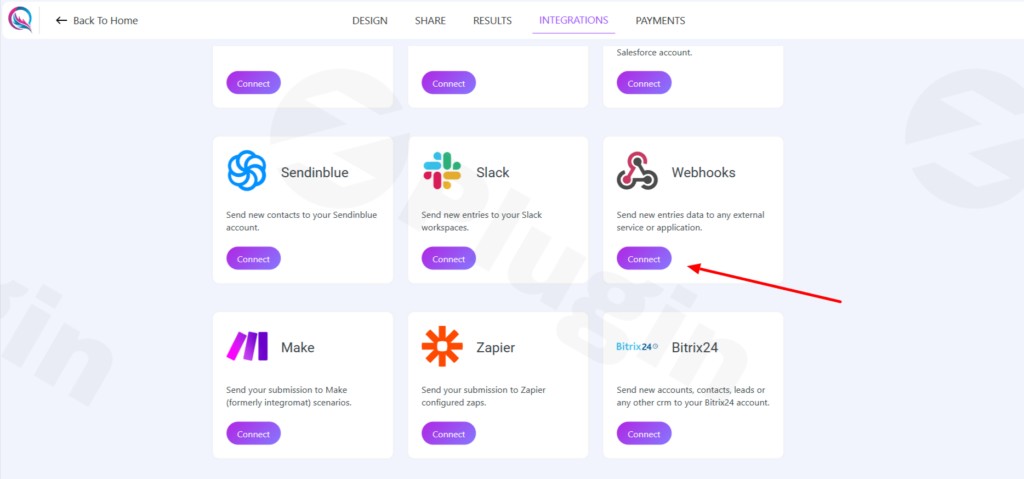
In the fast-paced digital world, efficiently managing data from your WordPress forms is crucial for business growth. The Quill Forms Webhooks Addon provides a powerful solution, enabling seamless Quill Forms Webhook Integration with virtually any external service. This addon transforms how you handle form submissions, allowing you to automate data flow in real-time, eliminate manual entry, and build robust workflows that save time and boost productivity.Quill Forms, known for its engaging conversational form experience, gains an essential automation layer with this webhooks integration. Instead of manually exporting data or relying on complex custom coding, you can instantly transmit form submission data to your CRM, marketing automation platform, payment processor, or any custom API via HTTP requests. This means your external systems always have the latest information, empowering you to act on leads and data the moment they arrive.
Key Features of Quill Forms Webhooks for Advanced Data Automation
The Quill Forms Webhooks Addon isn’t just about sending data; it’s about intelligent, flexible, and reliable data automation. Here’s a detailed look at its core capabilities:
Real-Time Data Transmission
Gone are the days of delayed data. With Quill Forms Webhooks, you get instant notifications and data transfers the very moment a form submission occurs. This ensures your external systems—whether it’s a sales CRM or an analytics dashboard—are always up-to-date with the latest user interactions and lead information.
Multi-Platform Integration
Connect your Quill Forms with an expansive array of third-party services. This powerful WordPress Webhook Plugin for Quill Forms facilitates effortless connections with CRM platforms like HubSpot or ActiveCampaign, marketing automation tools, payment gateways, project management systems, and custom APIs. It dramatically expands the reach of your form data without requiring complex coding expertise.
Flexible Trigger Options
Gain granular control over when your webhook requests are sent. The addon allows you to configure webhooks to fire on various form events, ensuring data is sent at the most appropriate moment in your user’s journey:
- Submission: Triggers when a user successfully completes and submits the entire form.
- Saving the form: Ideal for “save and continue” functionalities, sending data when a user saves a draft.
- Partial Submission: Executes when a user submits an incomplete form. This is incredibly valuable for lead capture, allowing you to gather contact information even if a user doesn’t finish the entire form.
Conditional Webhook Execution
This advanced feature allows you to set specific conditions based on form responses that dictate when a webhook should fire. You can use “AND/OR” logic to create multiple conditions, enabling intelligent routing of different responses to different endpoints. For example, send leads from a specific country to one CRM and others to a different system.
Dynamic Request URLs
The plugin supports both static URLs and dynamic URLs. With the use of merge tags, you can personalize the endpoint URL, providing immense flexibility for advanced integrations where the destination might depend on form input.
Request Body Mapping
You have full control over the data sent in the webhook’s request body (the payload). This ensures you send only the necessary information:
- All Data: Send all collected form data.
- Selected Fields: Choose specific fields to include in the submission, preventing unnecessary data transfer and keeping your external systems clean.
- Support for System Fields: Automatically includes essential data such as Entry ID, Form Name, and Submission Time, alongside your custom field values.
Integration with Automation Platforms
Beyond direct API connections, the Quill Forms Webhooks Addon integrates seamlessly with powerful automation platforms like Zapier. This expands your capabilities exponentially, allowing you to connect Quill Forms data to over 8000 other applications and build complex, multi-step workflows with ease. This is particularly useful if you need to send Quill Forms data to Zapier using webhooks.
Debugging Capabilities
To ensure smooth operation, the plugin offers practical debugging advice. This includes recommendations to test endpoints independently, checking Quill Forms logs for execution details, and utilizing tools like ngrok for testing local endpoints.
Installation & Setup: Getting Started with Quill Forms Webhooks Integration
Installing and configuring the Quill Forms Webhooks Addon is a straightforward process, even for non-developers. Here’s how you can get started:
- Purchase and Download: First, ensure you have an active Quill Forms license that includes the Webhooks Addon (typically part of an All Access Pass or a specific plan from Quill Forms, such as the Plus Plan or Enterprise Plan). Download the addon file from your Quill Forms account.
- Upload to WordPress:
- Log in to your WordPress dashboard.
- Navigate to Plugins > Add New.
- Click on the Upload Plugin button at the top.
- Choose the downloaded
.zipfile for the Quill Forms Webhooks Addon and click Install Now.
- Activate the Plugin: Once installed, click Activate Plugin. The addon is now ready for use within your Quill Forms settings.
- Configure Webhooks within Quill Forms:
- Go to Quill Forms > Forms in your WordPress dashboard and edit the form you want to integrate.
- Within the form builder, navigate to the Integrations or Settings tab (the exact location may vary slightly based on Quill Forms updates).
- Locate the “Webhooks” section and click to add a new webhook.
- Enter the Request URL: This is the endpoint URL of the external service you want to send data to.
- Choose Trigger Event: Select when the webhook should fire (Submission, Saving the form, or Partial Submission).
- Select HTTP Method: While the core documentation highlights data sending (implying POST), typically webhook addons support various methods like POST, GET, PUT, PATCH, and DELETE for diverse API interactions.
- Configure Request Body: Decide whether to send all form data or map specific fields. This is where you’ll be mapping Quill Forms fields to external API via webhook.
- Set Conditional Logic (Optional): If needed, define rules for when the webhook should execute based on form field values.
- Save: Save your webhook configuration.Now, every time your form triggers the configured event, the data will be automatically transmitted to your specified external service.
Practical Usage & Best Practices for Quill Forms Data Automation
The true power of the Quill Forms Webhooks Addon lies in its ability to automate crucial business processes. Here are some concrete use cases and best practices for leveraging its capabilities:
1. Lead Generation & CRM Integration
Best Practice: Automatically send Quill Forms data to CRM platforms like HubSpot, Salesforce, Zoho CRM, or any other system.
- Workflow: A prospect fills out a “Request a Demo” form. Upon submission, the webhook instantly sends their contact details and specific answers to your CRM, creating a new lead entry and triggering an automated follow-up sequence for your sales team.
- Why it’s ideal: Eliminates manual data entry, reduces lead response time, and ensures no lead falls through the cracks.
2. Marketing Automation & Email List Growth
Best Practice: Seamlessly add new subscribers to your email marketing lists or trigger advanced automation workflows.
- Workflow: A user signs up for your newsletter or downloads an ebook through a Quill Form. The webhook automatically adds their email address and preferences to your ActiveCampaign, Mailchimp, or ConvertKit list, and might even trigger a welcome email sequence or segment them into a specific audience.
- Why it’s ideal: Keeps your email lists constantly updated, powers personalized marketing campaigns, and automates subscriber onboarding.
3. E-commerce Order Notifications & Inventory Management
Best Practice: Integrate order forms with your internal systems or fulfillment partners.
- Workflow: A customer places a custom order or requests a quote via a Quill Form. The webhook sends the order details to your inventory system or a fulfillment service, automating the order processing and ensuring stock levels are updated.
- Why it’s ideal: Streamlines order fulfillment, improves customer service, and helps maintain accurate inventory.
4. Internal Workflow Automation & Team Collaboration
Best Practice: Use webhooks to notify team members, update project management tools, or log data in spreadsheets.
- Workflow: An employee submits an internal request form (e.g., IT support, PTO request). The webhook can post a message to a Slack channel, create a new task in Asana or Trello, or append a new row to a Google Sheet for tracking.
- Why it’s ideal: Enhances internal communication, automates routine administrative tasks, and centralizes data tracking.
FAQ & Troubleshooting for Quill Forms Webhooks Addon
Here are answers to common questions about using the Quill Forms Webhooks Addon, designed to be clear and helpful for both traditional and AI-powered searches.
Q1: Can Quill Forms send data to Zapier using webhooks?
Yes, absolutely! The Quill Forms Webhooks Addon is perfectly designed to send data to Zapier. You would typically configure a Quill Forms webhook to send data to a “Webhook by Zapier” trigger. This allows you to connect your Quill Forms submissions to over 8000 other applications available on Zapier, enabling complex automation workflows without any coding.
Q2: What are the benefits of using Quill Forms Webhooks Addon?
The primary benefits of using the Quill Forms Webhooks Addon include:
- Real-time Data Sync: Ensures external systems always have the latest form submission data.
- Automation: Eliminates manual data entry and reduces human error.
- Seamless Integration: Connects Quill Forms with virtually any external service, CRM, or marketing platform.
- Increased Productivity: Automates workflows, saving significant time and resources.
- Flexibility: Offers configurable trigger events, conditional logic, and dynamic URL options for tailored integrations.
Q3: How to set up conditional webhooks in Quill Forms?
To set up conditional webhooks in Quill Forms, you’ll need to configure the webhook within your specific form’s settings. Look for an option related to “Conditional Logic” or “Conditions” for your webhook. Here, you can define rules based on form field values (e.g., “If [Field X] is equal to ‘Value Y'”). The webhook will only fire if these conditions are met, allowing for intelligent routing of data based on user input.
Q4: How to debug Quill Forms webhook issues?
If your Quill Forms webhook isn’t working as expected, consider these troubleshooting steps:
- Test Endpoint Independently: Use a tool like Postman or Insomnia to send a test request directly to your target URL, bypassing Quill Forms, to ensure the external service is reachable and correctly configured.
- Check Quill Forms Logs: Quill Forms (or the Webhooks Addon) often provides logs detailing webhook execution attempts, including any errors or responses received from the external service.
- Verify URL and Method: Double-check that the webhook URL is correct and that you’re using the appropriate HTTP method (e.g., POST) for your external API.
- Inspect Request Body: Ensure the data you’re sending in the request body (field mapping) matches the expected format of the external service.
- Use Testing Tools: Tools like
ngrokcan create public URLs for your local development environment, useful for testing webhooks that need to hit a local server.
Q5: Does Quill Forms Webhooks Addon support all HTTP request methods?
While the primary use case for sending form submission data typically involves the POST method, similar robust webhook addons for WordPress form builders often support various HTTP methods such as GET, PUT, PATCH, and DELETE. The implies data sending, which primarily means POST requests. For detailed support on other specific methods, it’s always best to refer to the most current official Quill Forms documentation, but it can be inferred that at least POST requests are fully supported for transmitting submission data.
Conclusion: Transform Your WordPress Form Workflows with Quill Forms Webhooks
The Quill Forms Webhooks Addon is an indispensable tool for any WordPress user looking to maximize the value of their form data. By offering seamless, real-time integration with a vast array of external services, it empowers you to automate workflows, eliminate manual errors, and significantly boost operational efficiency.For marketers, store owners, and agencies, this powerful Quill Forms Webhook Integration translates directly into a higher return on investment. You gain the ability to instantly capture leads, manage customer interactions, and trigger critical business processes the moment they happen. With its commitment to GPL licensing, regular updates, and professional support (as offered by ZeroPlugin.com), the Quill Forms Webhooks Addon stands out as a reliable, secure, and feature-rich solution to automate form submissions WordPress sites rely on. Embrace this integration to transform your data flow and unlock new levels of productivity.
I. Download Limits & Account Benefits
- Free Downloads: Each email address receives 3 downloads per day for free products
- Upgrade Benefits: Purchase any paid product to increase your daily download limit by 3 for each paid product
- No Account Required: You can download immediately by receiving the download link via email
- Account Recommended: Create an account for easier access to your order history and direct update downloads
II. Understanding GPL vs Official Versions
Important: The products available on WPPick are GPL-licensed versions, which differ from official developer versions. Before purchasing, please read our comprehensive guide: Understanding GPL & Official Differences at WPPick
Key Points:
- GPL versions may not include premium support from original developers
- Updates may be delayed compared to official releases
- Some premium features might have limitations
- Always consider your specific needs and support requirements
III. Support & Assistance
We’re here to help through multiple channels:
- Email Support: Direct email assistance for all inquiries
- Live Chat: Real-time support during business hours
- Comprehensive Documentation: Detailed guides and tutorials
IV. Order Tracking
Access your complete purchase history and download links anytime: Order History
V. Account Access
New to WPPick? Login or Create Account to manage your downloads and orders efficiently.
VI. Refund Protection
We stand behind our products with a clear refund policy. Review our terms: Refund Policy
VII. Privacy & Security
Your data security is our priority. Learn how we protect your information: Privacy Policy
VII. Terms of Service
Understanding our service terms ensures a smooth experience: Terms of Use
Quick Tips for Best Experience
- Verify Compatibility: Check plugin/theme compatibility with your WordPress version
- Backup First: Always backup your site before installing new plugins or themes
- Test Environment: Consider testing on a staging site first
- Stay Updated: Regularly check for updates in your account dashboard
- Read Documentation: Review any included documentation for optimal setup
Need Help?
If you have questions about downloads, licensing, or need technical assistance, don’t hesitate to contact our support team. We’re committed to ensuring you have the best possible experience with WPPick products.
Ready to get started? Your download adventure begins with just one click!