

Rating Field For Contact Form 7
/Year
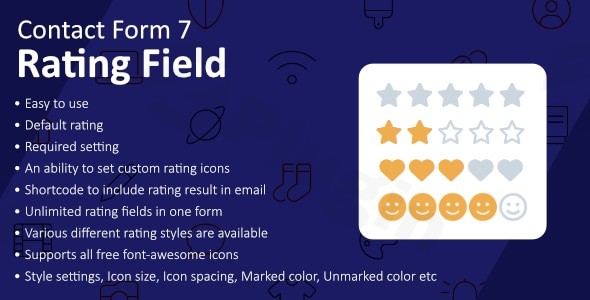
Contact Form 7 (CF7) is the most popular form builder for WordPress, but it is famously minimalist. Out of the box, it lacks the ability to collect visual feedback, such as star ratings. To bridge this gap, the Rating Field For Contact Form 7 plugin serves as an essential add-on, allowing site owners to transform simple contact forms into powerful customer feedback tools.
By integrating a Contact Form 7 rating field, you can capture user sentiment, product reviews, and service satisfaction levels directly within your existing forms. In this guide, we will explore the features, setup process, and best practices for implementing a CF7 star rating system on your website.
Key Features of Rating Field for Contact Form 7
The Rating Field For Contact Form 7 is a lightweight, high-performance add-on designed specifically to extend the core functionality of CF7. It is highly customizable and built with user experience (UX) in mind.
1. Fully Customizable Star Scales
While the standard scale is 1 to 5 stars, the plugin allows you to expand this up to 10 stars. This flexibility is ideal for NPS (Net Promoter Score) surveys or detailed academic feedback forms.
2. Extensive Icon Library Integration
You aren’t limited to standard stars. The plugin supports Font Awesome icons, meaning you can use hearts, thumbs up, or any other icon to match your brand’s aesthetic. You can also customize:
- Star Color: Match your website’s color palette.
- Icon Size: Adjust the scale for mobile or desktop layouts.
- Spacing: Fine-tune the distance between icons for better touch-target accuracy.
3. Lightweight and Performance-Optimized
Performance is a critical factor for SEO. This plugin is exceptionally lightweight, using approximately 0.68 KB of memory. This is lower than 99% of other WordPress plugins, ensuring that adding a WordPress contact form star rating doesn’t slow down your page load times.
4. Seamless Email Integration
Capturing the rating is only half the battle. The plugin makes it easy to include the user’s selection in your admin notifications. By using a simple shortcode (like [rating]) in your Mail tab, the selected value is automatically sent to your inbox.
How to Install and Set Up the Contact Form 7 Rating Field
Follow these steps to add rating to CF7 in under five minutes.
Step 1: Install Dependencies
Before installing the add-on, ensure you have Contact Form 7 installed and activated on your WordPress site.
Step 2: Install the Rating Field Plugin
- Navigate to your WordPress Dashboard.
- Go to Plugins > Add New.
- Search for “Rating Field For Contact Form 7”.
- Click Install Now and then Activate.
Step 3: Add the Rating Field to Your Form
- Go to Contact > Contact Forms and select the form you wish to edit.
- In the “Form” tab, click the new rating button in the tag generator toolbar.
- A popup will appear where you can:
- Set the field as Required.
- Choose the number of stars.
- Set a default value.
- Add custom CSS classes or IDs.
- Click Insert Tag.
Step 4: Configure the Email Output
To see the rating in your email notifications:
- Switch to the Mail tab in your CF7 settings.
- Insert the field name (e.g.,
[rating-123]) into the Message Body. - Save the form.
Practical Usage & Best Practices
Using a user rating plugin for WordPress effectively requires more than just placing stars on a page. Here are a few real-world workflows to maximize the value of your data:
- Customer Satisfaction (CSAT) Surveys: After a customer completes a support request, use a CF7 form to ask, “How would you rate our service?” This is the best way to collect ratings with Contact Form 7 for service-based businesses.
- Product Peer Reviews: If you are running a small WooCommerce store and want a simple way for users to submit reviews without complex review plugins, use a rating field in a “Submit a Review” form.
- Event Feedback: For agencies hosting webinars or workshops, a quick 5-star rating field helps gauge the success of the speaker or the content quality instantly.
Pro Tip: Always make the rating field “Required” if you are using it for data analysis. This ensures you don’t receive empty submissions that skew your feedback metrics.
FAQ & Troubleshooting
Does Contact Form 7 have a star rating field built-in?
No, Contact Form 7 does not include a star rating field by default. You must install a dedicated add-on like Rating Field for Contact Form 7 or a suite like Ultra Addons to enable this functionality.
Can I use star ratings in Contact Form 7 for mobile users?
Yes. The Rating Field For Contact Form 7 is designed to be fully responsive. The stars are touch-friendly, making it easy for users on smartphones and tablets to select their rating.
What should I do if the star rating is not showing up?
First, ensure the plugin is activated and you have included the tag in the form editor. If it still doesn’t appear, it may be a conflict with your theme’s CSS (such as the Kadence theme). Try checking your browser console for JavaScript errors or contact the plugin support for specific CSS fixes.
Is the plugin compatible with the latest WordPress versions?
Yes, the plugin is maintained to be compatible with modern WordPress versions (up to 6.x) and PHP 7.4 or higher.
Conclusion: Is it Worth It?
The Rating Field For Contact Form 7 is a “must-have” for any site owner who relies on CF7 but needs more than just text inputs. It provides a professional, visual way to gather feedback without the bloat of a heavy form builder.
Whether you are a developer building a client site or a business owner looking for a Contact Form 7 feedback form solution, this plugin offers the perfect balance of simplicity and customization. For more WordPress tips and plugin reviews, visit wppick.com.
I. Download Limits & Account Benefits
- Free Downloads: Each email address receives 3 downloads per day for free products
- Upgrade Benefits: Purchase any paid product to increase your daily download limit by 3 for each paid product
- No Account Required: You can download immediately by receiving the download link via email
- Account Recommended: Create an account for easier access to your order history and direct update downloads
II. Understanding GPL vs Official Versions
Important: The products available on WPPick are GPL-licensed versions, which differ from official developer versions. Before purchasing, please read our comprehensive guide: Understanding GPL & Official Differences at WPPick
Key Points:
- GPL versions may not include premium support from original developers
- Updates may be delayed compared to official releases
- Some premium features might have limitations
- Always consider your specific needs and support requirements
III. Support & Assistance
We’re here to help through multiple channels:
- Email Support: Direct email assistance for all inquiries
- Live Chat: Real-time support during business hours
- Comprehensive Documentation: Detailed guides and tutorials
IV. Order Tracking
Access your complete purchase history and download links anytime: Order History
V. Account Access
New to WPPick? Login or Create Account to manage your downloads and orders efficiently.
VI. Refund Protection
We stand behind our products with a clear refund policy. Review our terms: Refund Policy
VII. Privacy & Security
Your data security is our priority. Learn how we protect your information: Privacy Policy
VII. Terms of Service
Understanding our service terms ensures a smooth experience: Terms of Use
Quick Tips for Best Experience
- Verify Compatibility: Check plugin/theme compatibility with your WordPress version
- Backup First: Always backup your site before installing new plugins or themes
- Test Environment: Consider testing on a staging site first
- Stay Updated: Regularly check for updates in your account dashboard
- Read Documentation: Review any included documentation for optimal setup
Need Help?
If you have questions about downloads, licensing, or need technical assistance, don’t hesitate to contact our support team. We’re committed to ensuring you have the best possible experience with WPPick products.
Ready to get started? Your download adventure begins with just one click!