
Recipe Card Blocks Pro By Wpzoom
/Year
Empower Your Food Blog with Structured Recipe Cards
Recipe Card Blocks Pro by WPZOOM is a specialized WordPress plugin designed for food bloggers, chefs, and culinary websites looking to present recipes cleanly and professionally. Built specifically for the native WordPress block editor, it allows you to construct interactive, visually appealing recipe layouts without touching any code. By organizing your ingredients, instructions, and cooking times into structured elements, the plugin enhances how your culinary content appears to readers and search engines alike.
What Recipe Card Blocks Pro Does
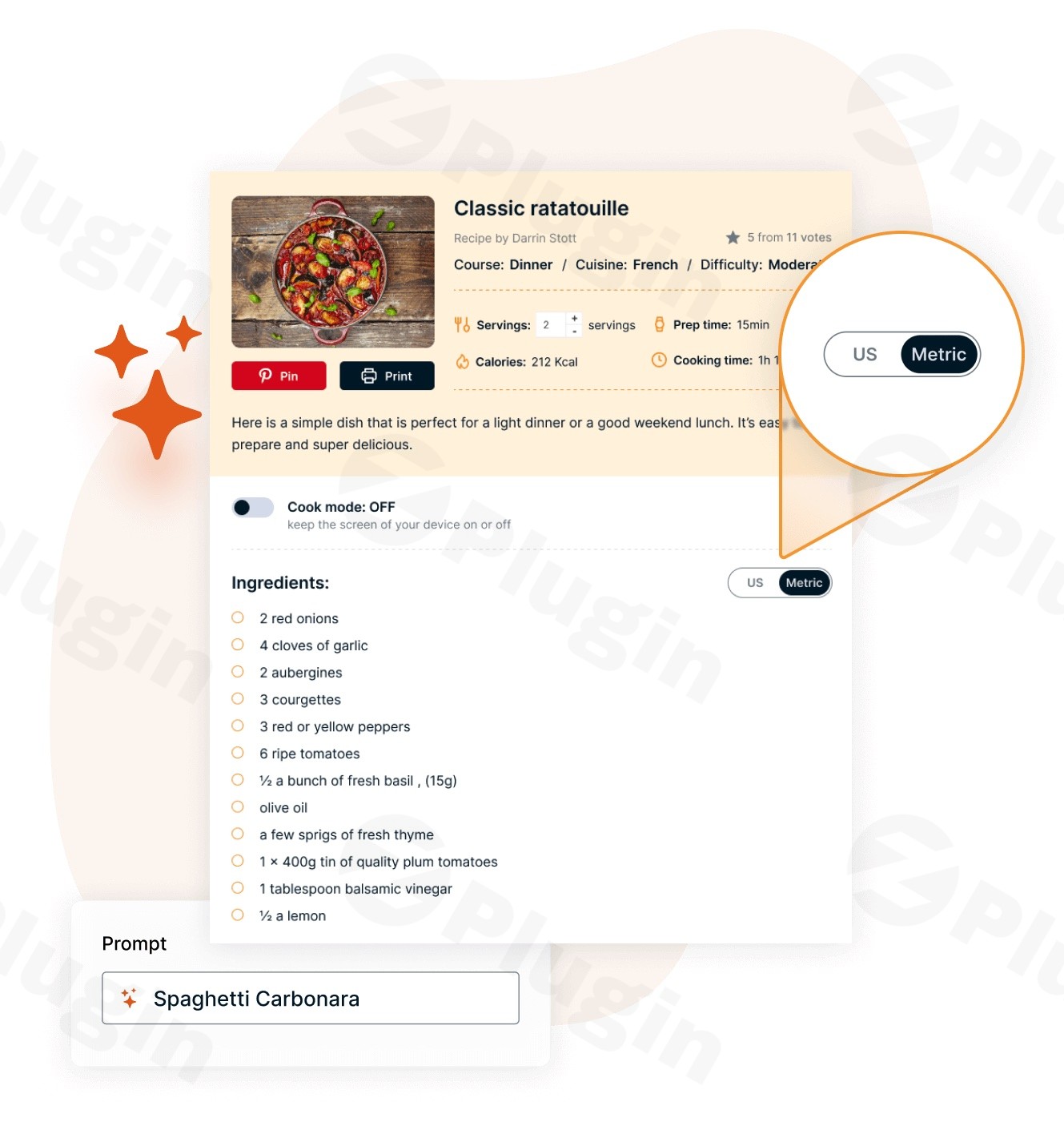
The plugin provides dedicated Gutenberg blocks that transform standard blog posts into comprehensive recipe guides. It automatically generates underlying schema markup, ensuring search engines can easily parse cooking times, nutritional information, and ingredient lists. Features like adjustable serving sizes let visitors scale ingredient quantities dynamically, while unit conversion tools allow users to switch seamlessly between metric and imperial measurements with a single click.
Who It Is For
This plugin serves food bloggers, recipe developers, culinary instructors, and lifestyle publishers who rely on organic traffic and clear user experience. Whether you are running a personal cooking journal or managing a high-volume recipe portal, the tool streamlines content creation, maintains consistent branding across posts, and ensures your cooking guides meet modern web standards.
Key Capabilities
- Native Gutenberg integration for smooth, drag-and-drop recipe card building.
- Automatic JSON-LD schema markup generation for enhanced search engine visibility.
- Interactive serving size calculator that adjusts ingredient amounts automatically.
- Unit conversion options for metric and imperial measurements.
- Customizable styling options to match your website theme and typography.
- Print-friendly layouts that let readers save or print recipes cleanly.
Practical WordPress Use Cases
- Publishing step-by-step cooking instructions with accompanying times, difficulty levels, and calorie counts.
- Enabling international readers to convert ingredient measurements instantly between US and metric standards.
- Displaying structured recipe data that qualifies for enhanced listings in search engine results.
- Allowing site visitors to scale recipe yields up or down based on party size without manual math.
Setup and Compatibility Notes
Recipe Card Blocks Pro is built to work natively with the WordPress Block Editor (Gutenberg). It requires no complex configuration panels; simply insert the recipe block into any post or page and fill out the designated fields. It is compatible with standard caching plugins, translation tools, and modern responsive WordPress themes.
Reasons to Choose It on WPPick
Acquiring Recipe Card Blocks Pro through WPPick grants you access to a secure, verified download file under the GPL license. Every plugin version is scanned for safety, ensuring a clean installation process for your WordPress website while providing regular updates to keep your content tools current.
Latest Version Context
Version 7.2.3 introduces several valuable updates, including ten new language translations such as Swedish, Brazilian Portuguese, Russian, and Japanese, bringing total language support to seventeen. This release also improves ingredient fraction handling, allowing fractions and symbols like quarters and halves to be entered naturally. Additionally, unit conversion logic has been refined to keep teaspoon and tablespoon measures accurate while snapping converted amounts to standard cooking fractions.
Frequently Asked Questions
Does Recipe Card Blocks Pro require a specific page builder?
No, the plugin is built specifically for the native WordPress Gutenberg block editor and does not require third-party page builders to function.
Will this plugin help my recipes appear in search engine results?
Yes, it automatically includes structured data markup, which helps search engines understand your recipe content and display rich snippets.
Can site visitors adjust ingredient quantities?
Yes, the built-in adjustable servings feature allows users to scale ingredient amounts up or down instantly.
How do readers convert between metric and imperial measurements?
Readers can use the integrated unit conversion buttons directly on the recipe card to switch measurement systems seamlessly.
Is the plugin translation-ready?
Yes, it supports multiple languages, with recent updates expanding localization to seventeen total languages.
I. Download Limits & Account Benefits
- Free Downloads: Each email address receives 3 downloads per day for free products
- Upgrade Benefits: Purchase any paid product to increase your daily download limit by 3 for each paid product
- No Account Required: You can download immediately by receiving the download link via email
- Account Recommended: Create an account for easier access to your order history and direct update downloads
II. Understanding GPL vs Official Versions
Important: The products available on WPPick are GPL-licensed versions, which differ from official developer versions. Before purchasing, please read our comprehensive guide: Understanding GPL & Official Differences at WPPick
Key Points:
- GPL versions may not include premium support from original developers
- Updates may be delayed compared to official releases
- Some premium features might have limitations
- Always consider your specific needs and support requirements
III. Support & Assistance
We’re here to help through multiple channels:
- Email Support: Direct email assistance for all inquiries
- Live Chat: Real-time support during business hours
- Comprehensive Documentation: Detailed guides and tutorials
IV. Order Tracking
Access your complete purchase history and download links anytime: Order History
V. Account Access
New to WPPick? Login or Create Account to manage your downloads and orders efficiently.
VI. Refund Protection
We stand behind our products with a clear refund policy. Review our terms: Refund Policy
VII. Privacy & Security
Your data security is our priority. Learn how we protect your information: Privacy Policy
VII. Terms of Service
Understanding our service terms ensures a smooth experience: Terms of Use
Quick Tips for Best Experience
- Verify Compatibility: Check plugin/theme compatibility with your WordPress version
- Backup First: Always backup your site before installing new plugins or themes
- Test Environment: Consider testing on a staging site first
- Stay Updated: Regularly check for updates in your account dashboard
- Read Documentation: Review any included documentation for optimal setup
Need Help?
If you have questions about downloads, licensing, or need technical assistance, don’t hesitate to contact our support team. We’re committed to ensuring you have the best possible experience with WPPick products.
Ready to get started? Your download adventure begins with just one click!
- 10 new translations — Swedish, Brazilian Portuguese, Russian, Polish, Danish, Norwegian, Finnish, Turkish, Ukrainian, and Japanese (the plugin is now available in 17 languages)
- Ingredient amounts can now be entered as fractions the way people naturally write them — "1/4", "1 1/2", or symbols like ¼ and 1½ — and Unit Conversion and Adjustable Servings will understand them (previously decimals like 0.25 were required)
- Unit Conversion keeps teaspoon and tablespoon measures unchanged when converting between systems (a metric teaspoon is the same spoon), instead of converting them to ml
- Converted amounts now snap to common cooking fractions (halves, thirds, quarters, eighths) — no more odd results like "3/7 cup" — and units already in the target system are kept as-is in mixed-unit recipes
- Minor bug fixes