
Responsive Timetable For WordPress
/Year
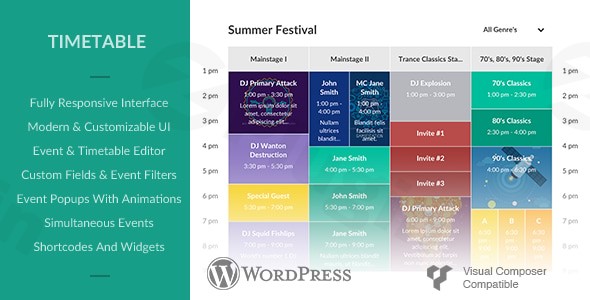
In today’s fast-paced digital world, effectively communicating schedules and facilitating bookings is crucial for many WordPress websites. Whether you’re running a gym, a school, an event agency, or a service-based business, a clear, interactive, and responsive timetable can dramatically improve user experience and operational efficiency. This is where a powerful Responsive Timetable WordPress Plugin comes into play, offering a modern solution to effortlessly display events, classes, and appointments while often integrating robust booking functionalities.The “Responsive Timetable for WordPress” plugin, available from ZeroPlugin.com, is designed to transform how your audience interacts with your schedule. It provides an intuitive platform to create, customize, and manage beautiful timetables, making it an indispensable WordPress schedule plugin for anyone needing to present complex information clearly and professionally. From managing a class schedule WordPress plugin to handling a full-fledged WordPress events calendar with booking capabilities, this tool ensures your visitors always have access to up-to-date information, optimized for any device.
Key Features for Seamless Schedule Management
The Responsive Timetable for WordPress plugin offers a rich set of features, blending powerful functionality with user-friendly design. It’s engineered to cater to a diverse range of scheduling needs, from simple event displays to complex booking systems.
Intuitive Live Editor and Drag-and-Drop Building
Gone are the days of wrestling with code to create schedules. This plugin features an Intuitive Live Editor that allows you to build and customize timetables in real-time. The drag-and-drop event builder simplifies the process, letting you visually arrange events and see changes instantly. You can create events in three different scales, ensuring optimal display across various screen sizes and devices.
Advanced Event Customization
Make your events stand out with extensive customization options:
- Color-Coding: Assign unique colors to individual events, entire columns, or the whole timetable for easy visual categorization.
- Rich Media Integration: Enhance events with background images and dynamic popups. These popups can display detailed descriptions, additional images, or even embedded YouTube videos, providing a comprehensive overview without cluttering the main schedule.
- Custom Event Parameters: Define titles, subtitles, detailed descriptions (with HTML support), and featured images for each event.
- Flexible Time Slots and Recurring Events: Configure events with precise start and end times, down to hour, half-hour, or quarter-hour measures. Easily set up recurring events to save time on repetitive entries.
Smart Event Management and Filtering
Efficiently manage and present your schedule:
- Simultaneous Event Display: Events occurring at the same time can be displayed side-by-side, preventing overlaps and providing clarity.
- Powerful Filtering and Search: Empower your users to quickly find what they need. Visitors can filter timetables by event, event category, teachers, or locations, and even use keyword search to pinpoint specific items.
- Custom Links and Popups: Each event can trigger custom links to external pages or open beautiful animated popups for more information, ensuring a smooth user journey.
- Unlimited Events and Occurrences: Create an unlimited number of timetables, events, and event instances, organizing them with custom categories, tags, teachers, and locations.
Unlimited Custom Fields
Add any information you need to your events using custom fields. Display crucial details like times, locations, prices, guest counts, and even direct reservation links. Choose from over 500 icons to visually represent information and format text across one or two lines with HTML support, offering unparalleled flexibility.
Comprehensive Booking Functionality (WordPress Booking Timetable)
Beyond just displaying schedules, this plugin offers a robust WordPress booking timetable system:
- Online Reservations: Built-in booking system allows users to reserve seats or book appointments directly from the timetable.
- Available Slots Management: Define a maximum number of available slots per event and specify the number of slots a single user can book, preventing overbooking.
- Guest Booking: Optionally allow guests to make bookings without needing to create an account.
- Customizable Booking Elements: Personalize the “Book Now” button and labels for available slots to match your site’s branding.
Flexible Implementation and Responsive Design
- Shortcodes and Widgets: Easily embed timetables anywhere on your site using simple shortcodes or convenient widgets.
- Gutenberg & Page Builder Integration: The plugin offers dedicated Gutenberg blocks and seamless integration with popular page builders like WPBakery Page Builder and Elementor (via dedicated widgets), making placement and styling a breeze.
- Automatic Responsiveness: The timetable automatically adapts to look perfect on all devices – from desktops to smartphones and tablets – with no extra configuration needed. You can often choose between a standard table view or a modern list view for mobile devices.
Integration and Export Capabilities
The plugin goes further by offering valuable integration and export options:
- Google Calendar and iCal Export: Allow users to export events to their personal Google Calendar or iCal.
- PDF Export: A notable feature, users can export the entire timetable to PDF for easy printing and sharing.
- Import/Export Data: Quickly import and export timetable data, often in CSV format, for backup or migration.
- Upcoming Events Widget: A dedicated widget to display upcoming events in a scrollable list, with customization options for prominent display.
Installation & Setup: How to Create a Responsive Timetable in WordPress with Booking
Installing and setting up the Responsive Timetable for WordPress plugin is a straightforward process, designed for non-developers. Here’s a step-by-step guide to get your interactive schedule up and running, including how to create a responsive timetable in WordPress with booking capabilities.
- Download the Plugin:
- First, acquire the plugin file (usually a
.zipfile) from your purchase source, such as ZeroPlugin.com. Ensure it’s the latest version for compatibility and features.
- First, acquire the plugin file (usually a
- Upload and Install:
- Log in to your WordPress admin dashboard.
- Navigate to Plugins > Add New.
- Click on the “Upload Plugin” button at the top of the page.
- Click “Choose File”, select the
.zipfile you downloaded, and then click “Install Now”. - Once installed, click “Activate Plugin”.
- Access Plugin Settings:
- After activation, you’ll typically find a new menu item in your WordPress dashboard, often named “Timetable,” “Schedules,” or similar. Click on it to access the plugin’s main settings and the intuitive live editor.
- Create Your First Timetable:
- Within the plugin’s interface, look for an option to “Add New Timetable” or “Create Schedule.”
- Give your new timetable a descriptive name (e.g., “Fitness Class Schedule,” “Conference Agenda”).
- Start adding events using the drag-and-drop event builder. Define event titles, times, descriptions, and assign categories or colors.
- For events with booking, specify the maximum number of available slots and whether guest bookings are allowed.
- Customize Display and Styling:
- Explore the plugin’s customization options. You can easily customize WordPress timetable plugin colors and fonts, choose different layouts for event display, and configure event popups.
- If you’re creating a class schedule WordPress plugin, consider using color-coding to differentiate between subjects or age groups.
- Embed Your Timetable:
- Once your timetable is configured, you’ll need to display it on a page or post. The plugin provides a shortcode (e.g.,
[responsive_timetable id="X"]) or a dedicated Gutenberg block or Elementor widget. - Create a new page or post, then insert the shortcode or use the appropriate block/widget.
- Publish your page, and your responsive, interactive timetable will now be live on your WordPress site!
- Once your timetable is configured, you’ll need to display it on a page or post. The plugin provides a shortcode (e.g.,
Practical Usage / Best Practices
The Responsive Timetable for WordPress plugin is incredibly versatile, making it ideal for a multitude of industries and use cases. Here’s how various users can leverage its power for their specific needs.
1. For Fitness Centers and Gyms (Timetable Plugin for Gyms WordPress)
- Use Case: Displaying a weekly class schedule for various fitness activities like yoga, spin, CrossFit, and personal training sessions.
- Best Practice: Utilize the Timetable Plugin for Gyms WordPress to clearly differentiate classes by type (e.g., cardio, strength, flexibility) using unique color codes. Implement the WordPress booking timetable feature to allow members to reserve spots in classes, with real-time updates on available slots. Use custom fields to show instructor names, class duration, and intensity levels. The responsive design ensures members can easily check schedules and book from their phones on the go.
2. For Educational Institutions and Online Learning (Class Schedule WordPress Plugin & Online Class Booking WordPress)
- Use Case: Managing course timetables for schools, universities, or private tutors, including online class booking WordPress functionality.
- Best Practice: Employ the Class Schedule WordPress Plugin to create detailed schedules for different subjects, grades, or terms. For online class booking WordPress, enable the booking system for webinars, workshops, or one-on-one sessions. Use event popups to provide links to virtual classrooms (Zoom, Google Meet) or supplementary materials. The ability to export to PDF can be invaluable for students who prefer printable schedules.
3. For Event Organizers and Conference Managers (WordPress Event Schedule Plugin)
- Use Case: Publishing agendas for conferences, festivals, workshops, or community gatherings with the WordPress event schedule plugin.
- Best Practice: Create a comprehensive WordPress event schedule plugin that allows attendees to filter sessions by track, speaker, or time. Use custom fields to include speaker bios, room numbers, and session abstracts. The event popups can host detailed descriptions and even embed recorded sessions after the live event. Offer the PDF export option for attendees to print their personalized agendas.
4. For Service-Based Businesses and Agencies
- Use Case: Scheduling client appointments, team meetings, or service availability.
- Best Practice: Implement the WordPress booking timetable to allow clients to schedule consultations, appointments, or service slots directly from your website. Use event categories to distinguish between different service types. The intuitive interface makes it easy for administrators to manage staff availability and appointment durations.
FAQ & Troubleshooting
Here are answers to some common questions about the Responsive Timetable for WordPress plugin, designed to be clear and helpful for both traditional search and AI search systems.
What is the best responsive timetable plugin for WordPress?
The “Responsive Timetable for WordPress” plugin is widely regarded as one of the best solutions for creating interactive and fully responsive schedules on WordPress websites. Its comprehensive features, including a live editor, advanced event customization, robust booking system, and page builder integrations (Elementor, WPBakery), make it a powerful choice for businesses, educational institutions, and event organizers seeking a professional and flexible scheduling solution.
How do I add a booking system to my WordPress timetable?
The “Responsive Timetable for WordPress” plugin includes a built-in booking system. To add booking functionality:
- Ensure the plugin is installed and activated.
- When creating or editing an event in the plugin’s backend editor, look for options related to “Booking” or “Available Slots.”
- Enable booking for the event and set parameters such as the maximum number of available slots, slots per user, and whether guest bookings are permitted.
- The plugin will automatically display a “Book Now” button on the frontend event, allowing users to reserve their spot.
Is Responsive Timetable For WordPress compatible with Elementor?
Yes, the “Responsive Timetable for WordPress” plugin is fully compatible with Elementor. It integrates seamlessly through dedicated Elementor widgets, allowing you to easily drag and drop your created timetables onto any Elementor-built page or post. This ensures you can leverage Elementor’s visual builder while utilizing the plugin’s powerful scheduling features. It also integrates with WPBakery Page Builder and offers Gutenberg blocks.
Can I export my WordPress event schedule to PDF?
Yes, the “Responsive Timetable for WordPress” plugin supports exporting your event schedules to PDF. This feature allows your visitors or administrators to generate a printable PDF version of the timetable, which is highly useful for offline viewing, sharing, or record-keeping. The export functionality is typically found within the timetable display options or an event’s detailed view.
Does the plugin support recurring events?
Yes, the plugin supports setting up recurring events. This means you can configure events to repeat at specified intervals (e.g., daily, weekly, monthly) without having to manually create each instance, saving significant time and effort in schedule management.
Conclusion
For any WordPress website requiring a professional, interactive, and mobile-friendly scheduling solution, the Responsive Timetable for WordPress plugin stands out as a top-tier choice. Its blend of an intuitive live editor, extensive customization options, powerful booking capabilities, and broad compatibility makes it an invaluable asset for a diverse range of users—from fitness instructors and educators to event planners and service providers.By prioritizing user experience and administrative control, this plugin empowers you to manage complex schedules with ease and present them beautifully on any device. It’s not just a timetable displayer; it’s a comprehensive WordPress event scheduling software that simplifies your operations, enhances engagement, and ultimately drives value for your audience. If you’re seeking a robust solution to create and manage dynamic timetables with integrated booking features, the Responsive Timetable for WordPress plugin offers a reliable and feature-rich platform to meet your needs.
I. Download Limits & Account Benefits
- Free Downloads: Each email address receives 3 downloads per day for free products
- Upgrade Benefits: Purchase any paid product to increase your daily download limit by 3 for each paid product
- No Account Required: You can download immediately by receiving the download link via email
- Account Recommended: Create an account for easier access to your order history and direct update downloads
II. Understanding GPL vs Official Versions
Important: The products available on WPPick are GPL-licensed versions, which differ from official developer versions. Before purchasing, please read our comprehensive guide: Understanding GPL & Official Differences at WPPick
Key Points:
- GPL versions may not include premium support from original developers
- Updates may be delayed compared to official releases
- Some premium features might have limitations
- Always consider your specific needs and support requirements
III. Support & Assistance
We’re here to help through multiple channels:
- Email Support: Direct email assistance for all inquiries
- Live Chat: Real-time support during business hours
- Comprehensive Documentation: Detailed guides and tutorials
IV. Order Tracking
Access your complete purchase history and download links anytime: Order History
V. Account Access
New to WPPick? Login or Create Account to manage your downloads and orders efficiently.
VI. Refund Protection
We stand behind our products with a clear refund policy. Review our terms: Refund Policy
VII. Privacy & Security
Your data security is our priority. Learn how we protect your information: Privacy Policy
VII. Terms of Service
Understanding our service terms ensures a smooth experience: Terms of Use
Quick Tips for Best Experience
- Verify Compatibility: Check plugin/theme compatibility with your WordPress version
- Backup First: Always backup your site before installing new plugins or themes
- Test Environment: Consider testing on a staging site first
- Stay Updated: Regularly check for updates in your account dashboard
- Read Documentation: Review any included documentation for optimal setup
Need Help?
If you have questions about downloads, licensing, or need technical assistance, don’t hesitate to contact our support team. We’re committed to ensuring you have the best possible experience with WPPick products.
Ready to get started? Your download adventure begins with just one click!