

Saraggna | Woocommerce Product Combo With Discount Boost Sale Plugin (cross Sell)
/Year
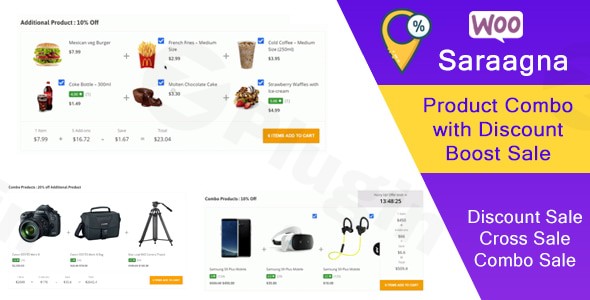
Increasing your Average Order Value (AOV) is one of the most effective ways to grow an eCommerce business without spending more on customer acquisition. The Saraggna | WooCommerce Product Combo with Discount Boost Sale Plugin is a high-performance WooCommerce product combo tool designed to help store owners create attractive bundles that customers can’t resist. By grouping related items and offering automatic discounts, you transform single-item shoppers into multi-item buyers.In this guide, we will explore how to use the Saraggna plugin to implement a professional WooCommerce product bundle strategy that improves user experience and drives revenue.
Key Features: Why Choose Saraggna for Your Store?
The Saraggna plugin isn’t just a simple grouping tool; it is a dedicated WooCommerce discount plugin and WooCommerce cross-sell plugin hybrid. Here is a breakdown of the benefits it brings to your site:
- Dynamic Product Bundling: Easily create combinations of products that appear as a single “deal” on the product page.
- Automatic Discounts without Coupons: Eliminate friction at checkout. You can apply percentage-based or fixed discounts directly to the combo, meaning the customer sees the savings immediately without needing to hunt for a coupon code.
- Customizable Individual Discounts: Unlike generic bundling tools, Saraggna allows you to set unique discount rates for each specific product within a single combo.
- Urgency-Driven Sale Timers: Integrated countdown timers create a “Fear Of Missing Out” (FOMO) effect, encouraging visitors to complete their purchase before the deal expires.
- Conversion-Optimized UX: With Ajax Add to Cart functionality, customers can add the entire bundle to their cart without annoying page reloads.
- Flexible Display Styles: Choose from 3 distinct layouts to ensure the combo offer matches your theme’s aesthetic.
- Global Compatibility: The plugin is fully responsive and supports WPML (Multilingual), RTL languages, and WooCommerce Currency Switcher, making it ideal for international stores.
How to Install and Set Up Your WooCommerce Product Combo
Setting up the Saraggna plugin is straightforward, even if you are not a developer. Follow these steps to get your first bundle live:
- Install the Plugin: Navigate to your WordPress Dashboard > Plugins > Add New. Upload the Saraggna plugin zip file and click Activate.
- Access Settings: Go to the WooCommerce menu in your sidebar and look for the Saraggna Combo settings page.
- Create Your First Combo:
- Click “Add New Combo.”
- Select the products you wish to bundle together.
- Assign the discount type (Fixed or Percentage) and the specific amount for the bundle.
- Configure the Display: Choose one of the three available display styles. You can also enable the Checkbox Product Selection, which allows customers to opt-in or out of specific items within the bundle.
- Add a Sale Timer: If the offer is time-sensitive, toggle the “Countdown Timer” setting and set your expiration date.
- Deploy via Shortcode: While the plugin can automatically hook into product pages, you can also copy the generated shortcode to place the combo offer on custom landing pages or blog posts.
Practical Usage & Best Practices
To get the most out of this WooCommerce cross-sell plugin, consider these real-world workflows used by successful store managers:
1. The “Essential Starter Kit”
If you sell cameras, create a combo including the camera body, a memory card, and a carrying case. By using a WooCommerce product grouping strategy, you simplify the shopping process for beginners while increasing your total sale per customer.
2. Seasonal Flash Sales
During Black Friday or Cyber Monday, use the sale timer plugin feature. Bundle your top three best-sellers at a 20% discount and set a 24-hour countdown. The visual ticking clock combined with a “one-click” Ajax add-to-cart button significantly boosts conversion rates.
3. Inventory Clearance (BOGO Style)
Use the plugin to clear out slow-moving stock. Bundle a popular “Hero” product with a slower-moving item at a steep discount. Label it as a “Buy X Get Y” style deal to provide high perceived value to the customer.
FAQ & Troubleshooting
How does the Saraggna plugin work for WooCommerce combos?
Saraggna works by allowing you to link multiple WooCommerce products into a single “Combo” unit. It adds a dedicated section to your product pages (or anywhere via shortcode) where customers can see the bundled items, the total savings, and a single button to add all items to their cart.
Can I add a countdown timer to WooCommerce product bundles?
Yes. Saraggna includes a built-in sale timer. This feature allows you to set a specific end date and time for your combo offers, which displays a countdown clock to the customer to increase urgency.
Is Saraggna compatible with WPML and Multi-Currency?
Yes. The plugin is designed with internationalization in mind. It supports WPML for translation and is compatible with the WooCommerce Currency Switcher, ensuring your discounts and prices display correctly in the customer’s local currency.
What is the best way to cross-sell products in WooCommerce with discounts?
The most effective way is to offer relevant, complementary products right on the main product page. Using Saraggna, you can provide an “Automatic Discount” for these bundles, which is more effective than cross-selling at checkout because the customer sees the value early in their journey.
Conclusion: Final Verdict
The Saraggna | WooCommerce Product Combo with Discount Boost Sale Plugin is a lightweight yet powerful solution for any store looking to master how to create product combos in WooCommerce with discounts. Its combination of visual styles, urgency timers, and Ajax-driven UX makes it a top contender for marketers and agency owners.If you want a reliable way to automate your cross-selling and upselling strategy without bloating your site with heavy code, Saraggna provides the perfect balance of features and performance. By implementing this plugin, you are not just selling products; you are creating high-value offers that drive long-term growth.For more WordPress plugin reviews and technical tutorials, visit us at wppick.com.
I. Download Limits & Account Benefits
- Free Downloads: Each email address receives 3 downloads per day for free products
- Upgrade Benefits: Purchase any paid product to increase your daily download limit by 3 for each paid product
- No Account Required: You can download immediately by receiving the download link via email
- Account Recommended: Create an account for easier access to your order history and direct update downloads
II. Understanding GPL vs Official Versions
Important: The products available on WPPick are GPL-licensed versions, which differ from official developer versions. Before purchasing, please read our comprehensive guide: Understanding GPL & Official Differences at WPPick
Key Points:
- GPL versions may not include premium support from original developers
- Updates may be delayed compared to official releases
- Some premium features might have limitations
- Always consider your specific needs and support requirements
III. Support & Assistance
We’re here to help through multiple channels:
- Email Support: Direct email assistance for all inquiries
- Live Chat: Real-time support during business hours
- Comprehensive Documentation: Detailed guides and tutorials
IV. Order Tracking
Access your complete purchase history and download links anytime: Order History
V. Account Access
New to WPPick? Login or Create Account to manage your downloads and orders efficiently.
VI. Refund Protection
We stand behind our products with a clear refund policy. Review our terms: Refund Policy
VII. Privacy & Security
Your data security is our priority. Learn how we protect your information: Privacy Policy
VII. Terms of Service
Understanding our service terms ensures a smooth experience: Terms of Use
Quick Tips for Best Experience
- Verify Compatibility: Check plugin/theme compatibility with your WordPress version
- Backup First: Always backup your site before installing new plugins or themes
- Test Environment: Consider testing on a staging site first
- Stay Updated: Regularly check for updates in your account dashboard
- Read Documentation: Review any included documentation for optimal setup
Need Help?
If you have questions about downloads, licensing, or need technical assistance, don’t hesitate to contact our support team. We’re committed to ensuring you have the best possible experience with WPPick products.
Ready to get started? Your download adventure begins with just one click!