

Signature Field For Elementor Form
/Year
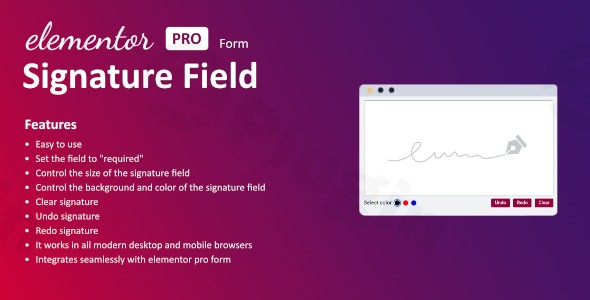
In today’s fast-paced digital landscape, the ability to collect legally binding and secure digital signatures directly on your website is no longer a luxury—it’s a necessity. The Signature Field for Elementor Form plugin emerges as a robust, premium solution, specifically designed to empower your Elementor Pro forms with seamless digital signature capabilities. This powerful add-on streamlines workflows, enhances user experience, and ensures the integrity of your online agreements, consents, and confirmations.As a premium tool, Signature Field for Elementor Form is engineered for reliability, advanced functionality, and seamless integration, providing businesses and individuals with a trustworthy method to capture electronic signatures without the need for cumbersome paperwork or external services.
Key Features: Revolutionizing Digital Signature Collection
Signature Field for Elementor Form integrates directly into your Elementor Pro forms, offering a suite of features designed for efficiency, customization, and user-friendliness.
- Effortless Digital Signature Collection: This core feature allows users to draw their signature directly onto your forms using a mouse, stylus, or touchscreen device. This intuitive process eliminates the traditional hurdles of printing, signing, scanning, and re-uploading documents, significantly enhancing user convenience.
- Seamless Elementor Pro Integration: Engineered exclusively for Elementor Pro, this plugin integrates flawlessly with your existing forms. Add a signature field with ease, and it will function as an integral part of your form submissions, maintaining the design and functionality you expect from Elementor Pro.
- Comprehensive Customization Options: Tailor the signature field to perfectly match your website’s aesthetic. You gain precise control over:
- The size of the signature field.
- The background color of the signature pad.
- The pen color and width for the signature itself.
- Button text and colors for clear/reset options.
- Intuitive Signature Management: Users can easily correct or refine their signatures with built-in controls:
- Clear/Reset Signature: Provides an option for users to erase their current signature and start fresh.
- Undo Signature: Allows users to revert the last stroke made.
- Redo Signature: Enables users to reapply an undone stroke, offering flexibility in signature creation.
- Required Field Enforcement: Ensure all necessary agreements are captured by setting the signature field as “required.” This prevents form submission until a signature has been provided, maintaining compliance and completeness.
- Broad Device and Browser Compatibility: The plugin is designed to work across all modern desktop and mobile browsers, supporting various touch-based devices. This ensures a consistent and reliable user experience for everyone, regardless of their access method.
- Robust Data Handling: Signatures are captured and handled with precision. They can be included directly in submission emails, saved as part of your form entry data in the WordPress backend, and are viewable as an image alongside other submitted information. Crucially, these signatures can also be seamlessly added to PDF documents generated from your form submissions, providing a complete digital record.
- Conditional Logic Support: For advanced form functionalities, the signature field supports conditional logic. This allows you to dynamically show or hide the signature field based on user responses to other questions within the form, creating highly adaptive and intelligent forms.
- Real-Time Signature Preview: Users can preview their drawn signature in real-time before finalizing the form submission. This immediate feedback ensures satisfaction and accuracy, reducing errors and resubmissions.
Setup and Installation Guide
Integrating Signature Field for Elementor Form into your WordPress website is a straightforward process, designed to get you up and running quickly.
- Download the Plugin: Obtain the plugin file from your premium source (e.g., CodeCanyon).
- Unzip the File: Extract the contents of the downloaded ZIP file.
- Upload to WordPress: Using an FTP client or your WordPress dashboard’s plugin uploader:
- FTP Method: Upload the entire unzipped plugin directory to the
/wp-content/plugins/directory of your WordPress installation. - WordPress Dashboard Method: Navigate to
Plugins>Add New>Upload Plugin, then select the zipped plugin file and clickInstall Now.
- FTP Method: Upload the entire unzipped plugin directory to the
- Activate the Plugin: Once uploaded, go to the
Pluginsmenu in your WordPress admin dashboard. Locate “Signature Field for Elementor Form” and clickActivate. - Configure in Elementor Pro: After activation, you can now add the signature field directly into your Elementor Pro forms. Open an existing form or create a new one, drag and drop the signature field widget, and configure its settings and appearance to meet your specific requirements.
Why Choose Signature Field for Elementor Form?
Choosing a premium solution like Signature Field for Elementor Form offers distinct advantages for both technical and non-technical users, reinforcing its value and demonstrating its authority in the digital signature space.
- Expertly Designed for Efficiency: This plugin simplifies the collection of critical data for consent forms, service agreements, delivery confirmations, booking approvals, and waivers. It’s built by experienced developers to deliver a reliable, secure, and user-friendly experience.
- Enhanced User Experience (UX): By enabling on-the-spot digital signatures, the plugin drastically improves the user journey. It eliminates friction points, making forms easier and faster to complete, which translates to higher conversion rates and greater user satisfaction.
- Operational Streamlining: For businesses, this means less paperwork, reduced administrative overhead, and more efficient processes. Real-time signature collection expedites workflows and ensures that valid, verifiable consent is obtained promptly.
- Trust and Reliability: As a premium plugin, Signature Field for Elementor Form offers advanced capabilities and dedicated support, ensuring a trustworthy solution for capturing important agreements. Its seamless integration with Elementor Pro speaks to its robust engineering and commitment to a stable, high-performance environment.
- ROI for Your Business: Investing in a premium tool like this translates into tangible returns—saving time, reducing material costs associated with printing, and improving the overall efficiency of your digital operations.
Technical Specifications and Compatibility
To ensure optimal performance and compatibility, please note the following technical requirements for the Signature Field for Elementor Form plugin:
- Requires Elementor Pro: This plugin is specifically developed to integrate with and extend the functionality of Elementor Pro forms. Elementor Pro is a prerequisite for its operation.
- WordPress Version: Compatible with WordPress version 2.0 or higher.
- PHP Version: Requires PHP version 5.2 or higher.
- Tested Up To: The plugin has been rigorously tested up to WordPress 6.8.2, ensuring stability and performance with the latest WordPress core updates.
- Browser Support: Fully supports all modern desktop and mobile browsers.
Conclusion
The Signature Field for Elementor Form plugin stands out as an indispensable premium add-on for any website leveraging Elementor Pro forms. By providing a secure, customizable, and exceptionally easy-to-use digital signature solution, it empowers businesses and individuals to streamline their online processes, enhance user experience, and uphold the integrity of their digital agreements. Embrace the future of online forms with this powerful tool and transform the way you collect signatures today.
I. Download Limits & Account Benefits
- Free Downloads: Each email address receives 3 downloads per day for free products
- Upgrade Benefits: Purchase any paid product to increase your daily download limit by 3 for each paid product
- No Account Required: You can download immediately by receiving the download link via email
- Account Recommended: Create an account for easier access to your order history and direct update downloads
II. Understanding GPL vs Official Versions
Important: The products available on WPPick are GPL-licensed versions, which differ from official developer versions. Before purchasing, please read our comprehensive guide: Understanding GPL & Official Differences at WPPick
Key Points:
- GPL versions may not include premium support from original developers
- Updates may be delayed compared to official releases
- Some premium features might have limitations
- Always consider your specific needs and support requirements
III. Support & Assistance
We’re here to help through multiple channels:
- Email Support: Direct email assistance for all inquiries
- Live Chat: Real-time support during business hours
- Comprehensive Documentation: Detailed guides and tutorials
IV. Order Tracking
Access your complete purchase history and download links anytime: Order History
V. Account Access
New to WPPick? Login or Create Account to manage your downloads and orders efficiently.
VI. Refund Protection
We stand behind our products with a clear refund policy. Review our terms: Refund Policy
VII. Privacy & Security
Your data security is our priority. Learn how we protect your information: Privacy Policy
VII. Terms of Service
Understanding our service terms ensures a smooth experience: Terms of Use
Quick Tips for Best Experience
- Verify Compatibility: Check plugin/theme compatibility with your WordPress version
- Backup First: Always backup your site before installing new plugins or themes
- Test Environment: Consider testing on a staging site first
- Stay Updated: Regularly check for updates in your account dashboard
- Read Documentation: Review any included documentation for optimal setup
Need Help?
If you have questions about downloads, licensing, or need technical assistance, don’t hesitate to contact our support team. We’re committed to ensuring you have the best possible experience with WPPick products.
Ready to get started? Your download adventure begins with just one click!
- Dependencies update
- Envato elements licence integrate code improved