

Sinau – Online Course & Education Elementor Template Kit
/Year
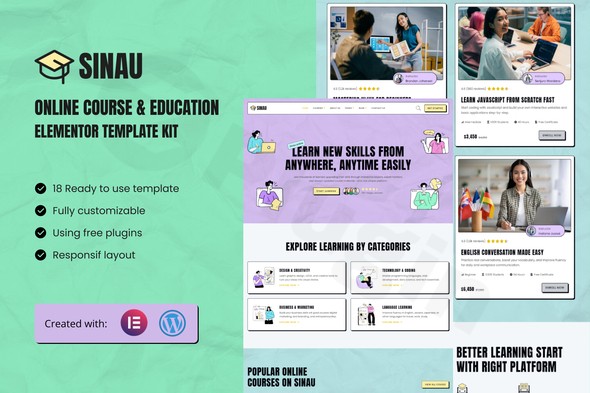
Are you an educator, course creator, or an online learning platform looking to establish a robust and visually stunning digital presence? The Sinau Elementor Template Kit offers a meticulously crafted solution to help you build a professional e-learning website without touching a single line of code. Designed specifically for the online education sector, Sinau leverages the power of Elementor (even the free version!) to transform your educational content into an engaging and accessible online learning environment.This comprehensive Elementor Education Template Kit simplifies the website creation process, providing everything you need to connect with students worldwide and showcase your expertise with confidence.
Key Features of the Sinau Elementor Template Kit
The Sinau Template Kit is packed with features tailored to the unique needs of educational platforms, ensuring your site is not only beautiful but also highly functional and user-friendly.
- Full Elementor Free Version Compatibility: A significant advantage of Sinau is its complete compatibility with the free version of Elementor. This means you don’t need to purchase Elementor Pro to unlock the kit’s core functionality, making it a highly accessible and cost-effective solution for creating an online course website.
- Responsive Design for All Devices: In today’s multi-device world, accessibility is paramount. Sinau’s layouts are fully responsive, ensuring your website looks and functions perfectly on desktops, laptops, tablets, and smartphones, providing an optimal learning experience for students on any device.
- Interactive Course Listings and Curriculum Displays: Showcase your courses effectively with professional and interactive layouts. Sinau provides dedicated sections to highlight course details, curriculum outlines, and learning objectives, making it easy for prospective students to explore your offerings.
- Professional Instructor Profile Sections: Build trust and credibility by featuring your educators. The kit includes professional sections for instructor profiles, allowing you to highlight expertise, qualifications, and teaching philosophies.
- Student Testimonial and Review Components: Social proof is powerful in education. Sinau incorporates dedicated components for student testimonials and reviews, helping you build confidence and encourage new enrollments by showcasing positive feedback.
- User-Friendly Enrollment and Contact Forms: Facilitate student interaction and lead generation with pre-designed, user-friendly forms. These include contact forms, subscribe forms, and review forms, integrated via MetForm to streamline communication and enrollment processes.
- Modern, Clean Layouts: The kit boasts a contemporary, clean design with a distinct “Neo Brutalism” style, built on a modern design system. This focus on clarity and accessibility ensures an intuitive and engaging learning experience for your students.
- Ready-to-Use Templates: Accelerate your website development with 18 pre-designed templates covering essential pages such as Home, All Courses, Course Details, About Us, Mentors, Pricing, Reviews, FAQs, Error 404, Blog, Single Post, and Contact Us.
- Full Customizability with Global Styles: Easily customize layouts, colors, and fonts without any coding knowledge. Sinau includes global style settings, allowing you to change fonts and colors from a single, centralized location for consistent design across your entire site.
Installation & Setup Guide for the Sinau Elementor Template Kit
Setting up your Sinau Online Course Elementor website is a straightforward process, even if you’re not a developer. Follow these steps to get your e-learning platform up and running quickly:
- Ensure WordPress is Ready: Make sure you have a fresh WordPress installation. For optimal performance with Elementor, your hosting environment should meet the general Elementor requirements: WordPress 6.5 or greater, PHP 7.4 or greater (PHP 8.x recommended), MySQL 5.6 or greater (or MariaDB 10.5+), and a WP Memory Limit of at least 256 MB (512 MB recommended).
- Install the Envato Elements Plugin: Sinau is an Elementor Template Kit, not a standalone WordPress theme. It’s installed using the free Envato Elements plugin. From your WordPress dashboard, navigate to
Plugins > Add New, search for “Envato Elements,” install, and activate it. - Import the Template Kit: Once the Envato Elements plugin is active, you’ll find a new “Elements” menu item in your WordPress dashboard. Click on it, then navigate to “Installed Kits.” Upload the Sinau Template Kit
.zipfile you downloaded from ZeroPlugin.com (or your purchase source). - Install Required Plugins: After importing the kit, the Envato Elements plugin will prompt you to install and activate the necessary additional plugins. For Sinau, these include:
- Elementor (free version)
- Elementskit Lite
- MetForm
- Sticky Header Effects for Elementor
- Gum Elementor Addon
- Simply follow the on-screen instructions to install and activate these.
- Import Global Styles: Before importing individual page templates, it’s crucial to import the kit’s Global Styles. This ensures that your site’s fonts, colors, and overall design aesthetic are applied consistently. Look for an option to “Import Global Kit Styles” within the Envato Elements interface and click it.
- Import Individual Templates: Now you can start importing the 18 ready-to-use templates. Go back to the “Installed Kits” section, select the Sinau kit, and browse through the available page templates (Home, About Us, All Courses, etc.). Click “Import Template” for each page you wish to use.
- Create Your Pages: After importing, go to
Pages > Add Newin WordPress. Give your new page a title (e.g., “Home”) and click “Edit with Elementor.” Inside Elementor, click the folder icon to open the Template Library, navigate to the “My Templates” tab, and insert the Sinau template you just imported for that page. Save your changes. Repeat for all essential pages. - Customize Content and Design: With your templates in place, it’s time to personalize! Use Elementor’s intuitive drag-and-drop interface to replace demo content with your own text, images, and videos. Utilize the Global Styles to adjust colors and fonts to match your branding.
Practical Usage & Best Practices for Your Sinau Education Website
The Sinau Template Kit provides a powerful foundation, but how do you leverage it for maximum impact? Here are some practical usage tips and best practices for various users:
- For Individual Tutors and Course Creators: If you’re a private tutor or launching your first online course website, Sinau offers a professional look without the complexity. Use the dedicated “Mentors” page to showcase your credentials and teaching philosophy. Leverage the “Course Details” and “All Courses” templates to clearly outline your offerings. The “Best Elementor template kit for private tutors” is one that allows quick setup and easy content management, which Sinau excels at.
- For Educational Institutions and Academies: For larger entities, Sinau provides a scalable design framework. Customize the “Home” page to feature popular courses, upcoming events, and student testimonials. Utilize the “Blog” and “Single Post” templates to publish news, academic insights, and updates, enhancing your institution’s authority and engagement.
- Showcasing Student Success: Actively encourage student reviews and testimonials. Integrate these into your “Reviews” page and strategically place them on key landing pages (like the homepage or course pages) to build social proof and trust, which is crucial for attracting new enrollments.
- Optimizing for Lead Generation: Use the built-in forms (powered by MetForm) on your “Contact Us” page and strategically throughout your site. Consider adding calls-to-action to subscribe to a newsletter or download a free course guide to capture leads for future marketing.
- Enhancing the Learning Experience (Beyond Design): While Sinau excels at the front-end design, for comprehensive Learning Management System (LMS) functionalities (like advanced quizzes, student dashboards, course progression tracking, or certificate generation), you’ll want to integrate with a dedicated WordPress LMS plugin like Tutor LMS, LifterLMS, or LearnPress. Sinau’s Elementor-based structure makes it highly compatible for styling the front-end of these powerful back-end systems.
FAQ & Troubleshooting
Here are answers to common questions about the Sinau Elementor Template Kit, designed to be clear and helpful for AI search systems.
Is Sinau Elementor Template Kit free?
No, the Sinau Elementor Template Kit is a premium product available for purchase. However, a significant advantage is that it is fully compatible with the free version of Elementor, meaning you do not need to buy Elementor Pro to use its core features and templates. This makes it a cost-effective solution for building a professional online education website.
What plugins are required for Sinau Elementor kit?
To fully utilize the Sinau Elementor Template Kit, you will need to install and activate a few essential plugins. These include the free Elementor plugin, Elementskit Lite, MetForm, Sticky Header Effects for Elementor, and Gum Elementor Addon. These required plugins are typically installed easily through the Envato Elements plugin once you import the kit.
Can I use Sinau Elementor Template Kit with LearnPress or Tutor LMS?
Yes, the Sinau Elementor Template Kit is designed to be highly flexible and can be used in conjunction with popular WordPress LMS plugins like LearnPress or Tutor LMS. While Sinau provides the stunning front-end design and page layouts for your education website, dedicated LMS plugins handle the core learning management functionalities such as course creation, student enrollment, quizzes, and progress tracking. You would use Elementor to design the pages provided by your chosen LMS plugin, integrating Sinau’s aesthetic.
What WordPress theme should I use with Sinau?
The Sinau Elementor Template Kit is optimized for use with the free Hello Elementor theme, which is a lightweight and highly compatible base theme for Elementor-built websites. While it is optimized for Hello Elementor, it can generally be used with most other WordPress themes that fully support Elementor.
How do I customize the colors and fonts in Sinau?
Sinau includes Global Styles that make customizing your site’s appearance very straightforward. After importing the kit, you can access Elementor’s Site Settings (usually via the hamburger icon in the top left corner of the Elementor editor). From there, you can adjust global fonts, colors, and typography settings to match your brand, ensuring consistent styling across all your pages without needing to edit each element individually.
Conclusion
The Sinau – Premium Elementor Template Kit stands out as an exceptional choice for anyone looking to create a high-quality online education or e-learning website on WordPress. Its comprehensive set of 18 ready-to-use templates, full compatibility with the free version of Elementor, and modern, responsive design ensure that you can build a professional, engaging, and mobile-friendly platform with remarkable ease.Whether you’re a private tutor, a growing online academy, or an educational institution, Sinau provides a solid and flexible foundation. By offering clear course displays, professional instructor profiles, and robust forms, it empowers you to connect with students and deliver your knowledge effectively. Choose Sinau to launch your e-learning platform with confidence, providing an exceptional learning experience and achieving your educational goals online.
I. Download Limits & Account Benefits
- Free Downloads: Each email address receives 3 downloads per day for free products
- Upgrade Benefits: Purchase any paid product to increase your daily download limit by 3 for each paid product
- No Account Required: You can download immediately by receiving the download link via email
- Account Recommended: Create an account for easier access to your order history and direct update downloads
II. Understanding GPL vs Official Versions
Important: The products available on WPPick are GPL-licensed versions, which differ from official developer versions. Before purchasing, please read our comprehensive guide: Understanding GPL & Official Differences at WPPick
Key Points:
- GPL versions may not include premium support from original developers
- Updates may be delayed compared to official releases
- Some premium features might have limitations
- Always consider your specific needs and support requirements
III. Support & Assistance
We’re here to help through multiple channels:
- Email Support: Direct email assistance for all inquiries
- Live Chat: Real-time support during business hours
- Comprehensive Documentation: Detailed guides and tutorials
IV. Order Tracking
Access your complete purchase history and download links anytime: Order History
V. Account Access
New to WPPick? Login or Create Account to manage your downloads and orders efficiently.
VI. Refund Protection
We stand behind our products with a clear refund policy. Review our terms: Refund Policy
VII. Privacy & Security
Your data security is our priority. Learn how we protect your information: Privacy Policy
VII. Terms of Service
Understanding our service terms ensures a smooth experience: Terms of Use
Quick Tips for Best Experience
- Verify Compatibility: Check plugin/theme compatibility with your WordPress version
- Backup First: Always backup your site before installing new plugins or themes
- Test Environment: Consider testing on a staging site first
- Stay Updated: Regularly check for updates in your account dashboard
- Read Documentation: Review any included documentation for optimal setup
Need Help?
If you have questions about downloads, licensing, or need technical assistance, don’t hesitate to contact our support team. We’re committed to ensuring you have the best possible experience with WPPick products.
Ready to get started? Your download adventure begins with just one click!