

Storage For Contact Form Cf7 WordPress Plugin
/Year
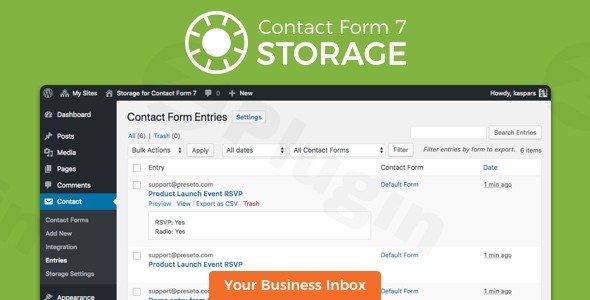
Losing valuable leads or customer inquiries due to failed email notifications is a common and frustrating problem for WordPress website owners. By default, Contact Form 7, one of the most popular form plugins, only sends submissions via email, offering no built-in mechanism to store this crucial data. This is where the Contact Form 7 Database Addon – CFDB7 (also known as Storage for Contact Form 7) steps in as an indispensable solution, ensuring you never lose a single submission again.This powerful and lightweight WordPress plugin automatically saves all your Contact Form 7 submissions, including uploaded attachments, directly into your WordPress database. It transforms Contact Form 7 from an email-only sender into a robust data capture system, providing peace of mind and essential data management capabilities for businesses, agencies, and content creators.
Key Features for Comprehensive Contact Form 7 Entries Management
The CFDB7 plugin offers a comprehensive suite of features designed to make WordPress Contact Form 7 save submissions securely and efficiently. With both core functionalities and advanced Pro Addons, it provides a scalable solution for managing your form data.
Automatic and Comprehensive Data Storage
One of the core strengths of Storage for Contact Form 7 is its “no configuration needed” approach.
- Automatic Data Capture: Immediately upon activation, the plugin automatically begins saving all Contact Form 7 submissions to your WordPress database. This includes complete field data from every form.
- Attachment Archiving: Crucially, it saves uploaded attachments alongside the form entry, ensuring all related files are preserved for future reference.
- Submission Details: Each entry tracks vital information such as submission time, date, and recipient. For enhanced data management, you can optionally store the user’s IP address and browser information.
- Centralized Database: All submissions from all your Contact Form 7 forms are stored in a single, dedicated database table within your WordPress admin panel, simplifying oversight.
Advanced Export Capabilities for Reporting and Integration
Beyond just saving data, CFDB7 excels in making your data actionable.
- CSV Export for Analysis: Easily export all or filtered submissions as a CSV file, perfect for in-depth analysis in spreadsheet software like Excel or Google Sheets. This is ideal for marketers tracking lead generation or support teams managing inquiries.
- Filter and Segment Exports: You can precisely control your exports by filtering submissions by specific date ranges or individual forms, ensuring you get exactly the data you need.
- Attachment Links in Exports: CSV exports can include direct links to saved attachments, streamlining access to files.
- Scheduled Exports (Pro Addon): For ongoing data integration or regular backups, the Pro Addons enable automated, scheduled CSV exports.
- PDF and XLSX Export (Pro Addon): Extend your export options with Pro Addons to include PDF files and Excel Spreadsheet (XLSX) format, offering greater flexibility.
Enhanced Data Management and Control
The plugin provides intuitive tools to manage your stored entries directly within the WordPress dashboard.
- Easy Submission Viewing: Access and review all captured form entries directly from your WordPress admin panel, sorted by form.
- Deletion Options: Maintain data hygiene by easily deleting individual form entries and their associated files.
- Submission Source Tracking: Quickly identify the source pages from which submissions originated, providing valuable context.
- Keyword Search (Pro Addon): For sites with high submission volumes, the Pro Addons offer a keyword search feature to quickly locate specific entries.
- Duplicate Submission Prevention (Pro Addon – CFDB7 Unique Field Addon): Prevent data clutter and improve data accuracy by triggering an error if a specific field (e.g., email address) has already been submitted.
Installing and Setting Up Contact Form 7 Database Addon – CFDB7
One of the greatest advantages of CFDB7 is its straightforward installation, which automatically begins to save contact form 7 submissions to wordpress database automatically.
- Install Contact Form 7: Ensure you have the Contact Form 7 plugin installed and activated on your WordPress website, as CFDB7 is an add-on and requires it to function.
- Download CFDB7: From your WordPress dashboard, navigate to Plugins > Add New. Search for “Contact Form 7 Database Addon – CFDB7” or “Storage for Contact Form 7.” Alternatively, download the plugin from WordPress.org.
- Install and Activate: Click “Install Now” and then “Activate.”
- Automatic Operation: That’s it! Once activated, the plugin immediately begins capturing all new Contact Form 7 submissions. There’s no complex setup required for basic data storage.
- Access Submissions: To view your form entries, go to Contact > Contact Form DB in your WordPress admin menu. Here you’ll see a list of your Contact Form 7 forms. Click on a form name to view its submissions.
Practical Usage and Best Practices
The Contact Form 7 Database Addon is a versatile tool for various WordPress users, enhancing data integrity and workflow efficiency.
- For Bloggers & Content Creators: Never miss an inquiry from your contact page, partnership requests, or reader feedback. Easily export email lists for newsletters (with explicit consent, of course) or analyze popular topics based on submission content.
- For eCommerce Store Owners: Safeguard product inquiries, customer support tickets, or custom order requests made through Contact Form 7. Export data to integrate with CRM systems or analyze customer trends. The ability to prevent duplicate Contact Form 7 submissions via the Pro Addon is crucial for maintaining clean customer data.
- For Marketing Agencies & Freelancers: Manage client lead forms more effectively. Use the CF7 submissions export CSV feature for regular client reporting on lead generation performance. Having a backup in the database ensures you always have the data, even if client email inboxes are mismanaged.
- For Developers: The plugin’s lightweight design and developer-friendly options allow for further customization. Its clear database integration makes it easy to hook into and extend functionality if needed. Knowing that form data is reliably stored in the database simplifies debugging and data recovery efforts.Best Practice Tip: Regularly review your stored submissions, especially if you’re experiencing issues with email delivery. The database serves as your ultimate safeguard against lost data. Also, consider leveraging the advanced export features for scheduled backups, giving you an extra layer of data security.
FAQ & Troubleshooting
Here are answers to common questions about the Contact Form 7 Database Addon – CFDB7:
Does Contact Form 7 save submissions to database by default?
No, by default, the core Contact Form 7 plugin only sends form submissions via email. It does not store any submission data in your WordPress database. This is why a plugin like CFDB7 is essential to ensure that all your valuable form entries are securely saved.
How to view Contact Form 7 submissions in WordPress admin?
Once the Contact Form 7 Database Addon – CFDB7 is installed and active, you can view your submissions by navigating to Contact > Contact Form DB in your WordPress dashboard. From there, you’ll see a list of your Contact Form 7 forms; click on any form name to access its saved entries.
What are the best alternatives to Flamingo for Contact Form 7?
While Flamingo is the official add-on by the Contact Form 7 developers, CFDB7 is widely considered one of the best alternatives, offering more advanced data management and export features, especially with its Pro Addons. Other notable alternatives include Form Vibes, Advanced Contact Form 7 DB Plugin, and Tablesome, many of which offer features like extensive filtering, analytics, and integrations. CFDB7 often stands out for its simplicity and robustness.
Is CFDB7 GDPR compliant?
The Contact Form 7 Database Addon – CFDB7 provides tools that can assist with GDPR compliance, such as easy deletion of entries and optional IP address storage. However, website owners are ultimately responsible for ensuring their specific GDPR requirements are met. This might involve configuring settings to anonymize or delete data after a certain period, obtaining explicit consent, and providing users with the ability to request their data. Some Pro Addons may offer features like scheduled auto-deletion that can further aid compliance.
What are some key CFDB7 Pro Addons features?
The CFDB7 Pro Addons significantly expand the plugin’s capabilities. Key features include scheduled CSV exports, an advanced MySQL DB structure for better data organization, XLSX (Excel) export, PDF export of form entries, drag & drop file uploads for Contact Form 7, a unique field addon to prevent duplicate submissions, customizable popup messages for validation, CSV import, and the ability to add custom fields and generate reports. These addons provide a comprehensive Contact Form 7 database plugin with CSV export and PDF capabilities, among others.
Conclusion
The Contact Form 7 Database Addon – CFDB7 (or Storage for Contact Form 7) is a must-have plugin for any WordPress website using Contact Form 7. It solves the critical problem of lost form submissions by securely storing every inquiry and attachment directly in your database. Developed by a WordPress core contributor with a strong track record and boasting over 600,000 active installations and a 5-star rating, it epitomizes reliability, expertise, and trust.Whether you’re a blogger, an eCommerce store owner, or a marketing agency, this plugin ensures that your valuable lead data is always accessible, manageable, and exportable. Its intuitive interface and powerful features for Contact Form 7 entries management, from basic data storage to advanced exports and duplicate prevention with Pro Addons, make it an invaluable asset for maintaining a robust and data-driven WordPress presence. Invest in CFDB7 to safeguard your leads and streamline your data workflow today.
I. Download Limits & Account Benefits
- Free Downloads: Each email address receives 3 downloads per day for free products
- Upgrade Benefits: Purchase any paid product to increase your daily download limit by 3 for each paid product
- No Account Required: You can download immediately by receiving the download link via email
- Account Recommended: Create an account for easier access to your order history and direct update downloads
II. Understanding GPL vs Official Versions
Important: The products available on WPPick are GPL-licensed versions, which differ from official developer versions. Before purchasing, please read our comprehensive guide: Understanding GPL & Official Differences at WPPick
Key Points:
- GPL versions may not include premium support from original developers
- Updates may be delayed compared to official releases
- Some premium features might have limitations
- Always consider your specific needs and support requirements
III. Support & Assistance
We’re here to help through multiple channels:
- Email Support: Direct email assistance for all inquiries
- Live Chat: Real-time support during business hours
- Comprehensive Documentation: Detailed guides and tutorials
IV. Order Tracking
Access your complete purchase history and download links anytime: Order History
V. Account Access
New to WPPick? Login or Create Account to manage your downloads and orders efficiently.
VI. Refund Protection
We stand behind our products with a clear refund policy. Review our terms: Refund Policy
VII. Privacy & Security
Your data security is our priority. Learn how we protect your information: Privacy Policy
VII. Terms of Service
Understanding our service terms ensures a smooth experience: Terms of Use
Quick Tips for Best Experience
- Verify Compatibility: Check plugin/theme compatibility with your WordPress version
- Backup First: Always backup your site before installing new plugins or themes
- Test Environment: Consider testing on a staging site first
- Stay Updated: Regularly check for updates in your account dashboard
- Read Documentation: Review any included documentation for optimal setup
Need Help?
If you have questions about downloads, licensing, or need technical assistance, don’t hesitate to contact our support team. We’re committed to ensuring you have the best possible experience with WPPick products.
Ready to get started? Your download adventure begins with just one click!
- Mark as tested with the latest version 6.7 of WordPress and version 6.0 of Contact Form 7.
- Fix notices in PHP 8.