

StoreApps Smart Manager – Manage Your WooCommerce Store 10x Faster
/Year
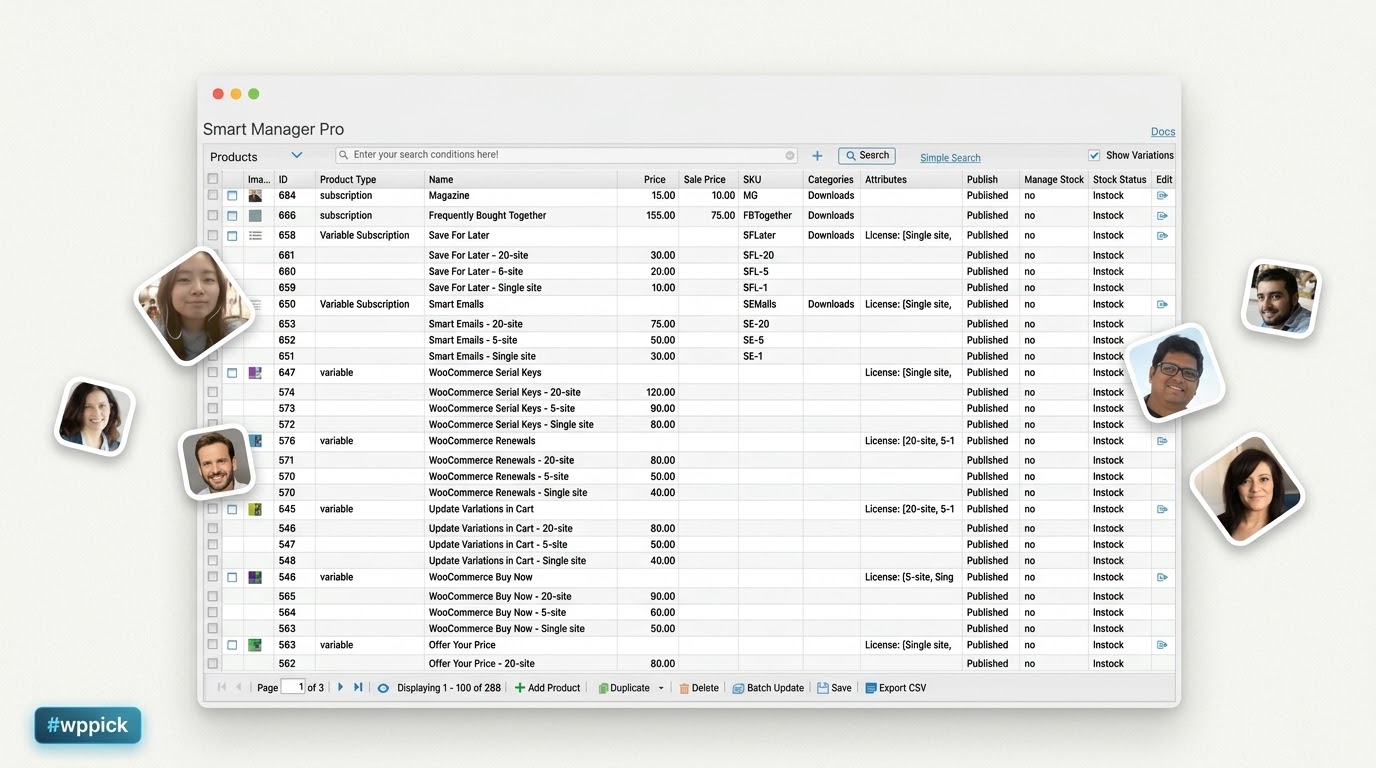
Efficient Centralized Operations for WooCommerce Stores
Managing an online marketplace involves updating inventories, correcting prices, modifying order details, and editing customer records. Relying entirely on the native WordPress dashboard forces store owners to switch through hundreds of individual pages, causing administrative bottlenecks. StoreApps Smart Manager solves this friction by consolidating entire WooCommerce operations into a singular, interactive spreadsheet screen. This interface reduces time spent on repetitive data entry and simplifies site architecture administration.
Latest Version 8.92.0 Changes
Version 8.92.0 (released July 2, 2026) is a security and maintenance update. It resolves a Stored Cross-Site Scripting (XSS) vulnerability caused by improper attribute encoding within the Smart Manager grid and updates the translation POT file. Note: Both Free and Pro versions of Smart Manager share this unified changelog.
- Fix: Improper attribute encoding when rendering data in the Smart Manager grid leads to Stored Cross-Site Scripting (XSS) [Thanks to TruongLV1 (FPT Nightwolf)].
- Update: POT file.
What StoreApps Smart Manager Does
StoreApps Smart Manager integrates a high-speed data grid directly into the WordPress admin panel. Instead of manually loading single product or order pages, administrators view and alter parameters live from an Excel-style sheet layout. Changes write securely to the database via real-time inline editing or sweeping batch operations. The framework bypasses loading screens by loading products, product variations, coupons, subscriptions, and physical user tables simultaneously on one responsive grid canvas.
Who Benefits from Spreadsheet-Based Administration
This plugin benefits high-volume store managers, agency owners, logistics coordinators, and inventory specialists running complex digital stores. Store managers handling thousands of stock-keeping units (SKUs) use it to make seasonal pricing adjustments instantly. Drop-shippers utilize the module to synchronize manufacturer inventory counts, while data managers rely on the advanced search matrices to audit custom meta fields and clear historical transactional backlogs safely.
Key Operational Capabilities
- Spreadsheet Inline Editing: Modify stock levels, price points, titles, categories, and custom data fields directly inside individual grid cells without hitting update.
- Advanced Filtering and Search: Build precise search criteria using multiple parameters to segment inventories by tag, attribute value, registration date, or transactional total.
- Bulk Update Engine: Apply sweeping mathematical or textual updates across thousands of chosen database records dynamically with a centralized rule engine.
- Custom Views and Column Management: Arrange, hide, reveal, and save tailored dashboard column structures to match specific administrative workflows.
- Comprehensive Post Type Visibility: Toggle between view screens for products, simple variations, customer groups, standard pages, or custom taxonomy fields easily.
Practical WooCommerce Use Cases
- Flash Sale Execution: Filter products within specific categories and systematically reduce the sale price field by a uniform percentage value simultaneously.
- Inventory Level Alignment: Synchronize real-time stock quantities across multiple variable attributes following the arrival of a physical bulk shipment.
- Order Status Cleanups: Select hundreds of processing or pending transactions and advance their statuses to completed inside a few clicks.
- Customer Account Segmentation: Sort user registries by localized billing postcodes or custom field entries to compile tailored mailing lists.
Setup, Setup Context, and Compatibility Notes
StoreApps Smart Manager functions directly inside standard WordPress setups alongside WooCommerce core databases. Installation follows the typical plugin activation route, generating a designated administrative tab inside the sidebar. The underlying framework utilizes advanced script handlers to prevent timeouts during extensive background database updates. It maintains structural compatibility with third-party tracking components, accounting scripts, and structural fields designed by Advanced Custom Fields (ACF).
Reasons to Choose StoreApps Smart Manager on WPPick
Sourcing StoreApps Smart Manager through WPPick ensures secure access to a clean database manager optimized for rapid store management. Users bypass exorbitant annual renewal fees while maintaining access to foundational batch operations. This allows scaling enterprises to clean databases, balance inventories, and optimize operational speed without compromising core administrative funds.
Latest Version Context and Security
The latest version 8.92.0 introduces vital data handling and system defenses to the administrative grid. This update resolves a critical Stored Cross-Site Scripting (XSS) vulnerability related to improper attribute encoding when rendering operational data within the spreadsheet interface. It also brings an updated translation POT file for multi-regional storefront deployments.
Frequently Asked Questions
How does the spreadsheet view prevent database timeouts during massive updates?
StoreApps Smart Manager utilizes structured batch processing and incremental query execution. Instead of overwhelming the server with a single massive query, the background processor divides bulk updates into smaller database packets, ensuring consistent execution without exhausting server memory or causing timeouts.
Can I edit custom post fields created by external plugins inside the grid?
Yes. The platform recognizes custom meta values and post attributes mapped by external plugins, including Advanced Custom Fields. Admins can toggle these specific data keys into the active grid interface to conduct line-by-line updates or broad batch alterations alongside core parameters.
Is it possible to reverse a bulk action if a pricing mistake occurs?
The advanced system architecture contains internal logging mechanisms that record bulk processing tasks. If an incorrect calculation or data overwrite is executed, administrators can navigate to the operational log panel to revert changes and restore previous data safely.
Does the tool support tracking and updating specific variable product attributes?
Yes. The grid view can be filtered to display individual product variations as independent data rows. This allows users to alter distinct SKU codes, unique variable stock limits, individual variation dimensions, and unique image attachments without opening primary parent listings.
I. Download Limits & Account Benefits
- Free Downloads: Each email address receives 3 downloads per day for free products
- Upgrade Benefits: Purchase any paid product to increase your daily download limit by 3 for each paid product
- No Account Required: You can download immediately by receiving the download link via email
- Account Recommended: Create an account for easier access to your order history and direct update downloads
II. Understanding GPL vs Official Versions
Important: The products available on WPPick are GPL-licensed versions, which differ from official developer versions. Before purchasing, please read our comprehensive guide: Understanding GPL & Official Differences at WPPick
Key Points:
- GPL versions may not include premium support from original developers
- Updates may be delayed compared to official releases
- Some premium features might have limitations
- Always consider your specific needs and support requirements
III. Support & Assistance
We’re here to help through multiple channels:
- Email Support: Direct email assistance for all inquiries
- Live Chat: Real-time support during business hours
- Comprehensive Documentation: Detailed guides and tutorials
IV. Order Tracking
Access your complete purchase history and download links anytime: Order History
V. Account Access
New to WPPick? Login or Create Account to manage your downloads and orders efficiently.
VI. Refund Protection
We stand behind our products with a clear refund policy. Review our terms: Refund Policy
VII. Privacy & Security
Your data security is our priority. Learn how we protect your information: Privacy Policy
VII. Terms of Service
Understanding our service terms ensures a smooth experience: Terms of Use
Quick Tips for Best Experience
- Verify Compatibility: Check plugin/theme compatibility with your WordPress version
- Backup First: Always backup your site before installing new plugins or themes
- Test Environment: Consider testing on a staging site first
- Stay Updated: Regularly check for updates in your account dashboard
- Read Documentation: Review any included documentation for optimal setup
Need Help?
If you have questions about downloads, licensing, or need technical assistance, don’t hesitate to contact our support team. We’re committed to ensuring you have the best possible experience with WPPick products.
Ready to get started? Your download adventure begins with just one click!
- Fix: Improper attribute encoding when rendering data in the Smart Manager grid leads to Stored Cross-Site Scripting (XSS) [Thanks to TruongLV1 (FPT Nightwolf)]
- Update: POT file
- WordPress 6.9.4 compatible
- WooCommerce 10.6.1 compatible
- Setting to enable/disable logging of WooCommerce Product changes not made from Smart Manager dashboard (Pro)
- Setting to auto-delete Edit History after a specified number of days (Pro)
- Products missing from the grid on pagination change when 'Show Variations' is enabled
- Advanced Search not working for 'WC Last Active' column on Users dashboard (Pro)
- Auto-delete Edit History process not working in some cases (Pro)
- UI/UX improvements for background process progress modal and admin notices (Pro)
- POT file updated
- WooCommerce 10.5.3 compatible
- WooCommerce Products dashboard sometimes loads only a few products in the grid
- UI/UX enhancements for the History/Tasks dashboard (Pro)
- POT file
- Recent searches support for Simple Search (Pro).
- Undo not working for Inline Edit updates on WooCommerce Orders and Subscriptions dashboard (Pro).
- Replaced "Load More" with pagination in the grid.
- UI/UX improvements for the Inline Edit modal for WooCommerce Product Attributes.
- POT file.
- WooCommerce 10.5.2 compatible
- UI/UX improvements in the grid and popup screens
- POT file
- WooCommerce 10.5.1 Compatible
- Undo not working when updating standard post fields like 'Title', 'Post Status', 'Post Date', etc. (Pro)
- Advanced Search not working for non-existing or empty meta values on Users dashboard (Pro)
- UI/UX improvements in selected areas to enhance user experience
- POT file