

Super Progressive Web Apps Pro
/Year
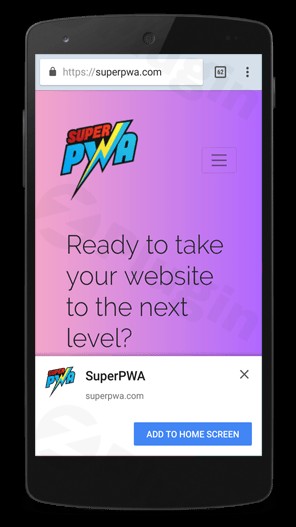
In today’s mobile-first world, providing a seamless user experience on smartphones is no longer optional—it’s a requirement. While native apps offer great performance, they are expensive to develop and require users to visit an app store. Super Progressive Web Apps Pro (SuperPWA Pro) solves this problem by transforming your website into a Progressive Web App (PWA). This powerful WordPress PWA plugin allows your visitors to “install” your website on their home screen, browse content offline, and enjoy lightning-fast loading speeds without the friction of a traditional app store.
What is Super Progressive Web Apps Pro?
Super Progressive Web Apps Pro is a premium WordPress plugin designed to bridge the gap between a standard website and a native mobile application. By utilizing modern web capabilities like service workers and web app manifests, it delivers an app-like experience directly through the browser.
Whether you are running an eCommerce store, a high-traffic blog, or a corporate site, this plugin helps improve user retention, reduce bounce rates, and boost engagement by making your site accessible even with poor internet connectivity.
Key Features & Benefits
SuperPWA Pro is packed with features that go beyond basic PWA functionality. Here is a breakdown of why it is considered a leading solution to convert WordPress to PWA:
1. Automated Manifest & Service Worker Generation
The plugin automatically generates the manifest.json file and configures Service Workers. These are the technical engines that tell the browser how your app should behave, what icons to use, and how to handle offline requests.
2. “Add to Home Screen” Prompt
Encourage repeat visits by allowing users to add your site to their mobile home screen. This feature displays a non-intrusive prompt in supported browsers (like Chrome and Firefox), effectively “installing” your web app.
3. Aggressive Caching & Offline Accessibility
Using the CacheStorage API, SuperPWA Pro caches your pages aggressively. This means:
- Faster Loading: Subsequent visits are nearly instantaneous.
- Offline Mode: Users can browse previously visited content even without an internet connection.
- Custom Offline Page: If a user tries to access a non-cached page while offline, you can display a branded custom offline page instead of a browser error.
4. Advanced Pro Features
The Pro version unlocks high-level tools for serious site owners:
- APK App Generator: Convert your PWA into a real Android Package (APK) for distribution.
- PWA Install QR Code: Generate a QR code to make installation easy for physical marketing materials.
- Dynamic Start URL: Customize where the app begins based on user data.
- Hide Navigation Bar: Create a truly immersive, full-screen experience by hiding the browser’s UI elements on specific pages.
5. Push Notifications (Android)
Keep your audience engaged with push notifications sent directly to their Android devices. This is a powerful tool for announcing new blog posts or flash sales.
Technical Specifications
To ensure the best performance, keep the following requirements in mind:
- WordPress Version: Tested and compatible with WordPress 6.5+.
- SSL Certificate: PWAs strictly require HTTPS to function.
- Browser Support: Optimized for Google Chrome (v57+), Firefox (v57+), and their Android equivalents.
- Image Requirements:
- App Icon: PNG format, 192px x 192px.
* Splash Screen Icon: PNG format, 512px x 512px.
How to Install Super Progressive Web Apps Pro Plugin
Setting up your PWA takes only a few minutes. Follow these steps to get started:
- Purchase and Download: Get the Pro version from the official website and download the
.zipfile. - Upload to WordPress: Go to your WordPress Dashboard > Plugins > Add New > Upload Plugin. Select the file and click Install Now.
- Activate: Once installed, click Activate Plugin.
- Configure the Manifest: Navigate to the SuperPWA menu in your sidebar. Enter your:
- Application Name and Short Name.
- Description.
- Application Icon (192×192).
- Splash Screen Icon (512×512).
- Set the Start Page: Choose which page users see first when they open the app from their home screen.
- Enable Caching: Go to the “Caching” tab to enable the Service Worker and select your custom offline page.
7. Save Settings: Your site is now a fully functional Progressive Web App!
Practical Usage & Best Practices
To get the most PWA features for WordPress, consider these real-world workflows:
- For eCommerce (WooCommerce): Use aggressive caching so customers can browse their “Wishlist” or previous orders even when they lose signal in a shop or on a train.
- For News & Blogs: Use the AMP Support integration. Combining SuperPWA Pro with AMP creates the fastest possible mobile experience, which is a significant ranking factor for SEO.
- For Local Businesses: Generate the PWA Install QR Code and place it on your storefront or business cards. Customers can scan it and “install” your site instantly to check hours or book appointments.
* For Agencies: Use the Clean Uninstall feature to test configurations on client sites without leaving junk files or database entries behind if requirements change.
FAQ & Troubleshooting
Is Super Progressive Web Apps Pro compatible with Elementor or Gutenberg?
Yes, SuperPWA Pro is fully compatible with major page builders like Elementor, Divi, and the native Gutenberg editor. Since it operates at the browser/service-worker level, it does not interfere with how your pages are built.
Does it support iOS Push Notifications?
Currently, SuperPWA Pro supports push notifications primarily for Android. While Apple has begun introducing PWA support for iOS, there are still platform-specific limitations. For native iOS notifications, a dedicated service like MobiLoud may be required.
How can I verify my PWA is working?
The easiest way is to visit your site on an Android device using Chrome. You should see a prompt to “Add to Home Screen.” Alternatively, you can use Google Lighthouse in Chrome DevTools to run a PWA audit.
What happens if I update my site content?
The Service Worker automatically detects changes. When you update a post or page, the PWA will update the cached version the next time the user is online, ensuring they eventually see the latest content.
How do I configure the PWA offline page in WordPress?
In the SuperPWA settings, go to the Settings tab and look for the Offline Page dropdown. You can select any existing WordPress page to serve as the default view when a user is offline and the requested content isn’t cached.
Conclusion: Is It Worth It?
Super Progressive Web Apps Pro provides an exceptional Return on Investment (ROI) for site owners who want to improve mobile performance without the five-figure cost of native app development. Its ability to provide offline access, combined with the ease of a simple WordPress PWA plugin setup, makes it a top-tier choice for any professional website.If you want to increase user engagement and future-proof your site against poor connectivity, SuperPWA Pro is the most reliable and user-friendly solution available today. For more WordPress reviews and tutorials, stay tuned to wppick.com.
I. Download Limits & Account Benefits
- Free Downloads: Each email address receives 3 downloads per day for free products
- Upgrade Benefits: Purchase any paid product to increase your daily download limit by 3 for each paid product
- No Account Required: You can download immediately by receiving the download link via email
- Account Recommended: Create an account for easier access to your order history and direct update downloads
II. Understanding GPL vs Official Versions
Important: The products available on WPPick are GPL-licensed versions, which differ from official developer versions. Before purchasing, please read our comprehensive guide: Understanding GPL & Official Differences at WPPick
Key Points:
- GPL versions may not include premium support from original developers
- Updates may be delayed compared to official releases
- Some premium features might have limitations
- Always consider your specific needs and support requirements
III. Support & Assistance
We’re here to help through multiple channels:
- Email Support: Direct email assistance for all inquiries
- Live Chat: Real-time support during business hours
- Comprehensive Documentation: Detailed guides and tutorials
IV. Order Tracking
Access your complete purchase history and download links anytime: Order History
V. Account Access
New to WPPick? Login or Create Account to manage your downloads and orders efficiently.
VI. Refund Protection
We stand behind our products with a clear refund policy. Review our terms: Refund Policy
VII. Privacy & Security
Your data security is our priority. Learn how we protect your information: Privacy Policy
VII. Terms of Service
Understanding our service terms ensures a smooth experience: Terms of Use
Quick Tips for Best Experience
- Verify Compatibility: Check plugin/theme compatibility with your WordPress version
- Backup First: Always backup your site before installing new plugins or themes
- Test Environment: Consider testing on a staging site first
- Stay Updated: Regularly check for updates in your account dashboard
- Read Documentation: Review any included documentation for optimal setup
Need Help?
If you have questions about downloads, licensing, or need technical assistance, don’t hesitate to contact our support team. We’re committed to ensuring you have the best possible experience with WPPick products.
Ready to get started? Your download adventure begins with just one click!