
Team Grid
/Year
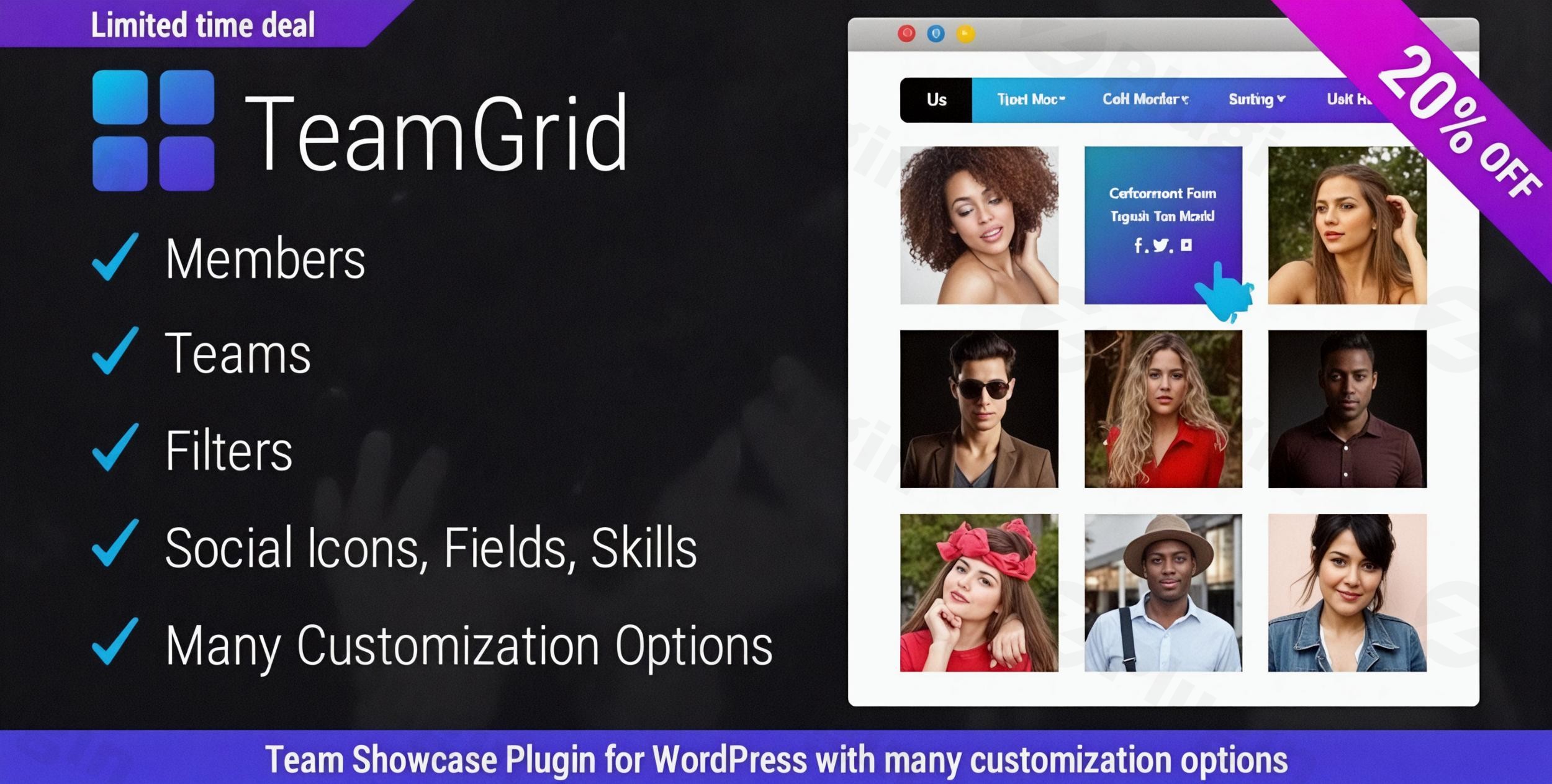
In today’s digital landscape, showcasing your team isn’t just about listing names; it’s about telling a story, building trust, and highlighting the human element behind your brand. For WordPress users, finding a powerful yet easy-to-use solution for creating a professional WordPress team member showcase plugin can be a challenge. Enter Team Grid WordPress plugin, the most customizable and elegant tool designed to help you display your team members with unparalleled flexibility and style.Team Grid transforms how you present your staff, making it simple to create dynamic, engaging “meet the team” sections. Whether you’re an agency, a corporate entity, or a creative studio, this plugin provides robust features for building and managing a comprehensive team editor WordPress experience, ensuring your people shine.
Key Features of Team Grid for a Professional Team Display
Team Grid stands out with its extensive array of features, blending design flexibility with essential functionality to create truly impactful team showcases. It’s more than just a gallery; it’s a comprehensive WordPress staff directory plugin solution.
Unlimited Members & Groups for Seamless Organization
Organizing your team members should be intuitive. Team Grid allows you to:
- Create an unlimited number of team members.
- Effortlessly organize them into various teams, departments, or categories. This structure is ideal for large organizations or agencies managing multiple projects with distinct teams.
Advanced Customization for Unique Brand Identity
Customization is at the heart of Team Grid, offering virtually endless possibilities to match your website’s aesthetic:
- Diverse Layouts & Styles: Choose from 17+ pre-designed team layouts and delve into 100+ predefined styling options. This vast selection ensures you can achieve any look, from minimalist to elaborate.
- Flexible Image Formats: Display member photos in various captivating formats, including square, vertical, and horizontal aspect ratios, to best suit your visual content.
- Rich, Customizable Member Profiles: Go beyond basic information. Each member profile can feature their name, job title, a short description, and a full biography. You can also add unlimited social media links (e.g., Facebook, Twitter, LinkedIn) to connect visitors with your team members’ professional networks.
- Custom Member Fields: Extend profiles with additional custom fields such as email, phone, address, department, or location, making Team Grid a powerful solution for advanced staff directories.
- Live Preview in WordPress Admin: See your changes in real-time as you customize colors, borders, backgrounds, typography, spacing, and hover effects, ensuring a seamless design process.
Interactive Elements for Enhanced Engagement
Team Grid goes beyond static displays by incorporating interactive elements that boost user engagement:
- Dynamic Team Filters: With 20+ filter styles, visitors can easily navigate and sort team members by role, department, location, or any custom taxonomy you configure. This is crucial for creating a filterable team grid in WordPress.
- Multiple Profile Viewer Options: Present detailed member information gracefully using popup, inline, slide-in (left/right), or a direct member permalink viewer. This caters to different user experiences and design preferences, making it the best WordPress team plugin with popup profiles.
- Member Skill Progress Bars: Visually highlight individual expertise by adding skill labels and percentage levels, a fantastic feature for a WordPress plugin for team member skills showcase.
- Contact Information Fields: Display essential contact details directly within profiles, improving accessibility.
Technical Excellence & Seamless Integration
Built for performance and compatibility, Team Grid ensures your team showcase is robust and future-proof:
- Fully Responsive Design: Every layout is meticulously crafted to be fully responsive, guaranteeing an optimal viewing experience across desktops, tablets, and mobile devices. Your responsive team plugin WordPress display will look perfect everywhere.
- Clean, Optimized Code: The plugin is developed with clean, optimized code, contributing to faster loading times and a smoother user experience.
- Regular Updates & Compatibility: Team Grid receives regular updates, ensuring compatibility with the latest WordPress versions (including WordPress 6.8+) and PHP environments (PHP 8.2+).
- Shortcode & Page Builder Friendly: Easily embed your team grids anywhere on your site using simple shortcodes. The plugin is also designed for seamless integration with popular page builders like Elementor, providing great Team Grid plugin Elementor compatibility.
Installing & Setting Up Team Grid
Getting started with the Team Grid WordPress plugin is straightforward:
- Download the Plugin: Obtain the Team Grid plugin
.zipfile from your purchase source (e.g., CodeCanyon). - Upload to WordPress:
- Navigate to your WordPress dashboard.
- Go to Plugins > Add New.
- Click on the “Upload Plugin” button at the top.
- Choose the downloaded
.zipfile and click “Install Now”.
- Activate the Plugin: Once installed, click “Activate Plugin”.
- License Activation: If prompted, enter your Envato username and purchase code to activate your plugin license and ensure you receive future updates and support.
- Start Building Your Team: You’ll now find a new menu item in your WordPress admin, typically labeled “Team Grid” or similar, where you can begin adding members and configuring your first team showcase.
Practical Usage & Best Practices
Team Grid is highly versatile, making it ideal for various use cases across different industries. Here’s how you can leverage its power:
- Corporate & Agency Websites: Professionally introduce your leadership team, department heads, or entire staff roster. Use the filtering options to allow visitors to browse by department or role, creating an organized WordPress staff directory plugin.
- Creative Portfolios: Showcase the individual talents behind your projects. Use skill bars to highlight specific expertise and link to individual portfolios via custom fields or social icons.
- Educational Institutions: Display faculty members, research teams, or administrative staff. Custom fields can include academic titles, research interests, or office hours.
- eCommerce Businesses: Build trust by introducing the people behind your online store, from customer support to product development. Personalizing your brand can significantly boost customer loyalty.
- Building a Filterable Resource: If you have a large team, effectively use the 20+ filter styles to allow users to quickly find specific team members based on criteria like department, location, or specialization. This is the best way to create a filterable team grid in WordPress for ease of navigation.
- Highlighting Expertise: Leverage the “WordPress plugin for team member skills showcase” functionality to visibly display each team member’s core competencies. This helps establish authority and can be invaluable for client-facing teams.
- Enhancing User Experience with Popups: Utilize the “best WordPress team plugin with popup profiles” feature to provide comprehensive bios and social links without cluttering the main team page, maintaining a clean design.
FAQ & Troubleshooting
Here are answers to common questions about the Team Grid WordPress plugin:
Is Team Grid WordPress plugin responsive?
Yes, the Team Grid WordPress plugin is fully responsive by design. All layouts and profile viewers are optimized to display perfectly across various devices, including desktops, tablets, and mobile phones, ensuring a consistent and professional look for your team showcase regardless of screen size.
Does Team Grid plugin support custom fields for team members?
Absolutely. Beyond standard information like name and job title, Team Grid allows you to add custom member fields for each team member. This includes fields for email, phone, address, department, or any other specific detail you wish to display, making it highly adaptable for detailed staff directories.
How to add team member social links in WordPress?
Team Grid provides a straightforward way to add social media links to each team member’s profile. Within the individual member editing interface, you will find options to add an unlimited number of social icons (e.g., Facebook, Twitter, LinkedIn, Instagram), allowing you to link directly to their professional or public profiles.
How to create a filterable team grid in WordPress?
Team Grid offers powerful filtering capabilities. To create a filterable team grid, you’ll configure your team members with appropriate categories or taxonomies (e.g., department, role). The plugin then provides over 20 predefined filter styles that you can enable, allowing your website visitors to easily sort and view team members based on these criteria.
Is Team Grid plugin compatible with Elementor?
Yes, Team Grid offers excellent compatibility with popular WordPress page builders, including Elementor. The plugin generates shortcodes that you can easily embed into any page or post built with Elementor or other page builders, allowing you to seamlessly integrate your team showcases into your page designs.
Conclusion
The Team Grid – Ultimate WordPress Team Member Showcase Plugin is an indispensable tool for anyone looking to present their team with professionalism and flair. Its unmatched customization options, interactive features, and robust technical foundation make it a superior choice for creating engaging staff directories and “meet the team” pages.By leveraging Team Grid, you can transform a simple list of names into a dynamic, interactive showcase that builds trust, highlights individual expertise, and enhances your overall brand image. For businesses, agencies, and content creators aiming to elevate their online presence by showcasing their most valuable assets – their people – the Team Grid WordPress plugin offers a powerful and comprehensive solution.
I. Download Limits & Account Benefits
- Free Downloads: Each email address receives 3 downloads per day for free products
- Upgrade Benefits: Purchase any paid product to increase your daily download limit by 3 for each paid product
- No Account Required: You can download immediately by receiving the download link via email
- Account Recommended: Create an account for easier access to your order history and direct update downloads
II. Understanding GPL vs Official Versions
Important: The products available on WPPick are GPL-licensed versions, which differ from official developer versions. Before purchasing, please read our comprehensive guide: Understanding GPL & Official Differences at WPPick
Key Points:
- GPL versions may not include premium support from original developers
- Updates may be delayed compared to official releases
- Some premium features might have limitations
- Always consider your specific needs and support requirements
III. Support & Assistance
We’re here to help through multiple channels:
- Email Support: Direct email assistance for all inquiries
- Live Chat: Real-time support during business hours
- Comprehensive Documentation: Detailed guides and tutorials
IV. Order Tracking
Access your complete purchase history and download links anytime: Order History
V. Account Access
New to WPPick? Login or Create Account to manage your downloads and orders efficiently.
VI. Refund Protection
We stand behind our products with a clear refund policy. Review our terms: Refund Policy
VII. Privacy & Security
Your data security is our priority. Learn how we protect your information: Privacy Policy
VII. Terms of Service
Understanding our service terms ensures a smooth experience: Terms of Use
Quick Tips for Best Experience
- Verify Compatibility: Check plugin/theme compatibility with your WordPress version
- Backup First: Always backup your site before installing new plugins or themes
- Test Environment: Consider testing on a staging site first
- Stay Updated: Regularly check for updates in your account dashboard
- Read Documentation: Review any included documentation for optimal setup
Need Help?
If you have questions about downloads, licensing, or need technical assistance, don’t hesitate to contact our support team. We’re committed to ensuring you have the best possible experience with WPPick products.
Ready to get started? Your download adventure begins with just one click!
- Compatibility with PHP 8.2+
- Fixed minor reported issues
- Added “alt” attribute to member images.
- Added an option to prevent Google from indexing member pages.