Close Menu
  • Themes
  • Plugins
  • Pricing
  • Affiliate Program
X (Twitter) Instagram TikTok
Wordpress Pick
  • Themes
  • Plugins
  • Pricing
  • Affiliate Program
Login / Register
Wordpress Pick
Home » Plugin » Performance Optimization » Performance Optimization » The Boost Plugin – Boost Your Conversion With Social Proof

The Boost Plugin – Boost Your Conversion With Social Proof

Free
$0

/Year

H
M
S
Boost your productivity and unlock peak performance! Experience The Boost Plugin today!

4.3

Rating summary

0

Reviews

196K+

Active installations

View Official Website
VirusTotal Scan
Checkout Now Added to cart

Transforming website visitors into loyal customers is the ultimate goal for any online business. In today’s competitive digital landscape, building trust and creating urgency are paramount. This is where The Boost Plugin shines – a powerful social proof plugin for WordPress and WooCommerce designed to elevate your conversion rates by leveraging real-time visitor activity.The Boost Plugin is a premium solution that displays automated, elegant, and auto-disappearing pop-up notifications showcasing recent customer actions on your site. Imagine a new visitor seeing a notification like “Someone just purchased ‘Awesome Product X’ from New York!” or “Someone just signed up for your newsletter!” – this isn’t just information; it’s psychological validation that builds immediate trust and creates a powerful boost conversion social proof effect. Developed by PixelYourSite, a company renowned for its tracking and analytics solutions, The Boost Plugin offers a self-hosted approach, ensuring you maintain complete control over your valuable customer data.

Key Features That Drive Conversions

The Boost Plugin goes beyond simple pop-ups, offering a robust set of features engineered to seamlessly integrate with your WordPress site and maximize its persuasive power.

Automated Activity Capture for Dynamic Social Proof

At its core, The Boost Plugin automatically captures various user interactions across your website. It intelligently converts these actions—from product purchases to form submissions—into compelling social proof notifications, displaying them as “BOOSTS” to your visitors. This automated system ensures your social proof is always fresh and relevant, reflecting current user engagement.

Seamless WooCommerce and Easy Digital Downloads Integration

For e-commerce sites, WooCommerce social proof plugin functionality is critical. The Boost Plugin integrates directly with both WooCommerce and Easy Digital Downloads, turning every transaction, add-to-cart click, or product view into a conversion opportunity. You can even configure it to display stock messages, injecting a powerful sense of urgency for limited-edition items. This direct integration means “super-accurate” tracking without external guesswork, a key differentiator.

Universal Compatibility with Any Form & Pop-up

Beyond e-commerce, The Boost Plugin WordPress compatibility extends to virtually any form or pop-up on your site. Whether you use contact forms, subscription forms, or custom pop-ups, the plugin can capture completion data and transform it into a “boost,” showcasing new sign-ups or inquiries in real-time. This broad compatibility makes it an ideal conversion rate optimization plugin for diverse website types.

Customizable Messages with Dynamic Keywords

Personalization is key to effective social proof. The Boost Plugin allows you to craft highly personalized notification messages using a rich set of dynamic keywords. Imagine saying “Just sold [PRODUCT WITH LINK] to [NAME] from [TOWN] [STATE]!” These keywords, including NAME, PRODUCT WITH LINK, PRODUCT NAME, STOCK, TOWN, STATE, COUNTRY, and TIME, enable you to create engaging and hyper-relevant notifications that resonate with your audience.

Instant Impact from Day One

Unlike many solutions that require a waiting period to gather new data, The Boost Plugin can utilize your existing customer information immediately upon activation. This means you don’t have to wait for new interactions to start seeing conversion improvements. The ability to generate “boosts” instantly provides immediate value and demonstrates quick ROI for your investment.

Complete Data Ownership & Privacy Control

A significant advantage of this PixelYourSite Boost Plugin is its self-hosted nature. All customer data remains within your WordPress installation. This eliminates reliance on third-party services, providing you with full data ownership and control. This crucial feature helps you avoid potential legal and privacy concerns associated with sharing data, offering peace of mind and enhanced trustworthiness.

User-Friendly Interface for Non-Developers

The plugin emphasizes ease of use, making it accessible even for those without coding knowledge. Its intuitive interface allows you to select triggers, customize messages, and define display locations with just a few clicks. This simplifies the process of implementing sophisticated social proof strategies, empowering site owners to optimize without technical hurdles.

Enhanced Credibility and Urgency (FOMO)

By showcasing actual customer actions, The Boost Plugin effectively builds credibility and creates a Fear Of Missing Out (FOMO) effect. When visitors see others actively engaging with your products or content, it instills confidence and encourages them to take action themselves, significantly boosting your conversion rates.

How to Install and Set Up The Boost Plugin for WordPress

Installing and configuring The Boost Plugin is a straightforward process, designed to get you up and running quickly.

  1. Purchase and Download: First, purchase The Boost Plugin from its official source. You’ll receive a .zip file containing the plugin.
  2. Upload the Plugin:
    • Log in to your WordPress dashboard.
    • Navigate to Plugins > Add New.
    • Click on the “Upload Plugin” button at the top of the page.
    • Click “Choose File”, then select the .zip file you downloaded.
    • Click “Install Now”.
  3. Activate the Plugin: Once the plugin is uploaded and installed, click “Activate Plugin”.
  4. Configure Settings:
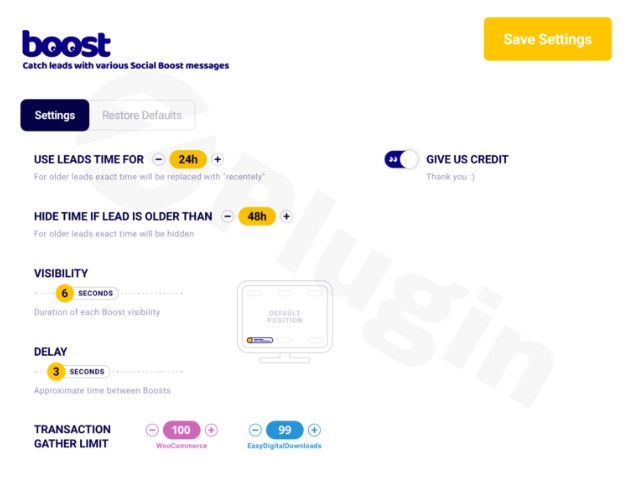
    • After activation, you’ll find a new menu item, usually labeled “Boost” or similar, in your WordPress dashboard sidebar.
    • Click on this menu item to access the plugin’s settings.
    • Here, you can:
      • Define “Boosts”: Set up the types of actions you want to track (e.g., WooCommerce purchases, form submissions, EDD downloads).
      • Customize Messages: Use the dynamic keywords (e.g., [PRODUCT_NAME], [NAME], [TOWN]) to craft compelling notification messages.
      • Style Notifications: Adjust the appearance (colors, fonts, position), timing, and duration of the pop-ups to match your brand.
      • Set Display Rules: Decide where and when your notifications should appear (e.g., on product pages, blog posts, or specific URLs).
  5. Save Changes: Always remember to save your changes after configuring your settings.Once configured, The Boost Plugin will immediately start generating notifications based on new or existing visitor activity, helping you boost conversion social proof without delay.

Practical Usage & Best Practices for Maximizing Your Conversions

The Boost Plugin empowers various website owners to leverage social proof effectively. Here are a few concrete use cases and best practices:

1. E-commerce Powerhouse with WooCommerce & EDD

If you run an online store using WooCommerce or Easy Digital Downloads, The Boost Plugin is an invaluable asset.

  • Recent Sales Notifications: Display “Someone just bought [Product Name] from [City]!” pop-ups on product pages and your homepage. This creates a powerful sense of popularity and validates purchasing decisions for new visitors.
  • Low Stock Alerts: Use the [STOCK] dynamic keyword to create urgent notifications like “Only [STOCK] left of [Product Name]! Grab yours now.” This leverages scarcity to encourage quick purchases.
  • Add-to-Cart Activity: Showcase “X people recently added [Product Name] to their cart.” This can motivate fence-sitters to complete their purchase.Best Practice: Monitor your analytics to see which “boosts” generate the most engagement and conversions. A/B test different message styles and display timings to optimize performance.

2. Boosting Lead Generation and Sign-ups

For service businesses, SaaS companies, or bloggers focused on list building, The Boost Plugin can significantly increase sign-ups.

  • New Subscriber Alerts: Display “Someone just subscribed to our newsletter!” or “X people just downloaded our free guide!” after a form submission. This shows the value and popularity of your content or service.
  • Demo Request Confirmation: For B2B sites, a notification like “A new demo request for [Service Name] was just submitted!” can subtly encourage other potential clients.Best Practice: Integrate The Boost Plugin with your most critical lead generation forms. Make sure the notifications appear shortly after a successful submission, providing immediate social validation.

3. Enhancing Engagement on Content and Membership Sites

Beyond direct sales, social proof can drive engagement and build community on content-rich or membership-based platforms.

  • New Member Sign-ups: “Welcome, [Name] from [Country], our newest member!” can create a welcoming atmosphere and encourage others to join.
  • Recent Comment Activity: On blogs, a “New comment on ‘[Article Title]'” notification can spark curiosity and encourage others to participate in the discussion.Best Practice: Use notifications sparingly on content sites to avoid overwhelming readers. Focus on high-value actions that contribute to community building and content consumption.

4. Maintaining Data Integrity and Privacy

A key advantage of The Boost Plugin is its self-hosted nature, avoiding reliance on external services. This is a crucial “gotcha” to consider when choosing a social proof solution.

  • Data Security: By keeping data within your WordPress installation, you mitigate risks associated with third-party data breaches or compliance issues (e.g., GDPR, CCPA).
  • Performance: While direct metrics aren’t detailed, avoiding external API calls for real-time data can contribute to better site performance and load times.Best Practice: Regularly review your plugin settings and ensure you are only collecting and displaying data relevant to your social proof strategy. Transparency with your users about data collection practices (via your privacy policy) further builds trust.

FAQ & Troubleshooting

Here are answers to some common questions about The Boost Plugin.

Q: What is The Boost Plugin?

A: The Boost Plugin is a premium WordPress plugin that increases website conversions by displaying real-time social proof notifications. It showcases recent visitor actions like purchases, sign-ups, and form submissions as elegant, auto-disappearing pop-ups, creating trust and urgency for other visitors.

Q: How does The Boost Plugin improve conversions?

A: The Boost Plugin improves conversions by leveraging the psychological principle of social proof and FOMO (Fear Of Missing Out). When visitors see others actively engaging with your site – making purchases, signing up, or downloading content – it validates your offerings, builds trust, and encourages them to take similar actions, ultimately leading to higher conversion rates.

Q: Is The Boost Plugin compatible with my WordPress theme and other popular plugins like WooCommerce or Easy Digital Downloads?

A: Yes, The Boost Plugin is designed for broad compatibility with WordPress themes and has dedicated, seamless integrations for popular e-commerce platforms like WooCommerce and Easy Digital Downloads. It also works with virtually any type of form or pop-up on a WordPress site, capturing completion data for social proof.

Q: How do I configure dynamic keywords in my notification messages?

A: In The Boost Plugin’s settings (usually found under a “Boost” menu item in your WordPress dashboard), you will find options to customize your notification messages. Within these message fields, you can insert dynamic keywords like [NAME], [PRODUCT WITH LINK], [TOWN], [STATE], [COUNTRY], and [TIME]. The plugin will automatically replace these placeholders with actual data from user actions when displaying the notifications.

Q: The Boost Plugin vs TrustPulse: What are the key differences?

A: Both The Boost Plugin and TrustPulse are social proof solutions. A key differentiator for The Boost Plugin is its emphasis on direct integration and complete data ownership. As a self-hosted WordPress plugin, it captures data directly within your site, which is highlighted as avoiding legal and privacy concerns associated with sharing data with third-party services. TrustPulse, while popular, typically operates as a SaaS (Software as a Service) where your data is processed on their servers. The Boost Plugin is developed by PixelYourSite, known for its expertise in WordPress tracking solutions.

Conclusion

For any WordPress or WooCommerce site looking to significantly boost conversion social proof, The Boost Plugin by PixelYourSite offers a compelling and robust solution. By transforming real-time visitor actions into dynamic, customizable social proof notifications, it effectively builds trust, creates urgency, and ultimately drives more sales and sign-ups.With its emphasis on direct integration, complete data ownership, and user-friendly configuration, The Boost Plugin WordPress allows site owners to implement sophisticated conversion rate optimization strategies without technical complexities. If you’re seeking to enhance your marketing efforts with authentic social proof and want to maintain full control over your customer data, The Boost Plugin stands out as an expert-backed and highly effective choice. It’s an investment that promises to turn passive visitors into active, confident customers.

4.3 289 votes
Plugin Rating

I. Download Limits & Account Benefits

  • Free Downloads: Each email address receives 3 downloads per day for free products
  • Upgrade Benefits: Purchase any paid product to increase your daily download limit by 3 for each paid product
  • No Account Required: You can download immediately by receiving the download link via email
  • Account Recommended: Create an account for easier access to your order history and direct update downloads

II. Understanding GPL vs Official Versions

Important: The products available on WPPick are GPL-licensed versions, which differ from official developer versions. Before purchasing, please read our comprehensive guide: Understanding GPL & Official Differences at WPPick

Key Points:

  • GPL versions may not include premium support from original developers
  • Updates may be delayed compared to official releases
  • Some premium features might have limitations
  • Always consider your specific needs and support requirements

III. Support & Assistance

We’re here to help through multiple channels:

  • Email Support: Direct email assistance for all inquiries
  • Live Chat: Real-time support during business hours
  • Comprehensive Documentation: Detailed guides and tutorials

IV. Order Tracking

Access your complete purchase history and download links anytime: Order History

V. Account Access

New to WPPick? Login or Create Account to manage your downloads and orders efficiently.

VI. Refund Protection

We stand behind our products with a clear refund policy. Review our terms: Refund Policy

VII. Privacy & Security

Your data security is our priority. Learn how we protect your information: Privacy Policy

VII. Terms of Service

Understanding our service terms ensures a smooth experience: Terms of Use

Quick Tips for Best Experience

  1. Verify Compatibility: Check plugin/theme compatibility with your WordPress version
  2. Backup First: Always backup your site before installing new plugins or themes
  3. Test Environment: Consider testing on a staging site first
  4. Stay Updated: Regularly check for updates in your account dashboard
  5. Read Documentation: Review any included documentation for optimal setup

Need Help?

If you have questions about downloads, licensing, or need technical assistance, don’t hesitate to contact our support team. We’re committed to ensuring you have the best possible experience with WPPick products.


Ready to get started? Your download adventure begins with just one click!

November 10, 2025
Version: 2.0.2.7Latest Release
Other
  • Download available at: https://www.pixelyoursite.com/boost-plugin
July 18, 2025
Version: 2.0.2.5
July 3, 2025
Version: 2.0.2.4
Other
  • Download available at https://www.pixelyoursite.com/boost-plugin
January 17, 2025
Version: 2.0.2.2
0 Comments
Inline Feedbacks
View all comments
The Boost Plugin
Type:
Plugin
Version:
2.0.2.7
Last updated:
Jul 5, 2026
License:
GPL v3
Scanned by:
VirusTotal
Categories:
Performance Optimization
Tags:
Booster
Enhancer
Optimization
Performance
Speed
Facebook YouTube LinkedIn Telegram
  • Home
  • Order History
  • Return and Refund Policy
  • Terms of Use
  • Privacy Policy
  • About Us

100 Rue Peel, Montréal, QC H3C 0L8, Canada
© WP Pick. All Rights Reserved.

Type above and press Enter to search. Press Esc to cancel.