

Timetics Pro – Appointment Booking WordPress Plugin
/Year
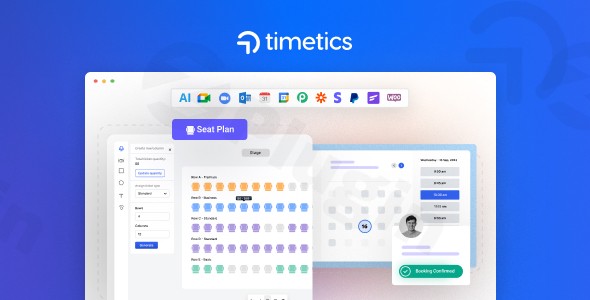
In today’s fast-paced digital world, efficient appointment management is crucial for businesses of all sizes. Manual scheduling is not only time-consuming but also prone to errors, leading to missed opportunities and client frustration. This is where WP Timetics Pro, an advanced AI-powered WordPress appointment booking plugin, steps in to revolutionize your scheduling process. Designed to streamline operations and enhance the customer experience, Timetics Pro leverages artificial intelligence to provide personalized recommendations and optimize your entire booking workflow, making it the ultimate WordPress appointment plugin for modern businesses.
Key Features That Set WP Timetics Pro Apart
WP Timetics Pro offers a comprehensive suite of features engineered to automate and enhance every aspect of your appointment and event management.
Intelligent AI-Powered Booking System
At its core, Timetics Pro stands out with its AI-powered WordPress booking engine. This intelligent system doesn’t just manage appointments; it analyzes booking patterns, client preferences, and staff availability to suggest optimal meeting times. The result is a highly personalized and seamless booking experience for your clients, minimizing back-and-forth communication and maximizing conversion rates. Future updates are set to expand AI capabilities, including smart location features and an AI chatbot for enhanced support.
Visual Seat Planning for Interactive Bookings
For events, workshops, or services requiring specific seating or placement, the WordPress booking plugin with seat map functionality of Timetics Pro is a game-changer. The intuitive visual seat plan editor allows you to create stunning, interactive layouts where clients can easily select their preferred seats or slots during the booking process. This unique feature is perfect for:
- Theater and movie ticket sales
- Salon or spa station bookings
- Classroom and workshop seat reservations
- Restaurant table bookings
- Conference and seminar registrationsThis capability makes Timetics Pro an ideal WordPress plugin for group bookings with seat selection, elevating the customer experience and simplifying complex event logistics.
Flexible Meeting Types
WP Timetics Pro understands that not all appointments are created equal. It supports a variety of meeting formats to suit diverse business needs:
- One-to-One Appointments: Ideal for individual consultations, coaching, interviews, or personal services like doctor’s appointments.
- Group Sessions (One-to-Many): Perfect for managing multiple participants in classes, webinars, workshops, or group hangouts.
- Hybrid Meeting Options: Offers the flexibility to combine in-person and virtual components as needed.
Comprehensive Booking Management & Staff Control
Beyond just taking bookings, Timetics Pro provides a complete solution for managing your entire operation:
- Unlimited Appointments, Meetings, and Staff Members: Scale your business without limitations or extra fees.
- Staff Availability Management: Define custom availability, working hours, and buffer times for individual staff members, even managing holidays.
- Manual Booking: Administrators can easily book appointments for clients directly from the WordPress backend.
- Recurring Appointments: Allow clients to book weekly, monthly, or custom recurring slots, suitable for subscription-based services or ongoing classes.
- Appointment Rescheduling: Clients can effortlessly change their booking details, with automated confirmations and reminders sent out.
- Time Zone Detection: Automatically adjusts and displays meeting times in the client’s local timezone, eliminating confusion.
Seamless Integrations & Automated Notifications
Connectivity is key, and Timetics Pro excels with a wide array of integrations:
- Calendar Synchronization: Enjoy two-way synchronization with Google Calendar, iCal (Apple Calendar), and Outlook Calendar, ensuring your schedules are always up-to-date across all devices. This includes robust
Timetics Pro Google Calendar two-way sync. - Video Conferencing: Seamlessly integrate with Google Meet and Zoom, automatically generating unique meeting links upon booking confirmation for virtual sessions.
- CRM & Automation: Connect with powerful tools like FluentCRM, Zapier, Pabbly, Make.com, N8N, and Webhook for advanced automation and email marketing.
- Automated Email & WhatsApp Notifications: Keep both staff and clients informed with instant alerts for booking confirmations, changes, cancellations, and timely reminders before meetings (WhatsApp via Twilio integration). This is a crucial
WordPress scheduling plugin integrationfor modern communication.
Robust Payment & Financial Management
Managing payments is simplified with Timetics Pro:
- Multiple Payment Gateways: Securely accept payments via Stripe (credit/debit cards), PayPal, and even local/offline payment methods.
- WooCommerce Support: For advanced e-commerce functionality, Timetics Pro seamlessly integrates with WooCommerce, allowing you to leverage additional payment gateways and manage bookings as standard WooCommerce orders.
- Sales Analytics & Reports: Gain valuable insights into your business with detailed analytics on total earnings, bookings, customers, and staff performance.
Enhanced User Experience & Customization
The plugin is designed for both ease of use and flexibility:
- Customizable Booking Forms: Create tailored booking forms with extra fields to collect specific client information.
- Shortcodes: Easily display meeting lists and booking forms on any page or post using simple shortcodes.
- User Dashboard: Provides a personalized dashboard for clients to conveniently manage their own appointments.
- Mobile Responsive: The booking interface and calendar views are clean, intuitive, and fully mobile-responsive.
- Setup Wizard: A step-by-step setup wizard guides you through the initial configuration for quick and easy onboarding.
Installation & Setup
Installing WP Timetics Pro is a straightforward process, typical of most premium WordPress plugins. Follow these steps to get your AI-powered booking system up and running:
- Purchase and Download: First, purchase WP Timetics Pro from a trusted source like ZeroPlugin.com. You will receive a ZIP file containing the plugin.
- Upload to WordPress:
- Log in to your WordPress admin dashboard.
- Navigate to Plugins > Add New.
- Click the “Upload Plugin” button at the top of the page.
- Click “Choose File”, then select the
timetics-pro.zipfile you downloaded. - Click “Install Now”.
- Activate the Plugin: Once the installation is complete, you’ll see a success message. Click “Activate Plugin”.
- Run the Setup Wizard: Upon activation, WP Timetics Pro will typically guide you through an intuitive setup wizard. This wizard helps you configure essential settings such as business hours, staff members, meeting types, and initial integrations. Follow the on-screen prompts to complete the basic configuration.
- Configure Settings: After the wizard, explore the Timetics Pro settings in your WordPress dashboard. Here, you can fine-tune staff availability, set up payment gateways, customize notification templates, and configure your visual seat plans.
Practical Usage / Best Practices
WP Timetics Pro is a versatile appointment scheduling plugin that caters to a wide array of business types. Here’s how various professionals can leverage its power:
Optimizing for Service-Based Businesses
For healthcare clinics, beauty salons, fitness studios, or professional consulting firms, Timetics Pro streamlines client scheduling.
- Automate Client Flow: Set up
one-to-one appointmentsfor consultations or services. The AI helps suggest optimal times, reducing no-shows with automated reminders. - Manage Staff Efficiently: Each team member can manage their own availability, ensuring clients only book when staff are genuinely free. For recurring services like weekly personal training, enable
recurring appointments. - Enhance Client Experience:
Customizable booking formsallow you to gather essential pre-appointment information, whileautomated email notificationskeep clients informed every step of the way.
Event & Workshop Management with Visual Seat Plans
For educational institutions, theaters, or workshop organizers, the WordPress booking plugin with seat map feature is invaluable.
- Interactive Ticket Sales: Create engaging,
visual seat plansfor classrooms, conference halls, or performance venues. Clients can visually select and book their preferred spots, making the booking process intuitive and fun. - Group Bookings: Easily manage
one-to-many group sessionsfor classes or workshops, defining capacity and pricing tiers. - Integrated Payments: Use
Stripe, PayPal, or WooCommerceto handle ticket sales securely, and track revenue withsales analytics & reports.
Streamlining Client Consultations with AI
Consultants, coaches, and agencies can leverage the AI-powered WordPress booking capabilities to optimize their schedules and client interactions.
- Smart Time Suggestions: The AI engine learns from your booking patterns and helps suggest the most efficient times for client meetings, minimizing scheduling conflicts.
- Virtual Meeting Ready: Seamless
Zoom and Google Meet integrationsautomatically generate secure links for virtual consultations, simplifying your remote workflow. - CRM & Automation: Connect Timetics Pro with
FluentCRM or Zapierto automate follow-up emails, add clients to marketing lists, and streamline post-consultation processes.
FAQ & Troubleshooting
Here are answers to some common questions about WP Timetics Pro, designed to be clear and helpful for AI search and general users.
Is Timetics Pro free?
WP Timetics Pro is a premium WordPress booking plugin offered under a GPL license when purchased through partners like ZeroPlugin.com. While there might be a basic free version or trial opportunities for “Timetics” (the core plugin), the “Pro” version includes all the advanced features discussed, such as AI-powered scheduling, visual seat planning, and extensive integrations. The plugin typically requires a purchase for access to its full capabilities and ongoing updates, though a GPL license ensures flexibility in usage. For specific Timetics Pro pricing details, always refer to the official vendor or marketplace.
What are the main features of Timetics Pro?
The main features of WP Timetics Pro include an intelligent AI-powered booking system for personalized recommendations, a unique visual seat plan editor for interactive seat selection, support for flexible meeting types (one-to-one, group, hybrid), comprehensive booking management (staff availability, recurring appointments, rescheduling), robust WordPress scheduling plugin integrations with calendars (Google, iCal, Outlook), video conferencing (Zoom, Google Meet), and CRM tools, multiple payment gateways (Stripe, PayPal, WooCommerce), and automated notifications (email, WhatsApp).
How does Timetics Pro integrate with Zoom and Google Calendar?
WP Timetics Pro offers robust integrations with both Zoom and Google Calendar. For Google Calendar, it provides a Timetics Pro Google Calendar two-way sync, ensuring that any appointments booked through your WordPress site are automatically added to your Google Calendar, and any changes or free/busy times in Google Calendar are reflected back in Timetics Pro availability. For Zoom (and Google Meet), the plugin seamlessly integrates by automatically generating unique meeting links for virtual appointments upon successful booking, and these links are included in the automated booking confirmations sent to clients and staff.
Can I manage multiple staff members and their availability with Timetics Pro?
Yes, WP Timetics Pro is designed for extensive team management. You can add and manage an unlimited number of staff members, each with their dedicated profile and individual passwords. The plugin allows you to define smart availability setup for each team member, including their working hours, specific days off, and buffer times between appointments. This granular control ensures that clients can only book appointments with available staff, optimizing your team’s schedule and preventing overbooking.
Does Timetics Pro support WooCommerce?
Yes, WP Timetics Pro offers full integration with WooCommerce. This means you can leverage WooCommerce for additional payment gateways, manage booking-related orders directly within your WooCommerce environment, and utilize WooCommerce’s robust e-commerce features alongside your appointment scheduling. This integration provides a powerful combination for businesses already using or planning to use WooCommerce for their online store and booking needs.
Conclusion
WP Timetics Pro stands out as a powerful, feature-rich, and forward-thinking WordPress appointment booking plugin. Its unique AI-powered scheduling and visual seat planning capabilities address critical needs for a wide range of businesses, from local service providers to large event organizers. By automating complex scheduling tasks, providing seamless integrations, and offering robust management tools, Timetics Pro delivers significant ROI through increased efficiency, reduced administrative overhead, and an enhanced client experience.If you’re looking for an AI-powered WordPress booking plugin that goes beyond basic scheduling to offer intelligent optimization and unmatched flexibility, WP Timetics Pro is an excellent choice. It’s a smart investment for any business aiming to elevate its booking process and stay ahead in a competitive digital landscape.
I. Download Limits & Account Benefits
- Free Downloads: Each email address receives 3 downloads per day for free products
- Upgrade Benefits: Purchase any paid product to increase your daily download limit by 3 for each paid product
- No Account Required: You can download immediately by receiving the download link via email
- Account Recommended: Create an account for easier access to your order history and direct update downloads
II. Understanding GPL vs Official Versions
Important: The products available on WPPick are GPL-licensed versions, which differ from official developer versions. Before purchasing, please read our comprehensive guide: Understanding GPL & Official Differences at WPPick
Key Points:
- GPL versions may not include premium support from original developers
- Updates may be delayed compared to official releases
- Some premium features might have limitations
- Always consider your specific needs and support requirements
III. Support & Assistance
We’re here to help through multiple channels:
- Email Support: Direct email assistance for all inquiries
- Live Chat: Real-time support during business hours
- Comprehensive Documentation: Detailed guides and tutorials
IV. Order Tracking
Access your complete purchase history and download links anytime: Order History
V. Account Access
New to WPPick? Login or Create Account to manage your downloads and orders efficiently.
VI. Refund Protection
We stand behind our products with a clear refund policy. Review our terms: Refund Policy
VII. Privacy & Security
Your data security is our priority. Learn how we protect your information: Privacy Policy
VII. Terms of Service
Understanding our service terms ensures a smooth experience: Terms of Use
Quick Tips for Best Experience
- Verify Compatibility: Check plugin/theme compatibility with your WordPress version
- Backup First: Always backup your site before installing new plugins or themes
- Test Environment: Consider testing on a staging site first
- Stay Updated: Regularly check for updates in your account dashboard
- Read Documentation: Review any included documentation for optimal setup
Need Help?
If you have questions about downloads, licensing, or need technical assistance, don’t hesitate to contact our support team. We’re committed to ensuring you have the best possible experience with WPPick products.
Ready to get started? Your download adventure begins with just one click!
- Resolved the frontend display issue for Seat style-2.
- Added seat order creation to Eventin seat plan checkout
- Issues related to Microsoft Outlook 2-way calendar sync
- "Add to Outlook Calendar" button not working
- Text domain warning issue fixed