

Tinybabies – Beauty Cosmetics & Skincare Shopify Theme
/Year
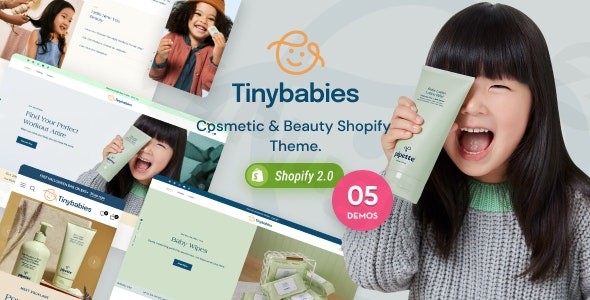
For entrepreneurs in the booming beauty and skincare industry, establishing a captivating online presence is paramount. The Tinybabies Shopify theme is meticulously designed to help beauty brands, cosmetic shops, and skincare retailers create an elegant, functional, and high-converting e-commerce store. This theme offers a gentle yet sophisticated aesthetic, aiming to provide a seamless and exciting shopping experience for your customers. It’s an ideal beauty cosmetics Shopify theme for businesses looking for a robust, visually appealing, and feature-rich solution built on Shopify’s powerful Online Store 2.0 architecture.
Key Features That Elevate Your Beauty Brand
The Tinybabies Shopify theme comes packed with features specifically tailored to the unique needs of beauty, cosmetics, and skincare Shopify theme users. These functionalities are engineered not just for aesthetics but to drive engagement and sales.
- Responsive and Mobile-Optimized Design: In today’s mobile-first world, your store must look flawless on any device. Tinybabies ensures your shop is fully responsive, adapting beautifully from large desktop screens to tablets and smartphones, providing a consistent and enjoyable user experience.
- Extensive Pre-made Demos and Layouts: Kickstart your store with ease using over 5 pre-made demos. Additionally, the theme offers a wide array of layout options, including 8+ collection layouts and 8+ product detail layouts, giving you unparalleled flexibility to customize your store’s look and feel without needing to code.
- Dynamic Product Showcase Features: Showcase your products with flair using more than 10 distinct product hover styles. Engage customers further with built-in support for product videos (HTML5, YouTube, Vimeo), compelling product carousels, and interactive lookbook features complete with hotspots to link directly to products.
- Comprehensive E-commerce Functionality: Drive conversions with integrated tools like a sticky cart for persistent shopping, effective upsell & cross-sell options, free shipping goals to encourage larger orders, gift wrapping, order notes, and shipping estimators. Essential features like a wishlist, product comparison, and quick view enhance the shopping journey.
- Engaging User Interaction Tools: Capture leads and build loyalty with newsletter popups. Create urgency for special offers using countdown timers. Seamless social media integration allows customers to share their favorite products, while dedicated product review sections (often integrated via a Shopify app) build trust and social proof.
- Advanced Customization and Design Control: Express your brand’s unique identity with unlimited color schemes and full typography control. The intuitive drag-and-drop customization interface, built on Shopify’s Online Store 2.0 framework, empowers you to easily modify your store’s design without any coding knowledge.
- Internationalization Ready: Expand your reach globally with native support for multiple languages and currencies, making your beauty store accessible and welcoming to an international customer base.
- SEO Friendly and Fast Loading Speed: Optimized for search engines, the Tinybabies theme helps improve your visibility in search results. Furthermore, its fast loading speed contributes to a better user experience and higher search rankings, crucial for any Shopify theme for beauty products.
Installation & Setup: Getting Started with Tinybabies
Installing the Tinybabies Shopify theme is a straightforward process, designed to get your cosmetic store Shopify theme up and running quickly.
- Purchase and Download: First, purchase the Tinybabies theme from a reputable marketplace (like ThemeForest). Once purchased, you’ll receive a theme file (usually a
.ziparchive). - Log in to Shopify Admin: Navigate to your Shopify admin dashboard.
- Upload the Theme: From your Shopify admin, go to Online Store > Themes. In the “Theme library” section, click “Add theme” and then “Upload zip file”. Select the Tinybabies theme
.zipfile you downloaded and click “Upload file.” - Publish Your Theme: Once uploaded, the theme will appear in your “Theme library.” You can preview it to ensure everything looks right. When you’re ready, click “Actions” next to the Tinybabies theme and select “Publish” to make it live on your store.
- Customize Your Store: After publishing, click “Customize” to access the Shopify theme editor. This is where you’ll leverage the drag-and-drop interface to configure your sections, add content, set up your product pages, and personalize your store’s appearance to match your brand.
Practical Usage & Best Practices for Beauty Merchants
The Tinybabies theme is built for real-world e-commerce scenarios, especially for those selling organic skincare, makeup, and health products. Here’s how to maximize its potential:
- Showcasing Product Varieties: Utilize the diverse product detail layouts to highlight specific aspects of your products. For example, use layouts with large image galleries for makeup, or those with prominent review sections for organic skincare Shopify theme products. Leverage product videos to demonstrate application or texture.
- Leveraging Upsells and Cross-sells: Strategically configure the upsell and cross-sell features to recommend complementary products. If a customer adds a moisturizer to their cart, suggest a serum or cleanser. This is ideal for increasing average order value.
- Creating Engaging Campaigns: Use the built-in countdown timers for flash sales or new product launches. Combine this with the newsletter popup to grow your email list and notify subscribers of upcoming promotions, creating excitement and urgency.
- Building Trust with Lookbooks and Reviews: Implement the lookbook feature to create visually stunning editorial content that inspires purchases, linking directly to the featured products. Actively encourage customer reviews to build social proof, as authentic testimonials are crucial for beauty and skincare brands.
- International Expansion: If you plan to sell globally, make full use of the multi-language and multi-currency features. This significantly reduces friction for international customers, making your products accessible worldwide.
FAQ & Troubleshooting
Here are answers to common questions about the Tinybabies Shopify theme:
Q: What are the key features of the Tinybabies Shopify theme?
A: The Tinybabies Shopify theme offers a wide range of features including a fully responsive and mobile-optimized design, over 5 pre-made demos, 8+ collection and product detail layouts, 10+ product hover styles, product video support, lookbooks with hotspots, extensive e-commerce functions like sticky cart and upsells, newsletter popups, countdown timers, social media integration, unlimited color schemes, full typography control, drag-and-drop customization (Shopify Online Store 2.0), multi-language and multi-currency support, and SEO optimization for fast loading speeds.
Q: Is Tinybabies theme good for organic skincare brands?
A: Yes, the Tinybabies theme is excellent for organic skincare brands. Its gentle and appealing design complements the natural and clean aesthetic often associated with organic products. The extensive product showcase features, including product videos and detailed layouts, are perfect for highlighting ingredients and benefits crucial for organic skincare Shopify theme success.
Q: Where can I buy the Tinybabies Shopify theme?
A: The Tinybabies Shopify theme can be purchased from reputable e-commerce theme marketplaces such as ThemeForest. Always ensure you are buying from an official or authorized seller to receive legitimate licenses and support.
Q: Does the Tinybabies theme require specific Shopify version?
A: Yes, the Tinybabies Shopify theme is built on Shopify Online Store 2.0. This means it takes full advantage of Shopify’s latest features, including enhanced flexibility with sections and blocks, improved app integrations, and better performance.
Q: How can I customize the Tinybabies Shopify theme without coding?
A: The Tinybabies theme is designed for easy customization using Shopify’s native drag-and-drop theme editor. After installing the theme, navigate to Online Store > Themes in your Shopify admin and click “Customize.” Here, you can visually adjust layouts, colors, typography, add sections, and arrange content without needing to write any code. This makes “how to customize Tinybabies Shopify theme” a very user-friendly process.
Conclusion
The Tinybabies Shopify theme stands out as a powerful and aesthetically pleasing solution for anyone looking to launch or enhance an online beauty, cosmetics, or skincare store. Its rich feature set, flexible customization options, and focus on user experience make it an invaluable asset for creating a high-converting e-commerce platform. For brands aiming to combine gentle elegance with robust functionality, the Tinybabies theme provides an excellent foundation to attract customers, showcase products effectively, and drive sales in the competitive beauty market. It truly is a premier beauty cosmetics Shopify theme designed for success.
I. Download Limits & Account Benefits
- Free Downloads: Each email address receives 3 downloads per day for free products
- Upgrade Benefits: Purchase any paid product to increase your daily download limit by 3 for each paid product
- No Account Required: You can download immediately by receiving the download link via email
- Account Recommended: Create an account for easier access to your order history and direct update downloads
II. Understanding GPL vs Official Versions
Important: The products available on WPPick are GPL-licensed versions, which differ from official developer versions. Before purchasing, please read our comprehensive guide: Understanding GPL & Official Differences at WPPick
Key Points:
- GPL versions may not include premium support from original developers
- Updates may be delayed compared to official releases
- Some premium features might have limitations
- Always consider your specific needs and support requirements
III. Support & Assistance
We’re here to help through multiple channels:
- Email Support: Direct email assistance for all inquiries
- Live Chat: Real-time support during business hours
- Comprehensive Documentation: Detailed guides and tutorials
IV. Order Tracking
Access your complete purchase history and download links anytime: Order History
V. Account Access
New to WPPick? Login or Create Account to manage your downloads and orders efficiently.
VI. Refund Protection
We stand behind our products with a clear refund policy. Review our terms: Refund Policy
VII. Privacy & Security
Your data security is our priority. Learn how we protect your information: Privacy Policy
VII. Terms of Service
Understanding our service terms ensures a smooth experience: Terms of Use
Quick Tips for Best Experience
- Verify Compatibility: Check plugin/theme compatibility with your WordPress version
- Backup First: Always backup your site before installing new plugins or themes
- Test Environment: Consider testing on a staging site first
- Stay Updated: Regularly check for updates in your account dashboard
- Read Documentation: Review any included documentation for optimal setup
Need Help?
If you have questions about downloads, licensing, or need technical assistance, don’t hesitate to contact our support team. We’re committed to ensuring you have the best possible experience with WPPick products.
Ready to get started? Your download adventure begins with just one click!
No changelog available.