

Vendbase (formerly Woobase)
/Year
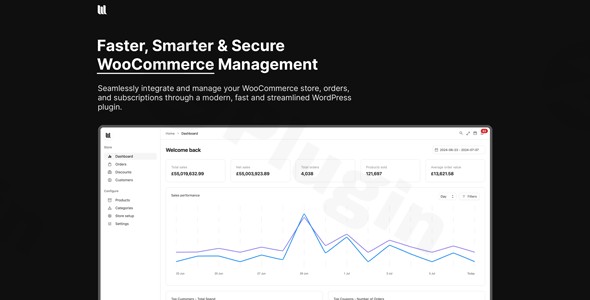
Managing a high-traffic e-commerce store requires more than just the default WordPress backend; it requires speed, clarity, and efficient workflows. Vendbase (formerly known as Woobase) is a premium WooCommerce management plugin designed to replace the often cluttered default interface with a lightning-fast, intuitive dashboard. By streamlining how you handle orders, products, and customers, Vendbase transforms the administrative side of e-commerce into a competitive advantage for store owners and agencies alike.
Key Features of Vendbase
Vendbase is not just a skin for your dashboard; it is a comprehensive productivity suite. Built by Mark Ashton—the developer behind UiPress—it focuses on performance and user experience.
1. Powerful Global Search
One of the standout Vendbase features is the unified global search bar. Instead of navigating to different tabs, you can instantly find products, specific orders, or customer profiles from anywhere in the dashboard. This significantly reduces the “click-fatigue” common in large WooCommerce installations.
2. Visual Order Kanban Board
For many businesses, the standard list view isn’t enough to track fulfillment. The WooCommerce order management system in Vendbase includes a visual drag-and-drop Kanban board. You can customize columns to match your specific logistics—such as “Processing,” “Packaging,” and “Shipped”—to identify bottlenecks at a glance.
3. AI-Powered Product Descriptions
Vendbase integrates AI to help you generate compelling product descriptions directly within your workflow. This is ideal for store managers who need to upload dozens of products quickly while maintaining high SEO standards.
4. Advanced WooCommerce Analytics
Knowledge is power in e-commerce. Vendbase provides a dedicated WooCommerce analytics module that delivers fast, comprehensive sales and inventory reports. Unlike the default reports which can be slow on large databases, Vendbase is optimized for rapid data retrieval.
5. White Labeling & Customization
For agencies managing client sites, Vendbase offers robust white-labeling options. You can remove all Vendbase and WooCommerce branding, replacing it with your own or your client’s brand identity. It also features a sleek Dark Mode to reduce eye strain during long management sessions.
How to Install and Set Up Vendbase
Setting up this WooCommerce management plugin is straightforward and does not require developer skills. Follow these steps to get started:
- Purchase and Download: Secure your license from the official website and download the plugin ZIP file.
- Upload to WordPress: Navigate to your WordPress Admin > Plugins > Add New > Upload Plugin. Select the Vendbase ZIP file and click Install Now.
- Activate: Once installed, click Activate.
- Initial Configuration: Go to the new “Vendbase” menu item in your sidebar. You will be prompted to run the setup wizard or jump straight into the settings.
- Enable Modules: In the settings tab, toggle the features you need (e.g., Kanban Board, AI Descriptions, or Global Search).
6. Set Up White Labeling (Optional): If you are an agency, navigate to the White Label settings to upload your logo and customize the dashboard colors to match your brand.
Practical Usage & Best Practices
To get the most out of your WooCommerce dashboard, consider these real-world workflows:
High-Volume Order Fulfillment
If you process hundreds of orders daily, the Kanban board is your best friend. Use the Order Duplication feature for recurring manual orders and use the powerful filters to group orders by shipping method or customer location.
Streamlined Customer Support
When a customer calls with a query, use the Global Search to find their profile instantly. Vendbase provides an advanced customer view that shows their entire order history and total lifetime value (LTV), allowing your support team to provide personalized service.
Efficient Inventory Management
Utilize the automated reporting features to set up inventory alerts. The fast performance of Vendbase ensures that even with thousands of SKUs, your inventory reports load in seconds, helping you avoid “out of stock” scenarios during peak sales periods.
Agency Client Handoff
When building a site for a client, use Vendbase to simplify the backend. By hiding unnecessary WooCommerce menus and using the White Label feature, you provide the client with a professional, branded interface that is much easier for them to navigate.
FAQ & Troubleshooting
What is Vendbase?
Vendbase (formerly Woobase) is an advanced management plugin for WooCommerce. It replaces the standard WordPress e-commerce interface with a faster, more intuitive dashboard featuring global search, Kanban boards, and AI tools to improve store productivity.
Is Vendbase compatible with my theme and other plugins?
Yes, Vendbase is designed to be highly compatible with the WordPress ecosystem. It works seamlessly with major themes (like Astra or Hello Elementor) and supports core WooCommerce extensions, including WooCommerce Subscriptions.
Does Vendbase support Dark Mode?
Yes. Vendbase includes a customizable Dark Mode that can be toggled to reduce eye strain. This feature is particularly useful for shop managers who spend significant time in the backend.
What are the technical requirements for Vendbase?
For optimal performance, it is recommended to use PHP 8.3 or greater and MySQL 8.0/MariaDB 10.6 or greater. An active SSL certificate (HTTPS) is required for security.
How do I update Vendbase without losing settings?
Updates can be performed directly through the WordPress Plugins page. Since Vendbase stores its configuration in the WordPress database, your settings, Kanban columns, and white-labeling choices will remain intact after an update.
Conclusion: Is Vendbase Worth It?
If you find the default WooCommerce interface slow or disorganized, Vendbase offers a significant ROI through time saved and improved data visibility. It is an ideal solution for growing e-commerce stores, busy shop managers, and agencies looking to provide a premium experience to their clients. By centralizing your workflow into a modern, lightning-fast WooCommerce dashboard, Vendbase allows you to focus less on administrative friction and more on scaling your business. For more WordPress tips and plugin reviews, visit wppick.com.
I. Download Limits & Account Benefits
- Free Downloads: Each email address receives 3 downloads per day for free products
- Upgrade Benefits: Purchase any paid product to increase your daily download limit by 3 for each paid product
- No Account Required: You can download immediately by receiving the download link via email
- Account Recommended: Create an account for easier access to your order history and direct update downloads
II. Understanding GPL vs Official Versions
Important: The products available on WPPick are GPL-licensed versions, which differ from official developer versions. Before purchasing, please read our comprehensive guide: Understanding GPL & Official Differences at WPPick
Key Points:
- GPL versions may not include premium support from original developers
- Updates may be delayed compared to official releases
- Some premium features might have limitations
- Always consider your specific needs and support requirements
III. Support & Assistance
We’re here to help through multiple channels:
- Email Support: Direct email assistance for all inquiries
- Live Chat: Real-time support during business hours
- Comprehensive Documentation: Detailed guides and tutorials
IV. Order Tracking
Access your complete purchase history and download links anytime: Order History
V. Account Access
New to WPPick? Login or Create Account to manage your downloads and orders efficiently.
VI. Refund Protection
We stand behind our products with a clear refund policy. Review our terms: Refund Policy
VII. Privacy & Security
Your data security is our priority. Learn how we protect your information: Privacy Policy
VII. Terms of Service
Understanding our service terms ensures a smooth experience: Terms of Use
Quick Tips for Best Experience
- Verify Compatibility: Check plugin/theme compatibility with your WordPress version
- Backup First: Always backup your site before installing new plugins or themes
- Test Environment: Consider testing on a staging site first
- Stay Updated: Regularly check for updates in your account dashboard
- Read Documentation: Review any included documentation for optimal setup
Need Help?
If you have questions about downloads, licensing, or need technical assistance, don’t hesitate to contact our support team. We’re committed to ensuring you have the best possible experience with WPPick products.
Ready to get started? Your download adventure begins with just one click!
- Fixed broken app due to changes with WordPress 6.9 handling of wp_register_script_module.