

Vepien – Vpn Service & Proxy Elementor Template Kit
/Year
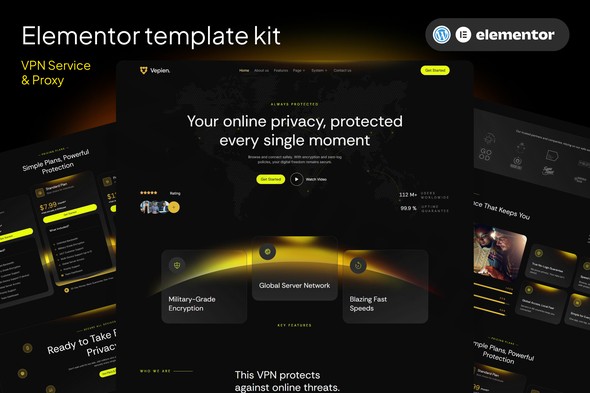
In the rapidly growing cybersecurity industry, establishing a trustworthy and professional online presence is critical for success. The Vepien Elementor Template Kit is a specialized solution designed for VPN providers, proxy services, and cybersecurity firms looking to launch a high-quality website without the high cost of custom development. By using this VPN Elementor Template Kit, businesses can bypass the complexities of coding and focus on what matters most: protecting their users’ data.
What is Vepien?
Vepien is a comprehensive collection of pre-designed website templates built specifically for the Elementor page builder. Unlike a standalone WordPress theme, Vepien is a “Template Kit,” meaning it provides the layout, styling, and structural elements that you can import into your existing WordPress setup. It is engineered to solve the design challenges of the tech and privacy niche, offering a sleek, modern aesthetic that communicates security and reliability.
Key Features of the Vepien Elementor Template Kit
The Vepien kit stands out because it balances visual appeal with technical efficiency. Here are the core features that make it a top choice for a proxy website template in Elementor:
- No Elementor Pro Required: One of the biggest advantages of Vepien is its compatibility with the free version of Elementor. This significantly lowers the entry barrier for startups and small agencies.
- Comprehensive Page Library: The kit typically includes 14 to 19 ready-to-use pages, including:
- Home Page: High-conversion layouts for your main offering.
- Servers & Global Map: Visually demonstrate your network reach.
- Pricing Plans: Clear, tiered tables for VPN subscriptions.
- Speed Test & Features: Dedicated sections to highlight performance.
- Blog & FAQ: Essential for SEO and customer support.
- Fully Responsive Design: The templates are mobile-first and adapt seamlessly to desktops, tablets, and smartphones, ensuring a consistent user experience.
- Clean & Modern Aesthetic: The design language uses professional color palettes and typography tailored for the tech and cybersecurity sectors.
- Customizability: While the layouts are pre-built, every element—from colors and fonts to image overlays—can be modified via Elementor’s drag-and-drop interface.
Technical Specifications and Requirements
To ensure a smooth experience when using this WordPress VPN website builder solution, your site should meet the following requirements:
| Requirement | Specification |
|---|---|
| CMS | WordPress 5.0 or higher |
| Page Builder | Elementor (Free version 3.10.x+) |
| Theme Recommendation | Hello Elementor (Lightweight and optimized) |
| Required Plugins | ElementsKit Lite, MetForm, Gum Elementor Addon, Envato Elements |
| PHP Version | PHP 7.4 or higher recommended |
How to Install Vepien VPN Elementor Template Kit
Follow these steps to set up your website quickly. Important: Do not unzip the kit file after downloading it from the marketplace.
- Install the Envato Elements Plugin: Go to Plugins > Add New in your WordPress dashboard, search for “Envato Elements,” and install/activate it.
- Upload the Kit: Navigate to Elements > Installed Kits. Click the Upload Template Kit button and select your Vepien ZIP file.
- Install Dependencies: After uploading, you will see a notice about “Missing Requirements.” Click Install Requirements to automatically add the necessary free plugins (like MetForm and ElementsKit).
- Import Global Styles: First, click Import on the “Global Kit Styles” template. This ensures your colors and typography are consistent across the site.
- Import Individual Pages: One by one, click Import on the pages you wish to use (Home, About, Contact, etc.).
- Create Your Pages: Go to Pages > Add New, set the template to “Elementor Full Width,” click the Elementor icon, and insert the imported template from your “My Templates” tab.
Practical Usage & Best Practices
To get the most out of the Vepien kit, consider these real-world workflows:
1. The Startup VPN Provider
If you are launching a new VPN service, use the Pricing Table and Features sections to highlight your “No-Logs Policy” and “Kill Switch” functionality. Use the Global Map section to show your server locations, which builds immediate credibility.
2. Cybersecurity Agencies
For agencies offering proxy management or web security audits, the Vepien kit provides a professional framework. Use the Case Studies and Testimonials templates to showcase previous successes and client trust.
3. SEO-Focused Tech Blogs
If your goal is to rank for terms like “best proxy for scraping” or “top-rated VPNs,” utilize the Blog Archive and Single Post templates included in the kit. They are designed for readability and include clear Call-to-Action (CTA) areas to convert readers into subscribers.Pro Tip: Always optimize your images before uploading them to WordPress. Large, unoptimized images can slow down your site, negatively impacting both user experience and SEO rankings.
FAQ & Troubleshooting
Can I use Vepien without Elementor Pro?
Yes, the Vepien Elementor Template Kit is specifically designed to work with the free version of Elementor. While it uses add-on plugins like ElementsKit Lite for advanced functionality, you do not need to purchase a Pro license to achieve the look shown in the demo.
Does Vepien support WooCommerce?
While Vepien is primarily a design kit for service pages, it can be used alongside WooCommerce. However, you may need to style the specific WooCommerce shop pages separately or use Elementor’s default WooCommerce widgets if you have Elementor Pro.
Why does my layout look broken after importing?
This usually happens if the “Global Kit Styles” were not imported first. Ensure you import the Global Styles before the individual pages. Also, verify that all “Required Plugins” are installed and active.
How can I update the kit without losing my changes?
Since a template kit is a starting point for your design, “updating” the kit file itself won’t automatically update your pages. If you have customized a page, those changes are saved in your WordPress database. Only import the kit again if you want to start a new page from the original design.
Conclusion
The Vepien Elementor Template Kit is a high-value asset for anyone needing a VPN Elementor Template Kit that is both affordable and professional. By utilizing free plugins and a streamlined design, it provides an excellent ROI for startups and established tech firms alike. Whether you are building a proxy service landing page or a comprehensive cybersecurity portal, Vepien offers the flexibility and aesthetic polish required to compete in today’s digital landscape. For more WordPress resources and plugin reviews, visit wppick.com.
I. Download Limits & Account Benefits
- Free Downloads: Each email address receives 3 downloads per day for free products
- Upgrade Benefits: Purchase any paid product to increase your daily download limit by 3 for each paid product
- No Account Required: You can download immediately by receiving the download link via email
- Account Recommended: Create an account for easier access to your order history and direct update downloads
II. Understanding GPL vs Official Versions
Important: The products available on WPPick are GPL-licensed versions, which differ from official developer versions. Before purchasing, please read our comprehensive guide: Understanding GPL & Official Differences at WPPick
Key Points:
- GPL versions may not include premium support from original developers
- Updates may be delayed compared to official releases
- Some premium features might have limitations
- Always consider your specific needs and support requirements
III. Support & Assistance
We’re here to help through multiple channels:
- Email Support: Direct email assistance for all inquiries
- Live Chat: Real-time support during business hours
- Comprehensive Documentation: Detailed guides and tutorials
IV. Order Tracking
Access your complete purchase history and download links anytime: Order History
V. Account Access
New to WPPick? Login or Create Account to manage your downloads and orders efficiently.
VI. Refund Protection
We stand behind our products with a clear refund policy. Review our terms: Refund Policy
VII. Privacy & Security
Your data security is our priority. Learn how we protect your information: Privacy Policy
VII. Terms of Service
Understanding our service terms ensures a smooth experience: Terms of Use
Quick Tips for Best Experience
- Verify Compatibility: Check plugin/theme compatibility with your WordPress version
- Backup First: Always backup your site before installing new plugins or themes
- Test Environment: Consider testing on a staging site first
- Stay Updated: Regularly check for updates in your account dashboard
- Read Documentation: Review any included documentation for optimal setup
Need Help?
If you have questions about downloads, licensing, or need technical assistance, don’t hesitate to contact our support team. We’re committed to ensuring you have the best possible experience with WPPick products.
Ready to get started? Your download adventure begins with just one click!