

Volare – Material Design Phpbb 3.3 Theme
/Year
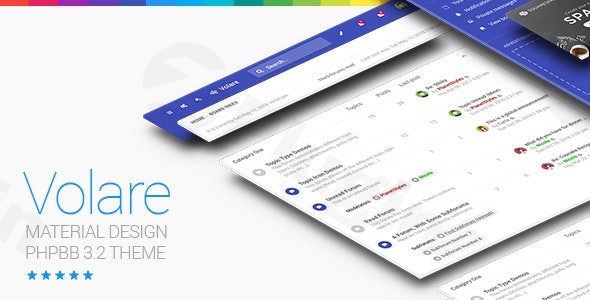
In the world of online communities, aesthetics and user experience (UX) are just as critical as the content itself. The Volare – Material Design phpBB 3.3 Theme is a premier choice for forum administrators looking to move away from the dated, “old-school” forum look and embrace a sleek, contemporary aesthetic. Drawing deep inspiration from Google’s Material Design principles, Volare offers a visually engaging interface that makes community management and participation feel like a premium experience.
While many site owners focus on their WordPress blogs or business pages, a robust forum is the heart of community engagement. If you are looking for a phpBB Material Design Theme that aligns with modern web standards, Volare provides the perfect bridge between functional forum software and high-end UI design.
Key Features: Design, Layout & Performance
Volare stands out in the phpBB ecosystem because it isn’t just a skin; it’s a comprehensive design overhaul built on the Material UI framework.
Modern Material Design & Visual Elements
The theme’s defining characteristic is its adherence to Material Design principles. This results in a clean, layered interface with subtle shadows and a logical visual hierarchy. One of the most unique features is the animated form and button elements, which provide tactile feedback that users expect from modern mobile apps and websites.
Flexible Layout Options
Whether you are running a fast-paced gaming community or a professional tech support board, layout matters. Volare offers:
- List and Grid Layouts: You can toggle how topics and forums are displayed, allowing for a more visual “card-based” look or a traditional data-rich list.
- Responsive Architecture: As a responsive phpBB 3.3 theme, Volare is built to be fully fluid. It scales perfectly from 4K monitors down to the smallest smartphone screens, ensuring your community stays active on the go.
- SVG Icons: By using Scalable Vector Graphics, the theme ensures that every icon remains crisp and sharp on Retina and high-DPI displays without the bloat of traditional image files.
Performance & SEO Readiness
Performance is a core pillar of the developer, PlanetStyles. Volare utilizes clean markup and optimized CSS3 animations to ensure that the visual flair doesn’t result in slow load times. Because it is built for phpBB 3.3, it benefits from modern PHP 7.4+ optimizations, making it a fast and responsive phpBB 3.3 theme that search engines and users alike will appreciate.
Installation & Setup Guide
Setting up Volare is straightforward, even for those who are more accustomed to WordPress than forum software. Follow these steps to get your community live:
- Verify Compatibility: Ensure your forum is running phpBB 3.3.x.
- Upload Theme Files: Extract the download package and upload the
volarefolder to the/stylesdirectory of your phpBB installation using FTP or your hosting File Manager. - Install the Style: Log in to your Administration Control Panel (ACP), navigate to the Customise tab, and click Install Styles. Locate Volare and click “Install.”
- Activate Volare: Once installed, go to the General tab -> Board Settings. Set Volare as the “Default Style” and, if desired, set “Override user style” to “Yes” to ensure all visitors see your new Material Design look.
5. Configure the Theme Control Panel: Volare includes a proprietary control panel where you can begin your branding journey.
Customization Guide: Branding & Layout
The phpBB Theme Customization Panel included with Volare is its secret weapon, offering over 30 configurable options that don’t require touching a single line of code.
Personalizing the Visuals
- Logo & Background: You can upload a custom logo and background images with a “2-click” process. This makes it incredibly easy to align the forum with your main website’s branding.
- Header Options: Choose between a Fixed Header (which stays visible as users scroll) or a Scrolling Header for a more traditional feel.
- Color & Typography: While the theme is rooted in Material Design, you can adjust the custom menu and social icons to match your brand’s specific color palette.
Layout Adjustments
- Profile Side Switcher: You can choose to display user profiles on the left, the right, or even horizontally above the post. This is a rare level of flexibility in forum themes.
* Custom Menus: Use the control panel to add custom links to your navigation, perfect for linking your forum back to your WordPress site or shop.
FAQ & Troubleshooting
How to install Volare phpBB Theme?
To install Volare, upload the style folder to your server’s /styles directory. Then, navigate to the Administration Control Panel (ACP) > Customise > Install Styles and click install. Finally, set it as the default style in Board Settings.
Is Volare a WordPress theme?
No, Volare is a dedicated theme for phpBB 3.3 forum software. However, it is an excellent choice for WordPress site owners who want to host a community forum on a subdomain (e.g., forum.yoursite.com) that matches a modern, Material Design aesthetic.
Is Volare Theme good for gaming forums?
Yes! Due to its modern grid layouts, CSS3 animations, and responsive design, Volare is highly popular for gaming communities, fan clubs, and tech-centric boards that want a high-tech, polished look.
Does Volare support high-resolution (Retina) displays?
Absolutely. Volare uses SVG icons instead of standard icon fonts or images, ensuring that all UI elements look perfectly sharp on high-density screens and mobile devices.
Conclusion: A Premier Choice for Modern Communities
The Volare – Material Design phpBB 3.3 Theme is a masterclass in how to modernize forum software. By combining Google’s Material Design system with a powerful, code-free Theme Control Panel, PlanetStyles has created a product that is both beautiful and highly functional.Why choose Volare?
- For Agencies: It provides a polished, professional forum solution for clients who need more than just a comment section.
- For Communities: The intuitive UI and animated elements increase user engagement by making the forum feel “alive.”
- For Beginners: The 2-click logo upload and extensive documentation make it accessible even if you aren’t a developer.If you are looking for a modern phpBB 3.3 forum theme that balances performance with cutting-edge design, Volare is a top-tier investment for your community.For more WordPress and forum design insights, visit wppick.com.
I. Download Limits & Account Benefits
- Free Downloads: Each email address receives 3 downloads per day for free products
- Upgrade Benefits: Purchase any paid product to increase your daily download limit by 3 for each paid product
- No Account Required: You can download immediately by receiving the download link via email
- Account Recommended: Create an account for easier access to your order history and direct update downloads
II. Understanding GPL vs Official Versions
Important: The products available on WPPick are GPL-licensed versions, which differ from official developer versions. Before purchasing, please read our comprehensive guide: Understanding GPL & Official Differences at WPPick
Key Points:
- GPL versions may not include premium support from original developers
- Updates may be delayed compared to official releases
- Some premium features might have limitations
- Always consider your specific needs and support requirements
III. Support & Assistance
We’re here to help through multiple channels:
- Email Support: Direct email assistance for all inquiries
- Live Chat: Real-time support during business hours
- Comprehensive Documentation: Detailed guides and tutorials
IV. Order Tracking
Access your complete purchase history and download links anytime: Order History
V. Account Access
New to WPPick? Login or Create Account to manage your downloads and orders efficiently.
VI. Refund Protection
We stand behind our products with a clear refund policy. Review our terms: Refund Policy
VII. Privacy & Security
Your data security is our priority. Learn how we protect your information: Privacy Policy
VII. Terms of Service
Understanding our service terms ensures a smooth experience: Terms of Use
Quick Tips for Best Experience
- Verify Compatibility: Check plugin/theme compatibility with your WordPress version
- Backup First: Always backup your site before installing new plugins or themes
- Test Environment: Consider testing on a staging site first
- Stay Updated: Regularly check for updates in your account dashboard
- Read Documentation: Review any included documentation for optimal setup
Need Help?
If you have questions about downloads, licensing, or need technical assistance, don’t hesitate to contact our support team. We’re committed to ensuring you have the best possible experience with WPPick products.
Ready to get started? Your download adventure begins with just one click!
No changelog available.